1 Stream Deck key calls a scene, or calls it and records. 1 MP4 per recording, with my voice and the other voices on separate tracks.
15 Oct 2026 Recordee is my own recorder for screens, cameras and calls. It keeps the one idea of OBS I used every day, preset scenes called from a key, and drops the rest. A scene is a fixed layout of screens, windows and cameras, plus 1 mic, the system audio and a quality setting. 1 key on my Stream Deck switches to a scene, or switches and records.
The name follows the -ee family of my other tools, like Webcamee: my own green screen virtual camera and Textee: my own text editor for macOS. Why I build my own apps at all is in The era of personal software is here. This note is the what and the how.
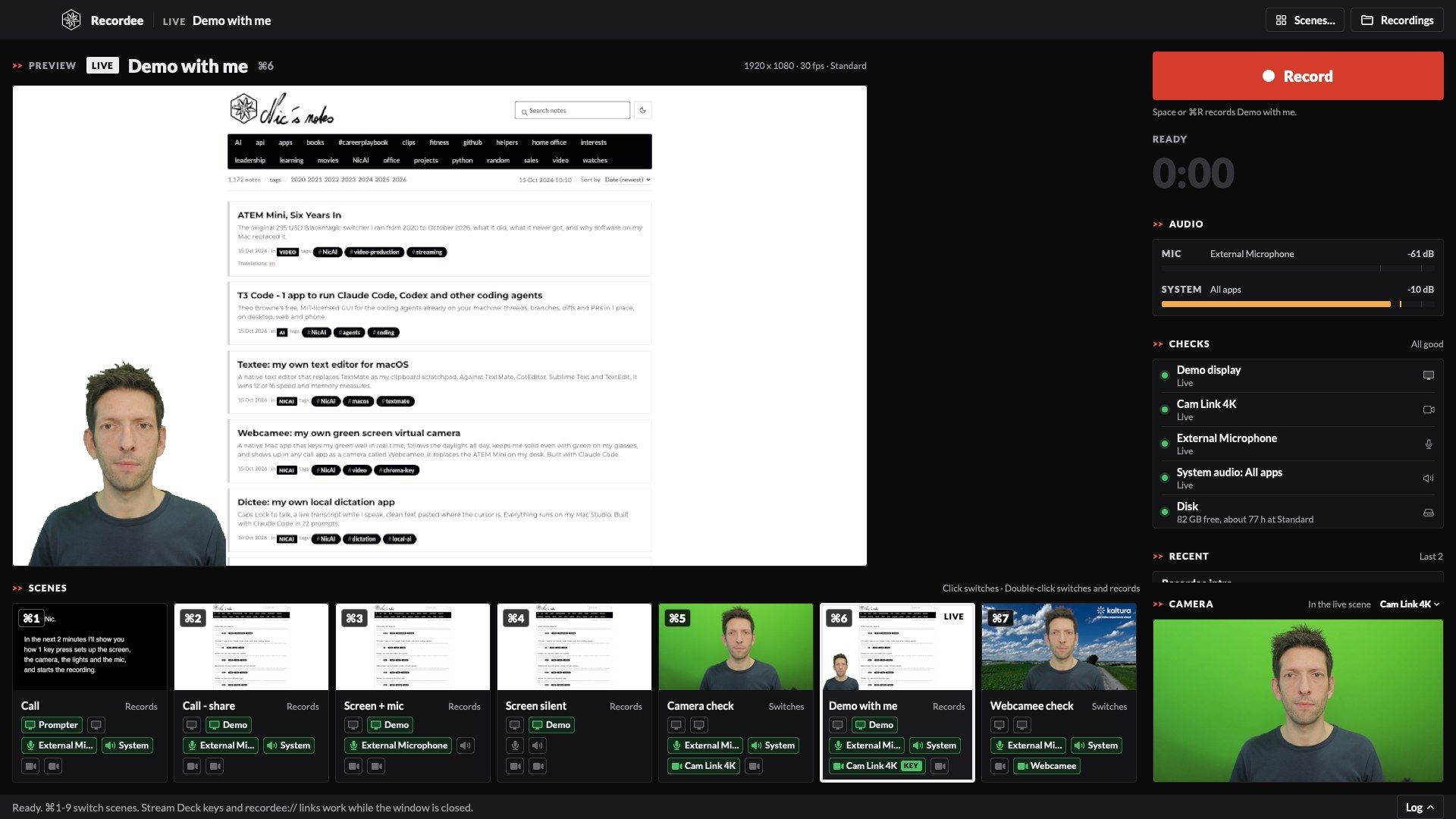
The Demo with me scene is live: my demo screen, with me keyed in the bottom-left corner. For this screenshot, Recordee showed sample pictures in place of my real screens.
Why I replaced OBS
I've recorded calls, demos and videos with OBS for more than 10 years. It's a great piece of open-source software, and it's built for streamers. I used about 5 % of it.
Before I wrote a line of code, Claude Code read 10 sessions of my OBS logs, my scene collection and my Stream Deck profiles. What it found:
- 13 recordings in 9 days, median 29 minutes: the length of a call. 1 recording ran for 5 h 17 min because I forgot to stop it after the call.
- 16 scenes, 9 in use. The main pattern: start on the call scene, switch to the demo screen each time I share, switch back.
- Display sources broke. OBS finds a display by an ID that macOS changes. My collection held 5 sources for 2 physical displays.
- A missing mic was silent. One day my audio interface went away mid-session. OBS wrote 53,605 log lines about it and showed me nothing.
- 1 mixed audio track. My voice and the other people's voices were in 1 track, so a transcript tool couldn't tell them apart.
- Every file stored twice. OBS wrote
.mkv, then a remuxed.mp4beside it, and kept both. - Not made for my agents. The scenes live in a large JSON file that OBS rewrites, the control API was off, and nothing told a script what OBS was doing.
| Job | With OBS | With Recordee |
|---|---|---|
| Scenes | 16, by display ID, 5 sources for 2 screens | 7, by display role and pixel size, edited as JSON or in an editor |
| Audio | 1 mixed track | 3 tracks in 1 MP4 (mix, mic, system), plus mic.mp3 and remote.mp3 |
| Files | .mkv and .mp4 of every recording |
1 MP4, written in 1 s fragments |
| Forgotten stop | 5 h 17 min, 8.4 GB, twice | A warning after 10 min of silence and no change on screen, a stop at 15 |
| Missing device | Silence in the log | A red banner, "Not found" on the canvas, the recording goes on |
| Name | YYMMDD-HHMMSS, renamed by hand |
A name panel after Stop, with the cursor ready |
| Agents | No way in | Links, a status file, a command line tool, files it watches |
How it works
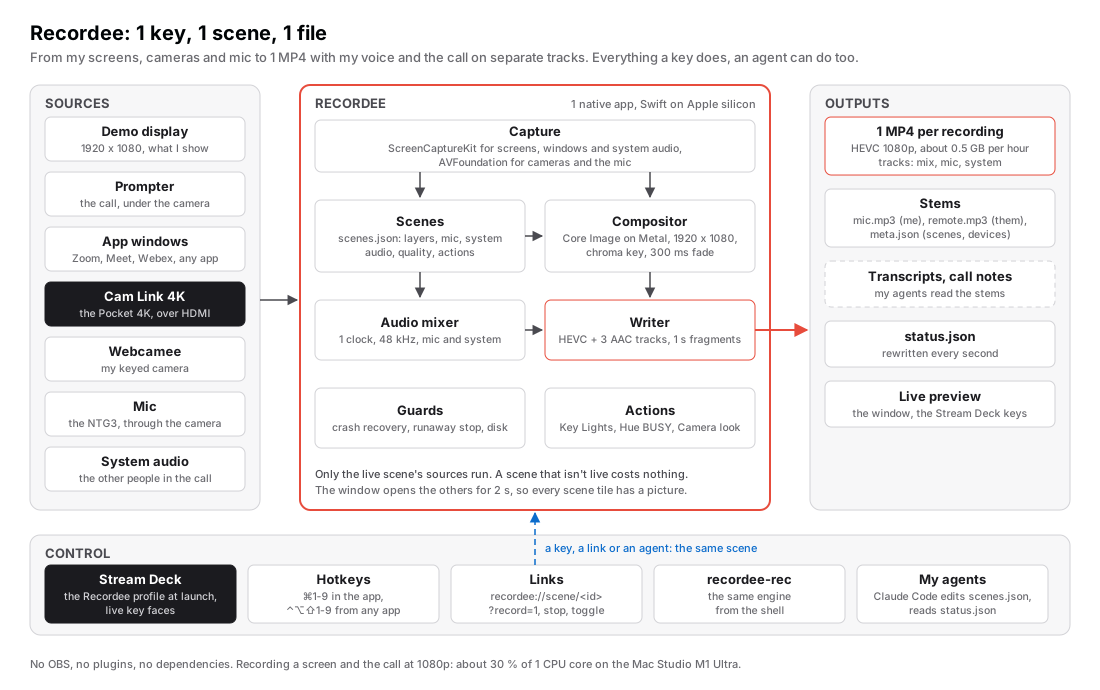
Recordee is 1 native app. It opens only the sources of the live scene: a scene that isn't live costs nothing. A switch opens the new sources, waits for their first frames, then fades over 300 ms. The mic and the system audio switch in the middle of the fade, so the file has no gap.
All features
Scenes
| Feature | What it does |
|---|---|
| Layers | Displays, app windows and cameras, each with a position, a crop and an optional chroma key |
| Audio per scene | 1 mic and the system audio: all apps, some apps or none |
| Quality per scene | Small, Standard or High, at 30, 25 or 15 fps. HEVC on the hardware encoder |
| Key mode | A key switches, or switches and records |
| Chroma key | auto reads the wall colour from the picture every 2 s, so it follows the daylight |
| Scene editor | A canvas with the layers, or the JSON file by hand. Recordee reloads it at once |
| Displays by role | demo, prompter, left, right: found by name and pixel size, never by an ID that changes |
My 7 scenes today: Call (the Prompter display with the call, my mic, the call audio), Call - share, Screen + mic, Screen silent, Camera check, Demo with me, and Webcamee check.
Recording
| Feature | What it does |
|---|---|
| 3 audio tracks | Mix (what players play), my mic only, the system audio only. ffmpeg -map 0:a:1 reads my voice |
| Stems | mic.mp3, remote.mp3 and meta.json (scenes, devices, durations, stop reason) next to the file |
| Switch while recording | 1 file, whatever the number of scene changes |
| Name after Stop | The file saves at once. A panel then offers the name, with the cursor at the end |
| Crash recovery | The file grows in 1 s fragments. The next launch saves what a crash left: about 1 s lost |
| Runaway guard | 10 min with silence on every track and no change on screen: a warning. 15 min: a stop and a save |
| Disk guard | No start under 10 GB free, a warning when less than 1 hour is left |
| Shared devices | No lock: Recordee records the same mic as Teams or Webcamee without taking it from them |
Actions
A scene can run actions when it goes live, or when a recording starts and stops:
- Key Lights. My Elgato Key Lights (my note: Elgato Key Light — Overview & Wi-Fi Troubleshooting) come on over their local API and go off at the stop.
- Hue BUSY. My Philips Hue BUSY scene comes on while I record, and the lights go back after the stop.
- Camera look. The script that sets my Pocket 4K and the lights for the camera, as in Webcamee: my own green screen virtual camera.
- Window move. The call window (Zoom, Meet, Webex) moves to the Elgato Prompter and fills it, so I look into the camera when I look at the people.
- Command. Any shell command, with its result in the window and on the key.
The window
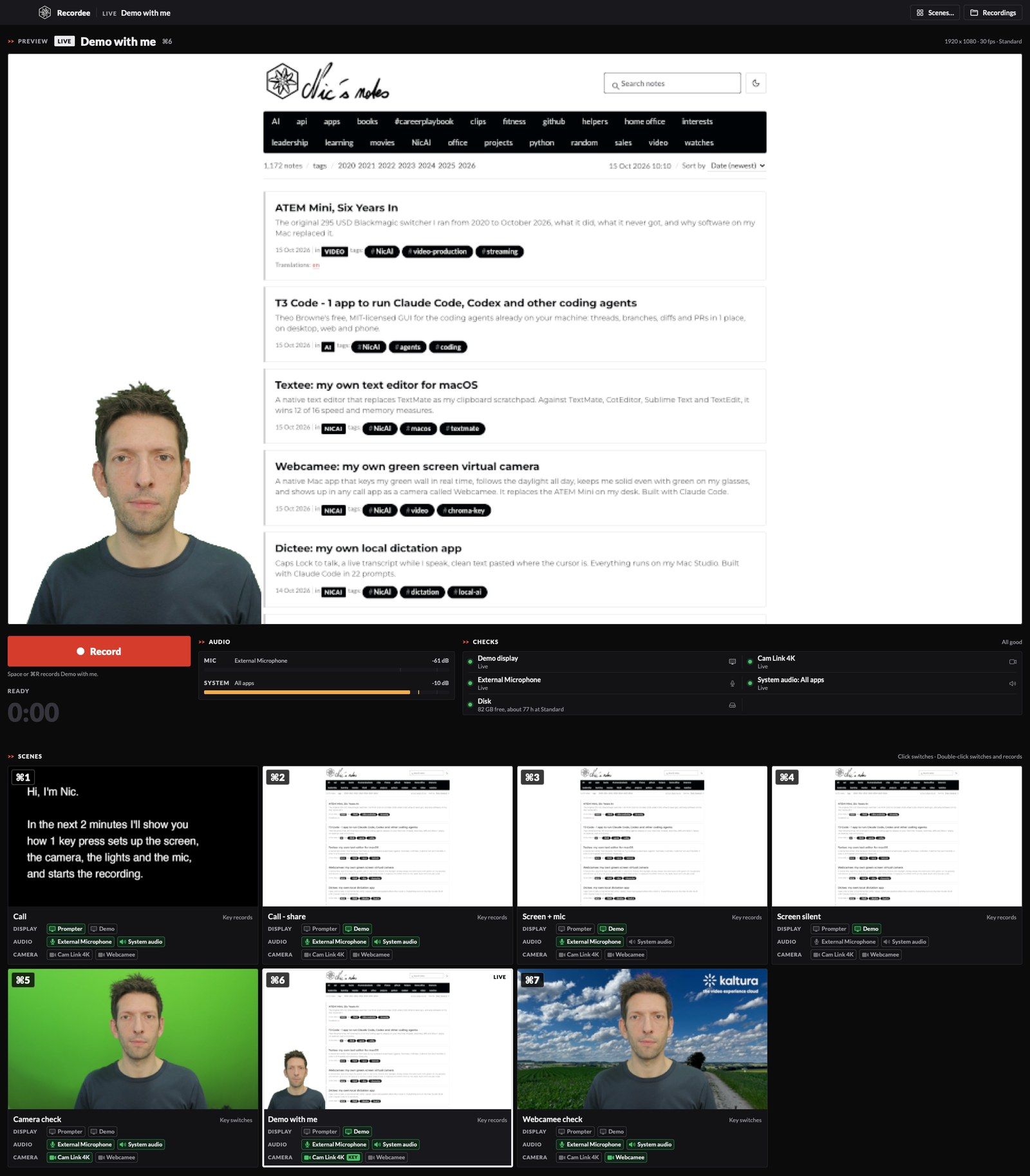
Recordee lives on my vertical 4K display, and the layout follows the window: wide, tall or portrait.
- Preview of the live scene, with its name in large type and a LIVE or REC badge.
- Scene tiles with a still of each scene, a large ⌘ number, and 3 rows: Display, Audio, Camera. Each row lists all my devices. Green means the scene uses it. A KEY badge marks a keyed camera.
- Checks for every source of the live scene: live, missing, or no permission.
- Camera panel at the bottom: the Cam Link 4K, whatever scene is live, to check my framing before a camera scene.
- Recent recordings, with play, rename and show in Finder.
- Square corners. 02 Nov 2026 Like all my apps now, the windows have square corners.
Control
- Stream Deck. Plugin keys with live faces. Starting Recordee shows the Recordee profile.
- Hotkeys.
⌘1to⌘9switch scenes and⌘Rrecords in the app.⌃⌥⇧1-9and⌃⌥⇧Rwork from any app. - Menu bar dot. Grey at rest, red with the timer while recording, orange on a problem.
- Links and files.
recordee://links,scenes.json,settings.jsonandstatus.json. - Agent CLI. 02 Nov 2026
recordee <command> --json:describe,status,scenes,actions,scene,record,stop,toggle,action,quit.
Made for my agents
This is the part OBS couldn't give me. Everything I do with a key, an agent can do with a file or a link:
| Way in | What it gives |
|---|---|
scenes.json |
The scenes as plain JSON. Claude Code adds or changes a scene, and Recordee reloads it at once |
settings.json |
Displays, devices, actions, output folder. Same: edit, save, live |
recordee:// |
scene/<id>, scene/<id>?record=1, record, stop, toggle, show: from a script, Raycast or Hammerspoon |
status.json |
Rewritten every second: the live scene, the state, the time, the levels, every problem |
recordee-rec |
The same engine on the command line: devices, record --scene <id> --seconds <n>, rename |
recordee |
The agent CLI: 1 JSON answer per command, with every write confirmed |
Stems and meta.json |
What my call-notes skill reads: my voice and the others apart, the scenes, the devices |
02 Nov 2026 My agents now have their own CLI, recordee, the same contract as my other apps. Every command takes --json and prints 1 JSON document, with an error and a hint when it fails. A write goes through a recordee:// link, then the CLI waits up to 3 seconds for status.json to show the effect, so "recording started" means it really started. quit refuses while a recording runs, unless the agent adds --yes.
The Stream Deck follows the same files. When Recordee starts, the Stream Deck switches to the Recordee profile, and its scene keys come from scenes.json: a new scene gets a key without me touching the Stream Deck app (my note: Elgato's Stream Deck for business users). Each key shows its scene, and the record key shows the timer.
Recordee vs OBS
The same job for both: record my demo display and the system audio at 1080p, 30 fps, HEVC on the hardware encoder. Measured on 15th October 2026 on the Mac Studio M1 Ultra.
| Measure | Recordee | OBS Studio 32 |
|---|---|---|
| Memory while recording | 292 MB | 598 MB (with its muxer) |
| CPU while recording | 31 % of 1 core | 54 % of 1 core |
| Energy impact | 29 | 50 |
| Launch to first picture | 1.5 s | 5.0 s |
| App on disk | 8 MB | 435 MB |
| Audio tracks per file | 3 | 1 |
2 notes on fairness:
- OBS keeps every source of all its scenes open, 16 scenes in my case. Recordee opens only the live scene's sources.
- About 100 MB of Recordee's memory isn't Recordee. macOS loads its camera effects engine (Reactions, with hand and face models) into every app that opens a camera, and my camera panel keeps the Cam Link open. Without a camera, Recordee idles at 130 MB.
For business people
Most of my videos are calls and demos for clients and colleagues. They need to look right and sound right, and the recording must be there afterwards.
- 1 key, everything ready. Screen, camera, mic, Key Lights and the Hue BUSY light, from 1 key on the Stream Deck.
- Nothing lost. A crash costs about 1 second. A missing device shows at once, and the recording goes on. A forgotten recording stops by itself.
- Better notes from calls. My voice and the other voices are on separate tracks. The transcript knows who said what, so the call notes my agents write get better.
- Private. Everything runs on my Mac: no cloud, no account, no analytics.
- Cost. No subscription. About half the memory of OBS and 40 % less CPU for the same recording.
- Limits. No streaming, no virtual camera, no plugins. It's built for 1 Mac and 1 person: me.
For technical people
| Part | Built with |
|---|---|
| App | Swift 6, AppKit and SwiftUI on macOS 26. A window, a menu bar dot, and global hotkeys |
| Capture | ScreenCaptureKit for displays, windows and system audio. AVFoundation for cameras and mics |
| Compositor | Core Image on Metal, 1920 x 1080. The chroma key is OBS's maths baked into a 64 x 64 x 64 colour cube |
| Audio | 1 timeline on the host clock at 48 kHz: mic and system audio mixed, and kept apart for their own tracks |
| File | Fragmented MP4: HEVC and 3 AAC tracks in 1 alternate group. ffmpeg makes the MP3 stems |
| Stream Deck | A native plugin in Swift on the Stream Deck SDK, with live key faces. A Python script builds the profile from scenes.json |
| Signing | My own Apple Developer ID. No App Store, no sandbox |
| Size | About 12,700 lines of Swift, plus 1,000 lines of Python for the build and the Stream Deck |
Gotchas I hit
- ScreenCaptureKit sends a frame only when the screen changes. A still screen means no frames. The compositor repeats the last frame, so the file keeps a steady frame rate.
- A pale green wall made me half transparent. My wall is a soft green in the morning light, and a fixed key distance ate into my face. The key distances now scale with the wall's saturation.
- 2 apps on 1 audio interface hung Core Audio. 2 processes opened the same USB audio device and the whole Mac's audio stopped. Tests now use a different mic.
- The camera effects of macOS cost about 100 MB. macOS loads its Video Effects engine, with face and hand models, into every app that opens a camera. Recordee turns the Reactions gestures off by default, but the engine stays loaded even with every effect switched off. I found no way for an app to opt out.
- A Stream Deck profile from a plugin needs a name. The Stream Deck app refused to import the profile until its manifest carried a preconfigured name.
- Scene stills need their sources. The tiles showed a picture only after a visit to each scene. The window now opens the other scenes' cameras and screens for 2 s at launch, never their mics.
How I built it
- Analysis first. Claude Code read my OBS logs, scene collection and Stream Deck profiles, and wrote down how I really use OBS, the problems above, and a list of open questions. I answered them in 1 prompt.
- Then a spec. About 530 lines: scenes, audio, file format, safety, control, actions, tests.
- Then the build, with Claude Code, on 14th and 15th October 2026. Every change gets tested with a separate settings folder, so a test never switches on my real lights.
- QA without my screens. A test hook replaces each source with a picture file. The screenshots in this note come from it.
What's next
- Scenes as my call camera. Recordee sends Demo with me to Webcamee, Webcamee sends it to Teams, and I switch between "me" and the scene during the call.
- Webcamee's cut-out in Recordee. Webcamee keys me better than Recordee's colour key does. It can send me, already cut out, to Recordee.
- A public repo, with the scene editor screenshots, once I've checked it for personal paths.
Further reading
- Webcamee: my own green screen virtual camera: my green screen virtual camera, the other half of my camera setup
- ATEM Mini, Six Years In: the hardware switcher that sat between my camera and my Mac for 6 years
- OBS: my older OBS notes
- Elgato's Stream Deck for business users: the Stream Deck that calls the scenes
- The era of personal software is here: why I build my own apps now