Textee is my own text editor for macOS. It replaces TextMate, and its main job is the clipboard scratchpad: I type ca in Alfred, and the clipboard lands in a new text file, in a Textee tab, a fraction of a second later.
It's the sibling of Notee: my own Markdown editor for macOS, which replaced VS Code for my Markdown notes. Same family of -ee apps, same way of building them (The era of personal software is here), but no shared code: each app is optimised for its 1 job.
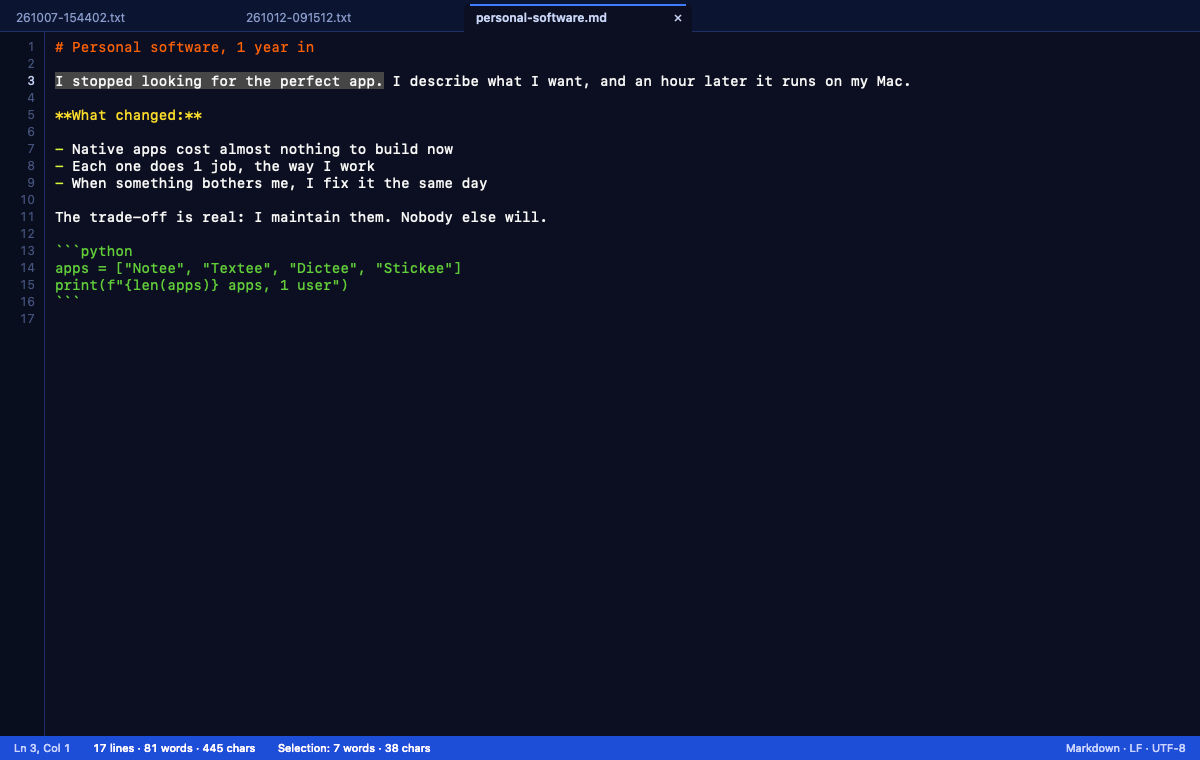
Why I built it
Before writing a line of code, Claude analysed how I actually used TextMate. The answer surprised me: TextMate was mostly a clipboard dump.
- The Alfred keyword
cawrote the clipboard to~/txt/YYMMDD-HHMMSS.txtand opened it in TextMate. That folder held 3,144 files since April 2025, about 8 a day. - 95% of those files never changed after the first hour. Read once, keep for search.
- 24% contained Markdown, mostly LLM answers I pasted to read or edit.
- I had 2 workarounds for things TextMate didn't do: a rebound word count command, and a Hammerspoon overlay that drew a character count on the TextMate status bar every 0.5 s.
- TextMate's Edit > Paste is a submenu, which broke my global Copy (⌘D) and Paste (⌘F) remaps.
TextMate is still a good, native editor (TextMate). But development has slowed, and I wanted the scratchpad to work exactly the way I use it.
What it does
| Feature | How it works |
|---|---|
| Clipboard scratch | textee://new-from-clipboard writes ~/txt/YYMMDD-HHMMSS.txt and opens it in a tab |
| New scratch file | ⌘N creates an empty timestamped file. If it's still empty when I close it, it's gone |
| Tabs | 1 window, 1 tab per file. Each tab keeps its own editor, so switching is instant |
| Counts | Line and column, words, characters, and the same for the selection |
| LinkedIn count | Green up to 300 (an invitation note), amber over 3,000 (the post limit) |
| Colours | Markdown for .md files, plus JSON, YAML, Python and shell. TextMate's Blackboard theme |
| Quick open | ⌘P searches recent files and all of ~/txt by name and content, with a preview |
| Find and replace | Regex, match case, every match coloured, Replace All as 1 undo step |
| Editing | Multi-cursor, move, duplicate and delete lines, the same keys as Notee |
| Open in Notee | ⌥⌘O hands a file to Notee when it deserves a real Markdown workspace |
| Auto-save | 1 s after I stop typing and when I switch apps. Warns if another app changed the file |
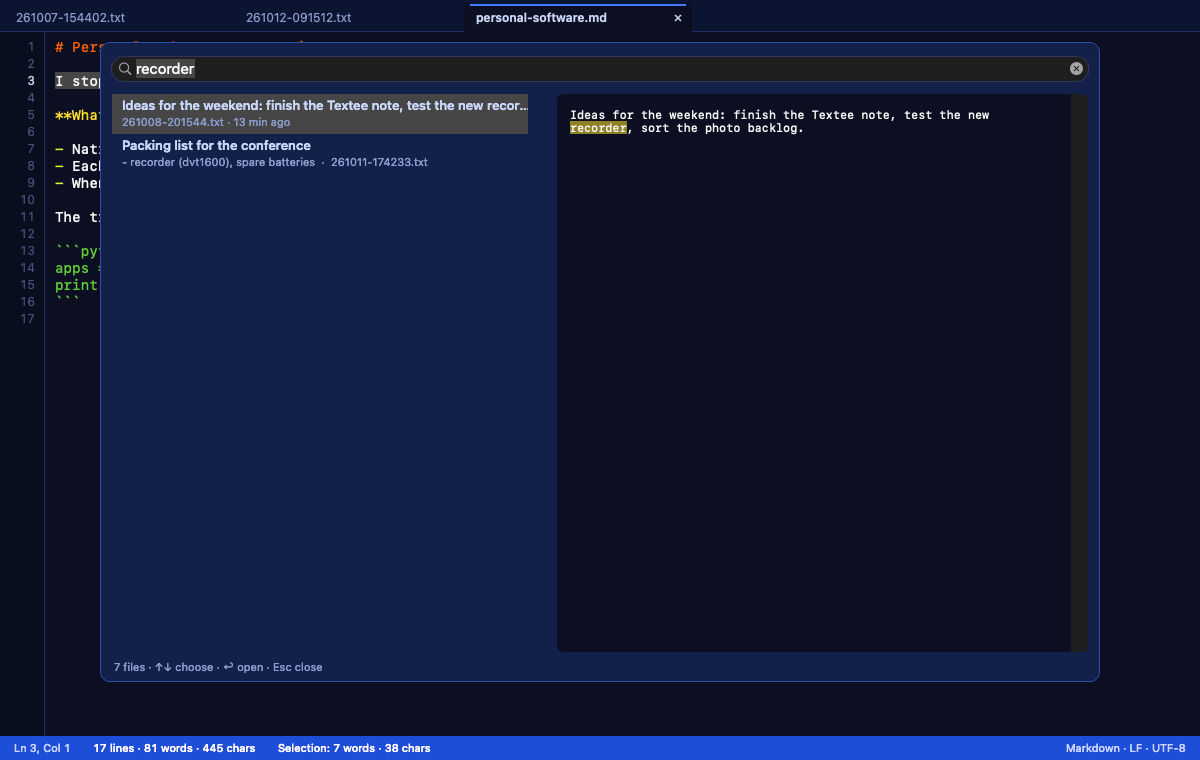
The scratch files have timestamps for names, so quick open shows the first line of each file as its title. That's what makes 3,000 files findable.
The character count follows LinkedIn as far as anyone knows. LinkedIn publishes no rule. Buffer's developer guide says it counts UTF-16 units, so an emoji counts 2, and Textee does the same: it never counts too low. Buffer also says a link counts as 24 units whatever its length. Textee doesn't apply that yet.
Textee vs TextMate
Measured on 12th October, both apps from outside, the same way: launch or open a file, then watch the process until its CPU time stops growing. My own TextMate kept running: the benchmark used a copy of TextMate with its own bundle id and my TextMate settings. 5 rounds, the first as warm-up, medians of the other 4.
| Measure | Textee | TextMate | Textee |
|---|---|---|---|
| Open 1 file in the running app | 244 ms | 707 ms | 2.9x |
| CPU for that open | 31 ms | 153 ms | 4.9x |
| Open 9 more files at once | 327 ms | 799 ms | 2.4x |
| Launch with a 2 KB file, window visible | 1,273 ms | 1,707 ms | 1.3x |
| CPU for that launch | 370 ms | 587 ms | 1.6x |
| Launch with a 22 MB file, work done | 2,209 ms | 3,885 ms | 1.8x |
| CPU for the 22 MB file | 669 ms | 1,982 ms | 3.0x |
| Launch with a 2 MB Markdown file | 1,768 ms | 9,327 ms | 5.3x |
| CPU for the 2 MB Markdown file | 365 ms | 8,207 ms | 22.5x |
| Memory, 11 files open | 51 MB | 75 MB | 1.5x |
| Memory, 2 MB Markdown file | 60 MB | 196 MB | 3.3x |
| Memory, 22 MB file | 177 MB | 178 MB | equal |
| CPU at idle, 15 s with 11 files | 9 ms | 13 ms | 1.4x |
| App size | 1.0 MB | 37.6 MB | 38x |
How to read it:
- The
cacase is the one that matters. Textee is always running, socais "open 1 file in the running app": under a quarter of a second, against 0.7 s for TextMate. - Launch times look slow for both. They include about 1 s of macOS work to start an app with
open, and my Mac was busy (load average around 12). CPU time is the steadier number. - The 22x is a design choice. TextMate parses the whole Markdown file with its grammar. Textee colours only the lines on screen, and the next ones when I scroll.
- TextMate wins 1 row. It shows the window of the 22 MB file about 0.1 s sooner, then keeps loading in the background. Textee shows the window once the file is in it, and finishes 1.7 s earlier.
- Not compared: typing. Sending key presses to TextMate needs a permission the benchmark didn't have. Textee's own QA measures 2.6 ms per keystroke, including a full redraw of the editor.
The benchmark also caught a bug. The first run had Textee slower than TextMate at opening 9 files (1.3 s against 0.8 s): Textee asked macOS to bring itself to the front once per file. One fix later, it was 2.4x faster.
For business people
Textee is a tool for 1 user and 1 habit. It does the scratchpad job I do 8 times a day, and the plain text editing around it, and nothing else.
The value isn't the editor. It's that 2 workarounds disappeared (the word count command and the Hammerspoon overlay), the clipboard flow got faster, and the next change is 1 prompt away.
The trade-off is the same as for every app I build: I maintain it, it runs on my Mac only, and nobody else supports it.
For technical people
Stack
| Layer | Choice | Why |
|---|---|---|
| Language and UI | Swift 6 and AppKit, no third-party code | Native, compiled, nothing to load at launch |
| Text engine | NSTextView on TextKit 1 |
Fast on large files, with non-contiguous layout |
| Line numbers | Own gutter view, visible lines only | Draws from an index of line starts, never a full scan |
| Line index | Line-start offsets, updated per edit | Keystroke cost doesn't grow with the file |
| Colours | Own line lexers, temporary attributes | No text-storage edits, so no undo entries, no flicker |
| Counts | Words and UTF-16 units; over 1 MB, background | Typing stays fast in the 22 MB file |
| Saving | Atomic replace, conflict check | Keeps CRLF and BOMs; never writes an empty file over content |
| Build | XcodeGen, Developer ID signing | The project is a text file Claude can edit |
About 4,200 lines of Swift, a QA script with 193 checks and a benchmark script. The QA works on copies of my files in a temp folder, with a private clipboard, so it never touches ~/txt or what I copied.
How the benchmark works
A small Swift probe watches the other app from outside, with no special permission: proc_pid_rusage gives CPU time and memory, the window list gives the moment the window appears. "Work done" is the moment the app's CPU time stops growing for 300 ms. The same probe measures both apps, so the comparison is fair even when the absolute numbers are noisy.
Gotchas I hit
- Views don't clip by default since macOS 14. The editor painted over the tab bar until every bar and the editor set
clipsToBounds. - Undo merged several commands into 1 step. NSTextView merges an edit with the previous one unless
breakUndoCoalescing()comes beforeshouldChangeText, not after. - QA steps aren't events. AppKit closes an undo group when it finishes an event, so the QA posts an event after each step, as a real key press would.
- Default apps need a click now. On macOS 26,
dutireports success but nothing changes until I approve a system prompt. - 1 activation per file is slow. macOS already brings an app to the front when it opens a file. Asking again for each file cost up to 2 s.

How I got there: 3 prompts
I built Textee in 1 evening with Claude Code.
| Prompt | What I asked | What happened |
|---|---|---|
| 1 | "Analyse my usage of TextMate, plan the app, ask me all your questions" | It found the ca habit in my Alfred setup and asked 15 questions |
| 2 | My 15 answers, "blue colour scheme", "working app, QA'ed" | Built, tested, installed, default app for .txt, Alfred updated |
| 3 | "Compare it with TextMate", then this note | The benchmark above, and the bug it found |
What worked:
- Usage data before features. The analysis showed I didn't need a project editor. I needed a fast clipboard pad with search.
- Short answers to good questions. "No code sharing with Notee", "Blackboard", "count what LinkedIn counts": each answer cut a branch of work.
- Measure against the thing it replaces. The comparison found a real bug that my own QA, which only measured Textee, had missed.
Further reading
- Notee: my own Markdown editor for macOS: my Markdown editor, built the same way
- The era of personal software is here: why I build my own apps now
- TextMate: my older note on TextMate