
15 Oct 2026 Webcamee is my own virtual camera for video calls. It takes my real camera, removes the green wall behind me, and puts a background picture in its place. Teams, Zoom, browsers and OBS see the result as a normal camera named Webcamee.
The name follows the -ee family of my other tools, like Pitchee: my own demo video studio for macOS and Notee: my own Markdown editor for macOS. Why I build my own apps at all is in The era of personal software is here. This note is the what and the how.
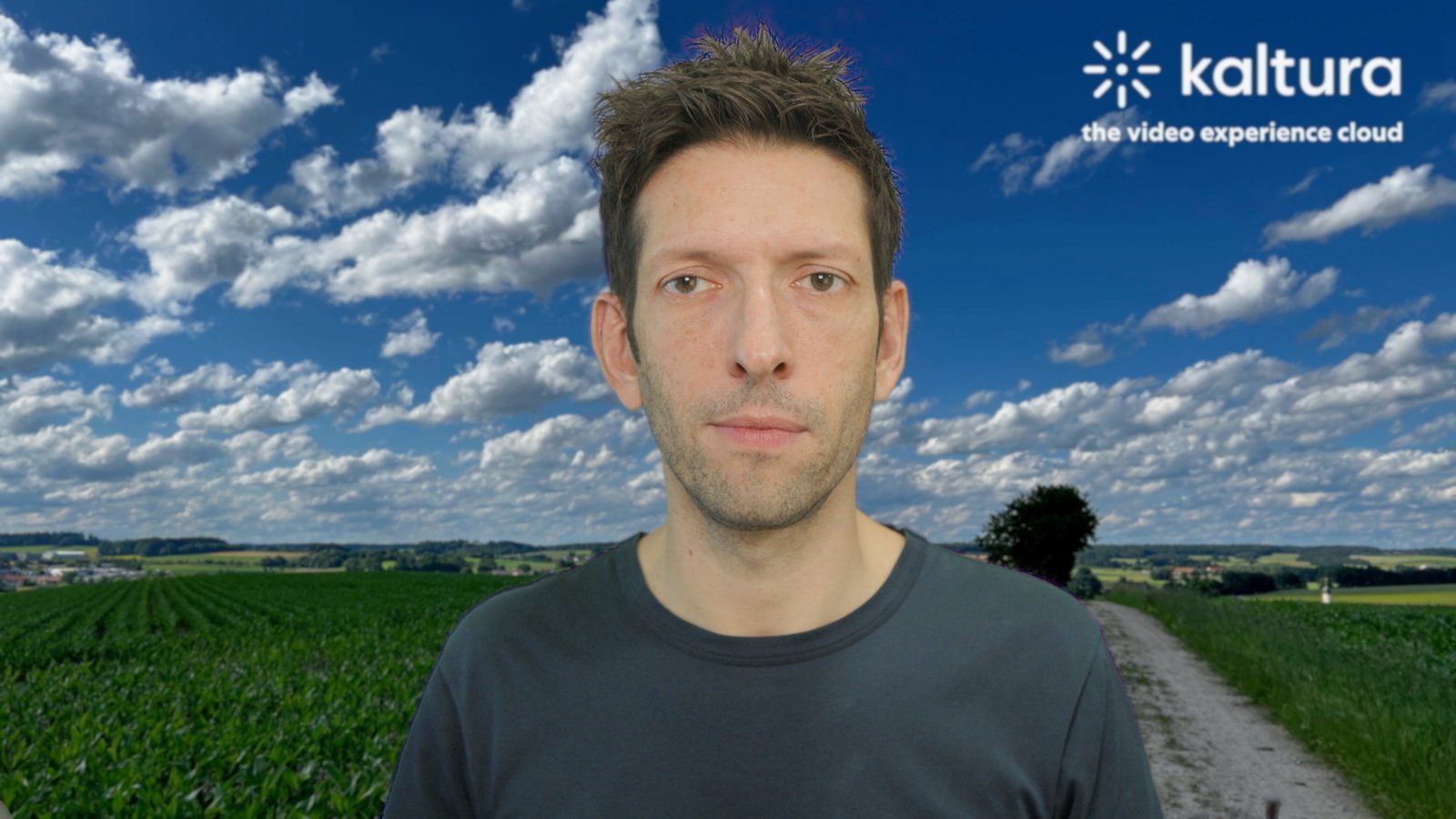
The picture the Webcamee camera sends, grabbed on 15th October 2026 at 09:44, a few minutes after Camera look set the camera. Morning light from the window, a calibration from the evening before.
Why I replaced the ATEM Mini
For 6 years a Blackmagic ATEM Mini sat between my camera and my Mac. The story of that box is in ATEM Mini, Six Years In, and my original setup notes are in ATEM Mini. It's a 4-input video switcher, but I only ever had 1 camera on it. I used it for 2 jobs:
- Chroma keying. Its hardware keyer replaced my green wall with a background, and its USB-C output gave the Mac a webcam with the result.
- Hardware camera control. It relays camera commands over HDMI to my Pocket 4K: ISO, shutter, white balance, tint, iris and focus. My camera scripts drove the ATEM, and the ATEM drove the camera.
Both jobs now run in dedicated software on the Mac:
| Job | With the ATEM Mini | Now |
|---|---|---|
| Chroma key | The ATEM's hardware keyer, 1 sampled green for the whole wall | Webcamee, on the Mac's GPU, with a wall model per place and a person guard |
| Camera control | Relayed over HDMI. Write only, so I never knew what the camera held | Camera look, over the Pocket 4K's own REST API. Every value is read back |
| Webcam | The ATEM's USB-C output | The Cam Link 4K into the Mac, and the Webcamee camera out of it |
| Microphone | The ATEM's USB audio | The Cam Link 4K: my NTG3 mic goes into the camera and over HDMI |
So the switcher is out of the setup: 1 box, 1 power supply and 1 link fewer between the camera and the call. The only thing the REST API can't set is the camera's dynamic range, and that's a one-off setting on the camera's touchscreen.
Software also fixes the 2 limits of the hardware key that I could never get around:
- The window. The sun comes in from my right and moves across the wall all day. A hardware key samples 1 green. By the afternoon the key was either eating my hair or leaving a halo of wall around me.
- Reflections. Green light on my glasses or a shiny forehead made those pixels look like wall. A plain colour key punches holes in you there.
I wanted a key that knows what the wall looks like at each place, at each moment, and that knows where I am, so it never makes me transparent.
Since 14th October 2026 my Blackmagic Pocket Cinema Camera 4K (my note: Blackmagic Pocket Cinema Camera 4K) goes over HDMI into an Elgato Cam Link 4K (my note: Elgato Cam Link Overview), and Webcamee does the keying on the Mac Studio. My old AVerMedia CAM 513 USB camera (my note: AVerMedia Live Streamer CAM 513) stays as the fallback source.
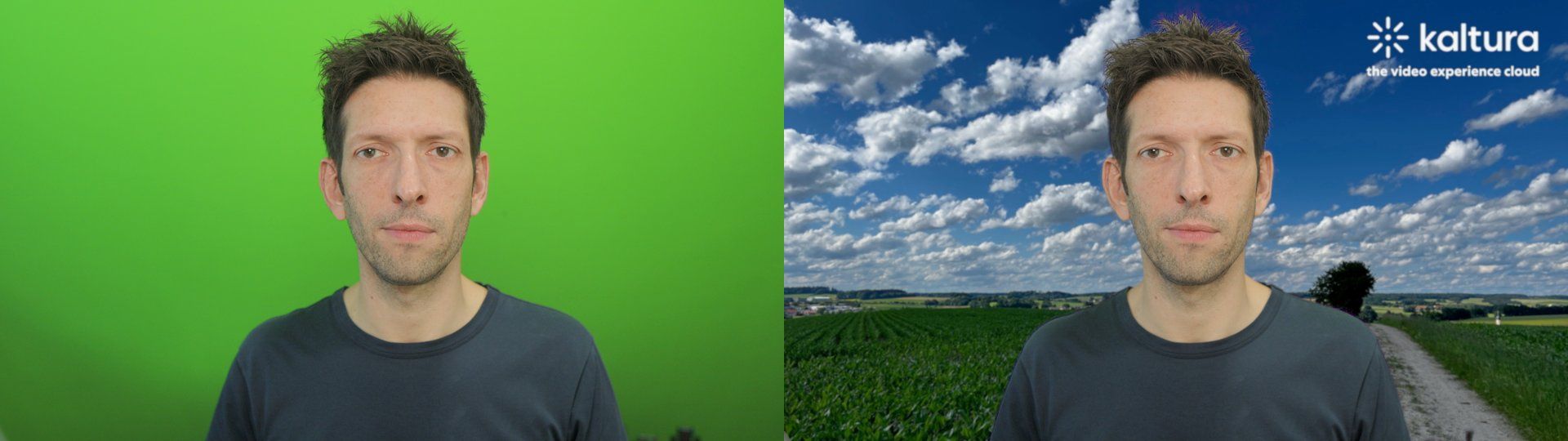
The same moment from the Cam Link (left) and from the Webcamee camera (right).
I checked first whether the Pocket 4K could skip the Cam Link and act as a USB webcam. It can't: its USB-C port offers file transfer and network, not video. The Cinema Camera 6K has a webcam mode, the Pocket 4K doesn't.
How it works
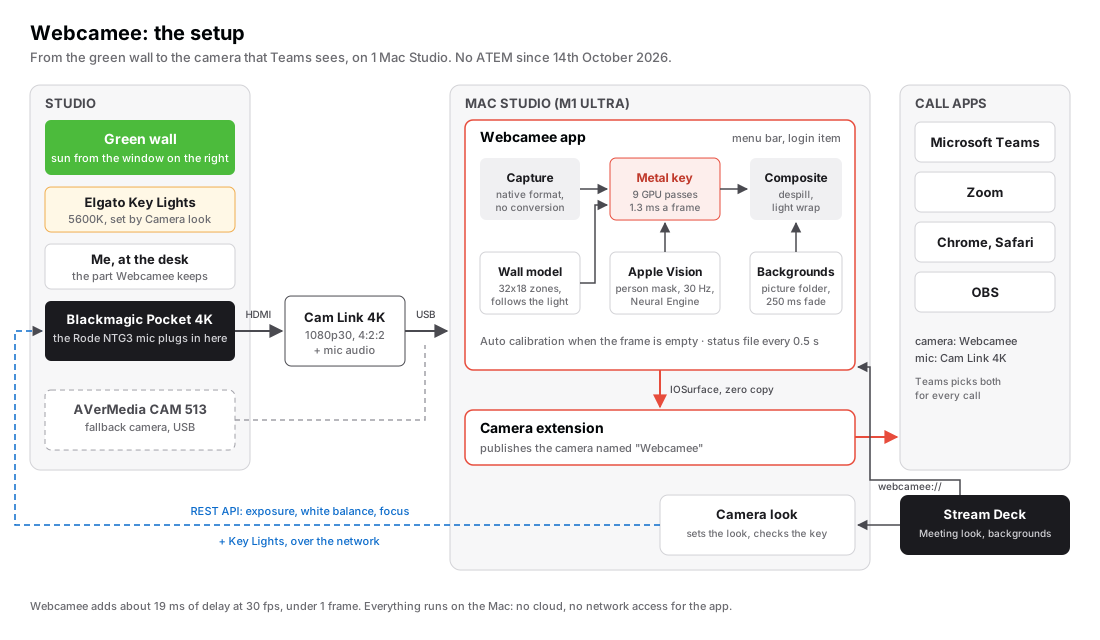
2 parts, like Apple's own camera extension template. The app does all the work. The camera extension is a small system process that only passes frames on to the apps that use the camera.
All features
The key
| Feature | What it does |
|---|---|
| Live wall model | A map of the wall's colour, 1 value per 4x4 pixels, updated all day from the parts of the wall I don't cover |
| Zones | The wall is split into 32x18 zones. A sun patch on 2 zones is tracked locally, a cloud over the whole wall globally |
| Fast mode | A light switch or a cloud makes the model catch up in under a second, then slow down again |
| Live correction | An exposure or white balance change on the camera is corrected on the very next frame, from the wall's medians |
| Shadows are wall | My shadow on the wall keys as wall. A light that came on since calibration keys as wall too |
| Dark clothes stay | A charcoal shirt or black hair in front of a dark part of the wall stays opaque. Green excess decides, not brightness |
| Objects stay | A mug, a chair, or a desk object in front of the wall stays in the picture |
| Edges | A guided filter that follows hair and glasses frames, a small choke and feather, and smoothing only where nothing moves |
| Despill | Green spill on skin, hair and glasses goes neutral, even when the sun makes the wall warmer |
| Clean composite | The wall colour is subtracted from semi-transparent hair before the background goes in, so hair looks like hair |
| Light wrap | A little of the background's light spills over my edges, so I sit in the picture instead of on top of it |
The person guard
| Feature | What it does |
|---|---|
| Vision mask | Apple Vision finds me 30 times a second on the Neural Engine, in parallel to the key |
| Deep core | The middle of my head and body is always solid, whatever green lands on it |
| Shallow core | Glasses and the edges of my face are protected too, wherever nothing moved since the last mask |
| Outside guard | Specks of noise on the wall far from me are cleared. A held object is never cut |
| Age-aware margins | Each mask is a few frames old. The margins grow with its age, so a fast hand never leaves a ghost |
Calibration
| Feature | What it does |
|---|---|
| 1-click calibration | I step out of the frame, Webcamee records 2 s of empty wall and stores it as the reference plate |
| Automatic calibration | When the frame is empty for 4 s and the light has changed, Webcamee recalibrates by itself, at most once a minute |
| Fill-in | Where a chair stood during calibration, the plate is filled in from the wall around it |
| Safe failure | A failed calibration (me still in frame) keeps the previous plate |
| Garbage polygons | I draw polygons over the things that are never me: the wall edge, the window frame, a light stand |
| Per camera | Each source keeps its own calibration and polygons, so switching cameras doesn't break the other one |
Modes
| Mode | What it does | Use |
|---|---|---|
| Auto | The key, the person guard and the garbage polygons. The default | Every call |
| AI only | The Vision mask alone, no colour key | When the wall can't be keyed |
| Passthrough | The raw camera | To show the real room |
| Slate | A still picture, no camera | A short break, privacy |
Auto watches 3 quality signals: clipped wall, how far the wall is from grey, and how often the key and Vision disagree. If any one stays bad for 2 s, Webcamee falls back to AI only with a 250 ms cross-fade. It comes back to the key when all 3 stay good for 10 s.
Backgrounds
| Feature | What it does |
|---|---|
| Picture folder | JPEG, PNG, HEIC or WebP in 1 folder. A new file shows in the menu at once |
| Swap | Next and previous, or a picture by name. A 250 ms cross-fade, never a black or frozen frame |
| Defocus | A slight blur on the picture, because a sharp background behind a camera-sharp me reads as fake |
| Colour-correct | Each picture keeps its own colour profile (an iPhone HEIC in Display P3 comes out right) |
| Remembered | The last background comes back after a restart |
Control
| Feature | What it does |
|---|---|
| Menu bar | Status, the background list, next and previous, mode, Calibrate, and the preview window |
| Hotkeys | Ctrl+Opt+Cmd with the arrows for the background, P for passthrough, S for the slate. No Accessibility permission |
| Links | webcamee://bg/next, webcamee://mode/ai, webcamee://mode/calibrate and more, so any tool can drive it |
| Stream Deck | My Elgato's Stream Deck for business users keys call those links |
| Preview window | 7 views (output, source, matte, wall model, spill, guards, A/B split), the polygon tools, and sliders for the key |
| Settings | 105 settings in 1 file, with defaults and ranges, shared by the app and the test tools |
| Agent CLI | webcamee <command> --json: describe, status, backgrounds, bg, mode and calibrate, for my AI agents |
| Square windows | The preview window has square corners, like all my apps |
Reliability
| Feature | What it does |
|---|---|
| Login item | Starts with the Mac |
| "Webcamee is off" | If the app isn't running, the camera shows a slate instead of a black picture |
| Gap cover | A missing frame is covered by the last one. After 2 s of nothing, the slate comes up |
| Format guard | The Cam Link is shared. If another app switches it to 25 fps, Webcamee puts its own format back |
| Reconnect | Unplug and replug the camera, or wake the Mac: capture comes back by itself |
| Status file | Twice a second the app writes its source, fps, mode, wall quality, drops and latency to a small JSON file |
| No network | No network access, no analytics, no update check |
02 Nov 2026 My agents now drive Webcamee through its own CLI, the same contract as my other apps: 1 JSON answer per command, an error and a hint when it fails. status tells an agent whether frames flow and whether a call app is watching the camera, so it knows not to change the background in the middle of a call. A background change is confirmed through the app's own settings. calibrate replaces the wall plate, so the agent has to add --yes, and the wall has to be empty.
Works with my other tools
- Camera look sets the Pocket 4K for calls over its REST API: exposure, white balance and my Key Lights (my note: Elgato Key Light — Overview & Wi-Fi Troubleshooting). It starts Webcamee if needed, then checks the key: wall gone around me, nothing missing on me.
For business people
A video call is the first impression for most of my clients. A clean, steady picture with a branded background says "this person has their act together" before I've said a word.
- No more halo, no more holes. The key holds from the morning sun to the evening lamps, without me touching anything.
- 1 action to change the scene. A Kaltura background for a client call, a plain one for an internal meeting, from a key on my Stream Deck.
- Private by design. Everything runs on my Mac. No cloud, no account, no picture of my room leaves the machine.
- Cost. No subscription. The ATEM Mini is out of the setup, so the camera chain is shorter and has 1 device less to fail.
- Limits. It needs a green wall and a Mac with Apple silicon. It's built for 1 room and 1 person: mine.
For technical people
| Part | Built with |
|---|---|
| App | Swift 6 and SwiftUI on macOS 26, a menu bar app. AVFoundation for capture in the device's native format, no conversion |
| Camera | A Core Media I/O camera extension. The app sends frames to its sink stream as IOSurfaces, zero copy |
| Key | 9 Metal compute passes, plus pass 0 that unpacks the Cam Link's 4:2:2 yuvs on the GPU |
| Person guard | VNGeneratePersonSegmentationRequest at 30 Hz, turned into a signed distance field by jump flooding |
| Colour | Matte work in Y'CbCr, despill and composite in linear BT.709, output NV12 video range with the right tags |
| Timing | The capture timestamp stays on the frame all the way to the meeting app. The capture queue never waits on the GPU |
| CAM 513 | White balance over raw UVC requests through IOKit, because macOS doesn't expose it |
| Signing | My own Apple Developer ID. No App Store, no sandbox for the app |
| Size | About 5,700 lines of Swift, Metal and C |
The keyer compares each pixel with the wall model at the same place, at the pixel's own brightness. A shadow scales luma and chroma by the same factor, so a shadow stays close to the wall colour and keys out. A neutral shirt or skin is far from it and stays. Near my outline, a second test in linear light measures the pixel's green excess against the wall's. That's what keeps black hair and charcoal fabric solid where brightness alone would call them shadow.
Test tools ship with it:
| Tool | What it does |
|---|---|
clip-recorder |
Records raw frames from the camera for offline tests (about 125 MB per second at 1080p30) |
bench |
Keys a recorded clip offline and scores it against Vision's slow, accurate mask: holes in me, wall left over, worst frame as a PNG |
latency-probe |
Opens the Webcamee camera the way Teams does and measures fps, gaps and delay |
capture-probe, uvc-probe |
List the camera formats and the UVC controls |
Every change to the keyer goes through bench on recorded clips before it goes near a live call.
Measured on the Mac Studio M1 Ultra:
| Measure | Result |
|---|---|
| GPU time per frame | 1.3 ms |
| Delay Webcamee adds (median, 30 fps) | about 19 ms, under 1 frame |
| Holes in me | 0.05-0.07% of my pixels (the wall seen through my glasses) |
| Wall left over | 0.06-0.18% of the wall |
| Recovery after a 1-stop exposure jump | about 0.7 s |
| Memory | about 420 MB, app and extension together |
How I built it
- Spec first. Claude Code wrote a build spec of about 1,200 lines from my description of the problem.
- A council reviewed it. 5 expert personas (keying, camera extensions, real-time latency, camera control, build readiness) scored the spec over 3 rounds: 5.4, then 6.8, then 7.7 out of 10, with blocking issues going from 26 to 3.
- Then the build. Claude Code built the app, the extension and the test tools in phases, each with its own exit test. The first working version ran on 27th September 2026.
- The camera change to the Pocket 4K on 14th October 2026 took 1 evening: new input format, new calibration rules, automatic calibration, and the test tools to prove it.
What I learned building it
- Test on recordings, not on yourself. Every keyer change gets scored on the same recorded clips. Without numbers, "looks better" was a guess.
- Cameras lie in small ways. The CAM 513 ties its frame rate to the power line setting: 50 Hz means 50 fps. The Pocket 4K has no webcam mode over USB. Both took a test to find, not a spec sheet.
- Shared devices get changed under you. Another app opened the Cam Link at 25 fps and Webcamee's picture changed with it. Webcamee now watches the format and puts its own back.
- Watch only your own camera. My iPhone's Continuity Camera disconnecting once marked Webcamee's camera as missing for good, which stopped the automatic calibration. It now reacts only to its own source.
- Raw video is huge. Uncompressed 1080p30 is about 125 MB per second. 1 test recording without a time limit filled the disk in about 2 minutes.
- Calibration has to be forgiving. A chair left in frame counted as wall. A failed calibration replaced a good one. Both are fixed: the plate fills in around objects, and a failure keeps the old plate.
What's next
- Daylight clips. All the test clips are from the evening, under my Key Lights. Morning, noon and afternoon clips will show how the wall model follows the sun.
- Latency. Webcamee adds about 19 ms. My target was 8 ms. The GPU part is only 1.3 ms, so the rest is in scheduling and the camera path.
- Hair. A faint magenta fringe on top of my hair under the blue light of a screen: the despill pulls out too much green there.
- The first real Teams call on Webcamee with the Pocket 4K.
Further reading
- Chroma Keying Best Practices: how to light and shoot a green screen so the key is easy
- ATEM Mini, Six Years In: the hardware switcher that keyed my calls for 6 years
- Pitchee: my own demo video studio for macOS: my demo video studio, which keys me out of the same wall for recordings
- The era of personal software is here: why I build my own apps now
The Apple building blocks:

The hardware: