

31 Oct 2026
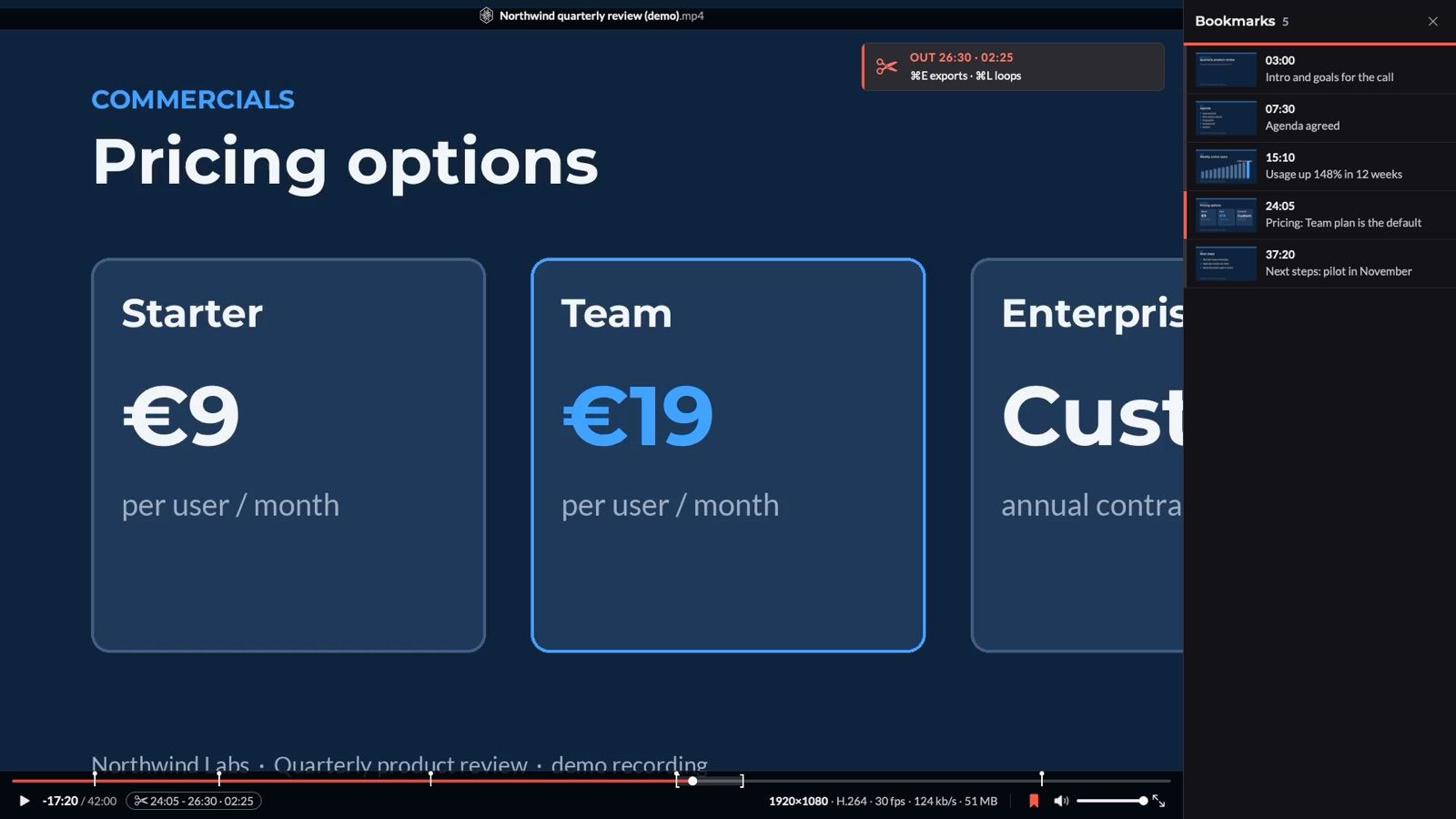
Playee is the video player I now use on my Mac. I double-click an MP4 or a MOV, and it plays centred on my main screen at its native size, 1 video pixel to 1 screen pixel, in a window with nothing over the picture. It replaces VLC and IINA for the files I open every day: meeting recordings, camera recordings from the studio, and videos I download with Tubee: my own video downloader for macOS.
I didn't write the code. I asked whether my own player made sense, answered 44 questions, and my AI agent (Claude Code) measured 2 engines, wrote the spec, built the app, tested it and installed it in 1 night, on 31st October 2026. The why is in The era of personal software is here.
Every screenshot in this note uses dummy data: an invented "Northwind Labs" slide recording, rendered by the app's own test harness.
Why my own player
VLC and IINA both play anything. But 4 things bothered me:
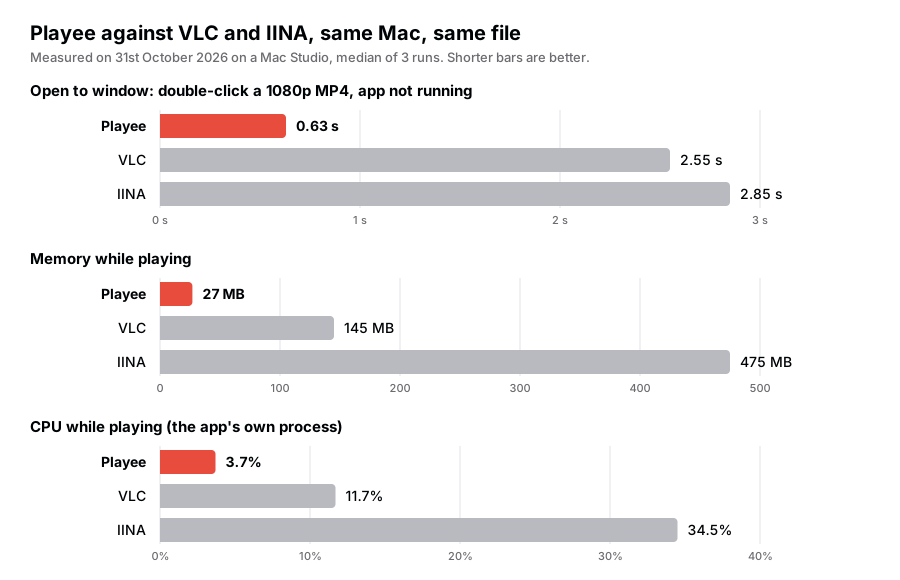
- They're slow to open. About 2.5 s for VLC and 2.9 s for IINA from double-click to window, on a Mac Studio.
- They're heavy. IINA used 475 MB of memory to play a 1080p file.
- Frame grabs stop at the file. My 2022 note Automating video screenshots asked for 1 key that saves the frame with the title and the time in the name, and puts a ready-to-paste snippet for my notes on the clipboard. Neither player does the second part.
- No marks. I review long recordings. I wanted to bookmark moments with a note, and to cut a clip with 1 key for the start and 1 for the end.
Before the build, the agent read my settings in both players. My key map in IINA was VLC's map plus 4 changes, so Playee ships that map as its default. My hands didn't have to learn anything.
The engine decision
IINA is a nice interface on top of mpv. The obvious plan was to do the same. Instead, the agent built a small test app with both engines, mpv's libmpv and Apple's AVFoundation, and measured them on the same files:
| Test (1080p H.264) | AVFoundation | libmpv |
|---|---|---|
| Launch to first frame | 710 ms | 950 ms |
| Memory while playing | 20 MB | 160 MB |
| Exact seek | 44 ms | 143 ms |
| 1 frame back | 1 ms | 309 ms |
AVFoundation won every test on every file it can play. The cost: it can't open MKV, WebM or AVI. I had 1 MKV file and no WebM or AVI, so those stay with VLC. The frame-back result mattered most to me: VLC can't step back at all, and mpv needs a third of a second for each step.
What it does
| Feature | How it works |
|---|---|
| Native size | Opens centred on my main screen at 1:1 pixels. ⌘2 doubles, ⌘0 halves, ⌘1 goes back |
| My key map | VLC's seek keys (3 s, 10 s, 1 min, 5 min), ⌥← and ⌥→ step 1 frame, ⌘= and ⌘- change the speed |
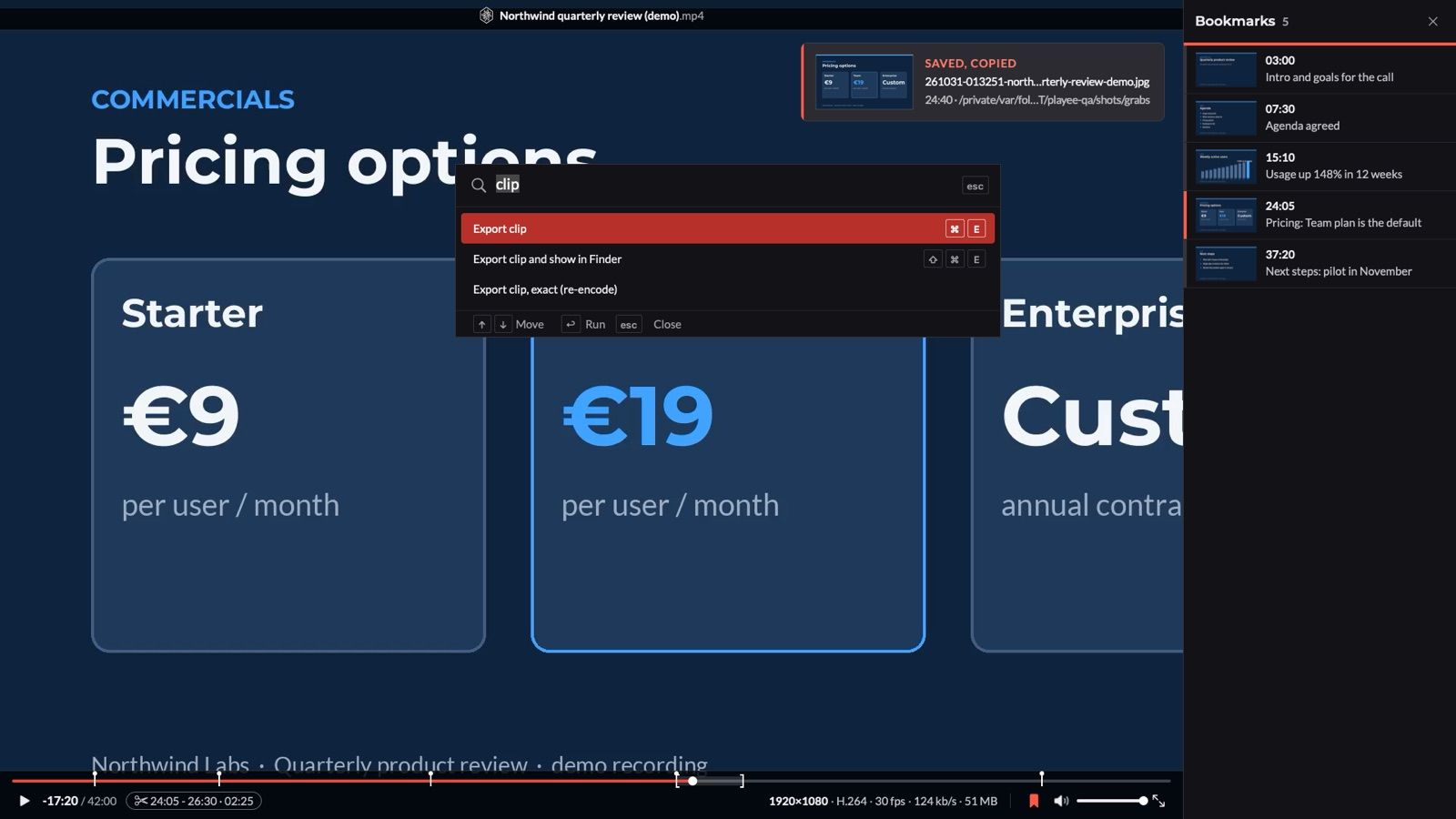
| Frame grab | ⌘S saves the exact frame as YYMMDD-HHMMSS-title.jpg and copies the image |
| Grab for a note | ⌥⌘S also copies the image into my notes and puts the <img> snippet on the clipboard |
| Bookmarks | b marks the frame, ⇧B adds a note, ] and [ jump between them, ⌫ deletes, ⌘Z undoes |
| Bookmarks to Markdown | ⇧⌘B copies the list for a note; ⌥⌘B adds 1 frame grab per bookmark |
| Clips | i sets the start, o the end, ⌘E exports an MP4, ⌘L loops the part |
| Picture details | Resolution, codec, frame rate, bitrate and size in the control bar, every detail with ⌘I |
| Resume | Files over 5 minutes start 3 s before where I stopped, even after a rename. No viewing history |
| Command centre | ⌘K lists every command with its key, with a fuzzy search |
| Light and dark | The panels follow the system; the picture is always black |
Clips that cut where I marked
A plain cut with ffmpeg copies the video from the nearest keyframe, so a clip can start seconds before the moment I marked. Playee checks the keyframes first. When the start sits on a keyframe, it copies the stream: instant, no quality loss. When it doesn't, it re-encodes clips up to 3 minutes with the Mac's hardware encoder, for an exact cut: 0.7 s for a 3 s clip in testing. Longer clips copy from the keyframe before the start and say how many seconds early they begin. The clip lands on the clipboard as a file, ready to paste into an email or Teams.
Built for my notes
⌥⌘S saves the frame, copies it into my notes images folder and puts this on the clipboard:
<img class="screenshot" src="https://ik.imagekit.io/vhucnsp9j1u/images/grabs/261031-142233-northwind-quarterly-review.jpg" alt="Northwind quarterly review at 24:40"/>
⌥⌘B does the same for every bookmark of the file and builds a Markdown list with the time codes. For a video I downloaded from YouTube, each time code links to that moment on YouTube.
Playee against VLC and IINA
| Need | VLC | IINA | Playee |
|---|---|---|---|
| Open a 1080p MP4 | 2.55 s | 2.85 s | 0.63 s |
| Memory while playing | 145 MB | 475 MB | 27 MB |
| Step 1 frame back | No | Yes | Yes, in 3 ms |
| Grab to a note snippet | No | No | 1 key, 25 ms |
| Bookmarks with notes | No | No | Yes, with Markdown export |
| Clip export | Recording workaround | No | 2 marks and ⌘E |
| MKV, WebM, AVI | Yes | Yes | No: VLC opens them |
Playee's CPU number counts its own process. AVFoundation decodes in a macOS system process, so part of the decoding work isn't in that number. The memory and launch numbers are like for like.
What I gave up
- MKV, WebM and AVI. AVFoundation can't play them. Playee offers "Open in VLC" with
↩when a file doesn't play. - Subtitle and audio delay, and side-car
.srtfiles. AVFoundation has no control for them. Embedded subtitle and audio tracks work. - Volume above 100%. VLC's boost has no AVFoundation equivalent.
For my AI agents
Like every app I build, Playee has a command line that my agents use without touching the screen:
playee open ~/Movies/demo.mp4 --at 12:41
playee grab --note
playee bookmark add --at 12:41 --note "Pricing objection"
playee clip --in 12:41 --out 14:03
A debrief task can now open a call recording at the right moment, grab the slide on screen and cut the 2 minutes that matter, then put all 3 in a note.
Built with
The tool that built it:

- VLC: my note on VLC, which I keep for exotic files.
- IINA: my note on IINA, my player since 2020.
- Tubee: my own video downloader for macOS: my video downloader, whose MP4 files Playee plays.
- The era of personal software is here: why I now build the apps I use.