
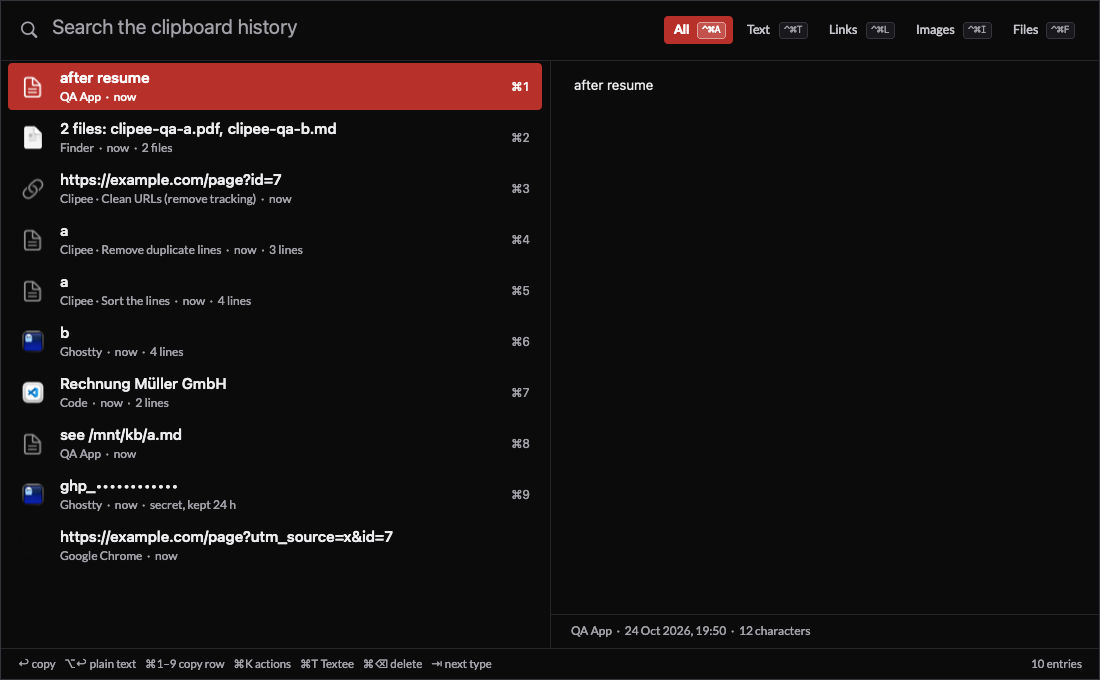
Clipee is my clipboard history. I press ⇧⌘P, type a few letters, press ↩, and the entry is back on the clipboard. ⌘K runs an action on it first: translate it, clean it, sort it, or hand it to 1 of my own scripts.
It replaced the clipboard history in Alfred (see Alfred). Claude Code built it on 23rd October 2026, from 29 questions I answered that day. Alfred's clipboard feature went off the same evening.
Every screenshot in this note comes from the QA run, on test data.
Why I replaced Alfred's clipboard history
Before the build, Claude Code read a copy of Alfred's clipboard database and counted how I use it:
| What I found | Value |
|---|---|
| History opened | About 12 times a day, by hotkey or by keyword |
| Copies recorded | 121 a day on average, 235 on the busiest day |
| History kept | 6,477 entries in 3 months, 4.4 MB of text |
| Multi-line entries | 34% |
| Accents | 524 entries with German umlauts, 202 with French accents |
| Formatting kept | None: Alfred stores plain text only |
3 things pushed me off it:
- It went down with the launcher. On 19th October 2026 Alfred froze, and my clipboard history froze with it. Clipee is its own process, so a hung launcher can't take the history down.
- Plain text only. A copy from an email or a web page lost its links and its bold.
- The window opened in the same place whatever screen I was working on. I have 4.
I also wanted the jobs I do around the clipboard in the same window. The biggest, "send the clipboard to a new scratch file", ran 147 times in 30 days through a separate Alfred keyword.
What it does
| Feature | How it works |
|---|---|
| Search | Every word must match, anywhere in the text. Case and accents ignored: muller finds Müller |
| Newest first | Always, also when filtered. Row 2 is always the copy before |
| Type filters | Tab cycles All, Text, Links, Images, Files. ⌃⌘A, ⌃⌘T, ⌃⌘L, ⌃⌘I, ⌃⌘F pick 1 |
| Copy as copied | ↩ brings back rich text, images and file lists as they were. ⌥↩ gives plain text |
| Rows 1 to 9 | ⌘1 to ⌘9 copy a row directly |
| Previous entry | ⌃⌥⌘V from any app copies the entry before the last one. Press again to swap back |
| To a scratch file | ⌃⌥⌘E sends the clipboard to a new Textee scratch, see Textee: my own text editor for macOS |
| Where it opens | In the centre of the screen with my focused window, never on the screen I share |
| Source app | Each row shows the app it came from, with its icon |
| Pause | From the menu bar, or clipee pause 15, before a screen share |
It copies, it never pastes
This was my call. ↩ puts the entry on the clipboard and closes the window. I paste myself, with my own paste key. Clipee needs no Accessibility permission, and it never types into the wrong window.
Actions on ⌘K
⌘K turns the list into a menu of actions for the selected entry. I type to filter, with short keywords: tfr translates to French, trim trims the lines.
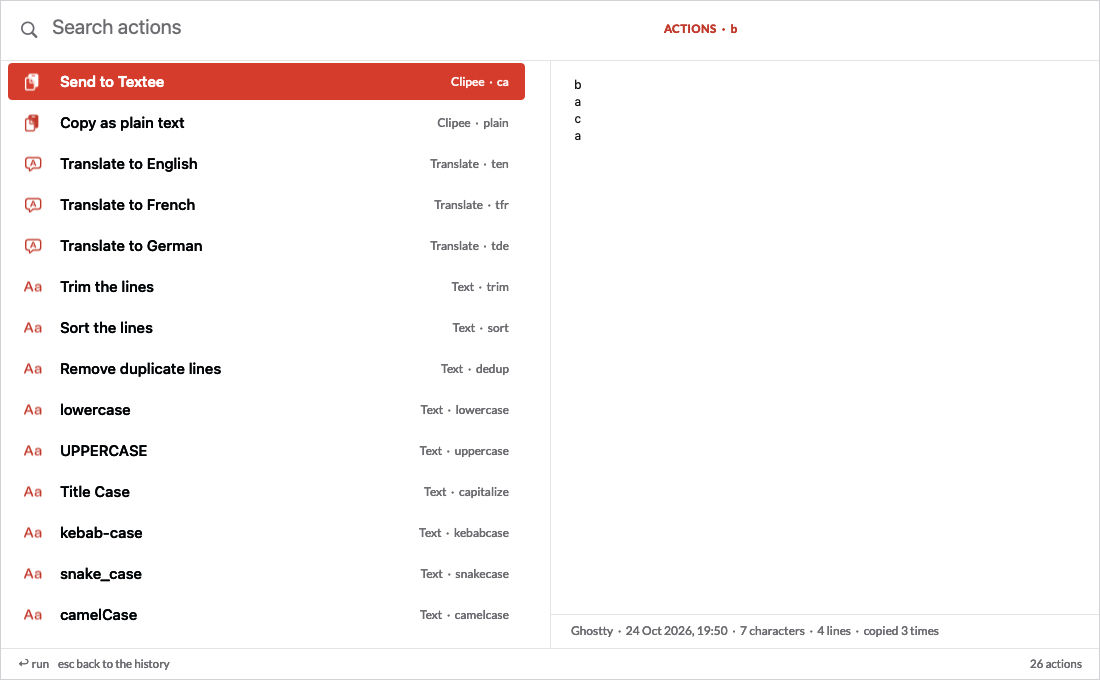
- 21 text actions: trim, sort, remove duplicate lines, case changes, clean tracking parameters from URLs, parse a URL, percent and base64 encoding, pretty and validate JSON. They port an Alfred workflow I had, with the same keywords.
- 3 translations, to English, French and German, through a local model in Ollama. Nothing leaves my Mac. A sentence takes about 7 seconds when the model is cold.
- My own scripts, from a small JSONC file. Clipee puts the entry on the clipboard and on standard input, then copies or shows the output. A script that hangs is killed after its timeout, and Clipee carries on.
The result of an action goes on the clipboard as a new entry. Nothing pastes.
The name comes from my older Python clipboard scripts, see Clipee. Those scripts now run from this menu.
Privacy
- Password managers are skipped. Copies from 1Password, Passwords and Keychain Access, and any copy marked concealed or transient, are never recorded.
- Text that looks like a key or token shows masked, isn't searchable, and expires after 24 hours.
- The history expires. Text after 90 days, images and file lists after 30.
- It stays on the Mac. 1 folder only my user can read, not synced, not in git, never in a log.
Speed
Measured by the QA script inside the app on my Mac Studio:
| Metric | Budget | Measured |
|---|---|---|
| Hotkey to window, 11,000 entries | < 30 ms | 20 to 24 ms |
| Filter per keystroke, p95, 11,000 | < 15 ms | 4.7 ms |
| Filter per keystroke, p95, 51,000 | - | 24 ms |
| Memory, 11,000 entries | < 80 MB | 59 MB |
| Load at launch, 6,579 entries | - | About 100 ms |
| CPU when idle | ~ 0% | 1 check every 250 ms |
How it's built
Stack
- Swift 6 and AppKit, about 5,100 lines, no dependencies. Pieces come from my other apps: the window from Lastee: my own recent-files app for macOS, the SQLite wrapper from Hifee.
- ClipeeCore, a Swift package with no AppKit: search, history rules, the store, the actions, the Alfred import. 15 unit tests.
- SQLite holds the history, 1 file that the CLI reads directly.
- No search index. 3 months of my copies are 4.4 MB of text. Clipee keeps a folded copy of each entry in memory (lowercase, no accents) and runs
memmemfor each word. That's fast enough at 51,000 entries.
Engineering notes
- macOS has no "copied" notification. A timer on a background queue reads the pasteboard's change count every 250 ms and reads the content only when it changed.
- The main thread never touches the disk. The store has its own queue. App icons and image previews load in the background.
↩hides the window first, then copies. - A watchdog restarts it. A background thread checks the main thread every 100 ms. A stall of 3 seconds writes a log line and quits with code 70, and launchd starts Clipee again. A normal Quit stays quit.
- The source of a copy can lie. By default it's the app in front. When a tool writes the clipboard for another app (my dictation app pastes into the terminal, see Dictee: my own local dictation app), it can set the nspasteboard.org source marker, and Clipee shows that tool instead.
- The same text is 1 entry. A repeat copy moves the old entry to the top, matched by a SHA-256 hash.
- It fits the small screens. On a 1024x600 screen the 1,100x680 window shrinks to fit, with a margin.
Agent interface
My agents use Clipee through its CLI, see What is NicAI. Every command takes --json. A write goes through a clipee:// URL opened in the background, and the CLI confirms it from a state file the app rewrites after each action.
clipee status --json      # running, paused until, entries, newest copy
clipee get 3 --json       # entry 3: kind, time, value (secrets refused without --secret)
clipee pause 10 --json    # stop recording for 10 minutes, confirmed
clipee textee --json      # the clipboard to a new Textee scratch
QA
110 end-to-end checks run the real app on a private pasteboard with a scratch history folder. They never touch my clipboard, never register a hotkey and never take the focus, so they run while I work. They cover capture of every type, the skip rules, secrets, search, every key, the actions, a fake Ollama, the Alfred import, the CLI and the watchdog. They fail when a speed budget breaks.
How I built it
- Usage review and questions. On 21st October 2026 Claude Code read Alfred's clipboard data, my Alfred workflows, my clipboard scripts and the hotkeys of my other apps. It wrote 29 questions, each with a recommendation.
- Answers and spec. I answered on 23rd October 2026. The spec records 24 decisions.
- Build and switch-over. Version 1.0 the same day. On the first launch it imported Alfred's 6,477 entries. Alfred's clipboard history went off, and its keyword now opens Clipee. Rollback is 1 checkbox in Alfred.
- Polish and agent interface. Filter keys and the source marker on 24th October, then version 1.0.1 with the agent interface. 7 commits in all.
The repository is private for now but has no personal paths in it and an MIT licence.
What I left out
Pins, paste stacks, OCR on images, sync with another Mac, and a settings window. The 2 settings files reload as soon as I save them.
Further reading
The app Clipee replaced:

What it's built on:


- see The era of personal software is here: why I now build the apps I use.
- All my apps: see My apps: everything I built for myself.