

Mirage is a small vision model from Cactus Compute, a Y Combinator company that builds foundation models under 30 MB for phones, wearables, robots and other consumer devices.
1 image in, 1 JSON record out: a scene description, named objects with boxes and masks, the text in the image, the relations between objects, and answers to questions you define. All of it in a single pass, on the device, with no server.
The numbers are the point. 51.3 million parameters, about 22 MB on disk with 2-bit quantisation, and 74 ms end to end on the NPU of a Samsung Galaxy S26, or 107 ms on its CPU. Most vision-language models run to gigabytes.
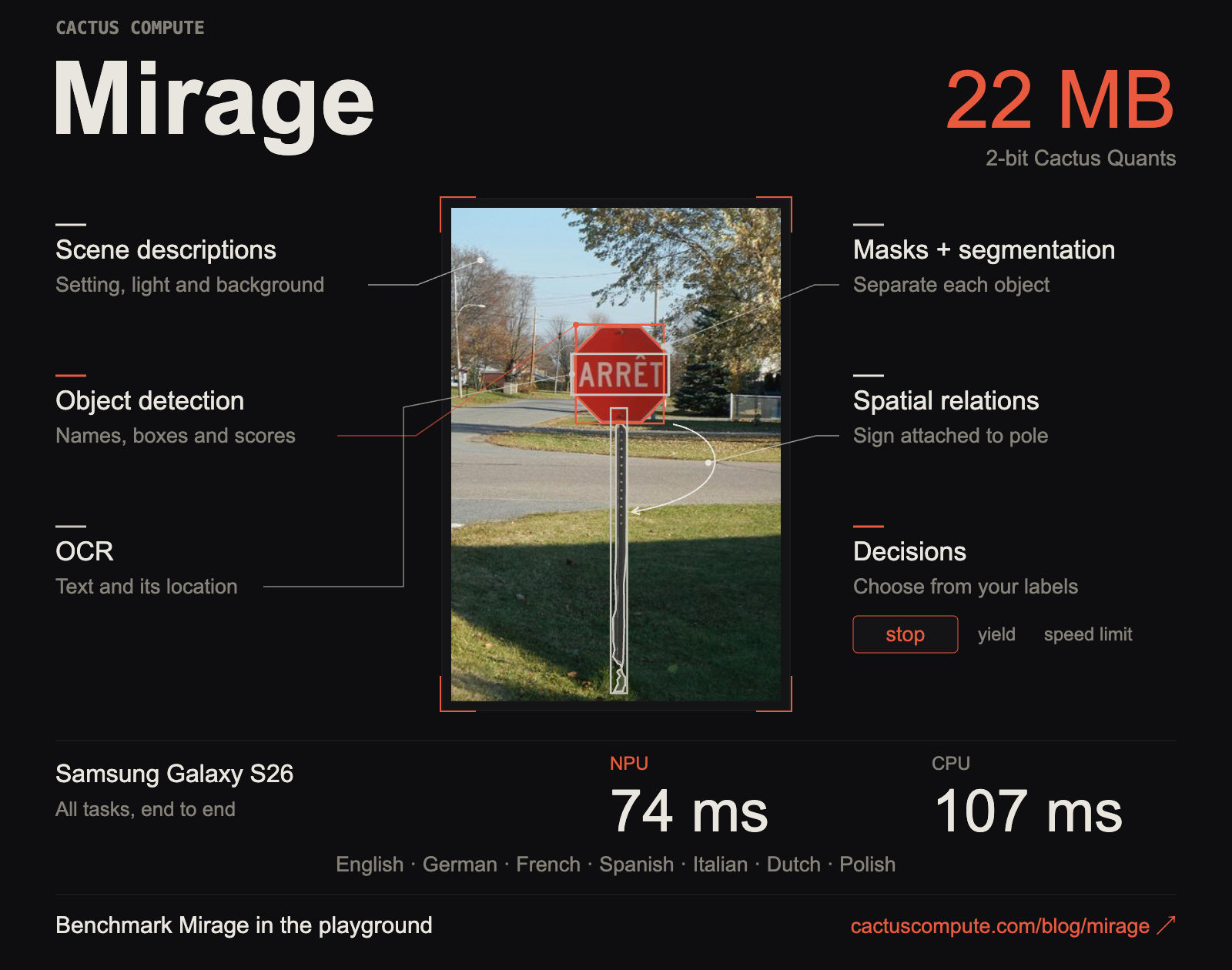
What comes back
| Section | What Mirage returns |
|---|---|
| Scene | The kind of place, the lighting, the surface and the background |
| Objects | Names, boxes, positions and attributes such as colour, shape or material |
| Masks | 1 mask per object, as an outline, separate pieces or a bitmap |
| Text | OCR, with a box and a detection score for each text region |
| Relations | What is attached to what, what sits on the table, which action is shown |
| Decisions | A choice from labels you supply, a count in a range, a short text field or a box |
| Reasoning | A short generated trace that explains the description |
- Object names aren't limited to a fixed class list. The language decoder names them, so Mirage isn't stuck with the 80 classes of a COCO-trained detector.
- The record is a small scene graph. Your code can follow a relation from the sign to its pole, or pick every object described as red, from the fields.
- Descriptions in 7 languages: English, German, French, Spanish, Italian, Dutch and Polish.
Get started
pip install -U cactus-compute
import cactus

vision = cactus.Mirage()
result = vision.describe("photo.jpg")    # path, bytes, Pillow image or RGB array
print(result)

# Only the parts you need
result = vision.describe(
    "photo.jpg",
    sections=["objects", "text"],
    fields=["bbox", "score", "mask"],
    mask_format="polygons",
    language="de",
)

# A decision from your own labels, with probabilities
result = vision.extract("photo.jpg", {
    "sign": {"enum": ["stop", "yield", "speed limit"]}
})
print(result["form"]["sign"])
- The first call downloads the engine and the weights, then caches them. Inference runs locally.
- Boxes use a 0 to 1,000 scale relative to the image.
conf,text_conf,max_objects,max_text_linesandmax_tokensset thresholds and bound the output. - For a native app,
cactus_loadloadsmirage.cactandcactus_describetakes RGB pixels with the same options. - ⚠️ The Python package sends anonymous usage counts by default. Set
CACTUS_TELEMETRY=0to stop it.
There's also a sandbox in the blog post that runs Mirage in the browser on your camera or an uploaded photo.
How it fits in 22 MB
- A shared encoder turns a 512 px image into a 16 by 16 grid of 256 cells. Detection, masks and OCR all read from it.
- HConvGLU replaces full channel-mixing matrices with fixed Walsh-Hadamard transforms around small learned convolutions: about 8 times fewer weights per layer.
- A small 8-layer decoder writes the description and short references to the detected boxes. The engine then merges boxes, masks and OCR into the JSON, so the decoder generates far fewer tokens.
- A dedicated CTC reader reads the text crops, rather than the decoder spelling them out.
- Cactus Quants: most matrices at 2 bits, the embedding and routing matrices at 4 bits, a few sensitive layers at 16 bits. The result is a 21.6 MB file.
Mirage runs in the same engine as Needle, Cactus's 8 to 29 MB tool-calling model, and Whistle, its 16.9 MB speech recognition model (see Whistle, a 16.9 MB speech model by Cactus ). 1 app can load all 3 and get on-device agents, voice and vision. For another small open speech model, see Phonon-2.
Mirage as eyes for a text model
Cactus tested a pipeline where Mirage looks and a text-only LLM answers. They gave Qwen3-0.6B Mirage's JSON plus a question, on 256 VQAv2 questions:
| Input to Qwen3-0.6B | Score out of 100 |
|---|---|
| Mirage record with the reasoning trace | 31.3 |
| Mirage record without the trace | 33.1 |
| The record of a different image (control) | 22.2 |
The record helps, but not by much, and the reasoning trace adds nothing. The LLM never sees the pixels, so whatever Mirage leaves out is lost. Cactus says larger text models gave no consistent gains either. Credit to them for publishing the weak result and the failures.
Limits
- All numbers come from Cactus. The post shows no standard detection, OCR or segmentation benchmark, and I found no independent test yet.
- Low confidence on easy cases. In their own example, the stop sign scores 0.64 and the pole 0.56, and the OCR gets the accent in ARRÊT wrong.
- Good for structure, not for depth. A 51M model will miss fine detail that a large VLM like Claude or Gemini catches. Mirage is for fast, cheap, private first passes.
- A young stack. The repository changes daily, and the API may move.
Value
Mirage is interesting where a cloud call is too slow, too expensive or not allowed: a camera pipeline, a wearable, an app that must work offline, or images that shouldn't leave the device.
For my own work, the fit is a local pre-filter. Run Mirage over a folder of screenshots, scans or event photos, keep the JSON in SQLite, and send only the images that matter to a large model. The extract call with fixed labels is the useful part: a typed answer, not a paragraph to parse.
Apache 2.0, the runtime binaries included, so it's free for commercial use.
Further reading
The model weights and config:

The engine source, for Mirage, Needle and Whistle:

The experiment with Mirage and a text-only LLM: