
A real KVM switch does what the last two months of monitor-input experiments have been circling: one keyboard, one trackball, one monitor, four machines, one button. The TESmart HKS401 family is 4-in, 1-out HDMI with a USB hub and per-input EDID emulation. Four machines is exactly the count: Mac Studio, Mac Mini, and two MacBook Pros.

Buy the cheap one
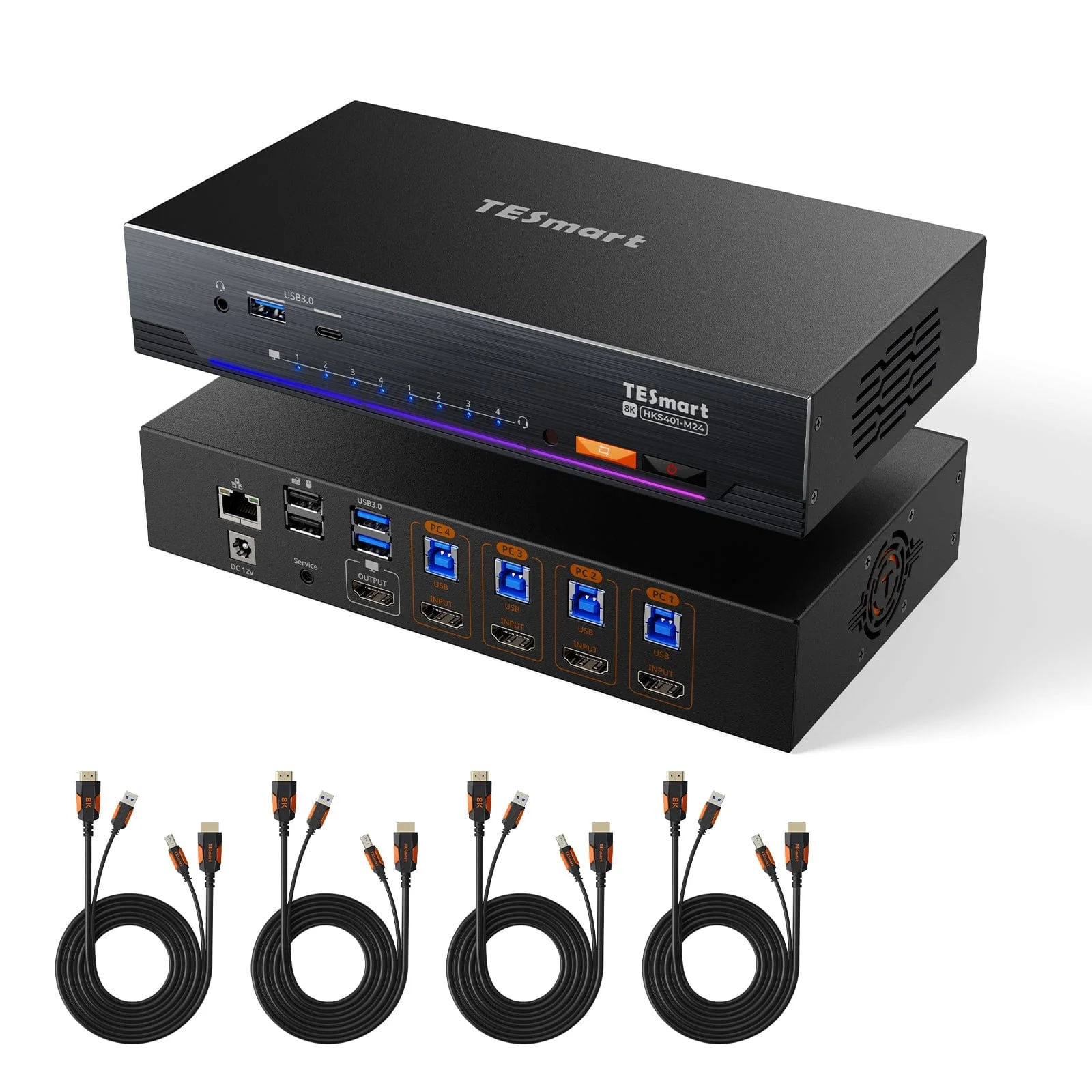
The M24 is the wrong model for this desk, and the reason is the display.
The Dell U2720Q is 4K@60. The Mac Studio is an M1 Ultra, and its HDMI port tops out at 4K@60. So the M24's headline numbers, 8K@60 and 4K@144 over HDMI 2.1, are capability neither end of the cable can use. You would be paying 428,62 EUR for bandwidth that stops at the monitor.
| Model | Video | USB hub | Extra | Price | Stock |
|---|---|---|---|---|---|
| HKS401-E23 | 4K@60 4:4:4, HDMI 2.0 | USB 2.0 | - | 92,52 EUR | In stock |
| HKS401-M23 | 8K@60, 4K@144, HDMI 2.1 | USB 3.0 | 7.5 W front charging | 363,60 EUR | 10 left |
| HKS401-M24 | 8K@60, 4K@144, HDMI 2.1 | USB 3.2 | Gigabit LAN switch, RGB bar | 428,62 EUR | Sold out |
All three have the feature that actually matters on a Mac: an EDID emulator on every input. Without it, macOS sees the display disappear when you switch away and rearranges your windows and desktop icons. With it, each Mac keeps believing the monitor is still attached. That single feature is the difference between a KVM you use and a KVM you unplug after a week.
The E23 at 92,52 EUR does the whole job for this setup, and it is in stock while the M24 is not. Reasons to go up-tier: you want to switch a fast external SSD or a capture device through the hub, in which case USB 3.0 beats USB 2.0. Keyboard, trackball and audio do not need it.
The Bluetooth problem
This is the thing to settle before ordering anything.
A KVM switches USB. It cannot switch Bluetooth. The Kinesis Advantage360 Pro and the MX Ergo 2 are both Bluetooth. Plug the KVM in and the monitor, the audio and any USB devices will follow the button, while the keyboard and trackball stay talking to whichever Mac they were last paired with. Half a switch is worse than none.
Two ways out:
- Wire the peripherals. The Advantage360 Pro runs over USB-C, and the MX Ergo works through a Logi Bolt receiver plugged into the KVM's shared USB port. Both then switch with everything else, one press. This is the point of buying a KVM, so this is the way.
- Leave them wireless and switch them separately. The Advantage360 Pro holds five Bluetooth profiles, changed with
Mod + 1-5, and the MX Ergo has its own multi-host button. Workable, but changing machines becomes two actions instead of one, and the KVM is then only switching the display.
Option 1 also removes a smaller annoyance: a wired keyboard can type at a pre-boot prompt, which matters if the Mini ends up running Omarchy with full-disk encryption.
How it wires up
Each machine takes two cables to the switch: HDMI out, and USB-A to USB-B. TESmart bundles four of each in one moulded pair.
| Port | Machine | Cable |
|---|---|---|
| PC 1 | Mac Studio | HDMI + USB-A to USB-B |
| PC 2 | Mac Mini | HDMI + USB-A to USB-B |
| PC 3 | MacBook Pro, personal | HDMI + USB-C to USB-B |
| PC 4 | MacBook Pro, work | HDMI + USB-C to USB-B |
The single HDMI OUT goes to the Dell, on whichever input is free. Keyboard, trackball receiver and headset plug into the switch, not into any Mac.
Switching works four ways: front buttons, a hotkey on Right Ctrl, the bundled IR remote, and a mouse-wheel gesture. The hotkey is the one that matters; the AVMTon never managed a reliable one, which is why it lives next to the Escape key.
What it retires
Two pieces of the current setup become unnecessary:
- The BetterDisplay input switching on the Dell. The one-way limitation, the SSH switch-back from the Mini, the warning never to send raw DDC VCP commands. All of it goes, because the monitor stops switching inputs at all. It sits on one HDMI input permanently and the KVM decides what feeds it.
- The AVMTon 2-port USB switch, in use since June 2022. It handles two machines; this handles four, and it carries video and audio as well.
Caveats
- Four ports, four machines, zero spare. Add a fifth box and the whole plan needs replacing. TESmart does make 8-port versions.
- Two more permanent cable runs to the desk for the laptops, which is the part of any docking arrangement that ages worst.
- The work MacBook is a policy question, not a technical one. A USB KVM presents as a generic hub and HID device, so it is far less likely to trip device management than a network-connected KVM would be, but check before assuming.
- The Studio moves from USB-C to HDMI on the Dell. Same 4K@60, but it gives up the single-cable USB-C convenience it has today.
- The M24's Gigabit LAN switch is not a reason to buy it. The desk already has a UniFi US-8 two metres away.
Against the IP-KVM
Worth being clear that this and the GL.iNet Comet solve different problems, and the answer is probably both eventually.
| TESmart HKS401 | GL.iNet Comet | |
|---|---|---|
| What it switches | Display, keyboard, mouse, audio, USB | A remote console in a browser |
| Where you are | At the desk | Anywhere, including on a phone |
| Machines at once | One | All of them |
| Needs a monitor | Yes, it is the point | No, target can be headless |
| Best for | Daily driving four machines | Reaching a headless box |
A KVM is for the machines you sit in front of. A Comet is for the machine in a cupboard. The Studio and the laptops belong on the KVM; a headless Omarchy Mini arguably belongs on a Comet.
Verdict
Right idea, wrong model. Buy the E23 at 92,52 EUR, not the M24 at 428,62 EUR, because every metre of extra bandwidth in the expensive one dies at a 4K@60 monitor fed by an M1 Ultra.
Then wire the Kinesis and put a Bolt receiver in the switch. Without that step the KVM only does half the job, and the half it leaves out is the half you touch all day.
Further reading
- HKS401-M24, the 8K model with Gigabit LAN
- HKS401-E23, the 4K@60 model
- HKS401-M23, 8K without the LAN switch
- TESmart Germany
- Kinesis Advantage360 Pro support, including the Bluetooth profile hotkeys