

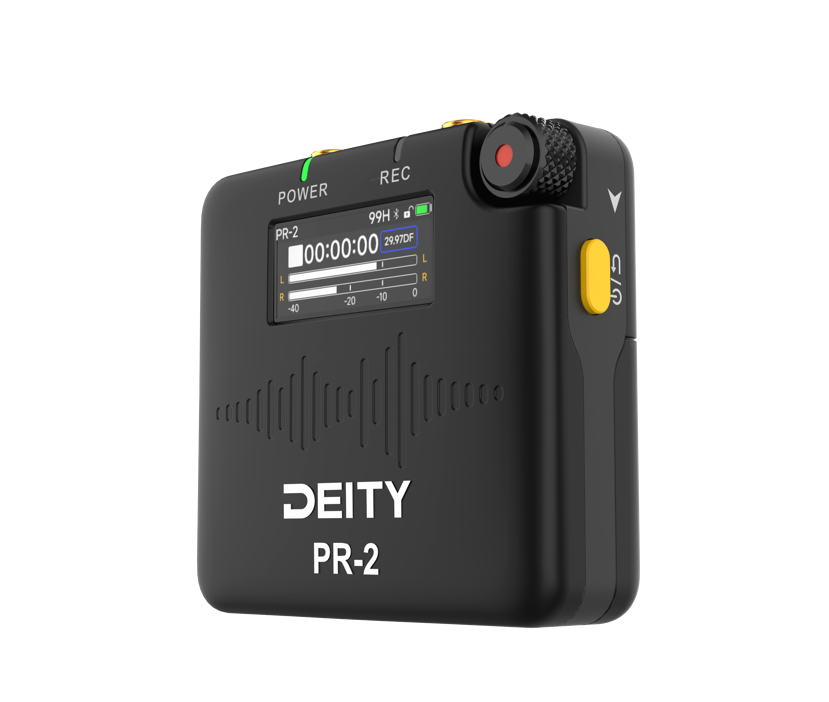
The Deity PR-2 is a matchbox-sized audio recorder that clips to a belt or slips into a pocket, with a lavalier mic on a cable to the collar. It records my voice close and clean, with little of the room. Bought October 2026.
It came out of the comparison in Voice Recorders, where it was the most capable of the 3 recorder + lavalier kits: stereo, timecode, Bluetooth and the longest battery life.
Overview
- What it is: a pocket WAV recorder with a locking 3.5 mm input, sold with the W.Lav Pro lavalier mic.
- Why it stands out: 32-bit float recording, so no clipped audio from a wrong gain. It also has a timecode generator, Bluetooth remote control and a USB mic mode, in a body 18 mm thick.
- Price: $239 list on the Deity site. Deity is the audio brand of Aputure, from Shenzhen.
- In the box: the PR-2, the W.Lav Pro lav mic, a belt clip holster, 2 Deity AA cells, a microSD card, a coiled USB-C cable and a USB-C to USB-A adapter.
Detailed specifications
| Spec | Detail |
|---|---|
| Size, weight | 58 × 55 × 18 mm, 40 g without batteries |
| Formats | WAV (BWF), 48 kHz. 32-bit float mono, or 24-bit mono or stereo |
| Input | 3.5 mm TRS, screw lock, mic (5 V plug-in power) or line, stereo |
| Output | Locking 3.5 mm TRS: headphones, mute or LTC timecode out |
| Gain | -12 to +36 dB in 12 steps, or auto gain |
| Processing | Low cut (off, 75 or 150 Hz), limiter in 24-bit mono only |
| Audio | 20 Hz to 20 kHz, 123 dB dynamic range in 32-bit float, EIN -130 dBu |
| Storage | microSD up to 128 GB. 16 GB holds 22 h of 32-bit float mono, 15 h of stereo |
| Power | 2 × AA (1.2 to 1.5 V) or USB-C. Up to 30 h on lithium AA |
| Bluetooth | 5.0 LE, Sidus Audio app on iOS, Android and macOS, range about 75 m |
| Timecode | Generator, LTC in and out, wireless sync from a Deity TC-1 |
| USB-C modes | Card reader, USB audio (mic), timecode, firmware update |
| Operating temp | -20 to 50 °C |
The remote control runs in the Sidus Audio app. Wireless timecode sync needs a Deity TC-1 box.
Background and context
Deity showed a PR-2 prototype at NAB 2023. NewsShooter reviewed the production model in July 2024. It goes up against 2 other 32-bit float pocket kits:
| Recorder | Strength | Weakness |
|---|---|---|
| Deity PR-2 | Stereo, timecode, app, 30 h on AA | Largest face, most expensive, plastic |
| Tascam DR-10L Pro | Narrowest, OLED, MP3 option | AAA cells, Bluetooth only via an add-on |
| Zoom F2 / F2-BT | Smallest, cheapest at €97 | No screen, WAV mono only |
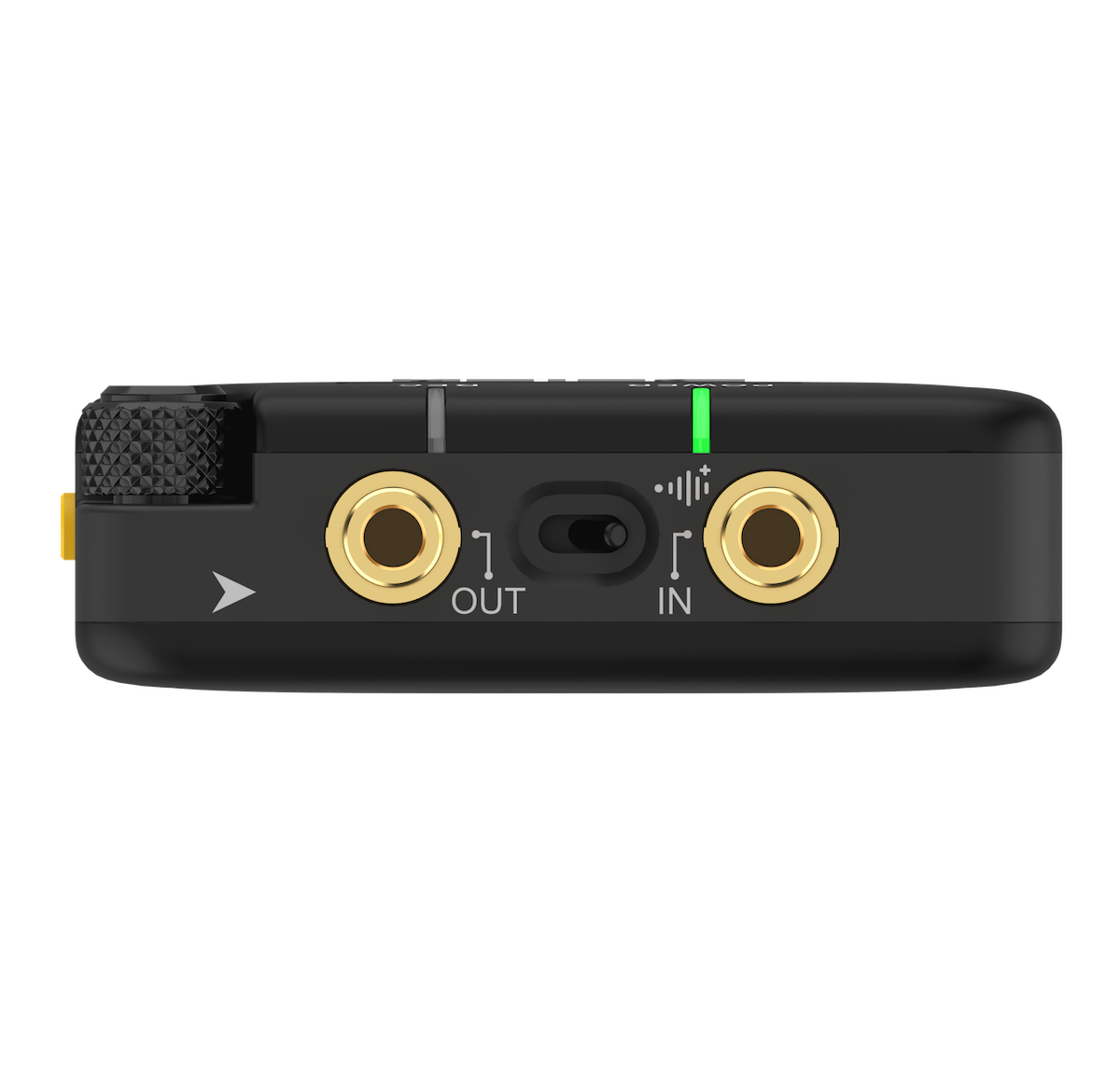
The mic pass-thru switch on the top is the unusual part. It passes the input to the output, so the PR-2 can sit between a lav mic and a wireless transmitter and record a backup copy. The transmitter keeps powering the mic even when the PR-2 is off.
Pros and cons
Pros:
- No gain to set. 32-bit float mono survives a shout or a whisper.
- Battery life. Close to 30 hours on 2 AA cells, and standard cells mean no built-in battery to die.
- A real screen. Every setting is on the device. The app is optional.
- Remote start and stop from the phone, and live monitoring over Bluetooth.
- USB mic mode. The Mac sees it as a microphone with no driver, so it doubles as a pocket audio interface.
- Triple-press lock on the power button, so a pocket can't stop a recording.
Cons:
- The belt clip doesn't lock to the recorder. It holds by friction on the rubber sides (NewsShooter).
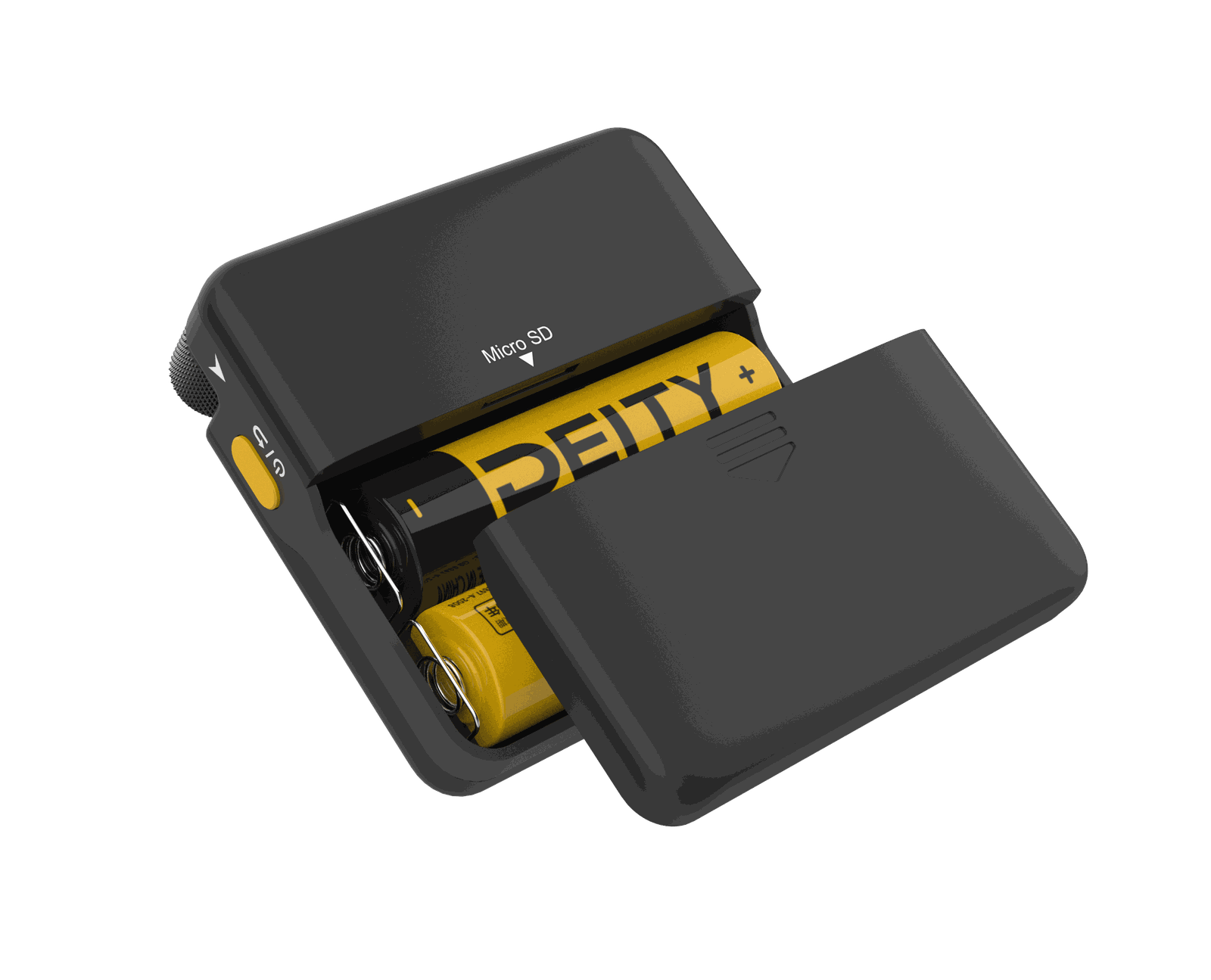
- The microSD card sits under the batteries. Swapping it means taking the cells out, and the slot is tight.
- 32-bit float is mono only. Stereo is 24-bit, with a gain to set.
- The limiter works in 24-bit mono only.
- Bluetooth monitoring has latency. Fine to check levels, not to listen live.
- Reader mode drops when you leave the menu, and USB audio carries the mic only, not playback.
- At least one Reddit user calls the headphone output noisy.
Who it's for
- Anyone who wants their own voice clean in a meeting, an interview or a walk-and-talk, without a mic in front of their face.
- Video work where the audio has to line up with a camera: timecode makes the sync automatic.
- A backup recorder behind a wireless lav system, with the pass-thru switch on the global version.
- Not for recording a whole table. A lav hears 1 person. For a room, use an all-in-one recorder.
User manual
From Deity's English manual, V1.2, rewritten as a reference. Menu names are as the screen shows them.
Controls
| Control | Action | Result |
|---|---|---|
| Wheel | Long press | Start recording. Long press again to stop |
| Short press | Open the menu. In a menu: confirm | |
| Turn | Move up and down a menu | |
| Turn up, home screen | Recording shortcut menu | |
| Turn down, home screen | Timecode shortcut menu | |
| Power button | Long press | Power on or off |
| Short press | Back, 1 menu level up | |
| 3 quick presses | Lock or unlock all controls | |
| Switch between the jacks | Left or right | Routes the output, see "Output switch" further down |
| IN jack (3.5 mm, lock) | Mic or line in, and timecode in | |
| OUT jack (3.5 mm, lock) | Headphones, and timecode out | |
| USB-C, side | Power, card reader, USB audio, timecode, firmware update |
| Light | Colour | Meaning |
|---|---|---|
| Recording LED | Red | Recording |
| Off | Not recording | |
| Battery LED | Green | 10% or more |
| Red | Under 10% | |
| Off | LEDs turned off in the menu |
The home screen
- Top line: the recorder name, the recording time left on the card (for example 99H), the Bluetooth icon, the lock icon and the battery gauge.
- Middle: a square when stopped, a red dot and red digits when recording, then the elapsed time and the timecode frame rate.
- Bottom: the level meter, from -40 to 0 dB. 1 bar in mono, 2 bars (L and R) in stereo.
Turn the wheel up for a summary of the recording settings: bit depth, track mode, input and output. Turn it down for the timecode summary: mode, group and frame rate.
Record
- Unlock the controls if the lock icon is closed: 3 quick presses on the power button.
- Long press the wheel. A progress bar fills, then the red LED lights and the digits turn red.
-
To stop, long press the wheel again and wait for the progress bar.
-
Power off while recording: a long press on the power button asks "Shut down while recording?". Confirm, and the PR-2 saves the file before it turns off.
- Auto-Lock locks the controls after 15 seconds by default. The recording continues. Unlock with 3 presses on the power button.
Menu reference
Short press the wheel to open the menu. Turn to move, short press to select, short press the power button to go back.
| Menu | Setting | Options and notes |
|---|---|---|
| GAIN | Input gain | 12 steps from -12 to +36 dBu |
| AUTO GAIN | Automatic gain | On or off. Sets the gain from the sound around you |
| TIMECODE | Mode | Free, Auto (default), Once, Rec. See "Timecode" further down |
| Group | A to H. Only units in the same group sync | |
| FPS | 23.98, 24, 25 (default), 29.97, 29.97DF, 30, 47.95, 48, 50, 59.94, 59.94DF, 60 | |
| PLAYBACK | Clips | Pick a date folder, then a file. See "Play back" further down |
| INPUT | Source | Mic (5 V plug-in power) or Line |
| OUTPUT | Mode | Mute, Monitor (headphones), LTC-3V (timecode out) |
| MONITOR | Headphone volume | 1 to 11, default 9 |
| COLOR | Colour tag | Red, orange, yellow or green frame on screen, to tell units apart |
| BT | Bluetooth | On (default) or off. Reset clears pairings. Shows the MAC address |
| MODE | Track | Mono or Stereo |
| Bit Depth | 24-bit or 32-bit float. 48 kHz always | |
| Rec mode | Manual (default), Always (records at power-on), Sync Rec (starts with the app) | |
| Low Cut | Off, 75 Hz or 150 Hz | |
| Limiter | On or off. Works in 24-bit mono only | |
| SD CARD | Format | Shows used and total space. Format erases the card |
| SYSTEM | LED | Status lights on or off |
| DID | Recorder name, edited letter by letter with the wheel | |
| Battery | Deity AA, Alkaline, Lithium (1.5 V) or NiMH (1.2 V) | |
| Auto-Lock | Never, 15 s (default) or 1 min | |
| USB | Reader, Audio or TimeCode. See "USB-C modes" further down | |
| Firmware | Shows the app and hardware versions | |
| Upgrade | From a USB disk or the microSD card | |
| System Reset | Back to factory settings | |
| Date / Time | Sets the clock used for folders and files | |
| Language | English or Simplified Chinese |
My recommended settings
For voice on the W.Lav Pro, with the mic hidden under clothing in a lav concealer. These settings don't change from one recording to the next.
| Setting | Value | Why |
|---|---|---|
| INPUT | Mic | Powers the lav with 5 V plug-in power |
| MODE → Track | Mono | 1 lav, 1 voice |
| MODE → Bit Depth | 32-bit float | Can't clip, so the gain doesn't matter |
| MODE → Low Cut | 75 Hz | Go to 150 Hz only if a test still has strong low rumble |
| GAIN | Leave it, or AUTO GAIN on | With 32-bit float, an exact gain isn't critical |
| OUTPUT | Monitor | Headphones on the OUT jack, for a quick rustle check |
Before the first recording:
- SD CARD → Format the card in the PR-2.
- SYSTEM → Date / Time.
- SYSTEM → Battery, to match the cells.
For each recording:
- Put on headphones and rub the clothing near the concealer. Listen for rustle, and move the mic if you hear it.
- Long press the wheel to start recording.
- Lock the controls: 3 quick presses on the power button.
- After the recording, normalise the file in post. 32-bit float files sound quiet until you do.
Recording settings for voice
| Use | Track | Bit depth | Gain | Low cut | Limiter |
|---|---|---|---|---|---|
| Voice on a lav, default | Mono | 32-bit float | Leave it | 75 Hz | n/a |
| Stereo, 2 mics or a mixer | Stereo | 24-bit | Set by ear | 75 Hz | n/a |
| Small files, safe level | Mono | 24-bit | Auto gain | 75 Hz | On |
- 32-bit float can't clip, so a wrong gain costs nothing. Normalise the file afterwards.
- 150 Hz low cut thins a voice. Keep it for wind or traffic.
- Recording time on a 16 GB card: 22 h in 32-bit float mono, 29 h in 24-bit mono, 15 h in 24-bit stereo. A 128 GB card holds about 8 times that. The battery runs out first.
Timecode
| Mode | Behaviour |
|---|---|
| Free | Runs from the recorder's own clock. Ignores external timecode, no wireless sync |
| Auto | Default. Picks up wired or wireless timecode and syncs to it |
| Once | Jam sync: takes the timecode from the source once, within a few seconds, then runs freely |
| Rec | Runs only while recording or playing. No sync |
- Wired in: feed LTC into the IN jack.
- Wired out: set OUTPUT → LTC-3V. The OUT jack, or USB-C in TimeCode mode, then sends timecode to a camera or a slate.
- Wireless: a Deity TC-1 or the Sidus Audio app sends timecode to every unit in the same group.
Output switch
The small switch between the 2 jacks behaves differently by region:
| Version | Left | Right |
|---|---|---|
| Global | Records. Output carries the processed monitor signal | Records. Raw input passes to the output, for a transmitter. No headphone signal from a mic |
| US | Records. No output | Records. Output muted |
The right position on the global version is the pass-thru: plug the lav into the PR-2 and the PR-2 output into a wireless transmitter. The PR-2 records a backup, and the transmitter's plug-in power still reaches the mic, even with the PR-2 off.
Play back
- PLAYBACK, then turn the wheel to a date folder and short press.
- Turn to a file and short press to play. Short press again to pause.
- While paused, turn the wheel to the previous, play, next or stop button.
- While playing, turn the wheel to fast forward or rewind.
Plug headphones into the OUT jack, with OUTPUT → Monitor. There is no built-in speaker.
USB-C modes
Connect the USB-C cable, then SYSTEM → USB:
| Mode | What the computer sees |
|---|---|
| Reader | The microSD card as a drive. Copy the WAV files off |
| Audio | A USB microphone, no driver, on Mac and PC |
| TimeCode | Timecode output over USB-C |
- Stay on the Reader screen until the copy ends. Leaving it disconnects the drive.
- Audio mode carries the mic input only. It doesn't play recorded files to the computer.
- USB-C also powers the PR-2, with or without batteries.
Bluetooth and the Sidus Audio app
- Install Sidus Audio (iOS, Android, macOS) and keep BT on.
- The app changes every setting, starts and stops recording, and monitors the audio, up to about 75 m away.
- 1 phone controls up to 48 Deity devices with Bitconnectify 2.0.
- Bluetooth monitoring lags. Use it to check levels, not to listen live.
Batteries and storage
- Cells: 2 × AA, any type from 1.2 to 1.5 V. Set SYSTEM → Battery to match, or the gauge is wrong.
- Battery life: up to 30 h with lithium AA, 29 h claimed with Deity's 3,000 mAh cells.
- microSD: up to 128 GB, class 10. The slot sits above the batteries, so remove the cells to swap it.
- Format the card in the PR-2 before first use. The manual says this makes recording more stable.
Update the firmware
- Download the latest firmware from the PR-2 product page.
- Copy the file to the root of a USB disk or the microSD card, formatted exFAT or FAT32.
- For a USB disk, connect it to the USB-C port with the USB-C to USB-A adapter from the box.
- SYSTEM → Upgrade, then pick USB DISK or TF, and follow the screen.
- Check the new version in SYSTEM → Firmware.
An exclamation mark means the PR-2 can't find or read the file. Check the card or disk, and that the file sits at the root.
First setup
- SYSTEM → Date / Time. Folders and files carry this date.
- SYSTEM → Battery. Match the cell type.
- SYSTEM → DID. Name the recorder.
- SD CARD → Format.
- MODE → Track: Mono, Bit Depth: 32-bit float, Low Cut: 75 Hz.
- MODE → Rec mode. Keep Manual, or pick Always to record from power-on.
- OUTPUT → Monitor and MONITOR → 9, to check the lav on headphones before the first take.
Buying considerations
- Price: $239 list. US dealers sell it for less: Trew Audio listed it at $194 in October 2026.
- Where: the Deity shop, or a European audio dealer for EU warranty and returns.
- Check the version. On the US unit the output switch only mutes, so it has no pass-thru position. See "Output switch".
- Alternatives: the Tascam DR-10L Pro for a narrower body and MP3, the Zoom F2 for the lowest price. Both are in Voice Recorders.
- Accessories: a spare microSD card (up to 128 GB, class 10) and lithium AA cells for the full 30 hours.
My take
The PR-2 is the kit with no compromise on features: a screen, an app, stereo, timecode, USB mic mode and the longest battery life. The price is a bigger body and a belt clip that needs care.
For voice capture, set it once to 32-bit float mono with a 75 Hz low cut and forget the gain. The screen confirms it records, which was the point that made the Tascam my earlier pick. The timecode and USB mic mode are a bonus for camera work and calls.
What I'll watch: the clip on a moving belt, and the microSD swap under the batteries.
Further reading
- NewsShooter review of the PR-2, July 2024
- Deity PR-2 User Guide, Deity's own video walkthrough
- Sidus Audio on the App Store
- Voice Recorders, the comparison that led to the PR-2