
The ATEN CS1824 is a 4-port USB 3.0 4K HDMI KVMP switch. ATEN has made KVMs for the server-room market for decades, and this is the desktop end of that line: four computers, one monitor, one keyboard, one trackball, plus a USB 3.1 hub and an audio mixer. Same job as the TESmart, built by a company whose other products live in racks.

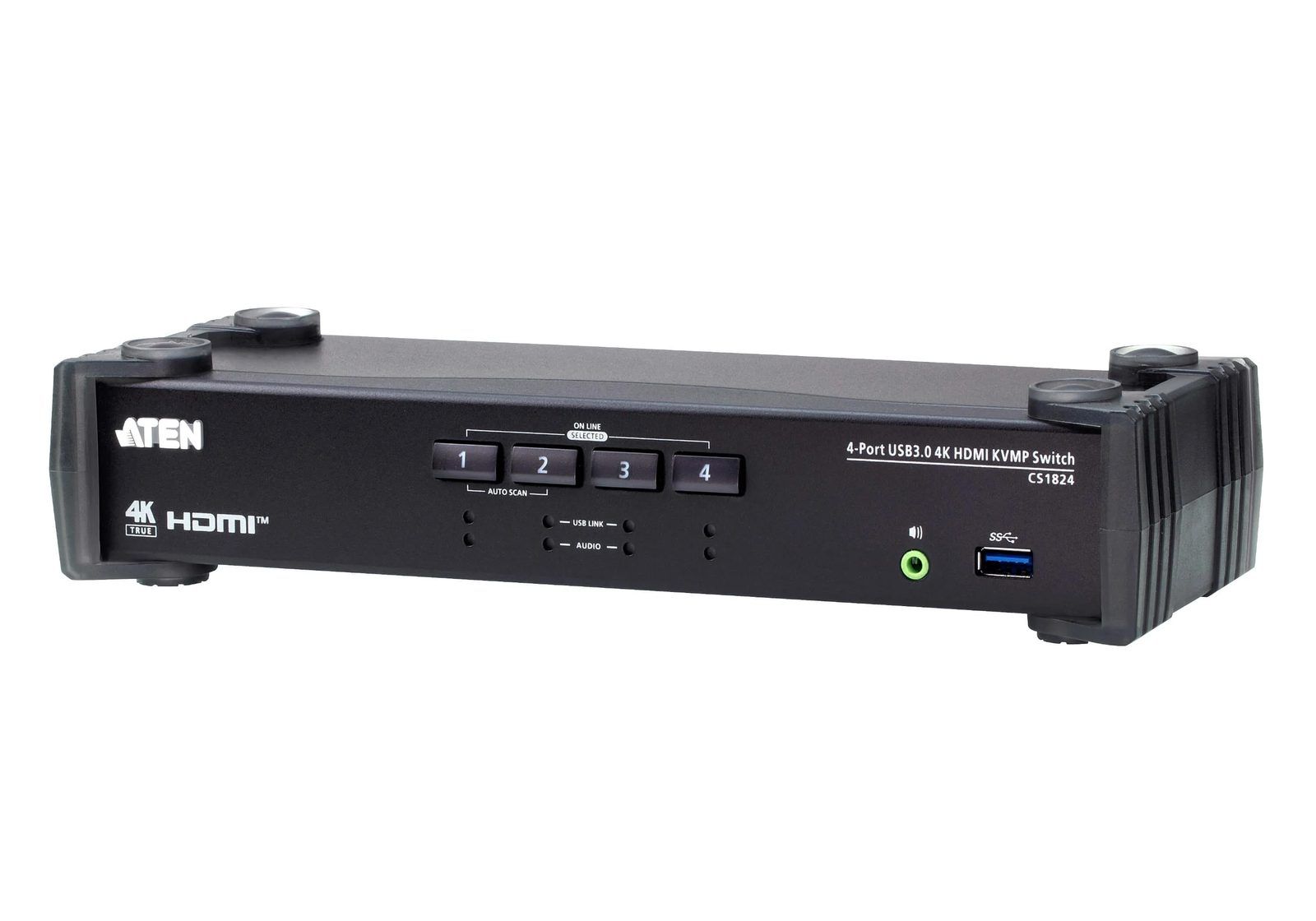
Specifications
| Computers | 4 |
| Monitors | 1 |
| Video | HDMI, 4096 x 2160 @ 60 Hz (DCI 4K) and 3840 x 2160 @ 60 Hz |
| EDID | Video DynaSync, ATEN's display-data emulation |
| USB hub | 2-port USB 3.1 Gen 1, 5 Gbps, one front and one rear |
| Console HID | Dedicated USB 2.0 keyboard and mouse ports, separate from the hub |
| Audio | 3.5 mm in per computer, console out, plus Audio Mixer Mode |
| Switching | Pushbuttons, hotkeys, mouse, RS-232 commands |
| Serial | RJ11 serial port for RS-232 control |
| Extras | Auto Scan across ports |
| Power | DC 5 V, external adapter |
| Price | ATEN quotes on request; German retail roughly 300 to 390 EUR |
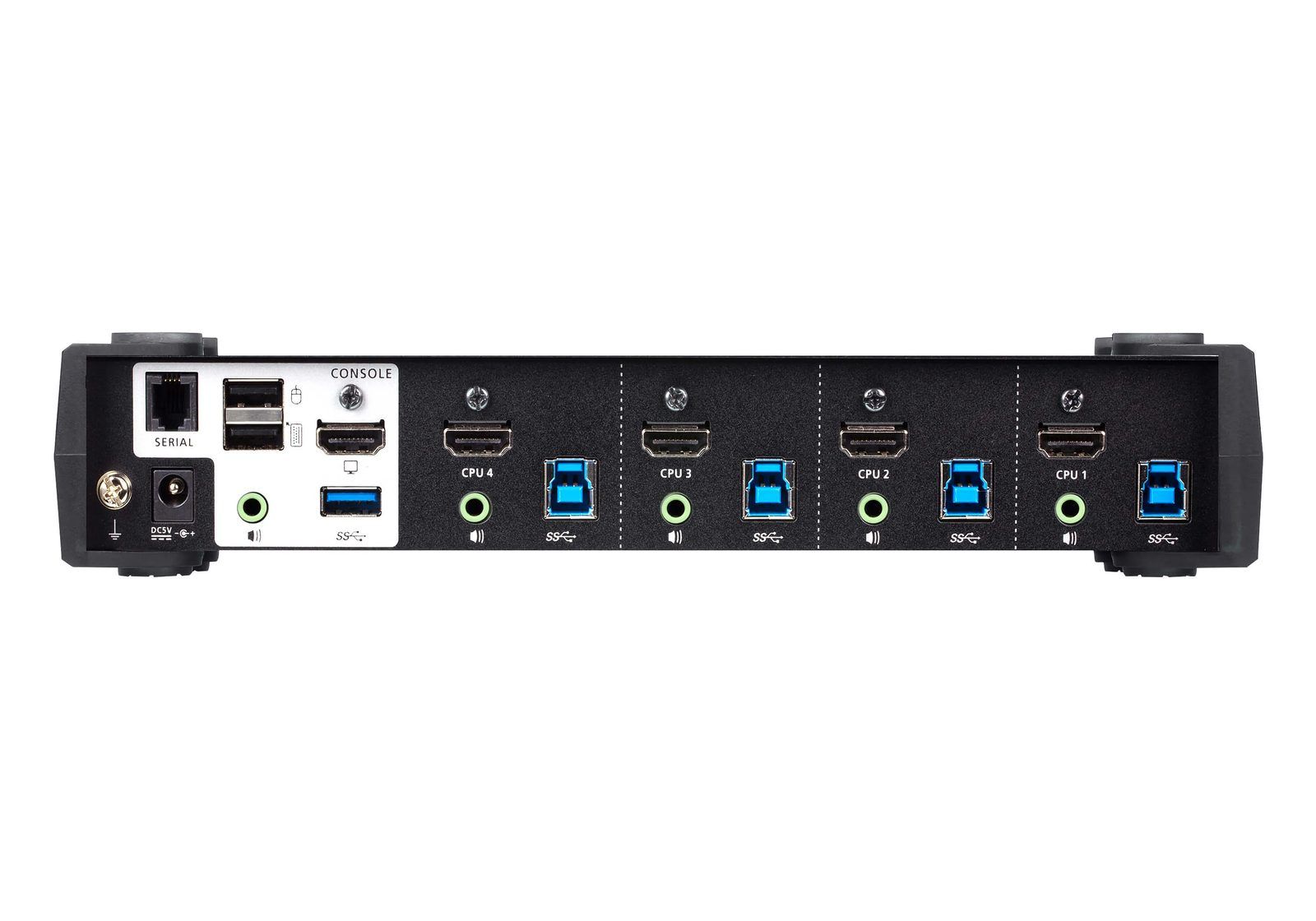
What the rear panel tells you
Three details on that photo are the reason this costs three times the cheap option.
Keyboard and mouse get their own USB 2.0 ports, marked with keyboard and mouse icons, separate from the USB 3.0 hub. On budget switches the keyboard shares the hub, so every switch re-enumerates the whole USB tree and you wait a second or two with a dead keyboard. Splitting the human-interface devices onto dedicated ports is what makes switching feel instant.
Every computer has its own 3.5 mm audio input. That is the mechanism behind Audio Mixer Mode, which combines two sources into one output. You can hear a Teams call on the work laptop and system audio from the Studio at the same time, without switching.
The serial port is RJ11, not DB9. RS-232 means the switch is scriptable, which is genuinely interesting given the ATEM already gets driven from Python over UDP. It also means an RJ11-to-serial cable and a USB-to-serial adapter on a Mac before any of that works.
Against the TESmart
Both do the core job. The question is what the extra 200 to 300 EUR buys.
| ATEN CS1824 | TESmart E23 | TESmart M24 | |
|---|---|---|---|
| Video | 4K@60, DCI and UHD | 4K@60 | 8K@60, 4K@144 |
| USB hub | USB 3.1 Gen 1, 2 ports | USB 2.0 | USB 3.2 |
| Dedicated keyboard/mouse ports | Yes | No, shared hub | No, shared hub |
| EDID emulation | Video DynaSync | Per-input emulator | Per-input emulator |
| Audio | Per-PC in, mixer mode | 3.5 mm | 3.5 mm |
| Scriptable | RS-232 | No | No |
| IR remote | No | Yes | Yes |
| Price | ~300 to 390 EUR | 92,52 EUR | 428,62 EUR |
| Stock | Widely available | In stock | Sold out |
Reading that honestly: the 8K on the M24 is dead weight on a 4K@60 Dell fed by an M1 Ultra, so the real contest is ATEN at around 340 EUR against the TESmart E23 at 92,52 EUR.
The E23 wins on price by a wide margin and matches the specification that matters, 4K@60 with per-input EDID. The ATEN wins on the things a specification sheet hides: dedicated HID ports so switching does not stall, a faster hub, per-computer audio with mixing, RS-232 for automation, and a company that has been supporting this product category since before USB.
The Bluetooth problem applies here too
Same blocker as every other KVM, and worth repeating because it decides whether any of this works.
A KVM switches USB. It cannot switch Bluetooth. The Kinesis Advantage360 Pro and the MX Ergo 2 are both Bluetooth. Buy the ATEN, plug everything in, and the monitor, audio and USB devices follow the button while the keyboard and trackball keep talking to whichever Mac they last paired with.
The fix is the same: run the Kinesis over USB-C into the dedicated keyboard port, and put a Logi Bolt receiver in the mouse port. Both then switch with everything else, instantly, because those ports do not share the hub.
That dedicated-port design is worth more here than anywhere else, because a wired ergonomic keyboard on a shared USB 3 hub is exactly the setup where a slow re-enumeration is most annoying.
Wiring the four machines
| Port | Machine | Cable |
|---|---|---|
| CPU 1 | Mac Studio | HDMI + USB-A to USB-B |
| CPU 2 | Mac Mini | HDMI + USB-A to USB-B |
| CPU 3 | MacBook Pro, personal | HDMI + USB-C to USB-B |
| CPU 4 | MacBook Pro, work | HDMI + USB-C to USB-B |
Console HDMI to the Dell, Kinesis into the keyboard port, Bolt receiver into the mouse port, headset into the console audio jack. The Dell then stops switching inputs entirely, which retires the BetterDisplay arrangement and its one-way limitation.
Optional per machine: a 3.5 mm cable from each Mac to its CPU audio input, if the mixer mode is something you actually want.
Caveats
- No cables in the box. ATEN sells KVM cable sets separately, unlike TESmart which bundles four. Budget for that; it is not a small line item at ATEN prices.
- No IR remote. Pushbuttons, hotkeys, mouse and RS-232 only.
- Four ports for four machines, zero spare.
- The price is opaque. ATEN lists MSRP as quote on request, so you are comparing retailer listings rather than a list price.
- RS-232 needs two adapters on a Mac before it does anything.
- The Studio moves from USB-C to HDMI on the Dell. Still 4K@60, but it loses the single-cable convenience it has today.
- ATEN's own site returns 403 to command-line tools. Nothing wrong with the pages, they render fine in a browser, but they resist scripted checking.
Verdict
If the KVM is going to be the thing you touch every hour of every working day, the ATEN is the one that will not annoy you: instant switching on dedicated HID ports, a hub fast enough for real peripherals, and audio done properly.
If it is an experiment to find out whether four machines on one desk is even the right shape, spend 92,52 EUR on the TESmart E23 first and find out. The two share the specification that matters, and the ATEN's advantages are all in the feel rather than the feature list. Feel is worth paying for, but only once you know you want the arrangement at all.
Either way, wire the Kinesis before buying anything. That step decides whether a KVM does its job.
Further reading
- ATEN CS1824 product page
- ATEN CS1824, German product page
- Video DynaSync explained by ATEN
- SECOMP, German stockist
- Alternate, another stockist