
25 Oct 2026
Tubee is the video downloader I now use on my Mac. I press ⌃⌥⌘D in my browser, and the video in the front tab downloads in the best quality, as an MP4 that QuickTime plays. A small progress card shows in the corner of the screen I work on, and the browser keeps the focus. It replaces Pulltube, which I used from my Setapp licence since 2022.
I didn't write the code. I described what I wanted in 1 line, answered 52 questions, approved a spec, and my AI agent (Claude Code) built it, tested it and installed it in 1 day, on 24th October 2026. The why is in The era of personal software is here. The name fits the -ee family of my tools, next to Recordee: my own screen and camera recorder, after 10 years of OBS and Lastee: my own recent-files app for macOS.
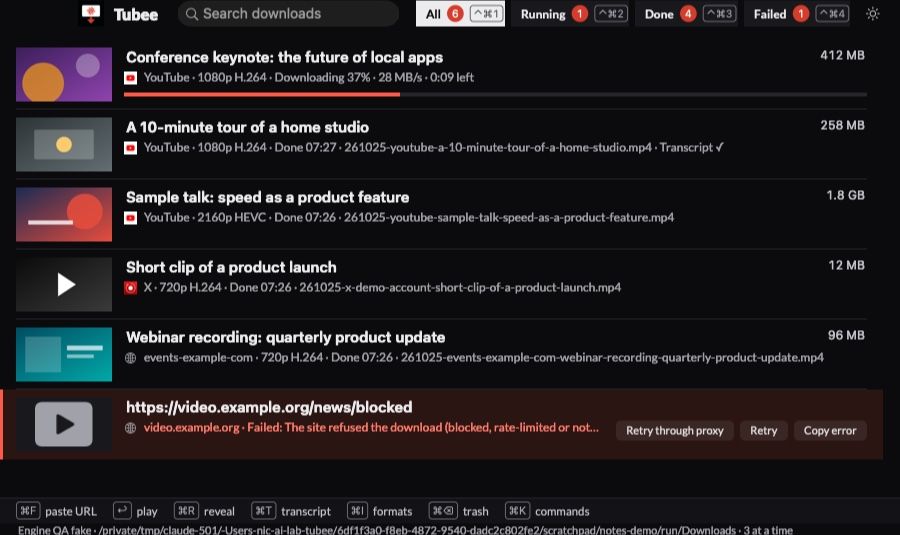
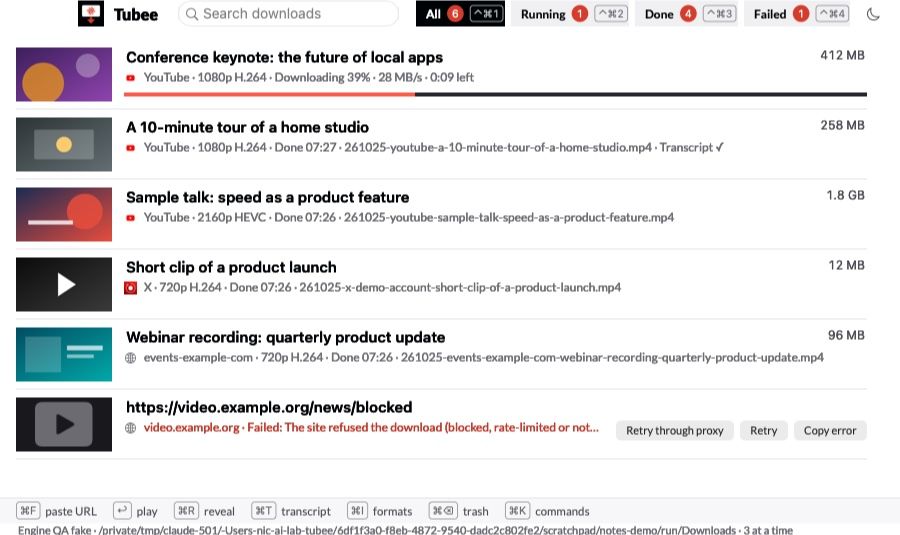
Every screenshot in this note uses dummy data: invented titles, generated thumbnails and fake example.com sites, rendered by the app's own test harness. None of it is a real download.
Why I replaced Pulltube
Pulltube works. It's a nice app on top of yt-dlp, the open-source engine that reads YouTube, X and about 1,800 other sites. But 4 things bothered me:
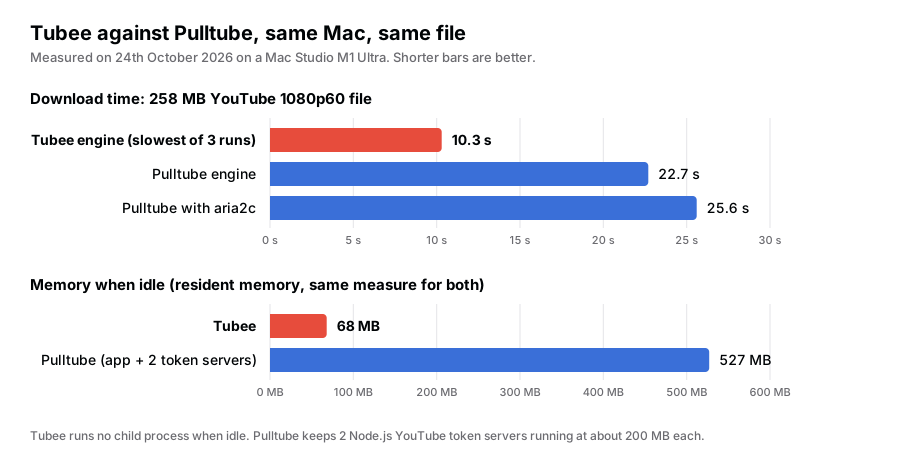
- It's slow. On the same 258 MB YouTube file, Pulltube's engine took 22.7 s. A fresh yt-dlp took 10.3 s at worst.
- It's heavy. Pulltube uses 527 MB while open, because it keeps 2 Node.js "token servers" for YouTube running all the time, at about 200 MB each.
- It has no hotkey. I had to copy the link, switch to Pulltube, paste, pick a format and click.
- It doesn't see every page. A video inside a web page that yt-dlp doesn't know (a webinar platform, a page behind a login) was out of reach.
I checked what I actually use first. About 220 downloads since 2022, almost all "best quality, MP4", from YouTube and X. No trim, no channel downloads, no watch-later list. So version 1 has only that, done fast.
What it does
| Feature | How it works |
|---|---|
| 1 hotkey | ⌃⌥⌘D takes the URL of the front browser tab (Chrome, Edge, Brave, Safari), else the link on the clipboard |
| Format picker | ⇧⌃⌥⌘D opens the formats first: resolution, fps, codec, size, audio only |
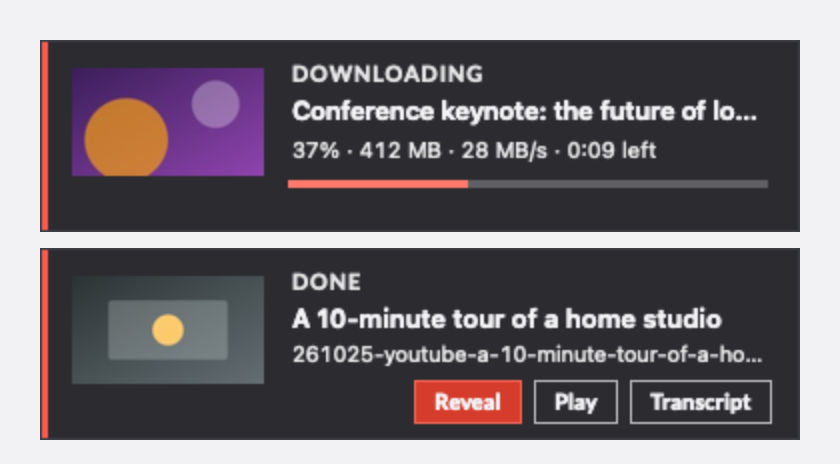
| Progress cards | A card in the top-right corner of the active screen, never on the screen I share in calls |
| Dock progress | A progress bar and a count of running downloads on the Dock icon |
| Best quality, MP4 | Up to 4K. VP9 and AV1 convert to HEVC in hardware, so QuickTime and Finder previews play every file |
| Clean file names | YYMMDD-site-title.mp4, for example 261025-youtube-a-10-minute-tour-of-a-home-studio.mp4 |
| Chrome extension | Sees the video streams any page loads, including pages behind a login, and sends 1 to Tubee |
| Failures with a fix | Each error says why, with the next step as a button: update the engine, retry with cookies, retry via proxy |
| Transcript | On request, a Markdown transcript beside the video, cleaned and summarised by Claude |
| History | Search, filters, reveal in Finder, play, move to the Trash with undo |
| Launcher and CLI | vd, vda, vdt commands in my launcher, a tubee command line tool and a tubee:// URL scheme |
The cards
The card is the part I see most. It appears in under 1 ms after the key, before Tubee even asks the browser for the URL. Then it fills in the thumbnail, the title, the progress, the speed and the time left. When the download is done, the card offers Reveal, Play and Transcript for 10 seconds, then fades. It never takes the focus, so I keep reading the page.
Any page with a video
The Chrome extension is small on purpose. It only watches what the tab loads, and counts the video streams it sees (.m3u8, .mpd, .mp4 and similar). It makes no network calls of its own and changes nothing. A click on its button sends the page and the stream to Tubee, which downloads it with the page as referer. DRM-protected video (Netflix and similar) stays out of reach, and Tubee says so.
When a download fails
Most downloaders show a red line of Python output. Tubee sorts each failure into 1 of 10 classes and offers the fix:
- The site changed: Tubee checks for a new yt-dlp, updates itself and retries once, without asking.
- The page needs a login: it retries once with my Chrome cookies. Never by itself on YouTube: a download through a signed-in Google account can get the account flagged, so that one is a button I click.
- The site blocked me: a Retry through proxy button.
- The disk is full, the network failed, the download stalled: plain words and a Retry.
Transcripts
⌘T on a row, or vdt in my launcher, writes a Markdown file next to the video. Tubee takes the human subtitles if the video has them, else YouTube's automatic captions, else it runs Whisper on the audio. Claude then fixes the punctuation, keeps [mm:ss] marks every minute, and adds a 5-line summary and chapters. It runs through my Claude subscription with claude -p, never the paid API. Tubee checks every answer: a cleaned part must keep 95% of the words and every timestamp, or the raw text stays.
Tubee against Pulltube
| Need | Pulltube | Tubee |
|---|---|---|
| Start a download | Copy, switch app, paste, pick, click | 1 key in the browser |
| See progress | In Pulltube's window | A card on my screen, plus the Dock icon |
| 258 MB YouTube file | 22.7 s | 8.5 to 10.3 s |
| Memory when idle | 527 MB | 68 MB (13 MB in Activity Monitor) |
| Any page with a video | Only the sites yt-dlp reads | Also any stream a page loads, via the extension |
| Engine updates | With the app | Daily check, plus an update when a site breaks |
| Transcript | No | Markdown, cleaned and summarised by Claude |
| Cost | Setapp subscription | Mine |
What I gave up
- Trim, channel downloads and the watch-later list. I never used them in 4 years.
- The YouTube token server. yt-dlp works without one today. If YouTube starts to refuse downloads, the plan is to start it only for the length of a YouTube download.
- Live streams. Later, maybe.
How it works
Stack
- Swift and AppKit, no third-party code in the app. A Dock app, with no menu bar icon. It starts at login with no window.
- yt-dlp as a child process, 1 per download, from Tubee's own copy installed with
pip --target. The official macOS build of yt-dlp unpacks itself on every run and macOS scans the new files, so each download started 10 s late. Thepipcopy starts in 0.26 s. - ffmpeg with Apple's VideoToolbox for the conversions: 4K60 VP9 or AV1 to HEVC at about 3 times real time.
- Apple Events read the front tab's URL: 1 Automation prompt per browser, no Accessibility permission.
- SQLite holds the jobs and the history, so a crash or a reboot resumes the unfinished downloads.
- A watchdog checks the main thread every 100 ms. Every disk, network and process call runs off it.
Budgets
| Metric | Budget | Measured |
|---|---|---|
| Hotkey to card on screen | < 100 ms | under 1 ms |
| YouTube, key to first byte | < 3 s | 2.8 s median |
| 258 MB YouTube 1080p file | ≤ 12 s | 8.5 to 10.3 s |
| 10 minutes of 4K to HEVC | < 3.5 min | about 3 min |
| Memory, idle | < 50 MB | 13 MB |
| Memory, window with 500 rows | < 100 MB | 20 MB |
| Cold launch | < 400 ms | about 300 ms |
The first-byte time is mostly YouTube's: the current yt-dlp spends about 0.7 s solving a JavaScript challenge before YouTube sends the video.
QA
21 unit tests and 103 end-to-end checks. The QA script runs the real app against a fake yt-dlp, a fake Claude and a local media server, in a scratch folder, so it never touches my downloads, my hotkeys or the focus. 1 extra run downloads a real YouTube video. A 2nd agent then reviewed the code and found 15 bugs before I used the app. The worst: every 4K YouTube download would have been deleted right after its conversion to HEVC. All 15 are fixed, and 3 have their own test now.
What I learned
- Measure the engine, not only the app. The biggest speed gain didn't come from Swift. It came from a fresh yt-dlp installed the right way, and from not running a token server between downloads.
- The official build isn't always the fast one. The single-file macOS build of yt-dlp is the easy choice, and the slowest: 10 s to start, every time.
- Errors need a next step. "HTTP Error 403" tells me nothing. "The site refused the download" with a proxy button saves the next 5 minutes.
Further reading
The app Tubee replaces:

The engine inside Tubee:

The tool that built it:

- Pulltube: my old note on Pulltube.
- Recordee: my own screen and camera recorder, after 10 years of OBS: my screen recorder, which shares the video folder with Tubee.
- The era of personal software is here: why I now build the apps I use.