

Tablee is the app I now use to look at my data. It opens SQLite databases and CSV files in 1 window, with tabs and 1 grid for every source. It replaces TablePlus, which I ran through Setapp: macOS app subsciption, and Easy CSV Editor, which I bought in 2023.
I built it with Claude Code. Version 1.0 shipped on 26th October 2026. The app is 2.6 MB. The name follows the -ee family of my tools.
Why I replaced TablePlus
Agents now do most of the writes to my databases. My own job changed: I check what changed, look at a file before an upload, fix a cell, and load a file into a table. TablePlus is built for a different job, and it showed:
- Speed. TablePlus took about 6 s to show my biggest table: 624,000 rows, 64 columns. I open it many times a day.
- 2 apps for 1 job. Databases in TablePlus, CSV files in Easy CSV Editor, and a different grid, filter and set of keys in each.
- No safety net on writes. With agents writing to the same files, I wanted a snapshot, a conflict check, a journal and an undo for every commit.
- Features I never used. Postgres, MySQL, SSH tunnels, AI chat, metrics. I use SQLite. Only SQLite.
The design goals, in order: speed, then data safety, then only the features I used in 2026.
Tablee vs TablePlus and Easy CSV Editor
| Tablee | TablePlus | Easy CSV Editor |
|---|---|---|
| My own app, MIT licence, not public yet | Paid, through Setapp for me | Paid, Mac App Store |
| SQLite, CSV, TSV, read-only XLSX | Postgres, MySQL, SQLite and many more | CSV files |
| Swift and AppKit, 2.6 MB | 439 MB | 137 MB |
| Snapshot, journal and undo for every commit | - | - |
| Databases open read-only, ⌘E to edit | - | - |
| CSV saved with unchanged rows byte for byte | - | - |
| Import wizard into a new or existing table | Import from CSV | - |
CLI with JSON and a tablee:// URL scheme |
URL scheme, no arbitrary query | - |
| No Postgres, MySQL, SSH, AI chat | All of those | - |
What Tablee does
1 window, 1 grid
A sidebar lists my pinned databases with their colour dot, then their tables and views with row counts, then recent files. Each table, query or file opens in its own tab. The grid draws only the cells on screen, so the size of the table doesn't matter: there is no row limit.
- Filter bar (
⌘L): conditions joined with AND, plus a rawWHEREfield. "Contains" ignores case and accents, somullerfindsMüller. - Search all columns (
⇧⌘F): every text column, first matches at once. - Choose values (
⌥⌘V): the distinct values of a column with counts, most frequent first. Ticks build a filter. - Row detail panel: the selected row as a vertical list, JSON pretty printed. Space toggles it.
- Recent (
⇧⌘R): rows whoseupdatedstamp is within 24 hours. - Agent writes: on a database with a
nicai_writestable, 1 sidebar entry opens the log of what my agents wrote, and↩jumps to the rows they touched.
Read-only until I say so
This is the part I care most about. A database opens read-only. ⌘E turns on edit mode, the mode pill turns red, and a red bar runs across the top of the grid. Edits stay staged, each with a red mark, until ⌘S.
A commit then does 5 things:
- Snapshot the database with
clonefile, on the first write of the session. A clone costs no disk space at first. The last 10 per database stay. - Check for conflicts. If an agent changed a row since I loaded it, the commit stops and names the row.
- Write in 1 transaction, with SQLite's session extension recording the change.
- Log the commit to Tablee's own journal. Tablee never writes its records into my databases.
- Keep an undo.
⌘Zwith nothing staged offers to undo the last commit. Commit History can undo any of them.
The SQL editor refuses DELETE and DROP on the databases I flag as no-delete, through SQLite's authorizer, so a trigger can't slip one through. It refuses REPLACE there too, because REPLACE deletes the old row without asking. A database under Dropbox or a network volume needs a 2nd confirmation for edit mode: SQLite locking isn't safe on sync folders.
CSV files keep their bytes
Tablee reads the first 64 KB of a CSV to detect the encoding, the delimiter, the quotes and the line endings. On save it writes the file back in the same format. A row I didn't change keeps its exact original bytes. This matters when a file goes to Salesforce next: an upload fails on a changed date format or a lost BOM, not on the cell I fixed.
⌥⌘N turns the clipboard into a new file: TSV from Excel, CSV or a Markdown table.
Import and copy
The import wizard (⇧⌘I) loads a CSV, TSV or XLSX sheet into a database. It proposes snake_case column names and a type per column, maps headers to an existing table, and runs a dry run that counts what will land. With a unique index, a rerun adds nothing twice. Undo removes only the rows that import added.
5 copy formats for a selection:
| Key | Copies |
|---|---|
| ⌘D | TSV with headers, pastes into Excel |
| ⌃⌘C | CSV with headers |
| ⌃⌘M | Markdown table, column-aligned |
| ⌃⌘I | SQL list: ('a@example.com', 'b@example.com') |
| ⌃⌘J | JSON array of row objects |
Speed
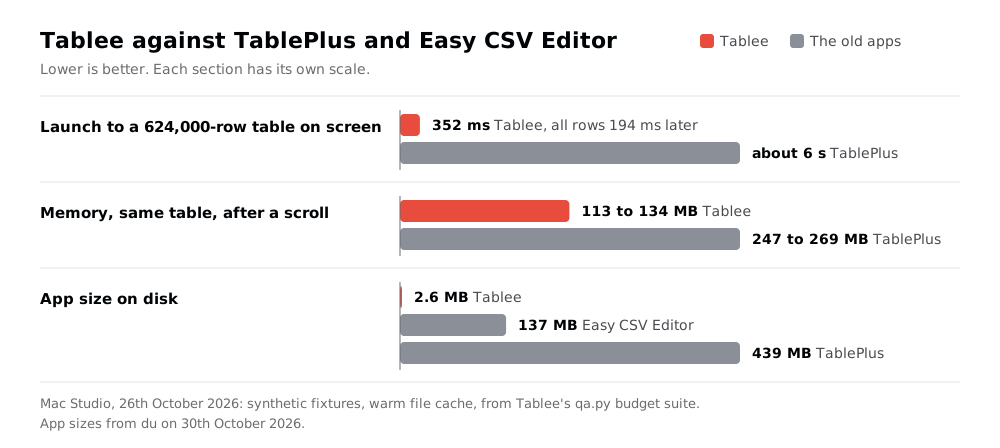
qa.py --budgets measures every budget on the Mac Studio, on generated test tables: 624,000 rows by 64 columns, and 3,500,000 rows in a 735 MB file. Measured on 26th October 2026:
| Step | Budget | Measured |
|---|---|---|
| Launch to the 624,000-row table on screen | < 500 ms | 352 ms |
| First page of a 3,500,000-row table | < 300 ms | 25 ms |
| Every row id of that table | < 1.5 s | 264 ms |
| Scroll 64 columns, per frame | < 16 ms | p95 4.3 ms, max 12.3 ms |
| Filter on an indexed column | < 20 ms | 0.4 ms |
| "Contains" on an unindexed column | < 150 ms | 134 ms |
| Search all 64 columns | < 300 ms to 1st rows | 51 ms, done in 991 ms |
| Open a 30 MB CSV | < 1.5 s | 763 ms |
| Commit 1 cell, with the snapshot | < 300 ms | 10 ms |
| Memory, after the scroll test | < 150 MB | 113 to 134 MB |
| CPU when idle | ~0% | 0.1% |
"Contains" is the 1 slow step, and it's slow because SQLite is: SQLite's own scan of the same column took 131 ms. Tablee's accent-insensitive match costs 3 ms on top.
Rules that keep it fast
- The main thread never runs a query or touches a file. Each database has its own queues for paging, queries, counts and writes.
- No read transaction stays open between 2 page fetches, so Tablee never blocks the WAL checkpoint my agents need.
- A new keystroke interrupts the running query on that view's connection only.
- The grid draws only the visible cells, from text lines cached per page. A page that isn't in yet draws empty cells.
- A SQL write transaction left open rolls back after 2 minutes, so I can't block the agents by walking away.
How it's built
Stack
- Swift 6.3 and AppKit. A custom canvas grid over an
NSScrollView, no view per cell. About 12,600 lines of Swift. - The system SQLite (3.51), with a small C module for the session functions. No vendored SQLite.
- SQLite under every source. A CSV, TSV or XLSX sheet loads into a temporary SQLite file, so 1 grid, 1 filter engine and SQL work on all of them.
- A
rowidarray per view. Rows come byrowidfor the visible window, 200 per page, so any of 3,500,000 rows is 1 lookup away. - XLSX through
unzipandXMLParser. Values only, no formulas. - A Python CLI, standard library only.
- No dependencies.
Gotchas worth knowing
INSERT OR IGNOREhides errors. It drops a row that fails a NOT NULL or CHECK rule without a word. The import usesON CONFLICT DO NOTHING, which skips duplicates but stops on a real error.REPLACEis a delete. It removes the old row without asking the authorizer, so the no-delete rule has to refuse it by name.ATTACHgets around every guard. An attached database would be written without a snapshot or a journal. The write connection refuses it; read-only mode allows it.- An
NSSearchFieldkeeps Esc to clear its text, so the⌘Kpalette never closed on Esc. It's a plain text field now. - A layout loop cost 2% CPU when idle. The row detail panel now rebuilds only when its width changes.
The agent interface
Every command takes --json, so NicAI can use Tablee inside a task (see What is NicAI). Reads go straight to the files, read-only. Commands that act open a tablee:// URL in the background and confirm through the app's state file:
tablee info main --json                            # tables, views, row counts, size, journal mode
tablee open main people --like email=alex@example.com   # 1 row found: opens as a record view
tablee log -n 20 --json                            # the last commits from the journal
tablee undo <commit> --dry-run --json              # what an undo would change
No command commits or discards my staged edits. The undo URL needs a token that changes at every launch, so a web page or another app can't trigger an undo. My launcher and an Alfred keyword use tablee open to jump from an email address to the person's row.
How it was built
Tablee followed my appee process for apps:
- Usage review: what I used in TablePlus and Easy CSV Editor in 2026, from their settings, saved queries and Spotlight data.
- Questions: 39, each with a recommended answer, in 1 round on 25th and 26th October 2026.
- Spec: the budgets and the no-hang rules first, then the features.
- Build and QA: the core engine, then the app, the CLI and the QA harness, all on 26th October.
- Review: an independent review agent found 14 defects, 2 of them high, on the SQL editor's transaction and on bulk edits of rows off screen. All are fixed, and the data-path ones have regression tests.
- Migration:
migrate.pyreads TablePlus's connections and saved queries, read-only, and writes Tablee's pins and query folder.
QA at version 1.0: 55 unit tests and 130 end-to-end checks in 12 suites. QA runs the real app on generated tables in a scratch folder, with a private clipboard. It never touches my databases, my screen or my focus. Any run against real data blocks every write.
Next
Version 2: structure edits, find and replace on databases, editable query results, XLSX export. Excel stays the tool for real spreadsheets.
Further reading
The apps Tablee replaces:

The SQLite extension behind the undo:

The tool I built it with:

- see The NicAI data layer, the SQLite databases Tablee opens
- see Filee: my own file manager for macOS, which opens
.csvand.dbfiles in Tablee - see The era of personal software is here, why I now build the apps I use
- All my apps: see My apps: everything I built for myself