
Stickee is my sticky notes app for macOS. I write a line or a short list, it sticks to the screen, and 1 click shows it full screen on every monitor I have. The small note keeps a reminder in view. The full-screen version makes sure I can't miss it.
The name fits the -ee family of my other tools, next to Dictee: my own local dictation app and Portee: one page for all my local apps.
Why I built it
Apple's Stickies app still looks like 2005, and it has no way to make a note impossible to ignore. I work on 4 displays. A small yellow square on 1 of them is easy to lose.
I wanted 3 things:
- Fast capture. 1 shortcut, type, done.
- Loud when it matters. A note that can take over every screen until I dismiss it.
- My own look. Black, white and red, my fonts and my edelweiss logo, like everything else I build.
What it does
| Feature | How it works |
|---|---|
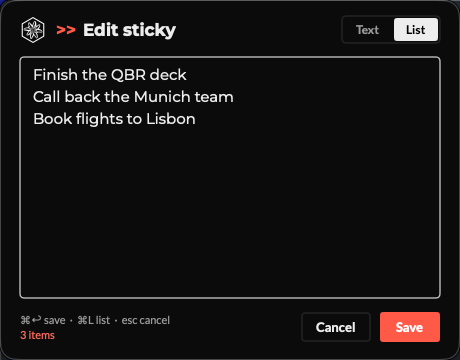
| Composer | ⌘N in the app, ⌃⌥⌘N from anywhere. ⌘↩ sticks the note, Esc cancels |
| Text or list | A Text / List switch, or ⌘L. Lines that start with - turn list mode on |
| Floating stickies | Always on top, on every Space. Drag to move, resize from the corner |
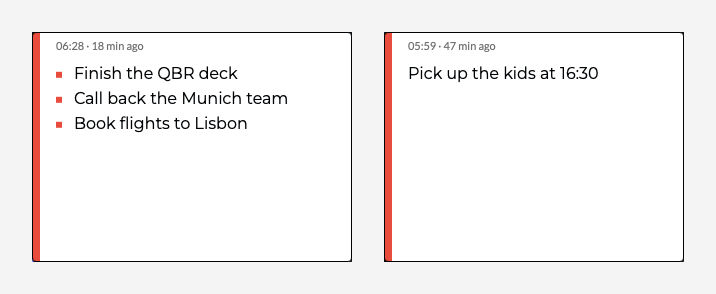
| Created time | Each note shows when I wrote it and a live counter: 06:28 · 18 min ago |
| Quiet chrome | Full screen, edit and delete buttons appear only when the pointer is on the note |
| Full screen, all | The button covers every display with the note in large bold type |
| Full screen, 1 screen | Click a note, press ⌘↩: full screen only on the display where the note sits |
| Step through notes | ← and → move between notes in full screen. Any other key or a click closes it |
| Undo delete | Delete fades the note out and offers Undo for 6 seconds. ⇧⌘T restores it later |
| Menu bar | My logo in the menu bar lists every note, hides or shows them all (⇧⌘H) |
| Memory | Notes, positions and sizes survive a restart |
The composer follows light and dark mode. This is the dark version, editing a list:
And this is the full-screen view on my 4 displays at once, including the one in portrait:

For business people
A sticky note is the cheapest reminder there is, and the easiest to ignore. Stickee keeps the cheap part and fixes the ignore part. Before a call I put the 3 points I must not forget on a note. When the moment comes, 1 click puts them on every screen in front of me, in type I can read from across the room.
It costs nothing to run: no account, no cloud, no subscription. The notes stay in 1 file on my Mac.
The limit: it's a personal tool for 1 machine. No sync to the phone, no sharing.
For technical people
Stack
Native Swift, AppKit for the windows and SwiftUI for the composer. No Xcode project and no Swift package: build.sh compiles the sources with swiftc, assembles the .app bundle, signs it ad hoc and copies it to /Applications.
./build.sh --install   # compile, bundle, sign, install
./build.sh --run       # build and open from build/
How it's built
| File | Role |
|---|---|
main.swift |
App delegate, menus, menu bar item, Carbon global hotkey |
ComposeWindowController.swift |
SwiftUI composer in an AppKit window |
StickyNoteController.swift |
Borderless floating NSPanel per note |
FullscreenPresenter.swift |
1 borderless window per NSScreen, auto-fitted type |
NoteStore.swift |
Note model, JSON in ~/Library/Application Support/Stickee/ |
Theme.swift |
NicAI design tokens: colours, Montserrat, Lato, logo |
A few details worth knowing:
- Non-activating panels. The stickies are
NSPanelwindows with.nonactivatingPanel. Clicking one doesn't pull Stickee to the front, so the app I'm working in keeps focus. - Full screen is not macOS full screen. It's a borderless window per display at screen-saver level, sized to
screen.frame. That covers the menu bar and the Dock, and it works on every monitor at once. - Type that fits the screen. The font size shrinks from large until the text fills about 80% of each display. A 4K screen and a small portrait one each get their own size.
- Cursors set by hand. macOS applies cursor areas reliably only in the active window. The sticky tracks the pointer itself: arrow on the buttons, open hand on the body, closed hand while dragging.
- Fonts in the bundle. Montserrat and Lato ship inside the app and load through
ATSApplicationFontsPath. The Montserrat variable font resolved to "Thin" in Core Text, so the build uses static weights instead.
How I built it
Claude Code built it in 1 morning, with several agents working in parallel. I wrote the shared pieces first (the note model and the design tokens), then 3 agents built the sticky and full-screen windows, the app shell and composer, and the packaging (build script, icon, fonts) at the same time. A 4th agent, briefed as a designer, reviewed the UI from screenshots and reworked it within my design rules.
Today it's about 2,000 lines of Swift in 7 files.



Further reading
- Dictee: my own local dictation app: my local dictation app, same
-eefamily - Portee: one page for all my local apps: the dashboard for my local apps
- My Claude Code setup: how I run Claude Code