

Sortee files my new files by rules: it renames them, moves them, runs a script on them or shows a notice. It replaces Hazel, a staple of my Mac since 2014: see Hazel for my old setup. All the rules live in 1 text file that Claude and I edit. Sortee never deletes a file, never overwrites one, and can undo every move and rename.
I built it with Claude Code on 24th October 2026, and installed it the same evening in shadow mode, beside Hazel. For 1 week it watches, plans and logs what it would do, and touches nothing. Every evening a report compares its plan with what Hazel actually did. When every difference is explained, Sortee goes live and Hazel leaves. The name fits the -ee family, next to Lastee: my own recent-files app for macOS and Filee: my own file manager for macOS.
Why I replaced Hazel
Hazel worked for 12 years. Then Claude read 5.2 days of its log, its 18 folders and its 72 rules.
The real job was small, and the log was huge
| What I found | Value |
|---|---|
| Real work per day | About 12 file actions and 16 image scripts |
| 1 broken rule | A transcription script failed 39,977 times in 5.2 days |
| Per day | 7,776 failed runs, on every scan, since September 2024 |
| Share of the log | 95% was that 1 broken rule |
| A tag rule with nothing to do | 2,572 matches in 5.2 days: nothing adds that tag any more |
| Download to renamed | p50 3 s, p90 5 s |
| Files renamed twice | 11 with a double date prefix |
| Processes | 2 resident (42 MB and 17 MB), plus 451 worker runs in 5.2 days |
| Features never used | Trash management, App Sweep, rule sync |
Hazel's worst habit was the retry loop. It retried a failing script on every scan for 2 years, and nobody saw it.
3 seconds is too slow
Hazel renamed a download about 3 s after it landed. A file I open or attach in those seconds gets renamed under me, and my agents wait for the move before they can find the file. My budget for Sortee: final name and folder in under 1.5 s.
Rules I couldn't read
Hazel stores its rules in a binary format that only its own window edits. I wanted 1 readable file, where sortee explain <file> says which rule matched and why.
What Sortee does
1 rules file
{
  "version": 1,
  "folders": [
    {
      "path": "~/Downloads",
      "rules": [
        { "id": "dl-prefix", "name": "Date prefix",
          "if": { "datePrefix": false },
          "do": [{ "rename": "{added:yyMMdd} {name}{ext}" }],
          "continue": true },
        { "id": "manuals", "name": "Product manuals",
          "if": { "ext": "pdf", "source": "support.example.com" },
          "do": [{ "move": "~/Documents/Manuals" }] }
      ]
    },
    {
      "path": "~/Desktop",
      "rules": [
        { "id": "old-shots", "name": "Archive old screenshots",
          "if": { "kind": "image", "startsWith": "Screenshot", "added": ">7d" },
          "do": [{ "move": "~/Pictures/Screenshots archive" }] }
      ]
    }
  ]
}
Rules run top to bottom, per file. The first rule that matches runs its actions, then Sortee stops for that file, unless the rule says continue. A move hands the file to its new folder's rules. Each rule runs at most once per file, so a rename never triggers the same rule again.
| Condition | Matches |
|---|---|
contains |
The name holds the text. A list means any of them |
startsWith |
The name starts with the text |
regex |
A regular expression on the full file name |
ext |
The extension |
kind |
image, movie, audio, pdf, or any file type |
source |
The URL the file was downloaded from |
added |
Date added: today, <7d, >7d |
datePrefix |
The name starts with a real YYMMDD date |
tag |
A Finder tag |
size |
Size, for example >10MB |
Conditions nest with all, any and not. Matching ignores case and Unicode normalisation, so märz matches a März that macOS stored in decomposed form.
| Action | Does | Undo |
|---|---|---|
move |
Moves the file into a folder | Moves it back |
rename |
Renames it from a pattern | Restores the old name |
run |
Runs a script file on it | No, logged |
shell |
Runs a line of zsh on it | No, logged |
notify |
Shows a small card | - |
A script can run once per file, once per burst with all the files, or once per burst with the newest file only. A burst ends after 3 s without a new match. On Hazel's log, that turned 84 runs of an image script into 29.
The Activity window
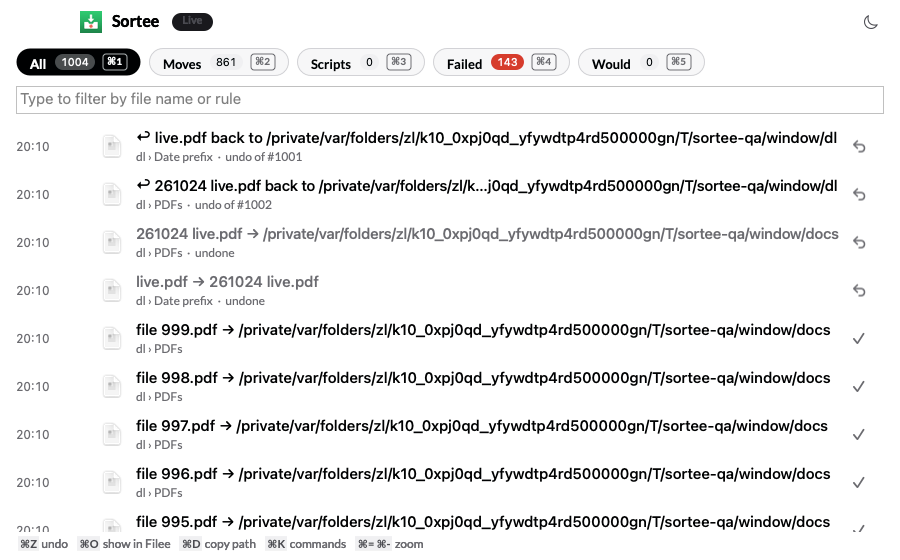
The menu bar menu shows the last 10 actions, Undo, Pause and a dry run. The Activity window lists every action, newest first, with filter pills and counts: All, Moves, Scripts, Failed, Would. I type to filter by file or rule name. ⌘Z undoes the selected rows, ⌘O shows the file in Filee, ⌘K lists every command.
Notices are small floating cards, and only when a rule asks for one or something breaks. A move or rename shows nothing. Cards never appear on the screen I share in calls or on the one I film with: a file name can be private.
Undo and dry run
- Undo reverses a move or rename when the file still sits where Sortee put it and the old name is free. Several rows undo as 1 batch, newest first.
- Dry run plans every rule against the files and fills the Would filter, without touching anything.
sortee dry-rundoes the same from the command line, and"dryRun": trueputs the whole app in shadow mode.
The numbers
| Metric | Sortee, measured | Hazel |
|---|---|---|
| Browser download to final name and folder | p50 0.59 s, p95 0.64 s | p50 3 s, p90 5 s |
| Memory, idle | 20 MB installed | 42 MB + 17 MB + workers |
| CPU, idle | 0.05% | 7,776 failed runs a day |
| Full rescan, 6,100 files | 89 to 238 ms | Not measured |
| Rules file reload | 2 to 5 ms | - |
sortee explain |
18 ms | - |
| Activity window open, 1,000 rows | 49 to 83 ms | - |
| Failed runs per file and rule | 4 at most | No limit |
| App size | 2.4 MB | - |
How it works
Knowing when a file is ready
The speed comes from the settle wait, not from the code. The work itself is 1 rename and a few attribute reads.
- Ignore files in progress:
.crdownload,.part,.download, Office lock files, and a 0-byte file that sits next to its in-progress twin (Firefox creates the final name first). - Wait for busy files: if a process still holds the file open for writing, Sortee checks again after 2 s and backs off to 60 s.
- The browser fast path: Sortee remembers which inode had an in-progress name. When that inode shows up under a final name, the browser has finished. Sortee waits 300 ms, so the browser can write the download URL, and acts. That's how a download gets its final name in 0.6 s.
- Everything else must keep the same size and date for 1 s.
Never lose a file
These rules are binding. A change that breaks one needs a measured reason.
- A move is 1 atomic system call (
renamex_npwithRENAME_EXCL). The file keeps its inode, and the call fails instead of replacing a file. A name clash gets(2). Sortee never copies and deletes, and never moves across volumes. - No delete action, no Trash action. Not in version 1, not later.
- The journal comes first. Every action writes its row before it starts, in 1 SQLite transaction. After a crash, the next launch checks each "started" row against the disk.
- New rules leave old files alone. When Sortee meets a folder or a changed rule, it records every file already there as handled.
sortee run --againis the explicit way to apply a rule to them. - Names and attributes only. Sortee never reads a file's content, so it never forces an online-only cloud file to download.
- Protected paths. Hidden folders,
.gitfolders, app bundles,~/Library,/Systemand external volumes are off limits at any depth. - A circuit breaker. More than 50 actions in 1 folder in 1 minute pauses that folder and shows a card.
- Retries that stop. A failed script runs again after 1 minute, 10 minutes and 1 hour, then stops, with 1 card per rule per hour. A broken script now fails 4 times per file at most, not 7,776 times a day.
- A bad rules file keeps the last good rules, shows the line number, and the last 20 good versions stay in a history folder.
Missed events
Sortee watches its folders with 1 FSEvents stream. At launch it rescans every folder, then replays the events it missed from the last event ID it stored, with code copied from Lastee. It also rescans at wake, when macOS reports dropped events, and every hour as a safety net.
The spike on the first day settled the latency: at 50 ms, events arrive in 11 ms (p50). At 300 ms, Lastee's value, they take 168 ms.
Why a separate app
I looked at 3 other homes for it:
- A module in Lastee: a script that hangs must never touch Lastee's hotkey.
- Hammerspoon's path watcher: it would tie file safety to Hammerspoon reloads.
- A Python daemon under launchd: macOS would grant the Downloads permission to the
python3binary, and with it to every Python script on the Mac.
As an app bundle, Sortee needs 1 permission: the Downloads folder. No Full Disk Access, no Accessibility, no Notifications.
Stack
- Swift 6.3 and AppKit, no third-party code. About 6,300 lines of Swift, with the engine in a
SorteeCorepackage that runs under unit tests. - The CLI links the same engine, so
explainanddry-rungive exactly the answer the app would act on. - SQLite holds the state, the journal and a silent usage log.
- Code copied, not shared: the FSEvents stream and JSONC parser from Lastee, the SQLite wrapper from Hifee, the notice card and watchdog from Clipee, see Clipee: my own clipboard history for macOS.
- The window is built off screen 1 s after launch, which keeps the first open under 100 ms.
Agent interface
The CLI takes --json on every command, so my NicAI agents can check and steer it:
sortee status --json                          # running, mode (live, paused, dry run), folders, rules, failures
sortee explain ~/Downloads/manual.pdf --json  # which rule matches the file, and what would happen
sortee dry-run ~/Downloads --counts --json    # what the rules would do now, counts only
sortee pause --json                           # stop acting on files before a bulk file job
sortee undo --json                            # undo the last batch
sortee pause matters more than it looks. An agent that is about to unpack 100s of files into a watched folder pauses Sortee first, and resumes it after.
Moving off Hazel
- Export. A Python script decodes Hazel's rule files (a short header, then a binary plist archive) into a first rules file, read-only on Hazel's side.
- Clean-up. 72 rules in 18 folders became 38 rules in 8. Out: the broken transcription rule, the tag rule with nothing to do, 8 disabled or dead rules, and "replace existing", which became "keep both".
sortee fix-prefixrepairs the double date prefixes, each rename in the journal with undo. - Parity test. QA replayed the 40 files of Hazel's log of 19th to 24th October as empty test files, in dry run, against the real rules. 34 planned the same as Hazel. The other 6 were expected differences, such as Hazel's busy-file skips and its own clash names.
- Shadow week. Sortee runs beside Hazel with
"dryRun": true. A report every evening at 21:00 puts Hazel's renames and moves next to Sortee's plan. - Rollback in 1 line:
sortee pause, then turn Hazel's folders back on.
How I built it
Claude Code built Sortee in 1 day, on 24th October 2026, from a draft spec of 19th October:
- Usage review. The log analysis above, and 39 decisions in 1 round of questions, each with a recommendation.
- Spec and spike. The FSEvents latency and a scan of the real folders: 6,087 files in 311 ms cold, 150 ms warm.
- Build. 8 commits between 17:11 and 20:12.
- QA. 36 unit tests and 115 end-to-end checks in 11 suites, all on test folders in a scratch home. Nothing touches my folders, my clipboard or my screen. 1 suite stalls the main thread for 4 s on purpose and checks that the watchdog ends it.
- 2 reviews. The spec review found 15 defects and the code review 11, each fixed with a test. Some of the code review's finds: a script that rewrites its own file ran in a loop, a crash between a rename and its record could leave a double prefix, and scripts could outlive Sortee.
The estimate was about 55% of 1 week of my Claude Max allowance.
What's next
- The shadow week, then live, then 7 days live before Hazel goes to the Trash.
- Rule toggles in the Activity window, which need a JSONC writer that keeps my comments.
copyandtagactions, when a rule needs them.- Voice memo transcription, rebuilt as a rule that calls my current transcription tool, not the script that failed for 2 years.
Further reading
The app Sortee replaces:

The macOS file events Sortee runs on:

The tool I built it with:

- Hazel: my Hazel notes from 2022.
- Lastee: my own recent-files app for macOS: the recent-files app whose FSEvents code Sortee copied, and which follows every move.
- The era of personal software is here: why I now build the apps I use.
- All my apps: see My apps: everything I built for myself