
Snippee is my text expander for macOS. I type ;sig and my signature appears before my next keystroke. It replaced Espanso, which I had used since 2022, and it took over the search-only snippets I kept in Alfred.
It's a native menu bar app of about 1 MB. It runs on 28 to 36 MB of memory and close to 0% CPU when idle. Espanso used 352 MB in 3 processes for the same job.
Every example and screenshot in this note uses dummy data ("Alex Example", "Sampletown"), not my real snippets.
Why I built it
Espanso works, and it's open source. 3 things pushed me off it:
- Weight. 352 MB of memory for a tool that watches keystrokes and swaps text.
- YAML. Editing snippets in nested YAML is slow, and a wrong indent breaks the whole file.
- Silent conflicts. 14 of my 222 triggers never fired, because a shorter trigger always matched first (
;debefore;deu). Nothing told me.
I also had 2 places for snippets: Espanso for triggers, Alfred for the ones I search. I wanted 1.
What it does
| Feature | How it works |
|---|---|
| Triggers | Fires on the trigger's last character, case-sensitive, no space needed |
| Short text is typed | Up to 200 characters on 1 line goes in as key events |
| Long text is pasted | Multi-line or long text goes through the clipboard, then the old clipboard comes back |
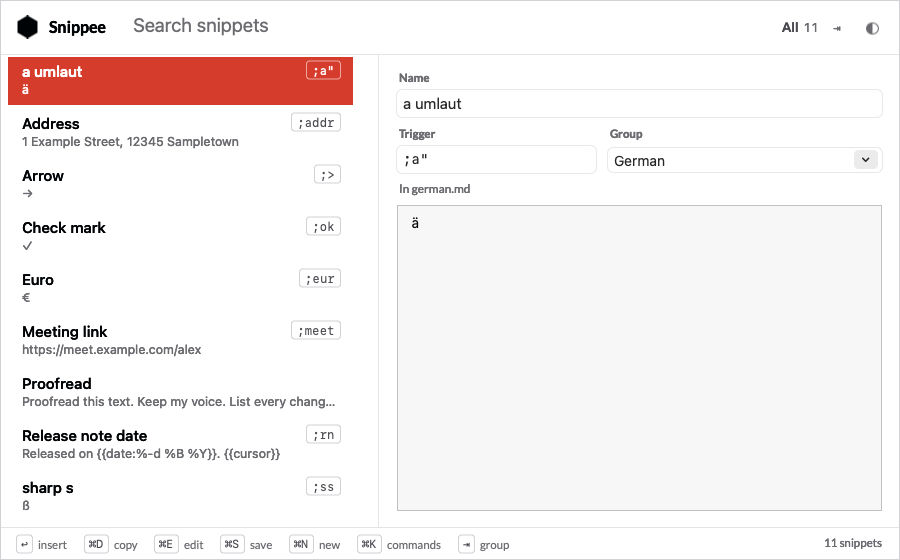
| Search panel | ⌃⌥⌘J, or a typed trigger, finds a snippet by name, trigger, alias or text |
| Edit in place | ⌘E edits, ⌘S saves, ⌘N adds, ⌘⌫ deletes with ⌘Z to undo |
| Conflict check | A trigger that a shorter one shadows shows struck through, and the CLI lists it |
| Placeholders | {{date}}, {{date:%y%m%d}} (any strftime format) and {{cursor}} |
| Pause | From the menu bar or snippee pause 30m, before a screen share |
| Usage log | Which snippet, when, in which app. Never the text I type |
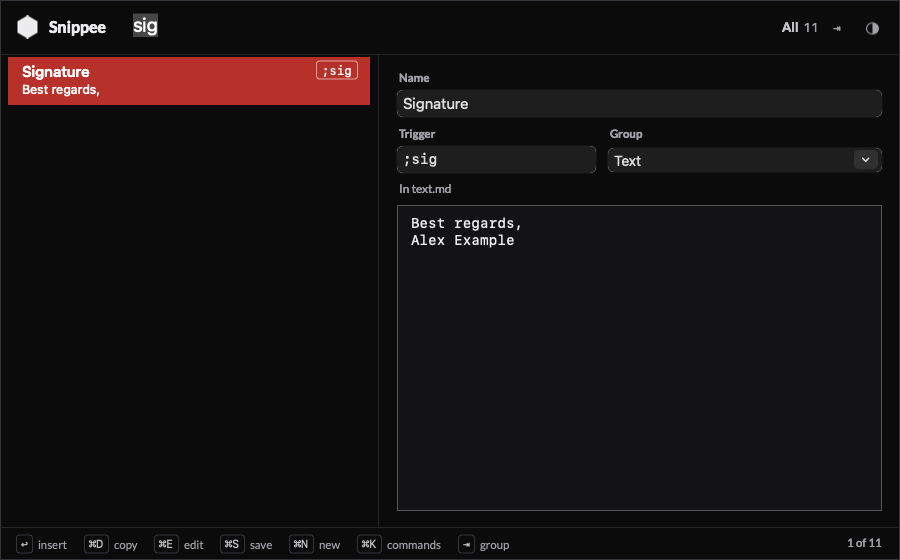
Search for "sig" and only the signature is left. The panel follows light and dark mode:
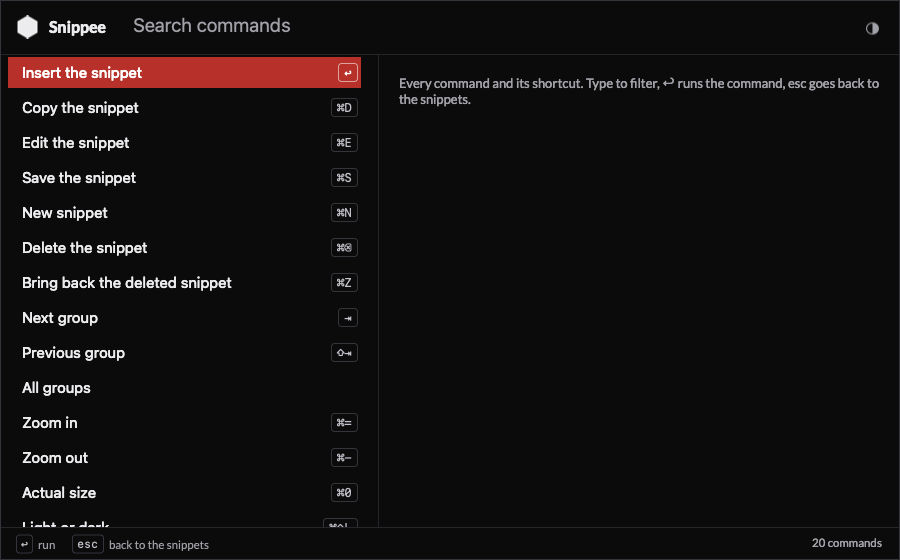
⌘K lists every command with its shortcut, so I never have to remember them:
Snippets are Markdown files
1 file per group, 1 heading per snippet, the text in a fenced block. Any editor works, and Snippee reloads a file within a second of the save. The folder sits in Dropbox, so the files have a history and a backup for free.
# Text

## Signature
trigger: ;sig
alias: regards, sign-off

```
Best regards,
Alex Example
```

## Proofread prompt
alias: proof, grammar

```
Proofread this text. Keep my voice. List every change you make.
```
- No
trigger:line makes a snippet search-only. That's where my old Alfred snippets went, with their keywords as aliases. disabled: <reason>keeps a trigger in the file without firing it.- Before every save from the panel, Snippee copies the file to a versions folder and keeps the last 200 copies.
To add a snippet, I press ⌘N in the panel, add a block to a file, run snippee add, or ask Claude.
How it works
Native Swift and AppKit, no Electron, no runtime. 2 parts:
- SnippeeCore, a Swift package with no AppKit: the file parser, the matcher, the placeholders, the usage log. Unit tested.
- The app: the key listener, the injector, the panel, the menu bar.
The rules that keep it fast and safe:
- The key listener only listens. It's a listen-only event tap on its own thread. If Snippee stalls, my keyboard doesn't: an active tap that stalls freezes every key on the Mac.
- Matching is cheap. The last 32 typed characters sit in a ring buffer, and a reversed trie finds the longest trigger that ends there. Work per key: p99 under 1 µs.
- Only physical keys count. Text that another tool types, or that Snippee types itself, never fires a trigger.
- Keystrokes never touch the disk. The ring buffer in memory is the only place they exist. The log holds events, never text.
- The clipboard comes back. A paste marks its clipboard entry as transient, so clipboard managers skip it, and the old clipboard returns 400 ms later.
Agent interface
A CLI wraps the app, with --json on every command, so my NicAI agents can use it:
snippee status --json          # running, expanding, paused, permissions
snippee search address --json  # triggers and names, never the text
snippee add --trigger ";x" --name "X" --group "Text" --text "..."
snippee lint                   # trigger conflicts and file problems
snippee stats                  # which snippets I actually use
Testing in real apps
QA runs 134 end-to-end checks against a hidden test window. That can't prove anything about real apps, so that night, while I was away from the keyboard, a script opened a test document in Chrome, Ghostty, TextMate and Word. It inserted 9 test snippets (accents, emoji, cursor marks, a 265-character line, multi-line text) and read the result back from each app. It stopped at once if it saw any keyboard or mouse activity it hadn't caused.
| App | Typed | Pasted | Clipboard back |
|---|---|---|---|
| Chrome | ✅ | ✅ | ✅ |
| Ghostty | ✅ | ✅ | ✅ |
| TextMate | ✅ | ✅ | ✅ |
| Word | ❌ then ✅ | ✅ | ✅ |
Word was the surprise. It ignores every synthetic key event that carries a character string, which is how most text expanders type. It also drops key events from a private event source. The fix: post from the same source as the physical keyboard, and paste every snippet in Word. The clipboard still comes back.
Moving off Espanso
An import script converted the Espanso YAML and the Alfred database into 14 Markdown group files: 257 snippets. It flagged the dead triggers on the way, so I renamed them instead of carrying them over.
The switch-over can't expand anything twice. Snippee waits as long as an Espanso process runs, and 1 menu item stops Espanso's service and hands over. To go back, I start Espanso again and Snippee steps aside by itself.
How I built it
Claude Code built it in 1 day, in 3 steps:
- Usage review. It read my Espanso config and Alfred snippets and wrote 34 questions, each with a recommendation. I accepted them all.
- Spec and build. A spec, then the app, the CLI, the import and the QA suite: about 4,500 lines of Swift and 1,500 of Python.
- Independent review. A separate agent reviewed the code and found 13 defects, 3 of them serious (a crash after a delete, expansion inside the panel itself, a synthetic
⌘Vthat my Hammerspoon setup would have typed out). All fixed, each with a QA check.



Further reading
- Text expanders: the background on text expanders
- Espanso: my Espanso setup, 2022 to 2026
- Stickee: sticky notes that go full screen on every monitor: another native app in the same
-eefamily