
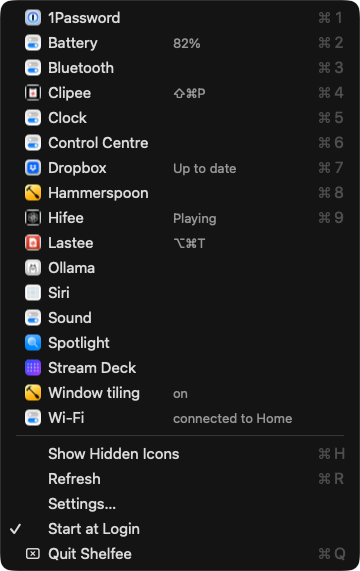
Shelfee is the 1 icon left in my menu bar. A click on it, or ⌃⌥⌘M, opens a native macOS menu with every other menu bar icon: its image, a name, and what the icon says about itself ("Up to date", "not enabled"). I pick a row and that icon's own menu opens, as if I had clicked the icon.
The other icons are hidden. Shelfee shows them for a moment when I open one, then hides them again.
Claude Code built it on 25th October 2026, in 1 day, from 41 questions I answered by exception. The screenshots in this note use dummy data from a test file, not my menu bar.
Why I replaced Bartender
Before writing any code, Claude Code checked how I use the menu bar:
| What it found | Value |
|---|---|
| Icons in my menu bar | 36, from 25 apps |
| Named by macOS | 12 by their label, 11 more by their tooltip. The rest only by the app |
| Several icons per app | Control Centre has 9, Hammerspoon has 4, and those 4 look alike |
| Bartender | Installed through Setapp: macOS app subsciption, but I hadn't run it since July 2024 |
So I wasn't using Bartender at all, and I never liked it much. With 36 icons, several of them nearly identical, I wanted to find an icon by its name, not by its picture.
What it does
| Feature | How it works |
|---|---|
| 1 native menu | A standard macOS menu, so it opens like any other menu and follows light and dark mode |
| Names | The icon's label, else its tooltip, else the app name. I can rename any row |
| State on the line | What the icon says beyond its name, in grey after the name: "Up to date", "82%" |
| Real images | The icon as it looks in the bar, cut from 1 capture of the menu bar. App icons as a fallback |
| Keyboard | ⌃⌥⌘M opens it, typing a name jumps to the row, ↩ opens, ⌘1 to ⌘9 open rows 1 to 9 |
| A to Z | 1 flat list, sorted by name |
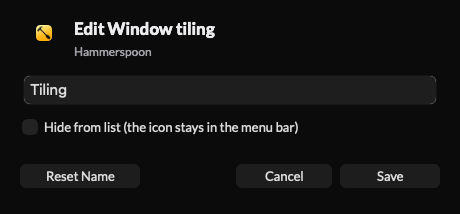
| Rename and hide | Hold ⌥ and each row turns into "Edit …": a new name, or "Hide from list" |
| Live | Rows update while the menu is open, and apps that start or quit add or remove their icons |
Hiding the other icons
Version 1 hid nothing: the brief said the bar stays full, and Shelfee only finds icons. Once I had used it, the same day, I changed my mind and asked for a menu bar with only Shelfee in it.
It works the way Hidden Bar, Ice and Bartender do it:
- A divider sits just left of Shelfee's button. When it grows to 10,000 points, every icon on its left leaves the bar, on every display.
- Exceptions are the icons I ⌘-drag to the right of the divider, once. I keep 2 there. Control Centre and the clock stay anyway.
- Opening a hidden icon from the menu: the divider shrinks, Shelfee waits until the icon is back on the bar, presses it, and hides the icons again when its menu closes.
- Show Hidden Icons (
⌘Hin the menu) shows them for 2 minutes, time enough to move an icon. - If Shelfee quits or crashes, the divider goes and every icon comes back.
Shelfee never moves an icon itself. Bartender does that with simulated ⌘-drags, and that's the part that breaks.
Speed
Measured on my Mac Studio. I didn't measure Bartender, because it wasn't running.
| Metric | Budget | Measured |
|---|---|---|
| Menu built, 36 rows | < 30 ms | 1.3 ms |
| Re-read of the apps that have icons | < 60 ms | 35 to 46 ms, in the background |
| Full scan of all 146 running apps | - | About 300 ms, in the background |
| Images: 1 capture of the bar | < 80 ms | 42 ms |
| Launch to first rows | < 400 ms | 264 to 349 ms |
| Memory | < 40 MB | 22 MB |
| CPU when idle | ~ 0% | 0.0% |
The menu never waits for a scan. It opens from the last known rows, and the fresh scan updates them in place.
How it's built
Stack
- Swift 6 and AppKit, about 3,400 lines, no dependencies. The skeleton, the hotkey and the watchdog come from Clipee: my own clipboard history for macOS.
- ShelfeeCore, a Swift package with no AppKit: the name rule, the icon keys, the image processing, the settings. 22 unit tests.
- Accessibility lists the icons: each app exposes its menu bar icons as
AXExtrasMenuBar, with a label, a tooltip and a position. - ScreenCaptureKit takes the images: 1 capture of the menu bar strip, cut at each icon.
- Settings in 1 JSONC file that reloads when I save it. No settings window.
What macOS 26 changed
The build found 5 things that aren't in Apple's documentation:
- Every menu bar icon belongs to Control Centre. In the window list, all 36 icon windows have the same owner, so the list can't say which app an icon belongs to. Accessibility can.
- Capturing 1 icon window returns an empty image for 27 of my 36 icons. 1 capture of the whole strip, cut at each icon's position, works for all of them.
- Accessibility reports the icons on the bar of the display I'm using, not always the main one. Shelfee captures whichever display holds them.
- Some apps answer a press only when their menu closes. A press that times out has worked. A 2nd click to be safe would close the menu again.
- A hidden icon still opens when pressed, but its menu appears in the top-left corner of the main display. That's why Shelfee shows the icons first.
Engineering notes
- The main thread never waits on another app. Every Accessibility call has a 250 ms limit and runs in the background, all apps in parallel. A scan of 146 apps 1 by 1 took 2.5 s. In parallel it takes about 300 ms.
- Permission checks are slow. Asking macOS whether Shelfee may record the screen takes about 8 ms. Shelfee asks in the background and keeps the answer.
- The hotkey opens the menu outside a dispatch block. Inside 1, the menu's own event loop blocks the main queue: no updates reach the open menu, and the watchdog would quit the app after 3 s.
- White icons become templates. The capture shows white glyphs on a dark bar. Shelfee removes the bar colour, and a glyph without colour is drawn in the menu's text colour, so it shows in light mode too.
- A watchdog restarts it. A main-thread stall of 3 s writes a log line and quits with code 70, and launchd starts Shelfee again.
Agent interface
My agents use Shelfee through its CLI, see What is NicAI. Every command takes --json, and each change is confirmed through a state file the app rewrites.
shelfee list --json            # every icon: name, state, app
shelfee open dropbox --json    # open Dropbox's menu, as a click would
shelfee rename tilee "Tiling"
shelfee hide-others on         # only Shelfee and the exceptions stay in the bar
shelfee reveal                 # show the hidden icons for a while
QA
110 end-to-end checks run the real app on a fake menu bar, from a test file, in a scratch folder. They never press a real icon, never register the hotkey and never take the focus. They cover names, keys, renames, hiding, images, presses that fail, the CLI and the watchdog. An independent review agent read the risky code and found 11 defects, all fixed before I used the app. The worst: the hotkey menu would have made Shelfee quit itself after 3 seconds.
How I built it
- Usage review and questions. Claude Code read Bartender's settings, probed my menu bar read-only, and timed every step. It wrote 36 questions, each with a recommendation.
- 1 change, then build. I asked for a native menu instead of a custom panel, which added 5 questions. Then "OK, go ahead and build", the same day.
- QA, review, install. The app went to
/Applicationsand GitHub (private), with the review fixes. - 2 requests after first use. The state text on the same line as the name, and hiding the other icons. The hiding ran as an 8-second test on my menu bar first, with my go.
What I left out
Pinned rows, right-click menus, a hotkey per icon, and opening an icon's copy on my second screen. The usage log in version 1 records which rows I open, so the next round runs on data.
Further reading
The app Shelfee replaced:

An open-source menu bar manager that uses the same divider technique:

What it's built on: