

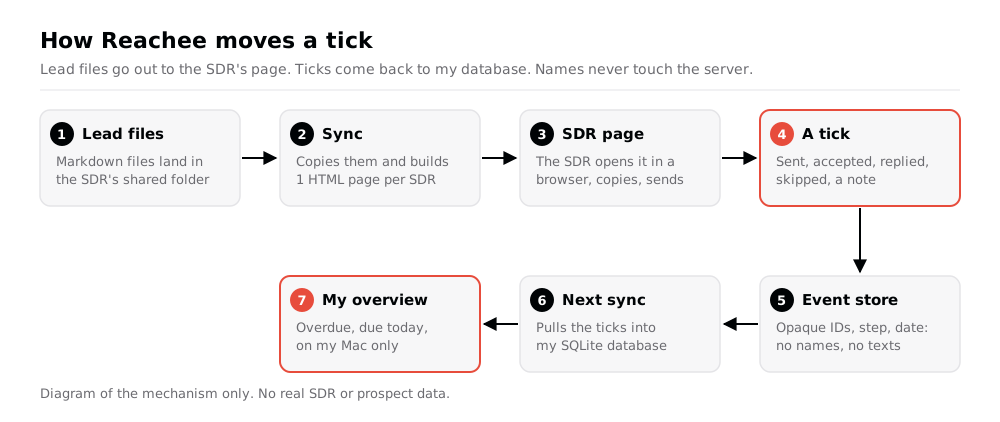
Reachee gives each SDR 1 prospecting page. An SDR (sales development rep) works through a list of prospects: a LinkedIn invite, then emails and LinkedIn messages on a fixed rhythm. Reachee puts that SDR's leads and ready-written texts on 1 web page, tells them what is due today, and records each step they tick. The ticks come back into my database, and I see everyone's progress on 1 overview on my Mac.
Reachee replaced Excel. I built it with Claude Code: version 1 on 3rd October 2026, now at version 1.1. The name follows Portee, my page for local apps: it reaches out. See Portee: one page for all my local apps for Portee.
This is a work tool, so this note describes the mechanism only. Names and figures in this note are fictitious, and the diagram holds no real data.
Why I built it
The old process was Markdown plus Excel. My lead-writing tools wrote 1 Markdown file per prospect, with the research and every message for the sequence, into a folder I share with the SDR. The SDR then tracked each step in an Excel file.
That had 3 problems:
- I couldn't see progress without opening their spreadsheet.
- Nothing came back into my database, so my other tools didn't know who had been contacted.
- Due dates lived in the SDR's head. The spreadsheet didn't say what was due today.
I wanted the SDR to work from 1 page that knows the cadence, and every tick to land in my database without anyone typing it twice.
What Reachee does
1 page per SDR
The page is 1 self-contained HTML file in the folder I share with the SDR. They open it in their browser, from the file. It holds that SDR's leads, texts, ticks and key, and nothing else: no other SDR's data, no internal numbers, no overview.
Each row is 1 prospect with the next step and its due date. Details shows the research and every message, with Copy buttons. A new lead waits in a Queue until the SDR starts it.
The cadence
Due dates count in business days from the step named:
| Step | Due |
|---|---|
| LinkedIn invite | The day the SDR starts |
| Email 1 | Invite + 2 |
| Emails 2 to 5 | Previous email + 4, 5, 7, 10 |
| LinkedIn message 1 | Accepted + 2 |
| LinkedIn message 2 | Message 1 + 5 |
| LinkedIn message 3 | Message 2 + 7 |
LinkedIn messages wait for Accepted. Emails run in parallel. Email bounced stops the emails only. Any other outcome, a reply or a meeting, stops the whole sequence.
Ticks that survive a bad connection
A tick is an event: sent, accepted, replied, bounced, skipped, a note. The page sends it to a small event store on my web host. Offline, the ticks wait in the browser and send themselves when the page is back online. An Undo bar shows for 8 s after each tick.
Every 15 minutes my Mac syncs: it imports new lead files, pulls the new events into my SQLite database and rebuilds each page that changed.
The server never sees a name
The event store holds events only: an event ID, the SDR, an opaque prospect ID, the step, the outcome, the date and an optional note. No names, no email addresses, no companies, no message texts.
2 fields are personal by nature, and the browser encrypts both before they leave the page:
- The text the SDR actually sent. The SDR can paste it under any step. The page encrypts it with my public key (RSA-OAEP wrapping an AES-256-GCM key). The server stores ciphertext, and only my Mac can read it.
- A corrected LinkedIn link. When a lead file links the wrong profile, the SDR pastes the right one. It is encrypted the same way, and the sync writes it into my database with the old value kept for undo.
What I learn from it
reachee sent-report puts each sent version next to the text my tools wrote, with a similarity score. It shows me what the SDR changes before sending, and those changes go back into the writing rules.
Here is the shape of 1 row in that report (sample data):
| Prospect | Step | Written | Sent | Similarity |
|---|---|---|---|---|
| Jane Doe | Email 1 | "Hi Jane, saw Acme Corp's new..." | "Hi Jane, I noticed Acme Corp..." | 0.71 |
All features
For the SDR
- 1 page, 1 file. Leads, texts and ticks for 1 SDR, opened from their shared folder in a browser.
- Due today and overdue at the top, from the cadence in business days.
- Queue. New leads wait until the SDR starts them.
- Copy buttons for every message, subject and body.
- Open email in Outlook. A
mailto:link with the address, subject and body. Past 1,900 characters it carries the subject only, because Windows cuts amailto:link at about 2,000. - Moves. A new due date, with an optional time, for any step. Undo goes back to the cadence.
- Skips. A step counts as passed, not as sent, and the next step counts from the skip.
- Manual tasks with a label, a channel, a due date and a time. Tick them done or reopen them.
- Spread over N days. Shares the selected leads' next steps over N working days, between 09:00 and 17:00.
- Notes per lead, any number, with edit and delete, from the list, Details or the lead's own page.
- Paste what you sent. The text the SDR sent, encrypted in the browser. A row with no sent text shows a reminder for 14 days.
- Edit the LinkedIn link when a lead file has the wrong profile.
- Link warnings. Every link in an unsent text is checked against my links database. A chip says what to check, and Use suggested link swaps it on the page only.
- Undo for 8 s after each tick, or untick the box.
- Works offline. Ticks wait in the browser.
- Sign-off swap. A lead file written for a former SDR has their name at the end. The page and the Copy buttons put the current SDR's name in its place.
For me
- Overview on my Mac only. Every SDR, overdue and due today, links to check, last sync. It never leaves my Mac.
- Ticks in my database. Every event lands in SQLite, so my other tools know who was contacted, when, and how.
- Lead files never edited. Reachee copies each file and reads the copy. A
-v2file replaces the copy and keeps the ticks. - Import filter. New prospects below director level are skipped.
- Sent versus written report with a similarity score.
- SDR admin. Add an SDR with a photo, rotate a key (the old one dies at once), or disable an SDR (the page becomes a notice, the data stays).
- Leak check on every build. A page that would carry internal data fails the build. A page that names someone who left the company gets a warning.
- 1-off Excel import. Reads an SDR's old tracker once, writes a review file first, and keeps their own notes word for word.
- Never deletes. Statuses and undo events instead.
- Agent CLI.
reacheewith--jsonon every command: status, overdue, sync, sent report, undo, SDR admin.
How it's built
- Python for the sync, the CLI and the overview: standard library, plus
cryptographyfor the sent texts andopenpyxlfor the 1-off Excel import. - Plain HTML, CSS and JavaScript for the SDR page. No framework. The cadence logic exists twice, in Python and in JavaScript, and both change together.
- Plain PHP for the event store: a few routes, keys stored as SHA-256 hashes, size and rate limits, its data outside the web root. Keys change over SSH only.
- SQLite on both sides: my company database on the Mac, 1 small file on the server.
- A LaunchAgent runs the sync every 15 minutes. Every step is idempotent, so a failed sync just runs again.
- A link check with my shared link tools. The first sync of the day checks every text in about 10 s. Later syncs take 0.1 s, because only changed texts are checked again.
- About 5,300 lines across Python, JavaScript and PHP.
The agent interface
Every command takes --json, so NicAI can use Reachee inside a task, see What is NicAI. status gives counts only. overdue returns prospect names, capped by --limit. disable is the only destructive command and refuses without --yes.
reachee status --json              # last sync, SDRs, active prospects, overdue, due today
reachee overdue --sdr sdr1 --json  # overdue and due-today prospects with their next step
reachee sync --json                # import lead files, pull events, rebuild pages
reachee sent-report --json         # sent versus written, with a similarity score
reachee undo sdr1 <event_id> --json
How it was built
- 3rd October 2026: version 1, with the event store, the page, the sync and the Excel import.
- 15th October: moves, skips, manual tasks, times and Spread over N days, from the first SDR's feedback.
- 19th October: corrected LinkedIn links and the Outlook button.
- 24th October: the agent CLI and a private repo.
- 27th October: the link check on every lead text, after an outdated link went out in a batch of lead files.
- 28th October: the import skips new prospects below director level.
I also had my own Reachee page for a while, from 15th October. I disabled it on 27th October: Prospectee runs my own outreach now, see Prospectee: my outreach engine, from 1 line to a campaign.
QA tests the CLI contract on a scratch database and a free port. It never syncs and never calls the server. Changes to the page are tested with a dummy SDR, never by ticking on a real SDR's page.
Further reading
The tool I built it with:

The database on both sides:

- see Prospectee: my outreach engine, from 1 line to a campaign, my own outreach engine
- see Portee: one page for all my local apps, which runs the overview
- see The era of personal software is here, why I now build the apps I use
- All my apps: see My apps: everything I built for myself