

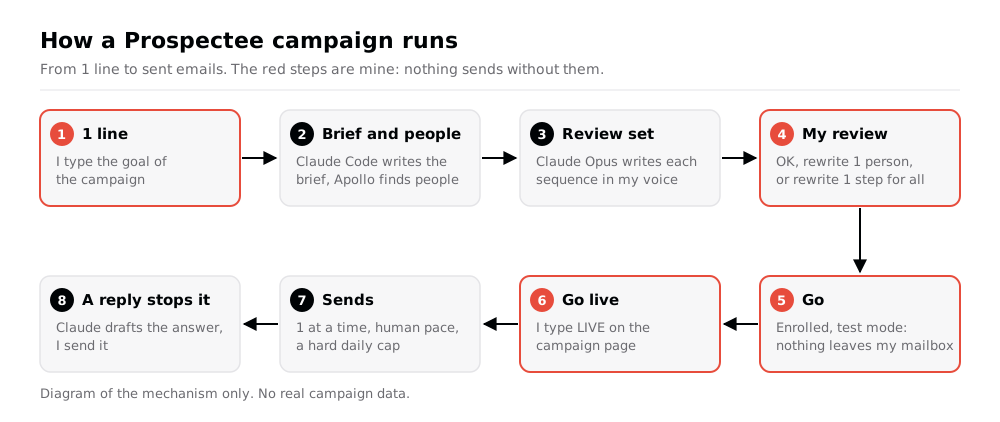
Prospectee is my outreach engine for sales prospecting. I type 1 line that says who to reach and why. Prospectee prepares the campaign, finds the people, and has Claude write 1 sequence per person in my voice: 5 emails, a LinkedIn invite and 3 LinkedIn messages. I review the texts. Nothing leaves my mailbox before my Go, and nothing real leaves before I type LIVE.
Prospectee has no window of its own. It runs in the background on my Mac, and I work with it in NicAI CC, the app where I review everything my agents produce, see NicAI CC: the command centre for my Claude Code sessions. I built it with Claude Code: version 1 on 27th September 2026, version 2 on 25th October, version 3 on 1st November. The name follows the -ee family of my tools.
This is a work tool, so this note describes the mechanism only. Names, companies and figures in this note are fictitious, and the diagram holds no real data.
Why I built it
Prospecting is volume work with a high bar. Each first touch must be relevant to 1 person at 1 company, and the follow-ups must stop the minute that person replies. Done by hand, that is hours of research and copy-paste a week, and the follow-ups slip.
Version 1 drafted every email and asked me to approve each one. In 6 days I approved 0. The bottleneck was me, 1 email at a time.
Version 2 changed the deal: I control the campaign, not each email. I set the goal, review the messaging across all people at once, and press Go. The engine does the rest within hard limits that only I can raise.
What Prospectee does
From 1 line to a review set
A campaign starts with 1 line, for example: "run a campaign to heads of internal communications at mid-size manufacturers in the UK, about live town halls". A Claude Code session reads my company knowledge base and writes the brief: the personas, up to 3 problems that the sequence works through, and the assets to share. It then selects the accounts and the people. Fresh people come from Apollo, within a credit cap per campaign.
Before anyone is enrolled, Claude writes a review set: every person up to 12, or 5 spread over personas, languages and countries. I get 1 notification when it is ready.
The review before Go
The campaign page has 3 parts, read top to bottom:
- Messaging at a glance. 1 row per step. Each row shows every person's text for that step, one under the other, with the word range, the number of different subjects, and how many texts open with the same words.
- People. 1 row per person with the whole sequence. OK keeps it. Rewrite with a note redoes it.
- Decide. Go, Go live, Rewrite all, Change, Drop.
A note on a step row becomes a rule for that step only: "Email 3: shorter, end with a question" rewrites Email 3 for every person and leaves the other steps alone. A note on Rewrite all becomes a rule for the whole campaign. My own edits in a lead file are final: no automatic rewrite ever overwrites them.
Here is what the glance view looks like for a campaign of 10 people (sample data):
| Step | People | Words | Different subjects | Same opening |
|---|---|---|---|---|
| Email 1 | 10 | 62-94 | 10 | 0 |
| LinkedIn invite | 10 | 28-41 | - | 1 |
| Email 2 | 10 | 38-55 | Reply to Email 1 | 2 |
Claude writes the words, not my own model
I fine-tuned a small local model on my own writing, see Fine-tuning my own model (LLM): NicAI. Version 2 used it to write the final texts. On 30th October I ran a blind test: 3 prospects in English, French and German, the same brief, 6 writing setups. Claude Opus won with both blind judges, and with me: I picked Claude's text for all 3 prospects. My local model ran long, at 130 to 190 words, and sounded corporate.
So cold outreach is written by Claude, not by my local model. Each writer is 1 claude -p call with Claude Opus per person. It reads my voice guide, the texts I picked as good examples, and a ledger of the edits I made to earlier texts. Python never composes a message: no templates, no name swaps. Every text then passes my checks and a cold email rulebook before it counts as ready.
Go, test mode, Go live
Go enrols the people and starts the campaign in test mode: the engine plans and "sends" every email, but nothing leaves my mailbox. Go live needs me to type LIVE on that campaign's page. A headless agent can't do it, and the agent CLI has no command for it.
Sending
The engine sends from my own mailbox, through my agent browser, 1 email at a time under a shared lock. Each email is plain text, to 1 recipient, with no tracking pixel, and a blind copy to me so I see every send live.
| Rule | Setting |
|---|---|
| Day plan | LinkedIn invite day 0, emails on days 1, 4, 9, 15 and 22 |
| Threads | Emails 2 and 3 reply to Email 1, Email 5 replies to Email 4 |
| Pace | A window of about 06:00 to 21:00, random start, gaps of 6 min or more |
| Recipient's time | Inside 06:00 to 21:00 in their own time zone |
| Per account | 1 first touch a day, 2 business days between first touches |
| Per person | Never 2 emails in 1 week, 1 campaign at a time |
| Daily cap | A ramp up to a hard cap of 40 a day, raised only on live bounces under 2% |
| Links | None in Email 1 or the LinkedIn invite |
Replies, bounces and referrals
- A reply stops the sequence. The engine checks for replies before every send. Claude drafts the answer, with 3 real free slots from my calendar when the reply is positive. I send it.
- A bounce finds a new address. The engine marks the bad address and searches for a replacement by itself. 3 bounces or more, over 3% of the last 100 sends, pause everything and alert me.
- "Talk to my colleague" becomes a referral: the engine finds the person, enrols them in the same campaign with an opening that names who sent me, and drafts a thank-you to the first person.
- People I already talk to never get an automatic email. Anyone I've emailed, messaged or met runs in follow-up mode: the texts are written, and I send them.
LinkedIn stays manual
Prospectee never touches LinkedIn. Each day it gives me a list: the invites to send and the messages for people who accepted. It copies the text, opens the profile in my browser, and I send it myself.
All features
Campaigns
- 1 line in. A campaign starts from 1 sentence, from the NicAI CC command palette, a Claude Code command or the CLI.
- Brief and selection. A Claude Code session writes the brief and selects accounts and people with every exclusion I set.
- Fresh people. Apollo search and reveal at each account, within a credit cap per campaign.
- Problem ladder. Up to 3 problems per campaign, each tied to a product, spread over the 5 emails.
- Email 1 A/B. 2 framings alternate. After 40 sends each, a variant with 5 replies and 1.5 times the other's rate wins.
- Evergreen campaigns. Once a week after Go, up to N new matching people, never someone who was in the campaign before.
- 1 campaign at a time per person, across every campaign.
Writing and review
- Claude writes every text in my voice, with my voice guide, my picked examples and my edit ledger.
- 9 texts per person: 5 emails, a LinkedIn invite and 3 LinkedIn messages, in the person's language.
- Review set before Go. Every person up to 12, or 5 spread across personas, languages and countries.
- Messaging at a glance. 1 row per step with every person's text and the word and subject spread.
- Rewrite this step. A note on a step row rewrites that step for everyone not marked OK.
- Rewrite all and Rewrite 1. A campaign rule, or a note for 1 person.
- My edits win. I edit any unsent text in its lead file. No automatic rewrite overwrites it.
- Checks. Every text passes the pattern checks and a cold email rulebook. A failed text gets 1 automatic retry.
- Link check. Every link in every text is checked against my links database before it is saved and before it is sent. It warns, it never blocks.
Sending
- Test mode by default. Go starts a campaign in test mode. Go live needs my typed LIVE, per campaign.
- Send guard. An email leaves only when its campaign runs and its person is enrolled.
- Human pace. A random daily window, the recipient's working hours, gaps of 6 min or more.
- Caps. A ramp up to a hard cap of 40 a day. The CLI can lower it. Raising it needs my confirmation in a terminal.
- Blind copy to me on every automatic email. A send that can't confirm the copy isn't recorded as sent.
- No double sends. A send that clicked Send without a confirmation is held for me, never retried.
- Kill switch. A
PAUSEfile orprospectee pausestops all sending. - Work sign-in. When my work session ends, the queue waits. 1 notification each business morning, 2 asks a day at most.
- Send now. My click sends 1 email at once, even in test mode. Every guard still applies.
Replies and follow-ups
- Reply detection from a local copy of my mailbox, checked again before each send.
- Reply drafts by Claude Opus, with 3 real free slots when the reply is positive.
- Bounce handling with a replacement address and a pause on a high bounce rate.
- Referrals found, enrolled and thanked.
- Follow-up mode for anyone I've already emailed, messaged or met.
- Reply classes. An out-of-office pauses the sequence until the return date. A "not now" comes back to me after 90 days. A "no" is never enrolled again for 12 months.
- Meeting detection from my calendar: a booked meeting ends that person's sequence.
- Daily list of invites and messages to send by hand.
- Acceptance detection from my local LinkedIn data, so the LinkedIn messages start after an invite is accepted.
Learning and reporting
- Monthly report on the 1st business day: reply and meeting rates by campaign, persona, angle, language, country and step.
- Learn from last month. Texts that won a positive reply or a meeting come back to me. 1 key adds a text to my examples.
- Edit ledger. My edits rebuild the ledger at once, so the writer learns from them.
- Weekly summary per campaign.
Interface
- NicAI CC section. 1 Prospectee page (replies, campaigns, LinkedIn today, emails for me to send, going out, held, needs a fix, learn, all leads) and 1 page per campaign under it.
- Agent CLI.
prospecteewith--jsonon every command: status, queue, campaigns, holds, going out, pause, resume, cap.
How it's built
- Python, standard library only. About 13,000 lines, no package to install.
- SQLite for the state, the briefs, the texts, the sends and the replies. Enrolments and events also go to my company database, so every other tool sees who is in a campaign.
- A LaunchAgent runs the engine every minute: planning, inbox, LinkedIn, writing, dashboard, send. Each job has its own file lock.
- Claude Code headless (
claude -p) for the writer, the reply drafts and the brief. About 5 min per person with Opus, 4 people at a time. - My agent browser for the sends, under a lock shared with every other tool that uses it. About 30 s per email, confirmed in Sent Items.
- NicAI CC as the only UI. The web editor of version 1 is gone.
- A local git repo with no remote, because the folder holds lead data.
The agent interface
Every command takes --json, so NicAI and other agents can use Prospectee inside a task, see What is NicAI. Read commands never return email bodies or addresses. Going live is not in the CLI at all.
prospectee status --json                 # live or test mode, paused, cap, counts
prospectee campaign list --json          # campaigns with people, sends, replies
prospectee going-out --hours 24 --json   # what goes out by itself, no bodies
prospectee holds --json                  # why sending waits
prospectee pause "client call" --json    # stop all sending
prospectee cap 10 --json                 # lower today's ceiling
How it was built
Prospectee followed my appee process for apps, 3 times:
- Version 1, 27th September 2026: a planner that drafted each email for my approval. It taught me that per-email approval doesn't happen.
- Version 2, 25th October: a usage review of my outreach, 45 questions and 15 decisions in 1 round, then the spec and the build. An independent review found 23 defects. The 17 that could send twice, send to the wrong address or lose a write were fixed first.
- 30th October: the blind test, and my local model out of the writing.
- Version 3, 1st November: a design council, with me as a blocking seat, reviewed the plan first, see The Council. It brought the review before Go, Go live per campaign, the morning sign-in notification, the learning loop, evergreen campaigns, messaging at a glance and 1 Prospectee section in NicAI CC.
QA runs the CLI contract and the whole campaign flow on fakes: a synthetic mailbox, calendar, LinkedIn copy and company database, with a fake writer, mailer and address finder. It takes about 1 minute. Real test sends go only to addresses at my own domains, never to a prospect.
Next
Job-posting and news signals for evergreen campaigns, and automatic answers to "not now" and "wrong person".
Further reading
The tool I built it with:

Where the fresh people come from:

- see Reachee: 1 prospecting page per SDR, ticks synced back, the prospecting pages for SDRs
- see NicAI CC: the command centre for my Claude Code sessions, where I review and decide
- see Fine-tuning my own model (LLM): NicAI, the local model that lost the blind test
- see The era of personal software is here, why I now build the apps I use
- All my apps: see My apps: everything I built for myself