
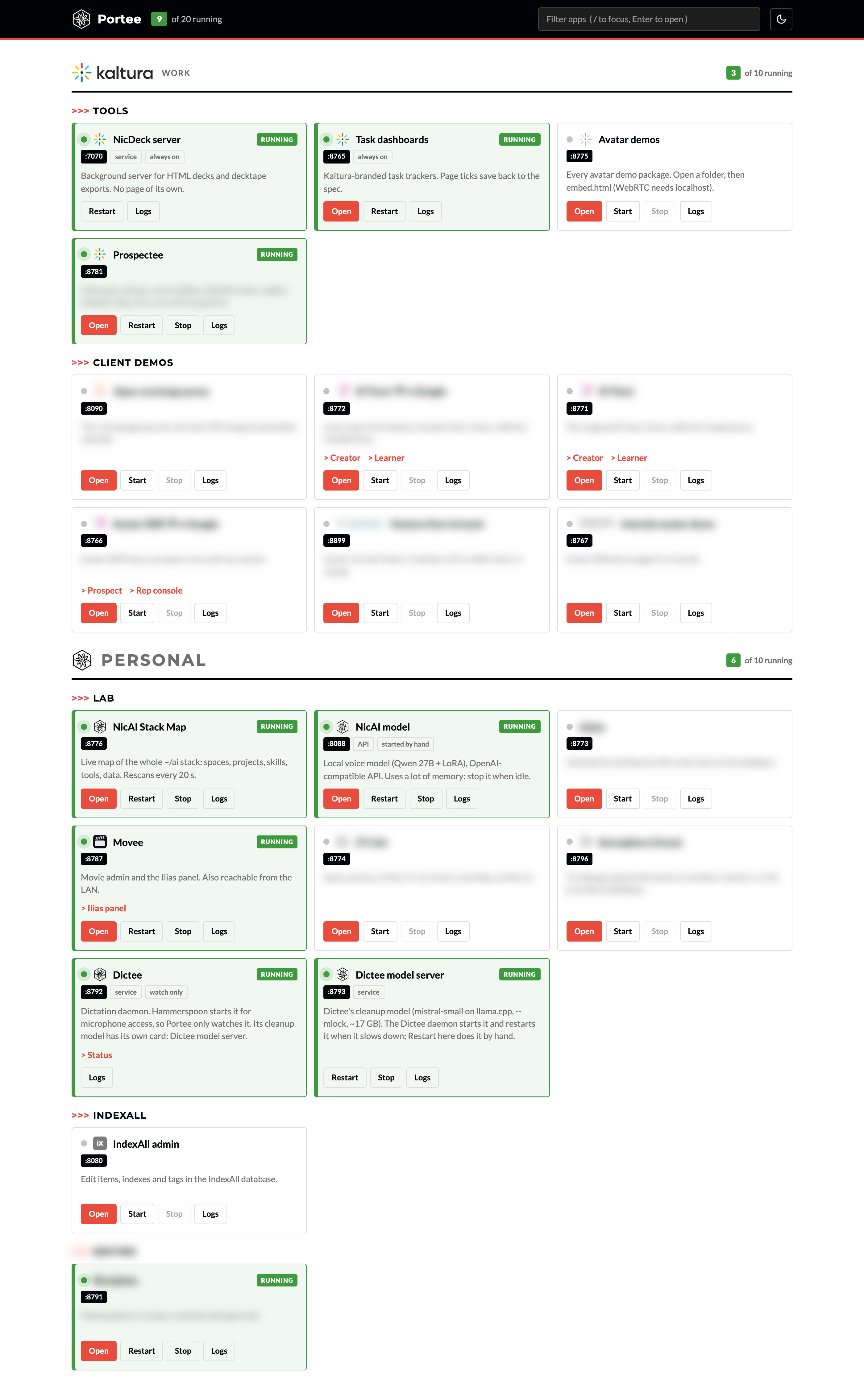
Portee is my local app dashboard. 1 page at localhost:9000 lists every browser app I run under ~/ai: demos, dashboards, admin pages, my local model. Each app has a card with Open, Start, Stop, Restart and Logs. If an app is down, Open starts it and opens it when its port answers.
The name: it manages ports, and portée is French for reach. It also fits the -ee family of my other tools.
Why I built it
Every project I build with Claude Code ends up with its own small web server. After a few months I had 13 of them, and 3 problems:
- Port collisions. 4 apps defaulted to port
8765. Only 1 of them could run at a time. - No registry. Each app had its own start command, in its own folder. I had to remember all of them.
- No overview. I never knew which servers were running, or which one still held a lot of memory.
I asked Claude for options first:
| Option | What it gives | Why not |
|---|---|---|
| Custom dashboard (stdlib) | 1 page, start/stop, logs, fixed ports | About 700 lines to maintain |
| Caddy + launchd | jobee.localhost style URLs, apps always on |
No start/stop, every app uses RAM all day |
| pm2 or honcho | Mature process management from the CLI | pm2 needs Node, no web page |
| Homepage, Dashy, Homarr | Polished dashboard tiles | Docker, and they can't start my apps |
The custom option was the only one that fixed the port collisions and gave me 1 page. It also matches my stack: Python standard library, a JSON file, no Docker.
What it does
| Feature | How it works |
|---|---|
| Start on click | Open on a stopped app starts it, shows the log while it boots, then opens it |
| Direct links | localhost:9000/go/jobee opens or starts 1 app. Good for bookmarks |
| Status | Running cards turn green, with a pulsing dot and a RUNNING badge |
| Logs | The last 200 lines of the app's own log, plus any log file it writes elsewhere |
| Filter | / focuses the filter, Enter opens the first match |
| Work and personal | Kaltura tools and client demos under the Kaltura logo, my own apps under mine |
| Extra pages | Links to sub-pages on a card, for example the Ilias panel in Movee |
| Light and dark | Light by default, a moon button for dark mode. The browser remembers it |
| Terminal | portee.py status, start, stop, restart, logs and scan |
The look comes from my NicAI design kit, the same black, white and red as this site. The Kaltura section uses Kaltura and client logos, with white versions for dark mode. The screenshot blurs the client demos and a few personal apps.
For business people
I run 17 local apps: client demos, avatar prototypes, task trackers, an outreach console, my voice model, a movie admin. Before Portee, opening a demo 5 minutes before a call meant finding the folder, remembering the command, and hoping the port was free.
Now I open 1 bookmark and click. The app starts in a few seconds.
It also saves memory. Apps only run when I need them, and I can see at a glance what is running. My local voice model alone takes a big part of the Mac's memory, so a visible Stop button matters.
The trade-off: it's my code, so I maintain it. Every new app needs 1 entry in a JSON file.
For technical people
Architecture
launchd (com.nic.portee, RunAtLoad + KeepAlive)
  └── portee.py serve  ->  ThreadingHTTPServer on 127.0.0.1:9000
        ├── GET  /              dashboard (HTML + JS, polls /api/apps)
        ├── GET  /api/apps      registry + live state of every app
        ├── GET  /api/logs/<id> last 200 lines of the logs
        ├── GET  /go/<id>       302 if up, else start + wait page
        └── POST /api/<start|stop|restart>/<id>   needs X-Portee: 1
1 file, about 700 lines, Python standard library only. The HTML and CSS sit inside the script.
The registry
apps.json holds 1 entry per app:
{
  "id": "jobee",
  "name": "Jobee",
  "section": "personal",
  "group": "Lab",
  "cwd": "lab/jobee",
  "cmd": ["python3", "serve.py"],
  "port": 8773
}
Other fields: links for extra pages, env, host, path, logo and logo_dark, kind (app, api or service), start_timeout, and launchd for apps that already have their own agent.
Portee refuses to start if 2 apps share a port. That check is the whole point: the registry is the single place where ports are assigned.
How it starts and stops apps
- Start.
subprocess.Popenwithstart_new_session=True, stdout and stderr tologs/<id>.log, the pid inrun/<id>.pid. The app runs in its own process group, so it survives a Portee restart. - Environment. Every app gets
PORT(its registry port) andNO_BROWSER=1. Aserve.pyreadsPORT = int(os.environ.get("PORT", "8780"))and keeps working when I start it by hand. - State. "Up" means a TCP connect to the port succeeds. The owner is
portee(pid file),launchd, orexternal(someone else started it). - Stop.
SIGTERMto the process group, then to anything still listening on the port (found withlsof). After 5 seconds,SIGKILL. - launchd apps. For my deck server and task dashboards, Portee calls
launchctl kickstartand never stops them, so it can't break the deck exports. - Logs. Capped at 2 MB, then rotated to
.log.1.
Security
- Portee and the apps it starts bind to
127.0.0.1. - Every request must carry a
Hostheader oflocalhostor127.0.0.1. That blocks DNS rebinding. - Start, stop and restart need a custom
X-Portee: 1header. A custom header forces a CORS preflight, and Portee never answers it. So another website can't start or stop my apps through my browser.
Discovery
portee.py scan walks ~/ai for Python files that call HTTPServer(, ThreadingHTTPServer( or serve_forever(, and lists the ones not in the registry. A scan_ignore list in apps.json silences the ones I don't want on the page.
Gotchas I hit
- Ports 5000 and 7000 are taken by macOS (AirPlay Receiver). Portee uses 9000.
- 4 apps shared port 8765. The task dashboards kept it. 3 apps moved to 8771, 8772 and 8773, and their docs changed with them.
- A shared design kit can break a running server. Another session moved Portee onto the NicAI design kit and deleted the old logo file. The running Portee still had the old code in memory, so the logo request crashed. A restart fixed it. Lesson: after a change to shared files, restart the long-running servers that use them.
How I got there: 6 prompts
I built Portee with Claude Code in 1 session on 26th September 2026.
| Prompt | What I asked | What happened |
|---|---|---|
| 1 | Suggest a single place to manage all my local servers | Scan of ~/ai: 13 servers, 4 on port 8765. 4 options |
| 2 | Build the custom option, all apps registered, better name | Portee, 15 apps, port fixes, launchd agent, all apps tested |
| 3 | Task dashboards must open in a new tab | A 1-line fix in another project |
| 4 | Light theme, dark mode switch, my logo | Theme toggle, logo as favicon and header |
| 5 | Black and white like my Notes site, red as the main colour | Notes fonts and colours, green only for running apps |
| 6 | Fix the logo, clearer green, separate Kaltura work | Work and Personal sections, client logos, stronger status |
What worked well:
- Options before code. The first prompt produced a scan of my real setup and a comparison table. I chose with the facts in front of me.
- Test everything once. Claude started all 15 apps through Portee, checked that every page returned HTTP 200, then stopped the ones it started.
- 1 rule for the future. A memory note tells every new Claude session to register a new local server in
apps.json. The registry stays complete without me.
Further reading
- NicAI shared tools: the
~/ai/_sharedfolder where Portee lives - The NicAI workspace: how my
~/aiworkspace is organised - nicailab.com: NicAI Lab, where I publish pages online
- Dictee: my own local dictation app: another local tool built the same way
- Fine-tuning my own model (LLM): NicAI: the local voice model Portee starts and stops