

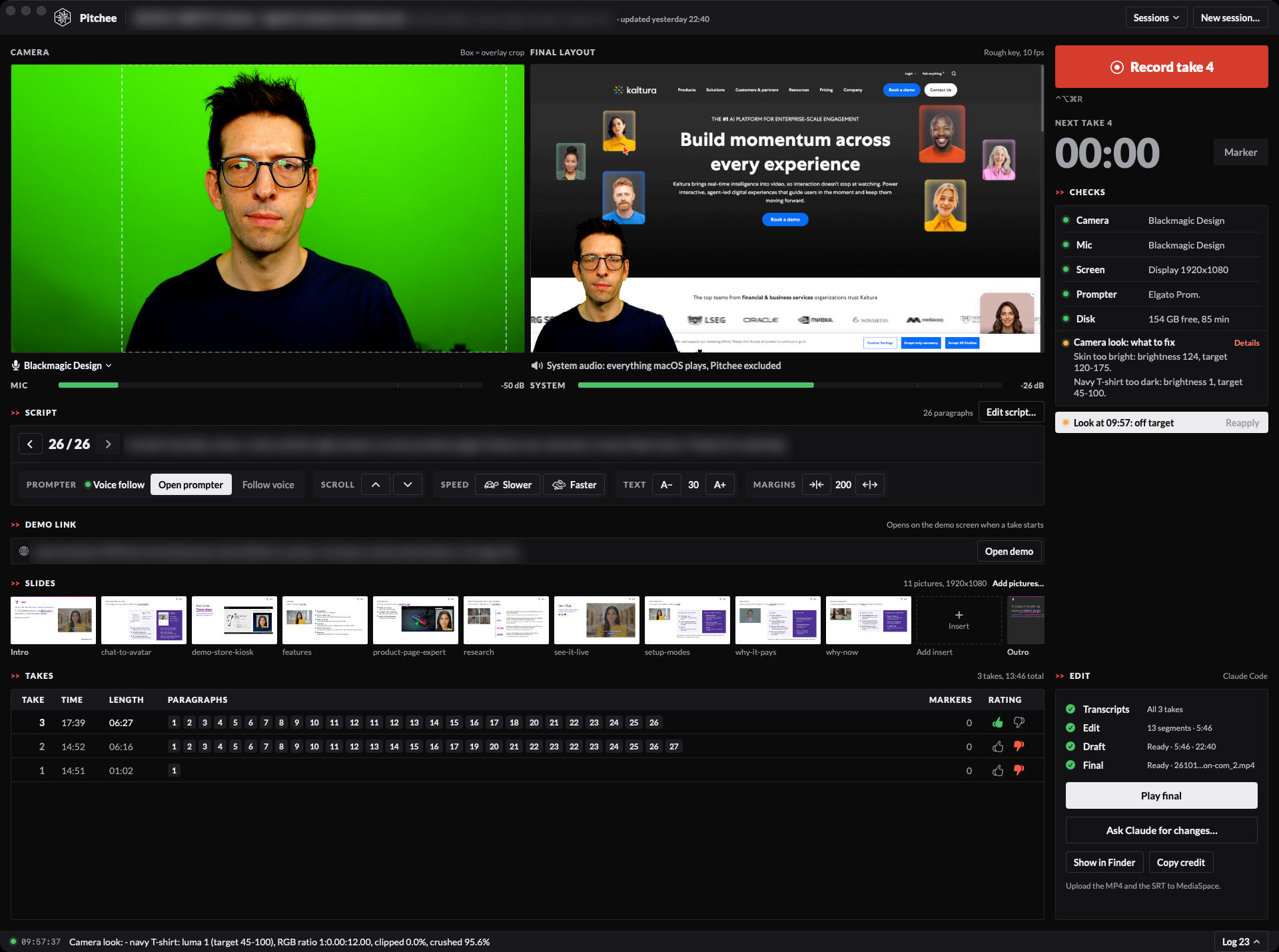
Pitchee is my own app for recording demo videos. I press Record, the demo opens on my 2nd screen, and I read my script from a teleprompter that follows my voice. Pitchee keys me out of the green screen, puts me in the bottom-left corner of the demo, and Claude Code edits the takes into a finished video with slides, captions and clean audio.
The name follows the -ee family of my other tools (Notee: my own Markdown editor for macOS, Dictee: my own local dictation app). My demos are sales pitches, hence Pitchee. The story of why I build my own apps is in The era of personal software is here. This note is the what and the how.
Updated 13th October 2026, after my 1st real client demo: demo links, captions for the avatar, language flags, English captions for German and French, blurred web addresses and menu bar, a script editor, and change requests to Claude from inside the app.
Why I built it
I record demo videos for clients regularly: set up a demo of a Kaltura solution, record myself in several takes, then edit. I did that in ScreenFlow for years. The recording was quick. The editing took hours: finding the best take of each part, cutting the stumbles, placing slides, fixing the sound.
I wanted an app that does only what I need from ScreenFlow, and does it better:
- 2 screens and me: my demo screen recorded with its sound, and me from my camera, in sync.
- Better keying than ScreenFlow's green screen, with hair that looks like hair.
- The editing done for me: the best take per paragraph, cuts in the pauses, my slides as intro, outro and backgrounds.
How a demo gets made
- Prepare. I ask Claude Code for a demo. It writes the script, makes the slides and sets the link to the demo: an avatar demo, a video portal, an event platform. 1 command creates the Pitchee session from them. All I have to do is press Record.
- Record. I press the Record key on my Stream Deck. The demo opens full screen on my demo screen, the camera autofocuses, the script opens on my teleprompter, and it scrolls as I speak. I record paragraph by paragraph and restart whenever I stumble.
- Edit. I click Edit with Claude. Claude Code transcribes every take, mine and the avatar's, picks the best one per paragraph, cuts inside the pauses, places the slides and translates what was said in German or French. A draft renders in minutes.
- Review. I watch the draft in Pitchee. To change something, I click Ask Claude for changes, type what I want, and Claude renders a new draft.
- Finish. Render final keys me again at full quality with CorridorKey, in the background, and delivers an MP4 and an SRT file ready for Kaltura MediaSpace.
The editing runs in a Claude Code session on my subscription. Pitchee never calls an AI API itself.
All features
Prepare
| Feature | What it does |
|---|---|
| Prepared sessions | Claude Code writes the script and the slides, then 1 command creates the session and opens it in Pitchee |
| Demo link | Every session keeps the link to its demo. Claude sets it with the script, or I paste it in the window |
| Script editor | The whole script in a large editor inside Pitchee. A saved change shows on the prompter at once |
| Slides | Intro, outro and insert pictures per session. I drop them on the window, or Claude prepares them |
| Image cues | A picture line in the script marks where an insert goes. The prompter skips it, the edit uses it |
| Sessions list | Sessions sorted by last update, each with its update time, its takes and whether the final is rendered |
Record
| Feature | What it does |
|---|---|
| Recording | My camera through the ATEM Mini as ProRes 422 HQ, plus the demo screen and its sound, in sync without a clap |
| Demo browser | At Record, the demo opens in a clean Chrome on the demo screen: none of my tabs, bookmarks, extensions or sign-in |
| Demo kept between takes | When I record paragraph by paragraph, the next take keeps the demo where I left it. Open demo starts it fresh |
| Live previews | The raw camera, and the final layout: me keyed over the demo screen, as the video will look |
| Checks | Camera, microphone, screen, prompter and disk. A problem that would ruin a take blocks Record and says how to fix it |
| Camera look | 1 button sets the camera and the lights, then measures the picture against its targets |
| Autofocus | The camera focuses on me when a take starts and when the prompter opens |
| Microphone picker | Any microphone macOS offers, switched between takes |
| Recording frame | A red ring around the window while a take records, amber while it saves |
| Crash safety | Files are written in 2-second pieces. A crash costs at most the last 2 seconds, and Pitchee recovers the take at the next launch |
| Takes list | Every take with its length, paragraphs, markers and a good or bad rating |
Teleprompter
| Feature | What it does |
|---|---|
| Whole script | The whole script on my Elgato Prompter, the line to read a third of the way down, the words already said in grey |
| Voice follow | It scrolls as I speak. Paraphrases, filler words and restarts don't lose my place |
| Manual control | Scroll, speed, text size and margins by hand. It follows my voice again when I'm back on script |
| Rehearsal | Open prompter shows the script without recording |
Control
| Feature | What it does |
|---|---|
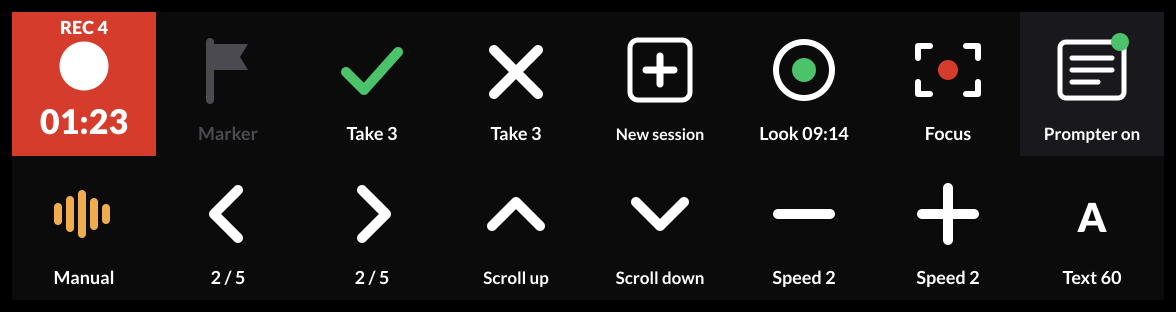
| Stream Deck | A profile of 20 keys. Each key shows its live state: the take timer, the prompter mode, the text size |
| Hotkeys and links | Global hotkeys and pitchee:// links for every command, so any tool can drive Pitchee |
Edit
| Feature | What it does |
|---|---|
| Edit with Claude | 1 click opens Claude Code on the session. It picks the best take per paragraph and cuts inside the pauses |
| Slides in the video | The intro and outro pictures open and close the video. Inserts show when my words name what they show |
| Draft | A fast render to watch in Pitchee before the final |
| Change requests | Ask Claude for changes opens a text box. I type what to change, and Claude applies it and renders a new draft |
| Avatar captions | Captions for the avatar's speech too, not only mine |
| Language flags | A German or French flag in the top-right corner while I or the avatar speak that language |
| English captions | German and French lines get English captions. Claude writes the translations during the edit |
| Blurred addresses | Every web address on screen is blurred, in any browser |
| Blurred menu bar | The macOS menu bar, with my clock and my menu bar apps, is blurred whenever it shows |
Finish
| Feature | What it does |
|---|---|
| Final render | CorridorKey keys me again at full quality. It runs in the background, survives quitting Pitchee, and notifies me at the end |
| Sound | A voice chain on my microphone, the demo's sound under my voice, and the whole track at -14 LUFS |
| Delivery | An MP4 and an SRT file, ready to upload to Kaltura MediaSpace |
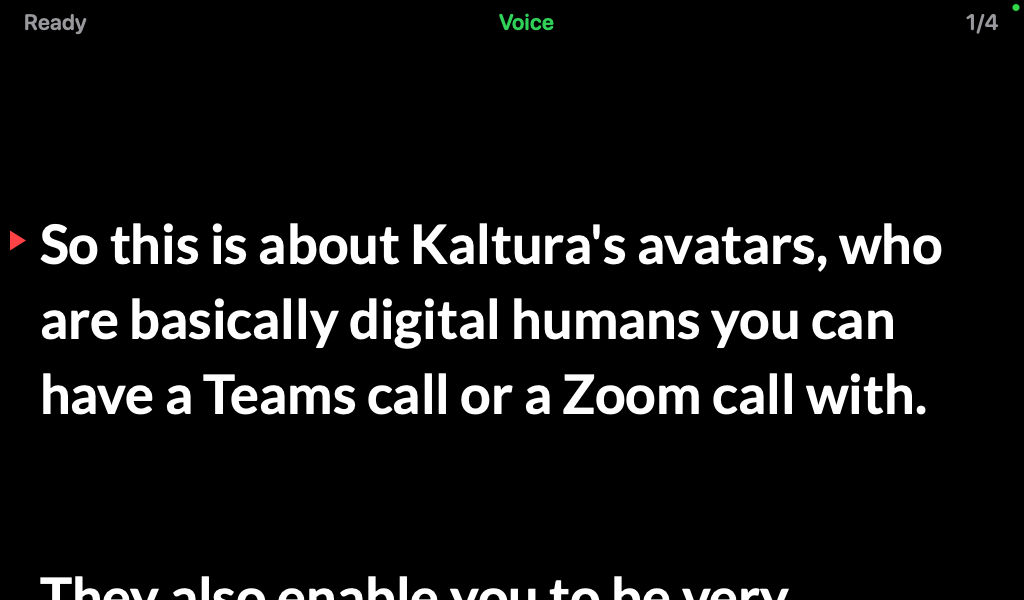
The teleprompter was the part I wanted most. It shows the whole script, not 1 paragraph at a time, and the line I'm reading stays a third of the way down the screen. The words I've already said turn grey. If I paraphrase, add a filler word or restart a sentence, it still finds my place. When I scroll by hand, it waits until I'm back on script, then follows my voice again.
For business people
For a seller, a demo video is a pitch that works while you sleep. The limit was never the idea, it was the hours of editing per video.
- Time: recording stays what it was. The editing drops from hours to a draft in minutes, and the final renders while I do something else.
- Quality: every video gets the same framing, keying, captions and loudness.
- International: a demo in German or French gets flags and English captions, so the same video works for a team across countries.
- Safe to share: my browser's address bar and my menu bar are blurred, so a video shows the demo and nothing else.
- Volume: when a video costs little, I can record one per prospect instead of one per quarter.
For technical people
| Part | Built with |
|---|---|
| App | Swift and SwiftUI on macOS 26. AVFoundation for the camera, ScreenCaptureKit for the screen and its sound |
| Sync | Both recordings are timed on the Mac's host clock, so the edit lines them up without a clap |
| Prompter | On-device speech recognition on the camera audio. A small matcher finds the heard words near the cursor in the script |
| Demo browser | Chrome with a profile of its own, driven over the DevTools protocol on 127.0.0.1 |
| Editor | Python and ffmpeg. whisper.cpp (large-v3-turbo) for word timings, on my voice and on the system audio |
| Languages | whisper detects the language per stretch of speech, then each sentence is checked for German and French |
| Blur | Apple Vision reads the top of the screen recording once per second and finds addresses and the menu bar |
| Keying | A fast green-screen key for drafts, CorridorKey running in MLX on Apple silicon for the final |
| Audio | A voice chain (rumble cut, less boom, light noise reduction, presence, de-esser, compression), then -14 LUFS and a limiter |
| Output | H.264 1080p30, AAC 256 kbit/s, SRT captions of at most 2 lines of 42 characters |
| Stream Deck | A native Swift plugin. The app writes a small status file and the keys redraw themselves from it 4 times a second |
Some numbers on a Mac Studio M1 Ultra:
| Measure | Result |
|---|---|
| Draft of a 47-second video | about 25 s |
| Final keying with CorridorKey | 0.48 s per frame |
| Final of my 1st client demo (5 min 46 s) | 54 min |
| Transcription | about 2 s for a 25 s take |
| Disk space while recording | about 1.75 GB per minute |
| Recorder killed mid-take | both files playable, take recovered |
What I learned building it
- Spec first, then build. Claude Code wrote the spec, then built and tested version 1 in one go. Most of the later changes came from my 1st real recordings, not from the spec.
- Real recordings find the gaps. My 1st client demo had an avatar that answered in French and German, my address bar on screen, and my clock and menu bar apps in every frame. The flags, the English captions and both blurs came from that one recording.
- Hardware fails in ways tests don't show. 2 recording processes on the same audio device froze the sound of the whole Mac, until a restart of Core Audio. Force-quitting the app while it held the camera left the ATEM's USB video stuck until I replugged the cable. Both now have a guard.
- Defaults are opinions. The first version slowly zoomed every slide, and I wanted them still. My voice also sounded boomy until the render got a proper voice chain.
- Specialists for the UI. 2 sub-agents reviewed the app, one for the user experience and one for the visual design. A 3rd one built what they specified. That's how the edit flow, the problem banner and the red recording frame came in.
The name
The first version was called Demoee. I renamed it after the 1st weekend: these videos are sales pitches, and Pitchee says it. The rename touched everything: the app, its links, its Stream Deck plugin, its folders and its Claude Code skill.
The icon follows my NicAI design rules: the full hexagon logo, unchanged, with a clapperboard band above it and the name below, set like the one in my Notee icon.
Further reading
- The era of personal software is here: why I build my own apps now
- Notee: my own Markdown editor for macOS: my own Markdown editor, built the same way
- Dictee: my own local dictation app: my local dictation app
The open-source parts inside Pitchee:
