

Notee is my own Markdown editor for macOS. It replaces VS Code for my notes, and only for my notes. It keeps the VS Code shortcuts my fingers know, opens each workspace in its own colour-coded window, and does it with a fraction of the memory.
The name follows the -ee family of my other tools (Dictee: my own local dictation app, Stickee: sticky notes that go full screen on every monitor). The story of why I built it is in The era of personal software is here. This note is the what and the how.
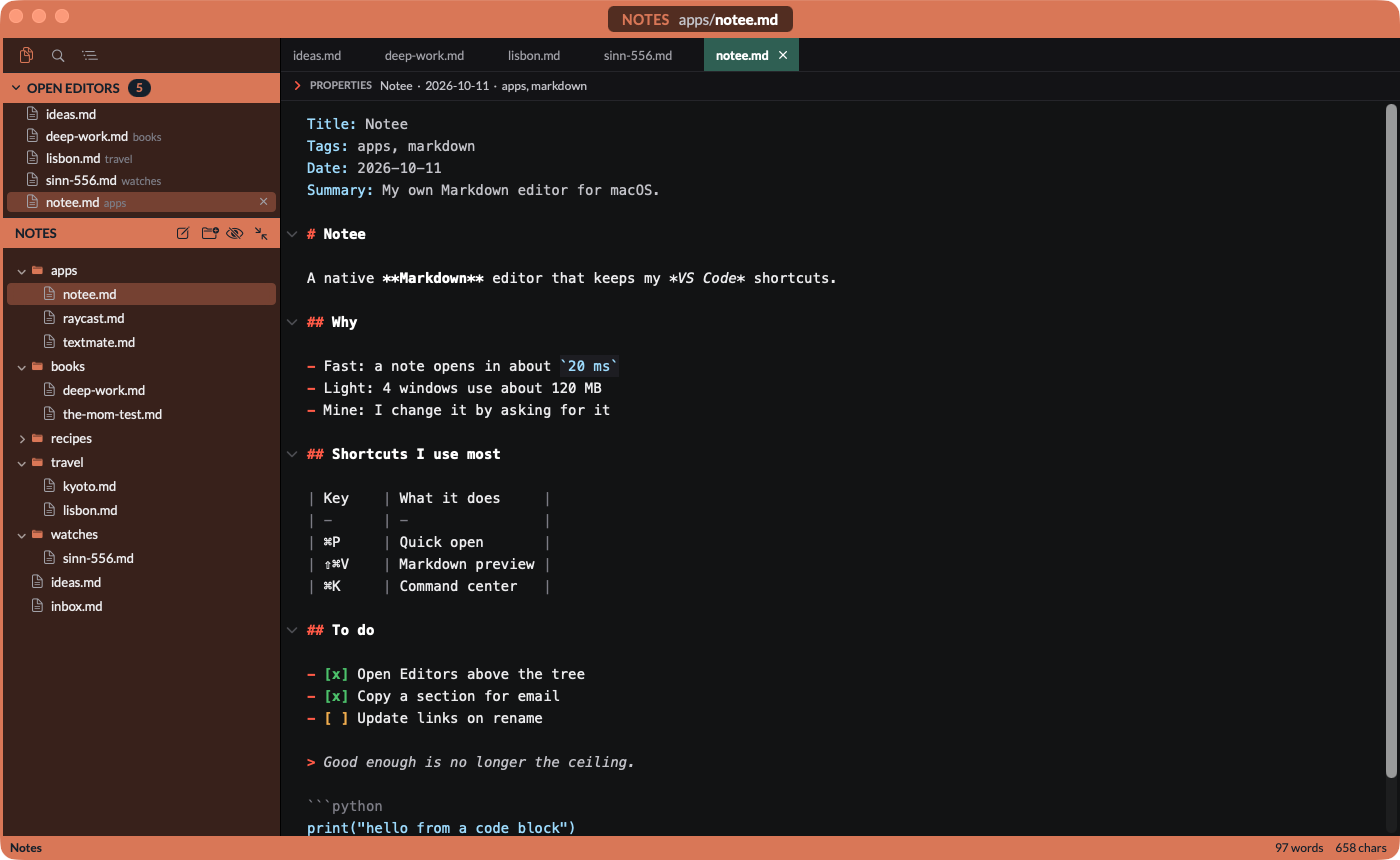
Why I built it
My notes moved to Markdown about 4 years ago, and I've edited them in VS Code ever since. The shortcuts, the snippets and the file navigation are muscle memory now. But VS Code is a coding environment. On the day I measured it, it used 4,013 MB across 31 processes.
The alternatives didn't fit either:
- Obsidian: I recommend it to non-technical people, but its UI and its shortcuts don't fit how I work.
- CotEditor: fast and native, but too basic for my workflows.
What I wanted: a Markdown app that I control and change whenever I need, with my VS Code keys and my colour-coded workspaces.
What it does
| Feature | How it works |
|---|---|
| Workspace windows | 1 window per folder, each in its own colour, all restored at launch. ⌘` cycles them |
| VS Code keys | My shortcuts, read from a VS Code-format keybindings.json that reloads live |
| ⌘K command center | Every shortcut in 1 searchable list, grouped like the menu bar |
| Quick open | ⌘P lists the notes I touched last, newest first, before I type anything |
| Open Editors | The open tabs above the file tree, with a count. The list pushes the tree down |
| Find in files | ripgrep under the hood, results stream in as they're found |
| Editor | Multi-cursor, line moves, folding, regex find, my VS Code snippets with tab stops |
| Properties panel | The YAML or Pelican front matter as editable fields above the note |
| Markdown preview | ⇧⌘V, side by side, scroll-synced. Notes for this site render with the site's own CSS |
| Copy for email | A copy icon next to each heading copies that section, formatted for Outlook |
| Auto-save and safety | Saves after 1.5 s, warns if the file changed on disk, shows a diff before overwriting |
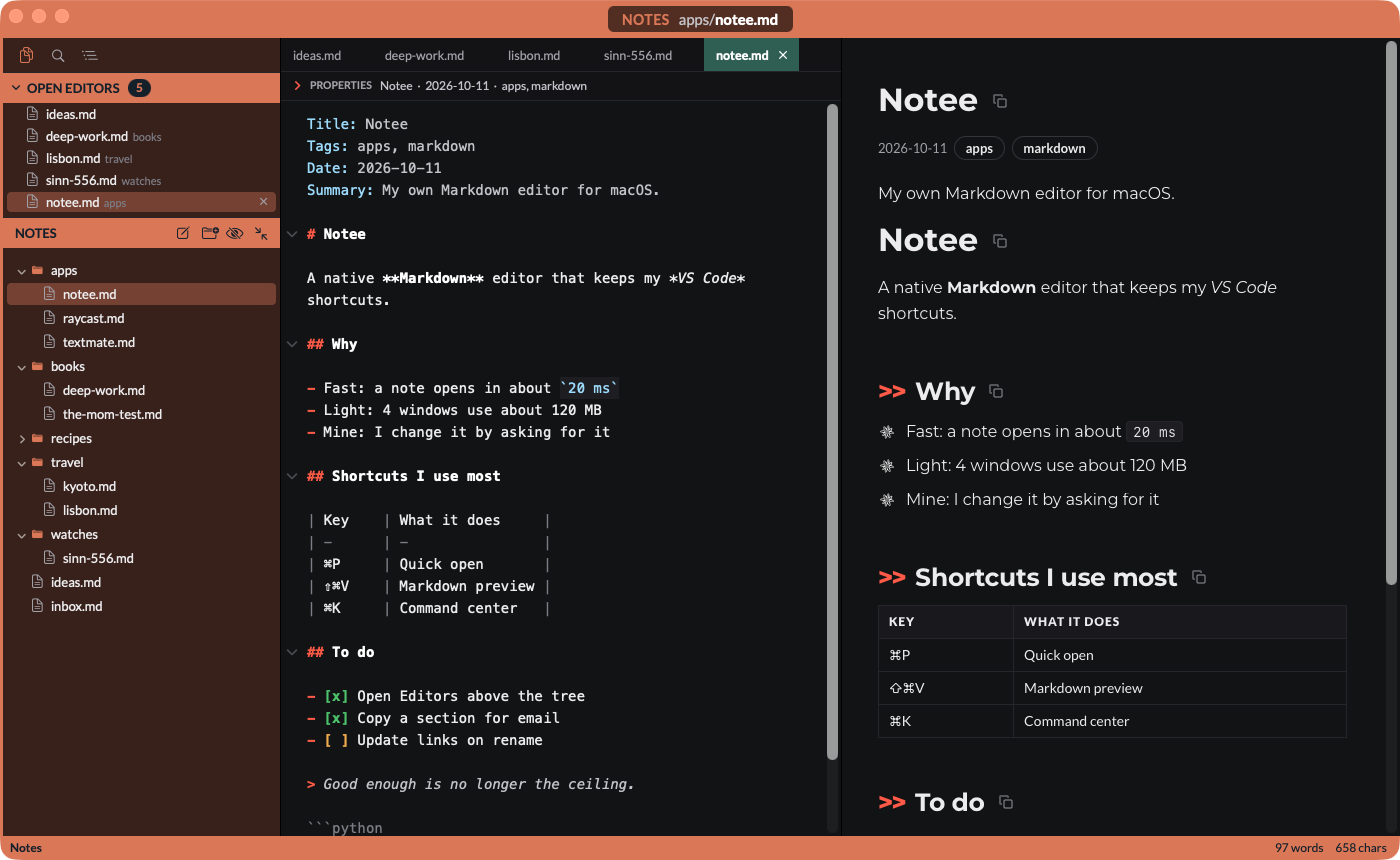
A few details I care about:
- Every file opened in Finder lands in the right window. Notee reads the path and routes the note to the matching workspace.
- Copy for email keeps the blank lines. Outlook drops CSS margins, so a normal copy from a web view pasted as 1 block of text. Notee writes its own HTML with inline styles and real empty lines.
- The sidebar follows the zoom. ⌘+ and ⌘- scale the editor, the preview and the sidebar lists together. ⌘0 resets.
Speed and memory
Speed came first, memory second. Every feature that costs either loads only when I use it. The QA script measured these on 10th October:
| Measure | Budget | Measured |
|---|---|---|
| Launch to the first window | < 400 ms | 204 ms |
| Open a typical note | < 30 ms | 20 ms |
| Open my largest note (12.8 MB) | < 1 s | 360 ms |
| Keystroke to screen | < 10 ms | 0.8 ms (8 ms in the 12.8 MB note) |
| Quick open over 70,344 files | < 16 ms | 7 ms |
| Find in files, notes folder | < 2 s | 0.15 s |
| 4 workspace windows, idle | < 250 MB | 119 MB |
119 MB against VS Code's 4,013 MB isn't a fair fight: that VS Code figure includes Python tooling, Claude Code and terminals. It's still the number Notee replaces.
For business people
Notee is a tool built for 1 user. It does what I need for notes and nothing else, so it stays fast and small.
The value isn't the editor itself. It's that the editor changes when I want it to. When something bothers me, I tell Claude Code, and a few minutes later the change is built, tested and installed. In 2 days of use I sent 16 prompts of changes and questions, from a command center to a copy button for Outlook.
The trade-off: I maintain it. It runs on my Mac only, and there's no support team behind it.
For technical people
Stack
| Layer | Choice | Why |
|---|---|---|
| Language and UI | Swift 6 and AppKit | Native, compiled, the lightest UI layer on macOS |
| Text engine | NSTextView on TextKit 1 |
Proven on very large files. 1 buffer feeds many views |
| File tree | View-based NSOutlineView, lazy children |
Loads a folder only when it opens |
| Syntax colours | Own incremental tokenizer, visible range only | No parser dependency, tiny cost per keystroke |
| Markdown to HTML | swift-cmark, Apple's GFM fork of cmark | Renders a long note in under 1 ms |
| Preview | 1 WKWebView per window, created on demand |
WebKit memory only while the preview is open |
| Find in files | Bundled ripgrep, streamed JSON | No index in memory when idle |
| File watching | 1 FSEvents stream per workspace | Kernel-level, near zero cost |
| Config | Plain JSON in ~/.notee/, reloaded live |
I, or Claude, can edit it |
| Shared logic | Swift package NoteeCore |
Ready for an iOS app later |
I rejected Electron and Tauri (the reason VS Code is heavy), CodeMirror in a web view (each web view starts its own WebKit process, about 50-100 MB) and TextKit 2 (reported scroll jumps on large files).
The code: about 10,100 lines of Swift, 240 lines of JavaScript for the preview, 37 unit tests and an end-to-end QA script with 129 checks.
How the QA works
The QA script never touches my real notes. It builds copies in a temp folder, launches Notee in the background with a JSON script of steps (open, type, press keys, take a screenshot, record the state), and checks the report. A read-only flag blocks every write for runs against the real folders.
Gotchas I hit
- TextKit 1 over TextKit 2. TextKit 1 lets the same note, open in 2 windows, share 1 buffer instead of 2 copies.
- Symlinked paths. macOS reports
/private/var/...for a path that also reads/var/.... Renames, moves and file events only match after both go throughrealpath. - Ad hoc code signing. An ad hoc signature changes with every build, so macOS treated each build as a new app and asked again for permissions it already had. Signing with a Developer ID fixed it.
- Highlighting during load. Colouring a 12.8 MB note while it loaded took 4 s. Notee now skips it during load and colours only what's on screen.
- Background reads of the text. Reading the live text storage while I typed crashed Notee. Background work now reads a copy.
- A view controller as the window content made the window shrink to its smallest size. Notee lays out the window by hand.
How I got there: 21 prompts
I built Notee in 1 session with Claude Code, from Friday evening to Sunday evening. I wrote 21 prompts.
| Phase | Prompts | What happened |
|---|---|---|
| Brief and spec | 2 | Claude read my VS Code setup and asked 24 questions. I answered in 1 prompt |
| Build | 1 | "Build it and don't stop until you have a working, QA'ed version" |
| Status checks | 2 | "status?" |
| Changes from use | 16 | Command center, recent notes in ⌘P, copy for email, Open Editors, fixes |
What worked well:
- Spec before code. The first prompt said "don't build anything yet". The questions surfaced choices I hadn't thought about: auto-save, conflicts with Dropbox and Claude editing the same file, which Markdown rules apply where.
- 2 goals, in order. Speed first, memory second. Every design choice in the spec traces back to them.
- Safety as a hard rule. My notes must never be damaged. A separate review of the save paths found 9 data-safety issues before I used the app, including a properties field that could write into the wrong note.
- Use it, then ask. Most of the 16 changes came from friction in daily use, not from the spec.
Further reading
- The era of personal software is here: why I build my own apps now
- Dictee: my own local dictation app: my local dictation app, built the same way
- VS Code, the editor Notee replaces for notes
The open-source parts inside Notee:
