

Lightee is the app that runs every light at my desk. It switches my 2 Elgato Key Lights, my Philips Hue lights and the screen warmth (Night Shift) from 1 menu bar panel, 1 hotkey, a Stream Deck key or 1 command: lightee studio.
It replaces 2 apps: Elgato Control Center for the Key Lights, and Shifty for Night Shift. It also replaces a row of single-purpose Stream Deck keys from 3 different plugins and scripts.
I built it with Claude Code. Version 1.0 shipped on 27th October 2026. The app is 1.9 MB.
Why I replaced Control Center and Shifty
My lights were spread over 4 tools:
- Elgato Control Center ran at login all day for 2 lights. Its own logs showed it lost contact with a light about 54 times a day, and it said nothing.
- Stream Deck keys came from the Control Center plugin, the Hue plugin and a shell script. Each key did 1 thing to 1 light. My Stream Deck XL is full, so there was no room for more.
- Shifty handled Night Shift. Of its features I used the switch and the warmth slider. Its rules per app and per website: 0 saved.
- Home Assistant knows every light, but every command through it adds a hop.
What I wanted was presets: "studio" sets both Key Lights to my tuned camera level and turns off the desk lamp, in 1 press. No app I had did that across Elgato and Hue. And no app gave my agents a way to switch a light.
What Lightee does
Presets in 1 file
Presets live in ~/.lightee/presets.jsonc. A preset can set lights and groups, recall a Hue scene by room and name, turn on a Home Assistant scene, set Night Shift and run a script after the lights answer. All the steps run in parallel. Lightee reloads the file as I save it, and a typo shows a card with the line and column. Dummy example:
{
  "presets": [
    {"id": "studio", "title": "Studio", "set": {"Key Lights": {"on": true, "brightness": "tuned", "kelvin": 5600}, "Desk lamp": {"on": false}}, "cameraLook": true},
    {"id": "focus", "title": "Focus", "set": {"Key Lights": {"on": false}, "Office": {"on": true, "brightness": 100, "kelvin": 4300}}},
    {"id": "evening", "title": "Evening", "screen": {"nightShift": true, "warmth": 70}}
  ]
}
I have 7 presets: Studio, Meeting, Busy, Focus, Off, After call and All off.
- Studio turns the Key Lights on at once, at the level my camera setup tuned, then runs my camera look script in the background. That script sets the camera and the lights for video, see Webcamee: my own green screen virtual camera. It refuses while Pitchee records a take, and the Studio key shows the refusal.
- Busy recalls my red Busy scene in Hue, downstairs.
- All off turns off every light in the house. It is the 1 destructive action, so everything except a click in the panel asks for a
yes. - A Key Light ceiling stops the Key Lights at 60%. Full Key Lights tire my eyes. ⌥ in the panel passes the ceiling.
The panel
⌃⌥⌘L or a click on the menu bar icon opens the panel: preset buttons with their number, 1 row per light with a switch, brightness and temperature, and a Night Shift row. The active preset's button is red. The panel is keyboard first:
| Key | Action |
|---|---|
| 1 to 9 | Run the preset with that number |
| ↑ ↓ | Pick a light or the Night Shift row |
| Space | Toggle the picked light or Night Shift |
| ← → | Brightness -5 / +5, or Night Shift warmth |
| ⇧← ⇧→ | Temperature -250 K / +250 K |
| Letters | Filter the presets, ↩ runs the 1st match |
| ⌘Z | Undo, 20 steps |
| Esc | Clear the filter, then close |
The panel never takes the focus from the app I work in. It never opens on my prompter display or the small display in front of my camera.
Undo covers everything: a light, a preset, a Hue scene, All off and Night Shift. Before each action, Lightee saves the state of every light the action can change.
A light that doesn't answer gets a name
Control Center lost lights in silence. Lightee retries once after 400 ms, also by the light's network name. Then a card names the light and its fix, for example "Power-cycle the right Key Light: unplug USB-C for 10 s". A light that misses 2 polls in a row turns red in the panel and puts a red dot on the menu bar icon.
Night Shift
| Shifty | Lightee |
|---|---|
| Night Shift on and off | Panel switch, Space, lightee screen toggle, Stream Deck |
| Colour temperature slider | Warmth slider 0 to 100% |
| Disable for an hour | Off 1 h |
| Disable until tomorrow | Until tomorrow |
| Quick toggle on the icon | ⌥-click on the menu bar icon |
| Rules per app and website | Dropped: 0 rules saved |
| True Tone | Dropped: my Dell displays don't support it |
I keep Night Shift on all the time. A Night Shift turned on by hand ends at the next sunrise, so Lightee sets the macOS schedule to all day once, 04:00 to 03:59. From then on macOS keeps Night Shift on by itself, with or without Lightee. An "off" by hand lasts until 04:00.
28 Oct 2026 On day 2, Night Shift went off each time I clicked outside the panel. The system log showed why: Shifty, still running, reset Night Shift to its own state at every app switch. Lightee wrote "on", Shifty wrote "off" at the next click. Shifty is gone now, and Lightee lists it as a problem if it ever runs again.
The Stream Deck plugin
Lightee has its own Stream Deck plugin, native Swift, no Node. 3 key types:
| Key | A press | The face shows |
|---|---|---|
| Preset | Runs the preset | The title, red while active, "CAM" while camera look runs |
| Light | Toggles a light or group | A bulb, the name, on or off and the brightness |
| Night Shift | Toggles Night Shift | A moon, on or off and the warmth |
The faces follow the live state 4 times a second, so a light switched from the Hue app or Home Assistant shows on the key too. A press posts a Darwin notification, which reaches Lightee in about 4 ms. With Lightee off, a press reaches the lights directly and the face turns grey.
The plugin is built. A script installs it and swaps my 11 old light keys in place, once I give the go. It backs up the Stream Deck profiles first and refuses a key that isn't the one it expects.
Lightee vs the old apps
| Lightee | Control Center and Shifty |
|---|---|
| 1 app for Key Lights, Hue and Night Shift | 2 apps, plus Stream Deck plugins for Hue |
| Presets across brands, in 1 file | No presets across Elgato and Hue |
| Names a light that doesn't answer | Control Center: about 54 lost contacts a day, silent |
| Undo, 20 steps | No undo |
| CLI with JSON for agents | No CLI |
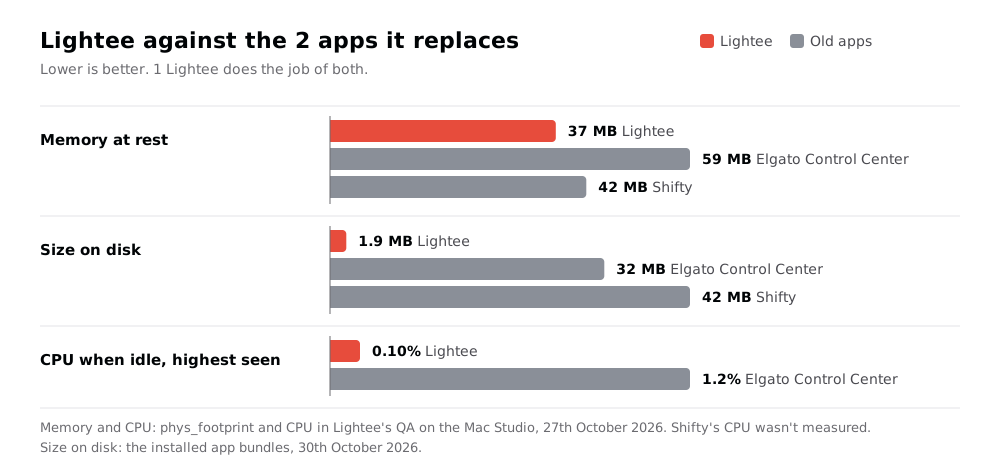
| 37 MB of memory | 59 MB + 42 MB |
| 1.9 MB on disk | 32 MB + 42 MB |
| My own app, macOS only | Free. Shifty is open source (GPL-3.0) |
| No Hue colour picker, no scene browser | The Hue app still does those |
Speed and footprint
The goal was a light change in under 200 ms from a key press, and a whole preset in under 300 ms. The time should go into the network, never into Lightee. Measured by QA on my Mac Studio, against fake lights, on 27th October 2026:
| Step | Budget | Measured |
|---|---|---|
| Stream Deck press to command sent | < 15 ms | 1.2 ms p50, 3.0 ms max |
| Press to light change, 1 light | < 200 ms | About 55 ms, 144 ms confirmed |
| Whole preset, 5 lights | < 300 ms | 4.2 ms in Lightee, plus the network |
lightee <preset> --json, confirmed |
< 250 ms | 96 to 99 ms |
| Panel on screen | < 30 ms | 1.2 ms p50 |
| Cold launch to ready | < 400 ms | 285 ms |
| Memory at rest | < 40 MB | 37 MB |
| CPU when idle | ~ 0% | 0.03% to 0.10% |
The network time comes from a spike the agent ran before any app code: it switched the desk lamp 10 times, directly and through Home Assistant.
| Path | Request p50 | Confirmed p50 | Confirmed max |
|---|---|---|---|
| Direct to the Hue bridge | 40 ms | 48 ms | 144 ms |
| Through Home Assistant | 60 ms | 118 ms | 136 ms |
Direct won, so Lightee talks to the lights itself. Home Assistant stays an optional preset step, never on the hot path, and Lightee keeps working while Home Assistant restarts.
How it's built
Stack
- Swift 6.3 and AppKit for the menu bar app, frame-based layout, the NicAI Design look in light and dark.
LighteeCore, a Swift package with no AppKit: settings, presets, the planner, the clients and undo. Unit tested.- Key Lights over their local HTTP API, by IP on warm connections: 15 ms, against 75 ms through the
.localname. The name is only the fallback. - Hue v1 HTTP for commands, and the v2 eventstream for live state, so a change from the Hue app shows at once.
- Night Shift through CoreBrightness, the private framework Shifty and macOS itself use. If a macOS update removes it, the Night Shift row hides and the rest works.
- Darwin notifications and a
lightee://URL scheme for the Stream Deck, Hammerspoon and the CLI. - Carbon hotkeys, which need no Accessibility permission. Lightee asks for Local Network only.
- A Python CLI, standard library only.
- No dependencies. The skeleton, the JSONC reader and the Stream Deck plugin are copied from my other apps (Clipee, Lastee, Recordee), not shared.
Rules that keep it fast
- The main thread never touches the network or the disk. Each device has its own queue.
- A key press never waits for a read. Lightee keeps the last known state of every light and sends the command at once.
- Lights switch in parallel. A preset never waits for 1 light before it starts the next.
- Hue fades take 100 ms, not the bridge's 400 ms default.
- A slider sends at most 1 command per light every 80 ms. The last value always goes out.
- Lightee never changes a light at launch, on a reload or on a read. Only an action does.
A watchdog checks the main thread every 100 ms. A stall of 3 s quits the app, and launchd starts it again.
The agent interface
Every command takes --json, so NicAI can switch lights inside a task (see What is NicAI). With the app running, a command goes through the app and is confirmed through its state file. Without it, the CLI reaches the lights itself.
lightee status --json            # every light, active preset, Night Shift, problems
lightee studio --json            # run a preset; --dry-run shows the plan
lightee desk off --json          # 1 light or group: on, off, toggle, --brightness, --kelvin
lightee screen off --for 60      # Night Shift off for 1 hour
lightee undo --json
lightee all off --yes --json     # destructive: every light in the house
Exit codes: 1 error, 2 usage, 3 refused (All off without --yes), 4 the app isn't running.
How it was built
Lightee followed my appee process for apps:
- Usage review: Control Center's logs, the Stream Deck profiles, the Hue bridge and Home Assistant.
- Questions: 32, each with a recommended answer. I accepted every recommendation on 27th October 2026 and moved Night Shift into version 1, which made Shifty the 2nd app to go.
- Spike and spec: the latency spike first, then the budgets and rules.
- Build and QA: 24 unit tests and 154 end-to-end checks in 9 suites. QA runs the real app against fake Key Lights, a fake Hue bridge, a fake Home Assistant and a fake Night Shift. It never touches a real light.
- Review: an independent review agent read the risky paths and found 14 defects, all fixed the same day. 1 example: a CLI request left behind by a crash could replay All off hours later. Now a request older than 5 s is deleted, never run.
Next
Version 1 runs next to Control Center for 1 week before I turn Control Center off. Later versions add an endpoint for my HA Voice and the iPhone, and maybe presets by time of day.
Further reading
The apps Lightee replaces:

The Hue API behind the desk lights:

The tool I built it with:

- see Webcamee: my own green screen virtual camera, where the camera look sets the camera and the lights for video
- see Recordee: my own screen and camera recorder, after 10 years of OBS, whose Stream Deck plugin Lightee's plugin started from
- see Home Assistant, which knows every light but stays off the hot path
- see Hammerspoon - macOS automation in Lua, which can post the same Darwin notifications
- All my apps: see My apps: everything I built for myself