

Launchee is the launcher behind ⌘Space on my Mac. I type a few letters and press ↩ to start an app, run 1 of my commands, open a URL or a folder, or find a file by type. It replaces Alfred 5, which I used daily since 2020. For my Alfred setup, see Alfred.
I built it with Claude Code on 24th October 2026, and switched Alfred off the same evening. Alfred's other jobs went to my other apps:
- the clipboard history to Clipee, see Clipee: my own clipboard history for macOS
- the snippets to Snippee, see Snippee: my own text expander, replacing Espanso
- the play and pause key to my music app Hifee, see Hifee: my own music player for the Mac
What's left is 1 bar, my commands and a runner that can't freeze.
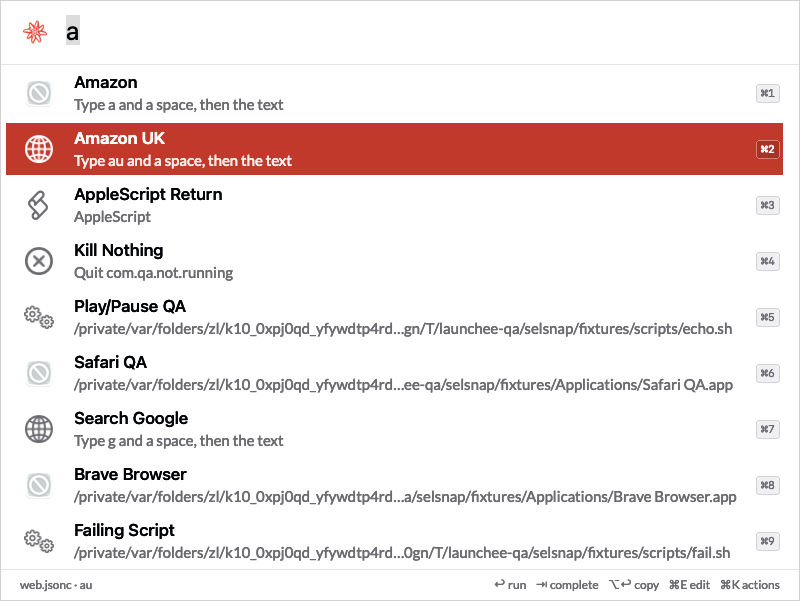
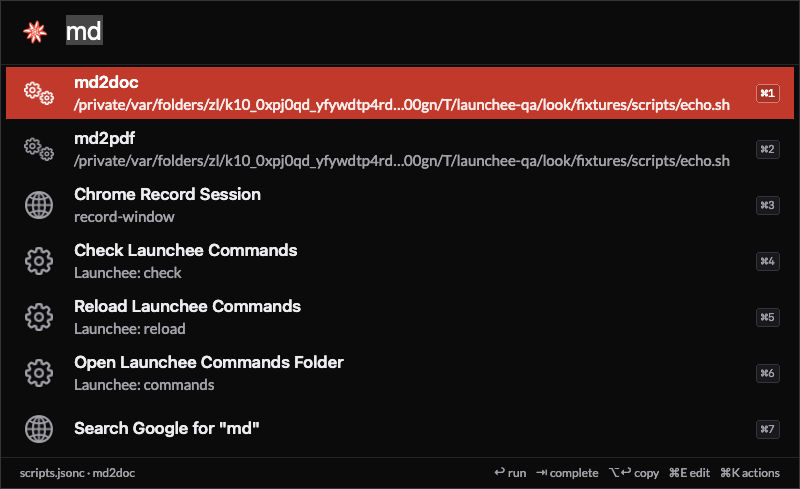
The screenshots and code examples in this note use dummy data: the commands, apps and paths come from Launchee's QA tests or are made up for the example. None of it is my real setup.
Why I replaced Alfred
It froze
On 19th October 2026, Alfred stopped answering. Its main thread was stuck in a macOS call that opens a URL, waiting for 1 action of a file search workflow. The whole bar was dead, and with it my music control, my clipboard history and every keyword. That's about 55 actions a day, gone.
That's a design problem, not a bug: Alfred runs some actions on the same thread that draws the bar, with no deadline. 1 slow volume or 1 stuck app is enough.
The usage review
Before writing a line of code, Claude read 30 days of Alfred's own usage database:
| What I found | Value |
|---|---|
| Actions in 30 days | 1,678, about 55 a day, peaks at 09:00-12:00 and 15:00 |
| App launches | 762, across 74 apps |
| Letters typed to start an app | 3.6 on average |
| Music control | 443 actions |
| Workflows installed | 162: 141 of mine, 21 from others |
| Workflows used in 30 days | 26 |
| Memory | 49 MB footprint, 137 MB resident after 12 hours |
| App size | 18 MB |
4 jobs were 84% of the use: start an app, control my music, and 2 of my own commands. Everything else was a long tail of 1 to 48 uses. So version 1 had to make those 4 work from day 1, with the same letters, and leave the rest for later.
Commands an agent can edit
Alfred stores a workflow as a graph of objects in a plist, built in its GUI. Claude can read that, but editing it is fragile. I wanted every command to be a few lines of text that Claude and I edit, check and diff.
Why not something that already exists
| Option | For | Against |
|---|---|---|
| A native app (the pick) | Its own process, my budgets | About 2 days of build |
| Raycast | Ready today | An account, network calls, its own extension format |
| Spotlight in macOS 26 | Built in, has quick keys and actions | 1 Shortcut per command, no import of Alfred's learning, no text commands |
Hammerspoon hs.chooser |
No new app | Same process as my keyboard taps: 1 hang kills every key |
What it does
The bar
⌘Space opens the bar on the screen I work on, with the query field at 25% of the screen's height. The app I was in stays in front. The bar is drawn once, invisible, at launch, so the 1st press is as fast as the next ones. It never opens on the screen I share in calls.
Ranking that remembers me
Results rank in 5 tiers:
- Latched: these letters picked this item 3 times or more, and nothing else. Always first.
- Exact keyword.
- Learned: these letters picked this item before, weighted by count and halved every 30 days.
- Keyword prefix:
md2findsmd2docandmd2pdf. - Fuzzy: titles, app names, aliases and keywords.
A Google search always closes the list. The import carried over Alfred's learned typing, so bra was Brave from the first press. Claude turned every pair that Alfred had logged 3 times or more into a test: 79 of 79 rank first in Launchee.
Commands are plain files
Each topic gets 1 JSONC file in ~/.launchee/commands/. Launchee reloads a changed file within 1 s. A file with an error keeps its last good version loaded, and the menu bar icon shows a red dot.
{"commands": [
  {"id": "amazon", "title": "Amazon", "keyword": "a", "arg": "required", "url": "https://www.amazon.de/s?k={query}"},
  {"id": "todo", "title": "To Do", "keyword": "todo", "open": "~/todo.md"},
  {"id": "report", "title": "Weekly report", "keyword": "wr", "run": ["~/py/report.py"], "terminal": true},
  {"id": "pdf", "title": "Find PDF files", "keyword": "pdf", "files": {"types": ["com.adobe.pdf"], "folders": ["~/Documents"]}}
]}
| Action | Does |
|---|---|
url |
Opens a URL, with the query percent-encoded, in the browser I name |
open |
Opens a file, folder or app |
run |
Runs a program with arguments, in the background or in a terminal |
osascript |
Runs an AppleScript |
quit |
Quits an app |
copy |
Copies a template with the query, the clipboard or today's date |
files |
A file filter: file types plus folders |
The folder is its own git repository, and launchee push backs it up. An app can write its own pack: Hifee writes the file with its music commands, so the launcher never needs to know about music.
launchee check runs after every edit. It reports broken JSONC, duplicate ids, keywords and hotkeys, commands with 0 or 2 actions, missing scripts, and warns on URLs that carry token=, password= or key=.
Paths, URLs and file filters
- A path:
~/or/lists the folder's entries, andTabcompletes a name. A folder opens in Filee. - A URL: "Open
" comes first. - A file filter:
pdf manualfinds PDFs whose name holds "manual". 14 filters, for PDFs, Office files, images, videos and screenshots, each limited to its own folders. Files that Lastee saw in the last 30 days come first.
Keys
| Key | Does |
|---|---|
↩ |
Runs the selected row |
⌘1-⌘9 |
Runs row 1 to 9, shown as key caps on the rows |
Tab |
Completes the keyword, or the folder name |
⌘↩ |
The alternative: reveal the file, or the command's 2nd action |
⌥↩ |
Copies the row's target: URL, path or command line |
⌘Y |
Quick Look |
⌘K |
The selected row's actions |
⌘E |
Opens the command's pack file in my editor |
⌘= ⌘- ⌘0 |
Zoom, which persists |
Esc |
Clears the query, then closes |
The numbers
| Metric | Launchee, measured | Alfred |
|---|---|---|
| Hotkey to the bar | About 1 ms (in-app) | Not measured |
| Keystroke ranking, 800 items, p95 | 3.5 to 4.3 ms | Not measured |
| File filter keystroke, 20,000 files, p95 | 0.2 ms | Not measured |
| Main-thread work to start an action | 0.4 ms | Froze on 19 Oct |
| Cold launch to a ready bar | 120 to 240 ms | Not measured |
| Memory, idle | 23 MB | 49 MB |
| Memory, 211 apps after 79 searches | 37 MB | - |
| CPU at idle | 0.0% | 0% |
| App size | 1.5 MB | 18 MB |
How it works
The no-hang rules
These rules are binding. A change that breaks one needs a measured reason.
- The main thread never waits. It reads keys, ranks lists in memory and draws. It never reads a file, waits for a process, sends an Apple Event, runs Spotlight or asks LaunchServices for anything.
- Hide first, act second.
↩hides the bar, records the use, and hands the action to a queue. - Every action has a deadline. 10 s to open a URL or file, 15 s for AppleScript, 120 s for a background script, 1 s for a folder listing. Then SIGTERM, then SIGKILL 2 s later, and a notice.
- Every open is a child process. URLs, files and apps open through
/usr/bin/open. A stuck LaunchServices call hangs the child, never Launchee. This is the exact rule that would have saved Alfred on 19th October. - A watchdog guards the main thread. A stall over 250 ms goes to a log. A stall of 3 s quits the app, and launchd starts it again in about 1 s.
- Late results die. Each keystroke starts a new generation, and an answer for an older one is dropped.
File filters without Spotlight in the keystroke
A Spotlight query over my main documents folder takes 0.75 to 1.25 s, whatever the query. That time sits in Apple's code. So the 1st use of a filter runs 1 mdfind in a child process (a "Searching…" row for about 1 s) and keeps the path and date of each file in memory. Every keystroke after that filters the cache in under 1 ms. A filter with more than 25,000 files keeps no cache and asks Spotlight per query instead. A cache unused for 10 minutes goes: I use the filters a few times a month.
The runner
The runner keeps the rules of my old Alfred runner script, so every converted script behaves as before. A Python script runs with the nearest virtualenv. There is no shell: the query is 1 argument, never split. terminal: true opens the command in a new Ghostty window. Up to 4 background runs at once, and a log with the exit code, duration and the last 20 lines of output.
Stack
- Swift and AppKit, frame-based layout, no third-party code. About 5,000 lines of Swift, with the ranking, packs and file matching in a
LauncheeCorepackage that runs under unit tests. - A Carbon hotkey for
⌘Space: no Accessibility permission, no event tap. - SQLite for the learning and a silent usage log.
- A Python CLI and an Alfred converter, standard library only.
- Code copied, not shared from Clipee (watchdog, runner, panel, notice card) and Lastee (the fuzzy matcher).
Memory lessons
- App icons from the app's own
.icnsfile, at 72 pixels. The usual macOS call keeps large images and system icon data: about 20 MB more with 200 apps. - Read
Info.plistdirectly. Opening an app as aBundlekeeps every bundle in memory for the life of the process.
Agent interface
A CLI wraps the app, with --json on every command, so my NicAI agents can use it:
launchee status --json                 # running, version, commands and apps loaded, hotkeys held
launchee list -n 50 --json             # command ids, keywords, packs, uses in 30 days
launchee run amazon "usb c hub" --json # run 1 command with a query, confirmed by the app
launchee check --json                  # pack errors and warnings
launchee usage --days 7 -n 10 --json   # the most used items
The CLI never prints the action log or what I typed: ids, keywords and counts only.
How I built it
The first draft spec was written on the day of the freeze, 19th October. The build day was 24th October 2026:
- Usage review and questions. 38 decisions in 2 rounds. The biggest call: convert only the 26 workflows I used in 30 days. The other 116 of mine and the 21 third-party ones went to a review list, each with what it does, so I can pick the ones worth rewriting.
- Spec and build. 8 commits between 17:17 and 20:02.
- QA. 19 unit tests and 92 end-to-end checks in 6 suites. QA runs in a scratch folder with a fake
openand a fake Spotlight, so it never touches my clipboard, files or hotkeys. 1 suite tests the hangs on purpose: an opener that never returns, a script that sleeps 600 s, a listing that blocks, and a 4 s main-thread stall that the watchdog must end. - Independent review. A separate agent found 13 issues, among them a reload loop, a watchdog that could fire after the Mac woke from sleep, and stale rows. All fixed.
- Switch-over. The converter read Alfred's files read-only and wrote the packs, then a script quit Alfred and started Launchee. To go back, I quit Launchee and open Alfred: its files are untouched.
On day 2, the selected row became a solid red block with white text, and the bar lost its hover state: only the keyboard selection is drawn.
What's next
The usage log runs silently. After 30 days, it shows which Google fallbacks repeat, which is where a missing command shows up. Version 2, ranked by value:
- My picks from the review list, most of them 1 line in a pack.
- List commands: a script that prints Alfred's Script Filter JSON shows its items as rows.
- A terminal line:
>runs the rest of the line in Ghostty. - Open with on a file row.
- A calculator, units, dates and time zones, offline.
Further reading
The app Launchee replaces:

The tool I built it with:

- Alfred: my Alfred setup from 2020 to 2026.
- Clipee: my own clipboard history for macOS: the clipboard history that left Alfred first.
- Snippee: my own text expander, replacing Espanso: where my snippets went.
- Lastee: my own recent-files app for macOS: the recent files that rank first in the file filters.
- The era of personal software is here: why I now build the apps I use.
- All my apps: see My apps: everything I built for myself