
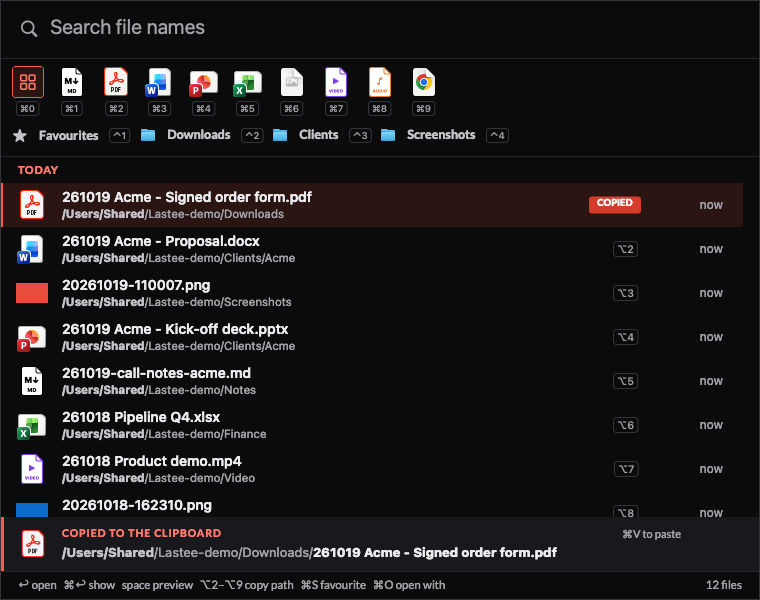
Lastee is the recent-files app I now use on my Mac. It replaces Trickster, which I used since 2021. I press ⌥⌘T, and 2 things happen in the same press: the path of the file I just saved goes to the clipboard, and the list of my recent files opens in the middle of the screen I am looking at.
I built it in 1 evening with Claude Code: a round of 29 questions, a spec, then the app, the tests and the QA. Trickster was retired the same day, on 19th October 2026. The name fits the -ee family of my other tools, next to Filee: my own file manager for macOS and Stickee: sticky notes that go full screen on every monitor.
Why I replaced Trickster
Trickster did 1 job well for years: a hotkey, a list of recent files, drag a file out. Then my Mac changed. AI agents now write files all day, and Trickster wasn't built for that.
Agents drowned the list
I analysed Trickster's own database on 19th October 2026:
| What I found | Value |
|---|---|
| Files in the list | 4,934, almost all from the last 4 days |
| New files per day | 1,200 to 1,900 |
| Written while Ghostty was in front | 53%: Claude Code agents, not me |
| Noise by type | 23%: json, log, gpx, pyc, database journals |
| Noise by folder | 20%: data/, build/, qa/, caches |
| History I could reach | About 4 days, although the setting said 31 |
The files I actually wanted, a PDF I downloaded or a screenshot I took, sat between 100s of JSON files that an agent wrote a minute ago.
Filters I couldn't make my own
- Icons came from a fixed set of 42 inside the app. None was a PDF or PowerPoint icon. Adding my own would break the code signature, and every Setapp update would overwrite it. I emailed a feature request on 2nd October 2026 and got no reply.
- "Which app wrote this?" was a guess. Trickster credits the app that was in front at the time. It credited Signal with 526 Markdown files. So its "Active Application" filter was no help.
The sandbox got in the way
Trickster is sandboxed, so it keeps a security bookmark for each watched folder. My scan share was bookmarked under its Bonjour name, but my scanner workflow mounts it by IP address. The files showed in the list, but Quick Look and drag and drop failed for every scan.
2 tools for 1 move
My most common move is "copy the path of the file I just saved and paste it somewhere": a screenshot into a note, a PDF into a script, a deck into an email. With Trickster that took an Alfred workflow (⌥L) on top of Trickster, plus a 2nd workflow to copy the path. Lastee does it in the hotkey itself.
What Lastee does differently
| Need | Trickster | Lastee |
|---|---|---|
| The hotkey | Opens the list | Copies the last saved file's path and opens the list |
| Agent noise | Exclude folder by folder | Excludes json, logs, .git, node_modules, build, data, qa... by default |
| History | About 4 days in practice | 30 days (favourites never expire) |
| Filter icons | 42 fixed icons | macOS file icons, Adobe's red PDF icon, own Markdown, video and audio icons |
| Copy another path | Select it, then ⌘C |
⌥2 to ⌥9, shown on the rows |
| Where the window opens | At the mouse pointer | Centred on the screen that holds the mouse pointer |
| Network share | Broken by the sandbox bookmark | Scanned every 5 minutes, no sandbox |
| Scripts and Alfred | AppleScript | A CLI and a lastee:// URL scheme over a plain SQLite file |
| Cost and dependency | Setapp subscription | Mine |
The window
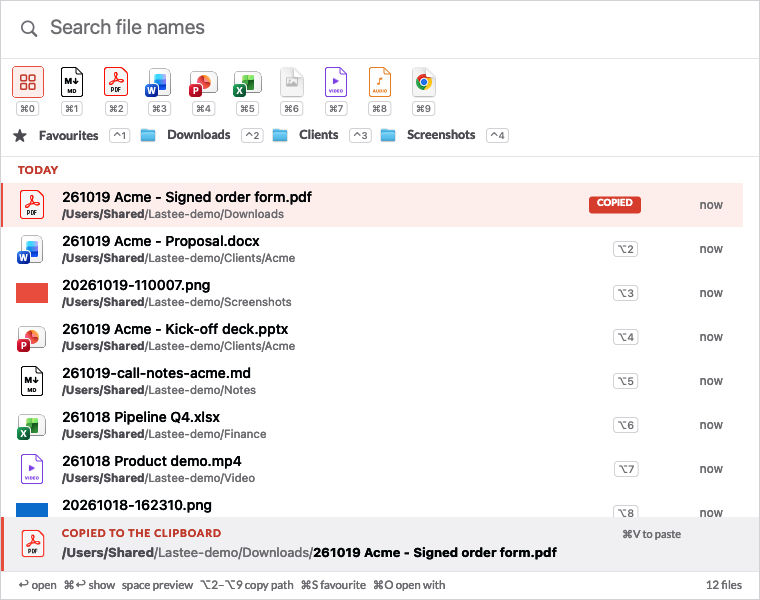
- Search as you type, fuzzy, on the file name only.
- Type filters,
⌘0to⌘9: All, Markdown, PDF, Word, PowerPoint, Excel and CSV, images, video, audio, HTML. Each icon shows its key. - Folder filters,
⌃1to⌃9: Favourites, Downloads, Dropbox, my scan share, my screenshots folder. - Rows with thumbnails for images and PDFs, the time since the last save or open, and the folder with its core in bold: ~/ai/lab/lastee/output.
- Actions: open, show in Finder, Quick Look on
Space, Open With, rename, move to the Trash, favourite, and drag out to any app. - A notice bar at the bottom says what is on the clipboard.
What I gave up
Trickster has features I left out, some on purpose:
- Apps and folders as list items, and flags. I never used them.
- Multiple selection, to drag or open several files at once.
- Remove a file from the list without excluding it, and "Exclude" in the right-click menu.
- Favourites as drop targets: drop a file on a folder to move it, on an app to open it.
- Pause tracking, sort by name, and a compact view.
The first 3 are on my list for the next version.
For business people
Lastee saves seconds many times a day. The value is in the 1 press: the file I just made is on the clipboard before I think about where it went. It costs nothing to run, uses about 20 MB of memory when idle and no CPU, and it doesn't depend on a subscription. The limitation is mine to carry: nobody else maintains it.
For technical people
Stack
- Swift 6 and AppKit, frame-based layout, no third-party code. The app is 1.2 MB.
- FSEvents with file-level events over the home folder. Each event costs 1
lstat, 1getattrlistand 1getxattr. - "Saved" is max(modification date, date added). The date added catches downloads and copies that keep an old modification date.
- "Opened" is the
com.apple.lastuseddate#PSattribute, the value Spotlight shows as "Last opened". Reading it on each change avoids Spotlight's lag. - Renames and atomic saves follow by inode, so a save that writes a temp file and renames it over the original stays 1 row.
- SQLite in WAL mode holds the index. The list lives in memory, newest first. Changes merge into it in 1 linear pass, so the hotkey never sorts.
- A global Carbon hotkey, which needs no Accessibility permission.
- A non-activating panel: it takes the keyboard while the app I was in stays in front, and that app gets the focus back when the panel closes.
Budgets
| Metric | Budget | Measured |
|---|---|---|
| Hotkey to the list on screen | < 50 ms | 20 to 28 ms |
| Filter per keystroke, 50,000 files | < 10 ms | about 1 ms |
| Memory when idle | < 60 MB | about 21 MB |
| CPU when idle | ~ 0% | 0% |
QA
18 unit tests and 74 end-to-end checks. The QA script runs the real app on fixture folders: it writes, renames, moves and deletes files, then checks the list, the filters, the copy rule and the timings. It never takes the focus and uses a private clipboard, so it runs while I work. A code review by a 2nd agent found 9 bugs before I used the app, for example the list jumping back while I scrolled during agent writes. All 9 are fixed and tested.
What I learned
- Never block on a privacy prompt. Reading Trickster's database for the import triggers macOS's "access data from other apps" prompt, and the file watcher waited for my answer. The import now runs on its own queue. Full Disk Access avoids the prompts altogether.
- Agents change what "recent" means. Excluding by file type and by working folder matters more than any other feature.
Further reading
The app Lastee replaces:

The tool I built it with:

- Filee: my own file manager for macOS: the file manager I built the week before, which shares Lastee's code for the hotkey, the fuzzy search and Quick Look.
- Alfred: the Alfred workflow that now reads from Lastee.
- The era of personal software is here: why I now build the apps I use.