

Imagee is the app that opens every image on my Mac. It replaces Preview for images and ImageOptim, plus the Python scripts I used to resize images for slides and for the web. I double-click a screenshot, it's on screen. I press 2, it's a WebP at 1,600 px. I press U, it's on ImageKit and the URL is on my clipboard.
I built it with Claude Code: version 1.0 shipped on 27th October 2026, version 1.1 with the folder grid on 28th October. The app is 2.3 MB. The name was first used for my 2022 image scripts, see Imagee.
Why I replaced Preview and ImageOptim
Before the build, the agent counted how I really use images:
| What | Before Imagee |
|---|---|
| Viewing | Preview, about 10 images a day. 222 opened in 30 days, 83% of them screenshots |
| Image sizes | Median 1,380 px wide, median 204 KB |
| Optimising | ImageOptim: 8 launches in 4 years |
| Resizing | 7 Python scripts, run from Launchee and Filee, 1 hard-coded script per job |
| Uploads to ImageKit | 411 in 30 days, almost all from the publish script of this site |
| Agents | 916 images over 2 MB in 90 days in my Kaltura workspace, from decks and exports |
3 conclusions came out of it:
- Viewing is the daily job, optimising is the monthly one. So the viewer has to be as fast as Preview, and every image job has to sit 1 key away from the image on screen.
- ImageOptim wasn't the job, my scripts were. Each script became a preset in 1 file.
- Agents are the biggest user. Claude makes 100s of large images a month. The CLI with JSON is the main door, the window comes second.
Preview also can't open an SVG on macOS 26.5, and ImageOptim can't write WebP.
What Imagee does
The viewer
- Every format macOS reads: JPEG, PNG, HEIC, WebP, AVIF, GIF, TIFF, BMP, camera RAW and SVG.
←→step through the folder, with the next image ready in about 1 ms.- Hold space and drag to pan, with the hand cursor, like Preview.
Ccrops,⌥⌘Sadjusts the size in pixels, percent or cm,⌘Land⌘Rrotate.- Nothing touches the file until
⌘S. The original goes to the Trash, so⌘Zafter a save, orimagee restore, brings it back. ⌘⌫moves the image to the Trash and shows the next one.⌘Zputs it back.- When a script rewrites the file, the viewer reloads it in about 110 ms. That matters when Claude edits a render while I watch.
⌘Klists every command with its key.
The folder grid
Version 1.1 opens a folder as a grid of thumbnails. ⌘↑ or ⎋ in the viewer goes back to the grid, ↩ opens the selected image. A disk cache keeps a 512 px thumbnail per image, about 20 KB each, so the second visit is instant. / filters, and presets, upload, copy and Trash work on the selection.
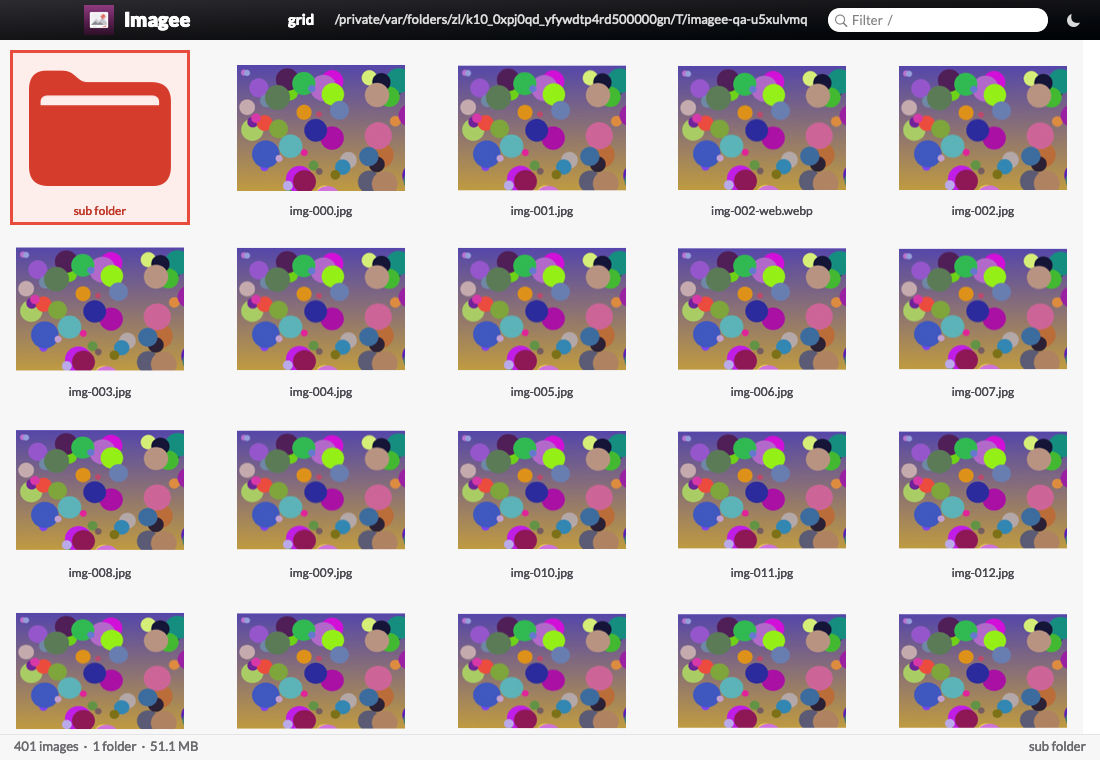
The screenshot comes from QA, on generated test images. Imagee's QA never reads my real files.
Presets on the number keys
The presets live in ~/.imagee/presets.jsonc. Imagee reloads the file when it changes.
| Key | Preset | What it does |
|---|---|---|
| 1 | shrink |
Same size and format, smaller file, replaces |
| 2 | web |
WebP, max 1,600 px wide, quality 80 |
| 3 | hd |
Fit 1920 x 1080 |
| 4 | notes |
Max 1,600 px wide, replaces |
| 5 | email |
JPEG, fit 1200 x 1200 |
| 6 | thumb |
WebP 400 x 300, cropped on the subject (Vision) |
| 7 | slide |
Width in cm at 96 dpi |
| 8 | full-slide |
1920 x 1080 at 144 dpi, PNG if transparent |
| 9 | phone |
JPEG (HEIC too), fit 1600 x 2133 |
Every preset strips EXIF, GPS, XMP and IPTC, keeps the colour profile and never upscales. full-slide used to be 960 x 540 in my old script, which looked soft on my 4K displays and in Teams.
⌥⌘Oopens the original and the output side by side at 100%. The new file size shows within about 120 ms of a quality change.⌘Bopens a batch window: I drop files or folders and pick a preset. It's ImageOptim's drop-to-shrink, on all cores.- Finder Quick Actions: Shrink, Web and Upload with Imagee.
Uuploads to ImageKit and copies the transform URL, sized for the job.
Imagee vs Preview and ImageOptim
| Imagee | Preview | ImageOptim |
|---|---|---|
| My own app, 2.3 MB, MIT licence | Built into macOS | Free and open source |
| Opens every image type, SVG included | No SVG on macOS 26.5 | Not a viewer |
| Presets on keys 1 to 9 | Adjust Size, 1 image at a time | 1 setting for every file |
| WebP, AVIF, HEIC, JPEG, PNG out | Exports, no WebP | Keeps the format, no WebP |
| Writes beside or replaces, original to Trash | Saves over the file | Replaces in place |
| ImageKit upload with a sized URL | No | No |
| CLI with JSON for agents | No | Command line, no JSON |
I lost nothing I used. Preview's markup tools and its PDF side were never part of the job: PDFs go to PDFee: my own PDF app for macOS since 24th October 2026.
Speed
The agent measured all 3 apps on 28th October 2026, on my Mac Studio, with the same files. The open times run from the open command to the window on screen. Memory is the physical footprint, the figure Activity Monitor shows.
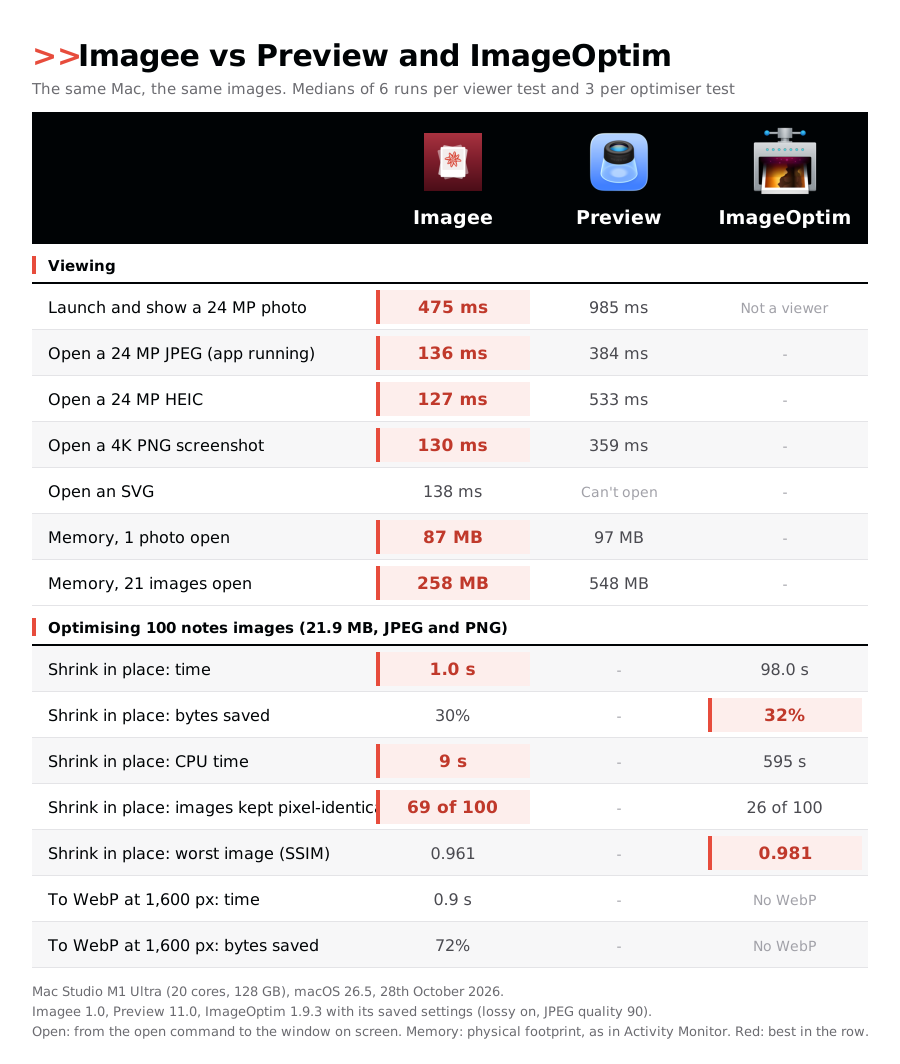
What the table says:
- Viewing: Imagee opens a photo 2.1x to 4.2x faster than Preview, and holds half the memory with 21 images open.
- Optimising:
shrinkdid 100 images from this site in 1.0 s. ImageOptim took 98 s and 595 s of CPU time. - ImageOptim saves 2 points more, 32% against 30%. Its extra lossless passes buy those 2 points and cost the 98 s. Its worst image is also a little better.
- Imagee kept 69 of the 100 images pixel-identical, against 26 for ImageOptim. It leaves a file alone when it can't make it smaller.
- WebP is the real saving: the
webpreset cut the same 100 images by 72% in 0.9 s.
1 caveat: Imagee shows its window first and decodes off the main thread, so its pixels arrive about 30 ms after the window. Preview draws its window with the image. With that added, Imagee still wins by 2.5x or more.
Budgets from QA
qa.py measures these on every build:
| Step | Budget | Measured |
|---|---|---|
| Open a 24 MP JPEG, app running, first pixels | < 80 ms | 27 ms |
| Next image in the folder | < 30 ms | 1 ms |
| A 74 MP image at full resolution | < 400 ms | 77 ms |
| 100 images to WebP at 1,600 px | < 3 s | 1.7 s |
| 1 image through the CLI, end to end | < 250 ms | 208 ms |
| Grid, first screen of thumbnails, cached | < 250 ms | 23 ms |
The grid numbers come from a real folder of 986 images.
How it's built
Stack
- Swift 6.3, AppKit. No SwiftUI.
- 1 binary.
Imagee cli <command>runs the engine with no window, so the app, the CLI and Claude share 1 engine. - ImageIO decodes, and encodes JPEG, PNG, HEIC, AVIF and TIFF. The viewer shows a screen-sized decode first and swaps in full resolution only when the zoom needs it.
- libwebp for WebP, because macOS can't write it. It's the only third-party code, vendored as a static library, so the app needs no Homebrew.
- pngquant, an external tool, for lossy PNG. Without it, PNGs stay lossless and a notice says how to fix it.
- Vision finds the subject for the
thumbcrop. - SQLite for the jobs, the uploads and the thumbnail cache.
- A Python CLI, standard library only.
Never lose an original
A replace writes a temp file in the same folder, checks that it decodes, moves the original to the Trash, then renames the temp file over the original's name. The new file keeps the creation date and Finder tags. imagee restore takes the original back from the Trash.
Gotchas worth knowing
- macOS writes JPEG, PNG, HEIC and AVIF, but not WebP. That's why libwebp is in the app.
- AVIF gave the same size as WebP in the benchmark, at more than 2x the time. WebP stays the web default, AVIF is 1 flag away.
- HEIC thumbnails are slow: 330 ms each, because the encoder runs 1 image at a time. The grid cache uses JPEG, or WebP when a pixel is see-through.
- Setting the default app needs a macOS confirmation that only an app can show.
imagee default --imageegoes through the app's URL scheme for that reason. - AppKit alone takes 65 to 88 MB before an image opens. The memory budget went from 100 MB to 160 MB after the first measurement.
The agent interface
imagee works without the app running, except open. Every command takes --json and prints 1 JSON document, so NicAI can use Imagee inside a task (see What is NicAI):
imagee web shots/ --upload --project blog --json   # run a preset, upload, return the URLs
imagee audit images/ --preset notes --json         # oversize files, metadata, expected saving
imagee info photo.jpg --json                       # format, pixels, bytes, EXIF, GPS
imagee restore photo.png --json                    # the original back from the Trash
imagee browse ~/Pictures --json                    # the folder grid, in the background
Exit codes: 0 success, 1 error, 2 usage, 3 refused (add --yes), 4 the app isn't running.
How it was built
Imagee followed my appee process for apps:
- Usage review: Preview's launch count and the images I opened, ImageOptim's settings, my scripts and the apps that call them, the ImageKit library, the images of this site, and a benchmark on 100 copies of them.
- Questions: 59, each with a recommended answer, answered on 27th October 2026.
- Spec: the decisions, the budgets and the switch-over plan.
- Build and QA: version 1.0 on 27th October. 15 unit tests and 96 end-to-end checks in 6 suites. An independent review found 11 defects, all fixed.
- Version 1.1 on 28th October: the folder grid, space to pan, and a new icon. A second review found 15 defects, all fixed.
QA runs in a scratch home with a fake ImageKit server. It never touches my real files, my clipboard, my default apps or my ImageKit account.
Launchee and the 3 image actions in Filee: my own file manager for macOS now call imagee instead of my old scripts.
Further reading
The apps Imagee replaces:


Where the uploads go:

The tool I built it with:

- see Shotee: my own screenshot app for the Mac, which makes most of the images Imagee opens
- see PDFee: my own PDF app for macOS, which took the PDFs from Preview
- see Filee: my own file manager for macOS, whose image actions run Imagee presets
- see The era of personal software is here, why I now build the apps I use
- All my apps: see My apps: everything I built for myself