

Hifee is the music player I use all day at my desk. It plays my local lossless library bit-perfect to my audio interface, sends it to my Sonos speakers around the house, adds Apple Music for discovery, and does nothing else. It replaces Audirvana, which I used since 2021.
I didn't write the code. I described what I wanted and my AI agent built it, tested it and shipped it. The why is in The era of personal software is here. This note covers what Hifee does and how it works.
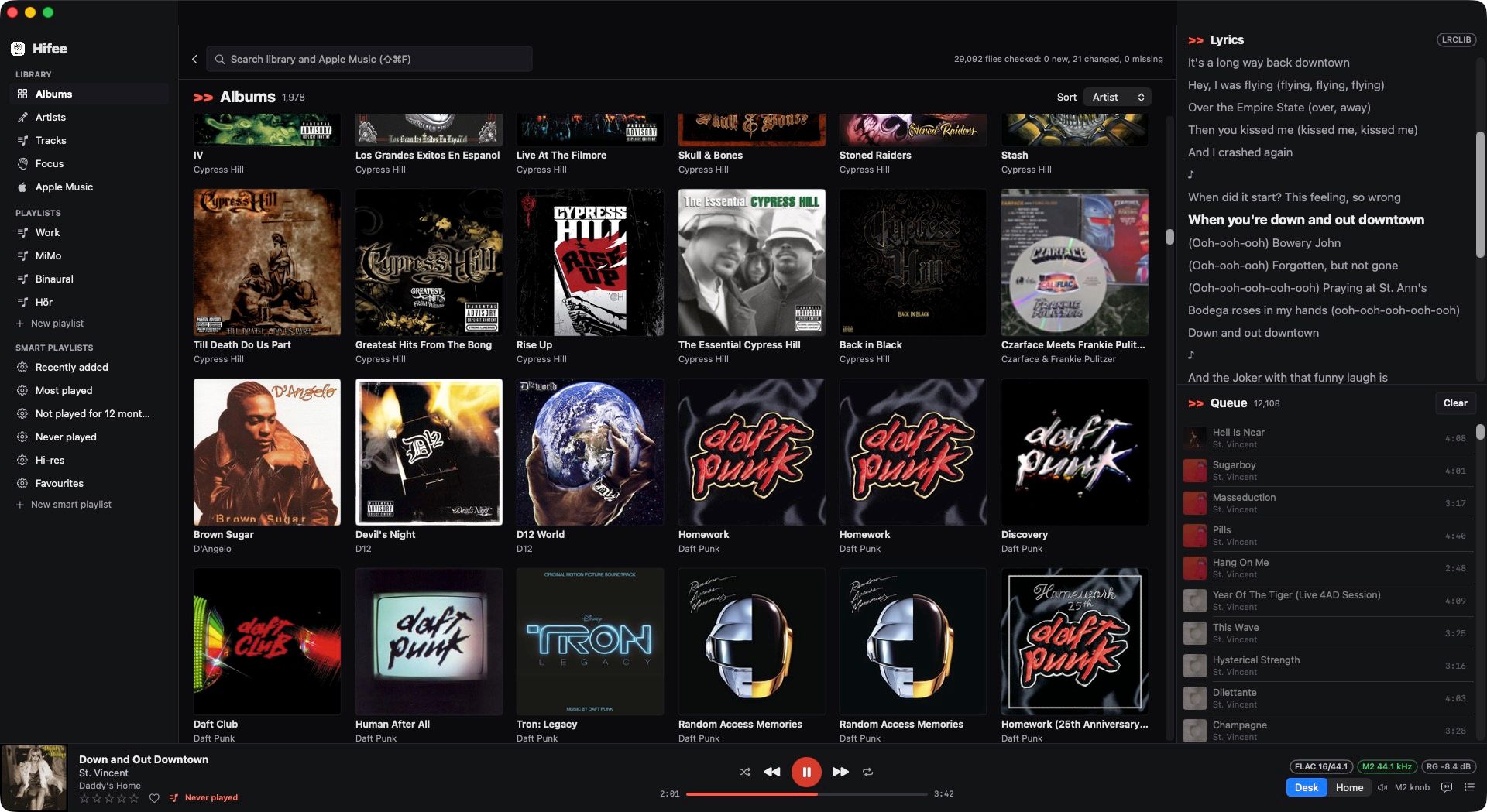
Why I built it
I had 2 apps and wanted neither of them:
- Audirvana plays local files well, but it's heavy, its playlists are clunky, and I pay a subscription for features I don't use.
- Apple Music is good for finding new music, but it doesn't do bit-perfect playback with sample-rate switching for a local library of FLAC files.
I wanted 1 app with only my features, in my own design, controlled from my keyboard and from Alfred. The name follows the -ee family of my tools, next to Dictee: my own local dictation app and Stickee: sticky notes that go full screen on every monitor.
What it does
| Feature | How it works |
|---|---|
| Bit-perfect desk | The output switches to each track's sample rate (44.1, 96, 192 kHz) and back when Hifee quits |
| Gapless | Live albums and DJ mixes play without a gap. A focus track loops with no click |
| ReplayGain | Every track plays at the same loudness. New tracks are measured on import |
| Apple Music | Search and charts from the Apple Music catalogue, next to the local results |
| Home output | 1 switch sends the music to my Sonos speakers as 1 group, with 1 volume for every room |
| Focus mode | 1 hotkey starts a binaural focus loop, from anywhere on the Mac |
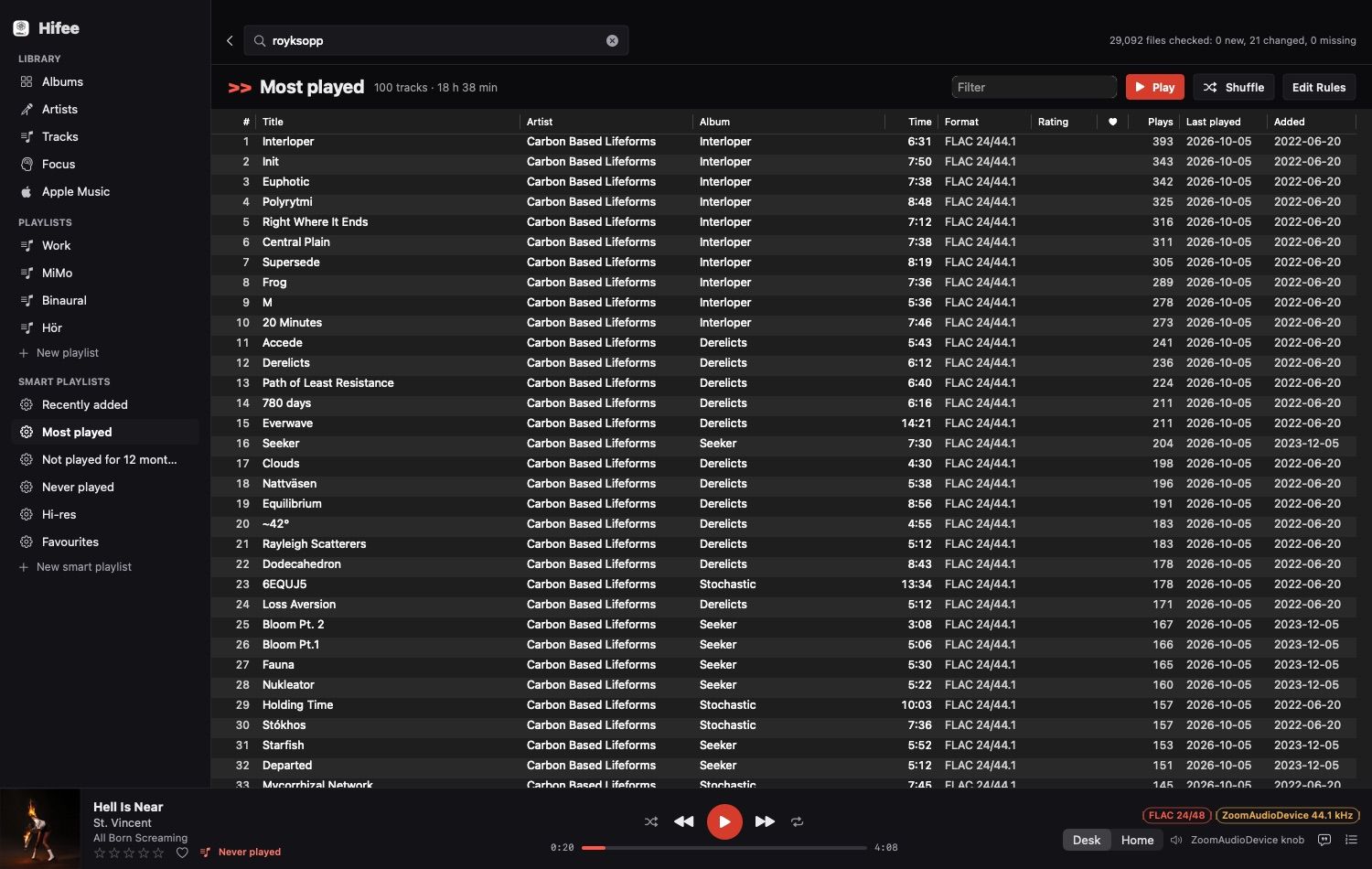
| Playlists | Manual and smart playlists (recently added, most played, never played, hi-res, favourites) |
| Smart tags | Language, Christmas, clean genres, release year, tempo and energy, for playlists like "French" |
| Ratings | ⌥1 to ⌥5 rate the playing track from any app. 1 or 2 stars also skips it |
| Resume | Hifee opens on the last song and plays it from where it stopped |
| Lyrics | Embedded lyrics first, then LRCLIB, synced when available |
| Tag editing | Edits FLAC tags in the files. Hifee never moves or deletes a file |
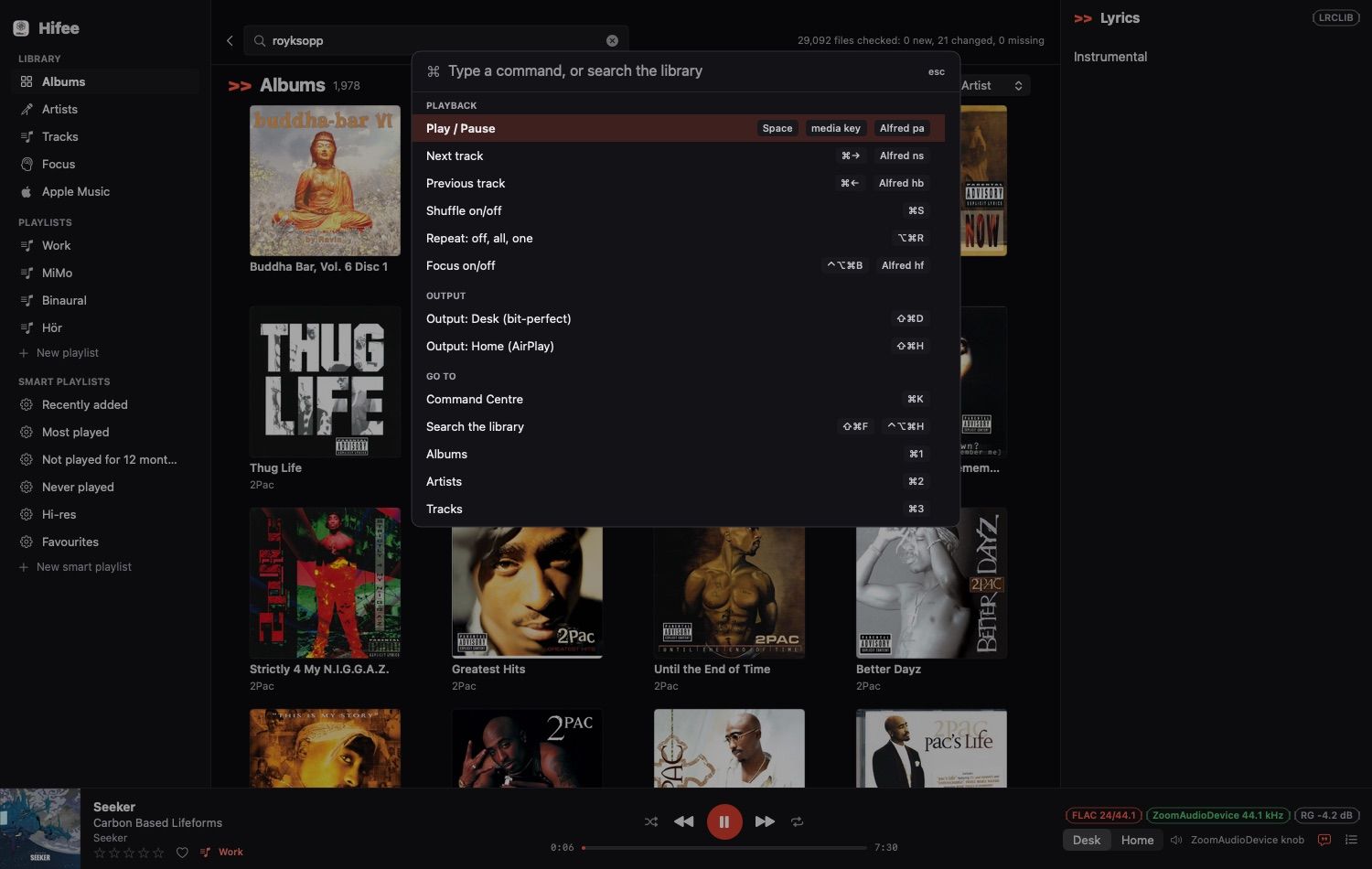
| Command Centre | ⌘K lists every command and its keys. Type to filter, Return to run |
| Pauses itself | Music pauses when I start dictating, and when a call starts |
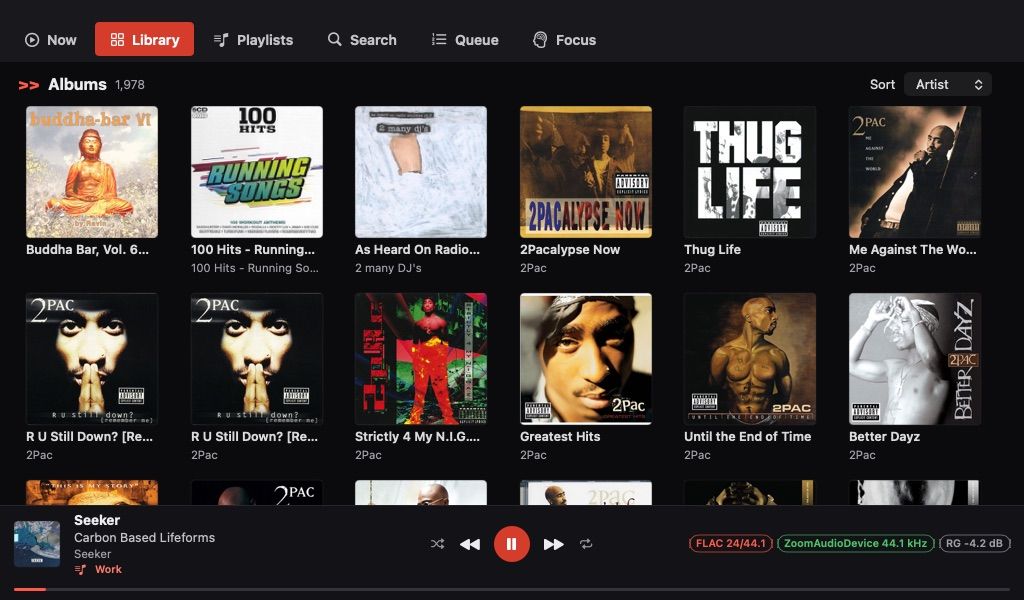
| Prompter layout | A layout for the 1024x600 screen of my Elgato Prompter, more columns on bigger windows |
The Prompter layout uses tabs instead of a sidebar, so it stays readable at 1024x600:
Playlists use a real table, with a column for each field and a click on a header to sort:
And ⌘K opens the Command Centre, so I never have to remember a shortcut:
Memory
I measured the 3 apps on the same day, with the same library of about 29,000 tracks:
| App | Memory |
|---|---|
| Hifee | 94 MB |
| Apple Music | 174 MB |
| Audirvana Studio | 508 MB |
Apple Music had almost no local library at the time, and it still used 2x more than Hifee. Memory matters more to me than it used to, because my local AI models need it.
For business people
Hifee is a personal tool for 1 user. It shows what a non-developer can now get from an AI agent: a native app that replaces a paid subscription, built around 1 person's habits instead of a product team's roadmap.
- Cost: no licence and no subscription for local playback. The Apple Music subscription stays, for discovery.
- Fit: only the features I use. The keywords I typed in Alfred for years (
oaopen and play,papause,nsnext song) now drive Hifee. - Risk: I own the maintenance. When macOS changes, the agent and I fix it. Nobody else will.
- Limit: Mac only, no phone app, no sync. My phone keeps Apple Music.
For technical people
Stack
Native Swift. SwiftUI for the views, AppKit where SwiftUI is too slow or too heavy. The library is a SQLite database, with FTS5 for search, so "royksopp" finds "Röyksopp". A 1-time script imported my Audirvana history: ratings, play counts, playlists and ReplayGain values.
Playback
- 1
AVAudioPlayerNodein anAVAudioEngine, with each track scheduled as a segment. The next track is scheduled 20 seconds before the end, which gives gapless playback and a seamless loop. - Sample-rate switching through Core Audio (
kAudioDevicePropertyNominalSampleRate). The gotcha: the output unit reports the new rate a moment after the device changes. Starting the engine before that left it silent. Hifee now waits until the output format matches. - ReplayGain 2.0 at -18 LUFS, with a BS.1770 loudness meter for new tracks. At a gapless boundary, the gain change is a scheduled audio-unit parameter event, so the next track starts at its own level.
- FLAC tags are written in place when the padding allows, else to a copy that replaces the file atomically. Only the comment block changes; the audio is checked before the swap.
Apple Music
MusicKit needs 2 things for an app signed outside the App Store: the MusicKit service on the App ID, and an embedded provisioning profile that carries the application identifier. With the service alone, every request fails with developerTokenRequestFailed.
Sonos
The first version sent Home through AirPlay. That had a hard limit:
⚠️ WARNING: a third-party Mac app can't select AirPlay speakers by itself.
The AirPlay picker runs in a system service. Hifee could read the speakers I ticked, but it couldn't select them, and macOS dropped the selection when Hifee quit. So every restart meant ticking the speakers again. It also ruled out a voice command like "play Favourites at home".
So Home now talks to the Sonos speakers directly, over the same local API that Home Assistant uses (UPnP on port 1400). AirPlay is gone from Hifee:
- Rooms: Hifee finds the speakers on the network and groups the rooms I tick. 1 speaker leads and the others follow it in sync.
- Stream: Hifee runs its own small web server. The lead speaker downloads each track from it, and gets the next track in advance, so it moves on by itself.
- State: Hifee asks the lead speaker every 0.5 seconds what it plays. It sees the next track start, a pause from the Sonos app, or another app taking the speakers.
- Volume: 1 slider sets every room to the same level. The Sonos group volume keeps the differences between rooms instead, which isn't what I want.
What the speakers accept surprised me. I measured it before building:
| Stream | Sonos One and Beam |
|---|---|
| FLAC 24-bit 48 kHz | Plays |
| FLAC 24-bit 96 kHz | Refused |
| WAV 24-bit, any rate | Refused |
| WAV 16-bit 44.1 kHz | Plays |
FLAC would keep 24 bits, but the encoder that ships with macOS took 3 seconds for a 6-minute track. WAV renders at about 400 times real time. So Hifee sends 16-bit WAV, after ReplayGain and with dither, and resamples anything above 48 kHz. That's the same depth AirPlay used.
2 gotchas worth knowing:
- Old settings: the stored AirPlay volume was 100%, a stream level. Sent to Sonos, it would have put every speaker at full volume. Hifee ignores it, and the first time it takes the speakers' own level, at most 40.
- Local network: macOS asks whether an app may use the local network, and keeps 1 switch per copy of the app. Until both copies were allowed, every request failed with "The Internet connection appears to be offline". The system log said what it really was: "Local network prohibited".
Apple Music songs can't go to Sonos this way: Apple's copy protection blocks a re-stream. They stay on the desk.
Testing
The agent wrote a test harness that drives the real app from JSON scripts, on a copy of the database and a muted virtual audio device. It checks gapless transitions, rate switches, the focus loop, call and dictation pauses, memory, and renders every layout to images. For Home, it plays to a fake Sonos household of 3 rooms that runs inside the app, 20 times faster than real time, so a test never touches the real speakers. The screenshots in this note come from those renders.
1 small fix worth stealing: Alfred kept listing the build copies of the app. A folder whose name ends in .noindex is invisible to Spotlight, so the build now goes to build.noindex/.
Further reading


- Apple Music
- Sonos, the speakers behind Home output
- LRCLIB, the open lyrics database
- Alfred, the launcher behind my keywords
- ReplayGain on Wikipedia
- The era of personal software is here, why I build my own software now