

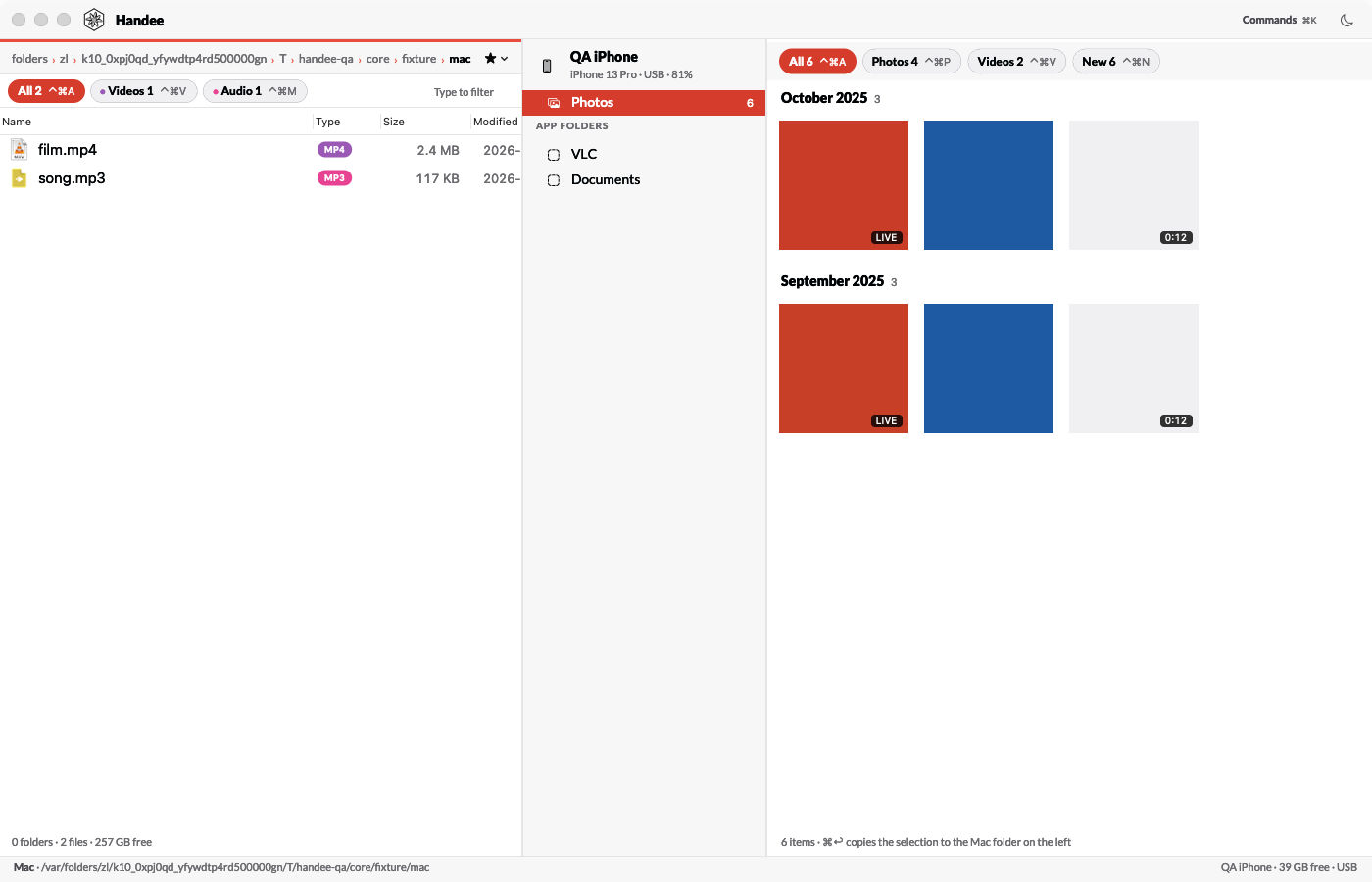
Handee copies and moves files between my Mac and an iPhone or iPad. It replaces AnyTrans for iOS by iMobie, which I ran through Setapp: macOS app subsciption. Handee waits in the background without a Dock icon and opens its window when a device connects by cable. The Mac is on the left, the devices in the middle, and the device's camera roll or app folder on the right. I drag, or press ⌘↩, to copy in either direction.
I built it overnight with Claude Code, on 25th October 2026. The name follows the -ee family of my tools, like my file manager, see Filee: my own file manager for macOS.
Why I replaced AnyTrans
The agent read a copy of AnyTrans's own logs and data before the build. It was a bad experience, and the numbers say why:
| What I found | Value |
|---|---|
| Use on record | 2 days in 19 months, 4 launches |
| Connect to ready | 69 s with 420 photos, 5 min 47 s with 3,965 photos |
| Crashes | 7, caught by its own crash guard, in 4 launches |
| Transfers logged | 1: a music track, which took 15 min 15 s |
| Wireless backup helper | 0 backups since July 2022, 10,256 connection errors |
| Data it kept on my Mac | 470 MB, mostly copies of the devices' photo databases |
I need this kind of tool a few times a year. When I need it, I want it ready in seconds, not minutes, and I want to trust that a move doesn't lose a photo.
What Handee does
| Feature | How it works |
|---|---|
| Opens on plug-in | A device on USB opens the window with that device selected. Wi-Fi never does |
| Camera roll | A grid by month, newest first, with All, Photos, Videos and New filters |
| Originals | HEIC, HEVC, ProRAW, both files of a Live Photo and the edit files. No conversion |
| "New" filter | Photos never copied to this Mac, from Handee's own copy log |
| Verified move | Copy, verify, then delete from the device. Refused when iCloud Photos is on |
| App folders | The folder of any app with file sharing: copy both ways, new folder, rename |
| Safe delete | A delete in an app folder keeps a copy on the Mac for 30 days. ⌘Z restores it |
| AirDrop | Sends Mac files to the device, the only public route into its Photos library |
| Several devices | Each paired on its own, with a clear "Tap Trust on the device" step |
Photos get a name that sorts: YYMMDD-HHMMSS-IMG_1234.heic, the capture time then the original name. A file with the same name and the same SHA-256 already in the folder is skipped, not copied twice. There is no automatic import. I copy by hand, on purpose.
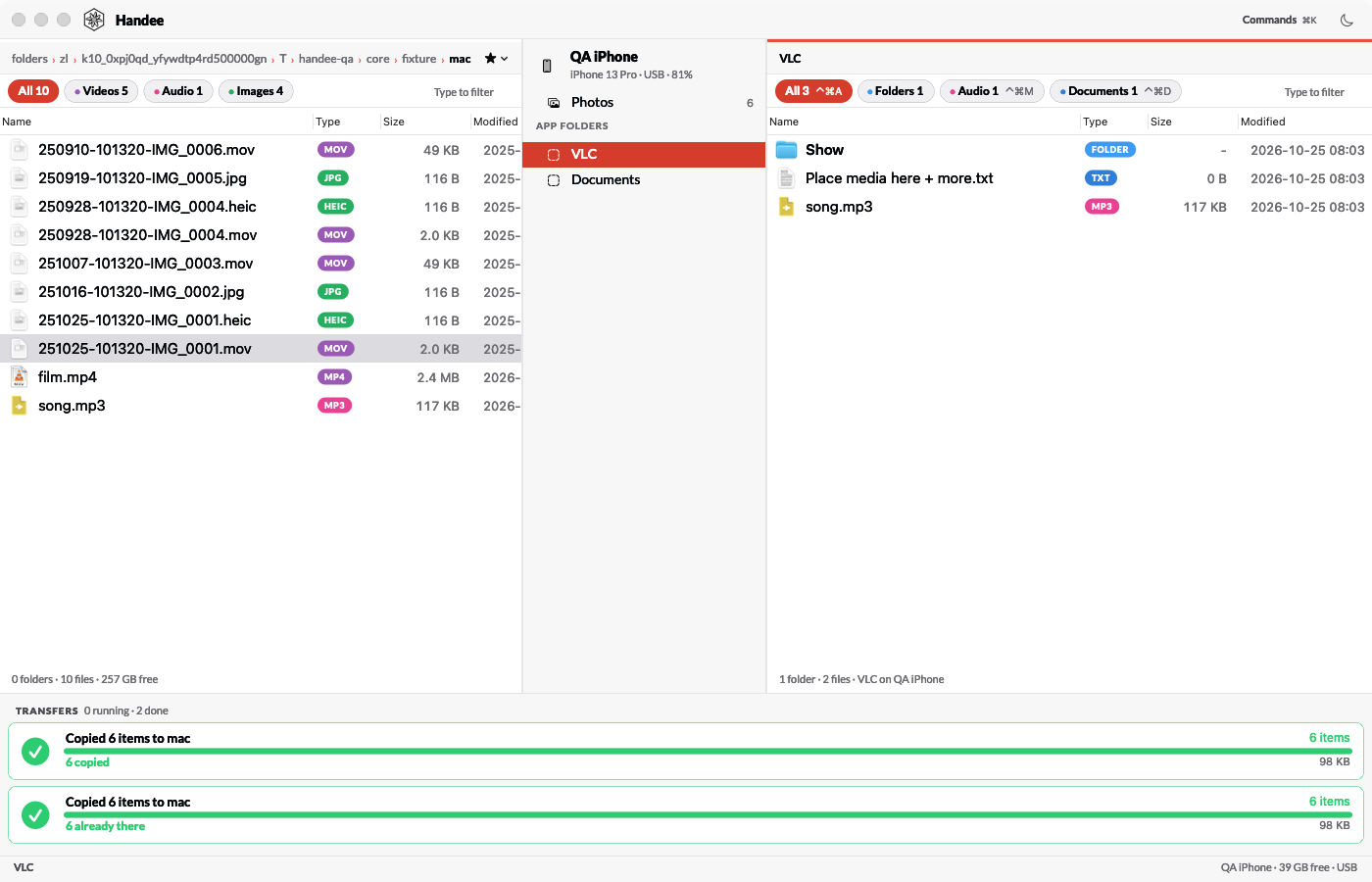
App folders are where video players and document apps keep their files. Here is a test device with a video player's folder open, and 2 finished transfers:
Keys
| Key | Action |
|---|---|
| ⌘↩ | Copy the selection to the other side |
| ⌥⌘↩ | Move it: confirm, copy, verify, delete |
| Tab | Switch side |
| ⌘⌫, ⌘Z | Delete with a safety copy; undo the last delete |
| ⇧⌘N, ⌘R | New folder, rename |
| ⇧⌘A | AirDrop the Mac selection |
| ⌃⌘A/P/V/N | Photo filters: All, Photos, Videos, New |
| ⌘K | Command centre: every command with its shortcut |
| ⌘. | Cancel the running transfers |
No global hotkey. Handee opens on plug-in, by name from my launcher, or from the CLI.
A move that can't lose a photo
Reliability was goal 2: nothing leaves a device without a verified copy on the Mac. A move runs in 5 steps:
- Download the item and its sidecar files into a hidden folder next to the target.
- Check the size and Apple's fingerprint of the copy against the device's.
- Record the SHA-256 of the copy in a journal, state
verified. - Move the files to their real names.
- Delete the verified items from the device in batches of 50.
The edge cases are where the care goes:
- iCloud Photos on: Move is refused, even from the CLI with
--yes. There a delete reaches iCloud and every device, the Mac included. - A crash between steps 3 and 5: at the next launch, Handee marks those items
keptand says the move was interrupted. It never deletes them without a new check. - Cancel: stops the copies, never the deletes of items already verified.
- Never through AFC: deleting a photo file through the file protocol breaks the Photos library on the device. Photos are deleted only through ImageCaptureCore, after the checks.
- App folder files arrive under a hidden partial name and get their real name only when the size matches. A pulled cable never leaves a half file under a real name.
Speed
Goal 1 was the time from plug-in to the first copy. Nothing in Handee waits for the whole device to load. Measured with QA's fake device:
| Metric | Budget | Measured | AnyTrans |
|---|---|---|---|
| Cold launch to ready | < 400 ms | 143 to 258 ms | - |
| Window shown again | < 50 ms | 1 ms | - |
| Grid of 4,000 photos on screen | < 500 ms | 156 ms | - |
| Select all 4,000 | - | 25 ms | - |
| Memory with 4,000 thumbnails | < 200 MB | 67 MB | - |
| Memory after a 200 MB transfer | < 200 MB | 108 MB | - |
| Handee's own cost per MB | > 150 MB/s | 1,800 to 6,800 MB/s | - |
| Idle, no window | ~ 0% CPU | 0.0% CPU, 59 MB | - |
| Plug-in to ready, real device | < 15 s | not measured yet | 69 s to 5 min 47 s |
The last row is the one that matters most. I'll add the real number after the first big copy from a phone.
How it's built
Stack
- Swift 6.3 and AppKit, built with XcodeGen. The transfer rules live in a package without AppKit, so they're unit tested without a device.
- ImageCaptureCore for photos: Apple's public API behind Image Capture. It gives originals, sidecars, a fingerprint and a proper delete.
- MobileDevice.framework for device info and app folders, loaded with
dlopen. It's Apple's private framework that Finder and Xcode use, and AnyTrans too. It ships on every Mac and Apple updates it for each new iOS. - An own AFC client for the file protocol, plus an own usbmux fallback in case a macOS update breaks the framework.
- SQLite in WAL mode for the copy log, the move journal and the safety copies.
- Nothing to install. The agent rejected libimobiledevice and pymobiledevice3 (installs that follow new iOS versions late) and Xcode's
devicectl(it needs Developer Mode).
Rules that keep it from hanging
- The main thread never touches the disk, a device or the database.
- Each device has its own serial queue. Transfers use their own connection, so browsing stays quick during a copy.
- Every blocking wait has a timeout: 30 s on a device socket, 120 s plus 1 s per 4 MB for a photo download.
- Transfers stream in 1 MB chunks, each in its own autorelease pool. Without the pools, 200 MB in meant 200 MB of memory.
Gotchas worth knowing
- App folders open at the container, not the files. Only
/Documentsis readable, and listing/was refused on iOS 27. Handee shows Documents as the top. - Image Capture sees only what's on the device. With "Optimise iPhone Storage", older photos live in iCloud only and don't show up in Handee, Image Capture or Photos import.
- The Files app's "On My iPhone" folder has no documented route. Handee doesn't try.
- A background app that opens a window must insist. The resident app switches from accessory to regular, and a plain
activate()was declined: the window opened behind the front app. Handee now callsactivate(ignoringOtherApps:)twice, 0.1 s apart. - Return values from a private framework. MobileDevice functions return
intorlong. Declared asInt32, the low 32 bits are right for both.
The agent interface
Every command takes --json, so NicAI can use Handee inside a task (see What is NicAI). The CLI opens a handee:// URL in the background, which starts the app when needed, and reads the app's reply from a file:
handee status --json                    # devices, iCloud Photos, locked, running jobs
handee photos list --new --json         # photos never copied to this Mac
handee photos copy --to ~/Pictures/Trip --since 2026-10-01 --wait --json
Destructive commands refuse without --yes. An agent never gets a dialog: --yes is the confirmation.
How it was built
Handee followed my appee process for apps:
- Usage review: AnyTrans's logs and data, Apple's device stack on my Mac, and the framework's exports, checked with
nm. - Questions: 35 in 1 round, each with a recommended answer. I changed 2: no automatic import, and open the window on plug-in.
- Spec and build in the same pass: 9 commits between 01:02 and 07:29 on 25th October 2026.
QA ran against fake devices: a folder that acts as a camera roll, and app folders served by an in-memory AFC server through the real client. At version 1.0:
- 26 unit tests.
- 81 end-to-end checks in 6 suites, 3 runs in a row.
- An independent review by another agent found 15 defects in the data paths, for example a Live Photo's second file not checked before a move. All 15 are fixed.
The screenshots in this note come from those QA runs, on test data.
Left for later
- Version 2: a local device backup, Messages export from that backup, HEIC to JPEG on export.
- Dropped: automatic import, writing to the Music library, contacts and calendars (iCloud does those).
Further reading
The app Handee replaces:

Apple's framework for photos on a connected device:

The tool I built it with:

- see Filee: my own file manager for macOS, the file manager:
⌥⌘Rreveals Handee's Mac folder there - see The era of personal software is here, why I now build the apps I use
- All my apps: see My apps: everything I built for myself