
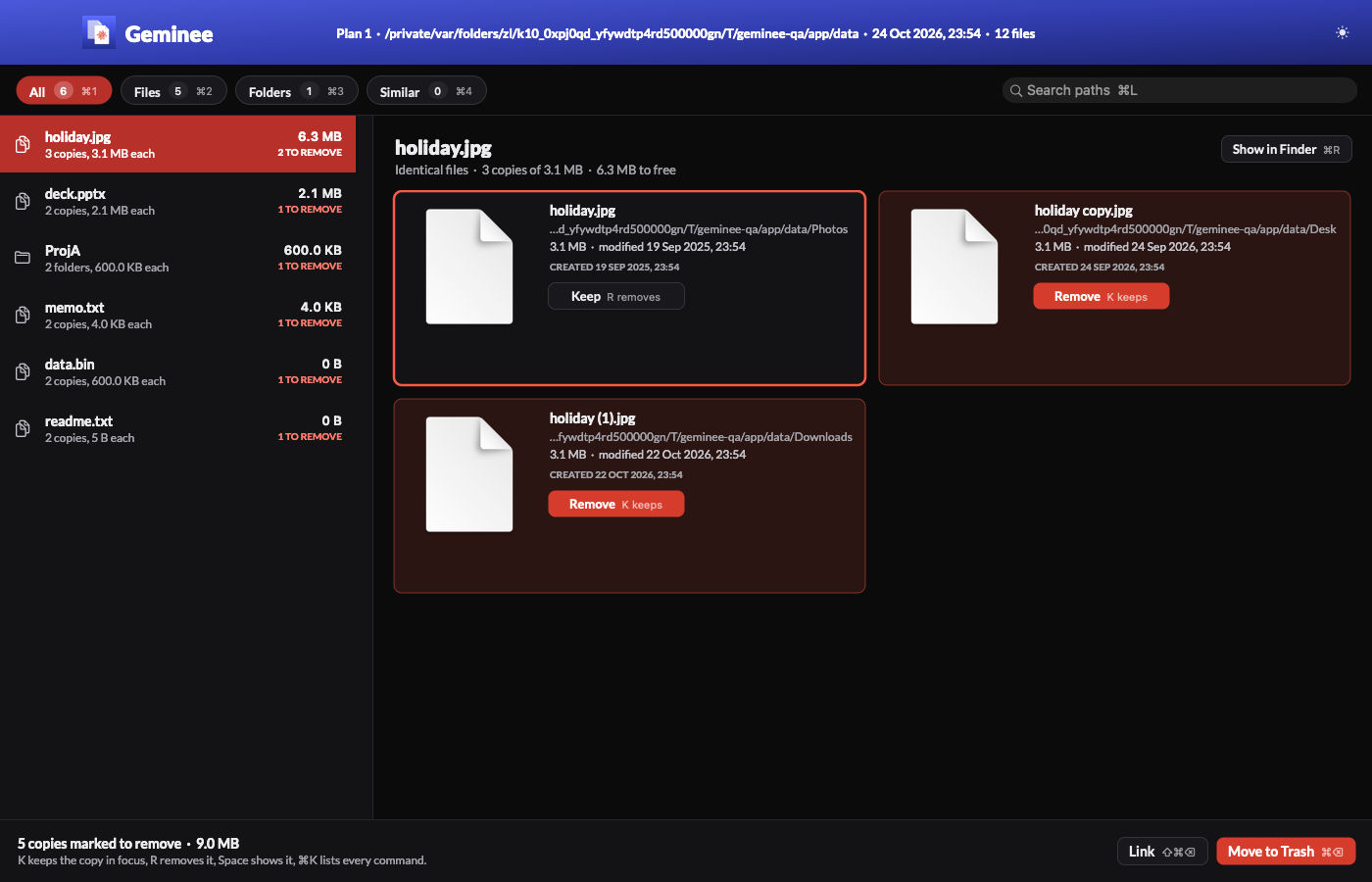
Geminee finds files and folders with identical content and gets rid of the extra copies. It replaces Gemini 2 by MacPaw, which I ran through Setapp: macOS app subsciption. It's a command-line tool first: geminee scan writes a plan, geminee clean moves the extra copies to the Trash, and geminee link turns them into clones or hard links, so the content is stored once and every path still works. A native window shows the plan with thumbnails when I want to look before I clean.
I built it in 1 evening with Claude Code, on 24th October 2026. The name is Gemini plus the -ee of my other tools, like my file manager, see Filee: my own file manager for macOS.
Why I replaced Gemini
Before the build, the agent read a copy of Gemini's own databases, preferences and logs. The numbers changed what I wanted:
| What I found | Value |
|---|---|
| Runs since 2022 | 6 launches, 6 scans, 6 cleans |
| Lifetime totals | 412.9 GB scanned, 151.9 GB removed |
| Last scan | 1 folder of images, 5 min 27 s, 1,425 groups, 17.5 GB found |
| How I chose | 1 bulk "keep the oldest" selection, clean 3 minutes later |
| File types | 99% PNG and JPEG |
| Launch to ready | 15 s |
| Never used | Photos libraries, schedules, the Downloads monitor |
So Gemini was an occasional tool, not a daily one. I trusted the automatic choice every time, and I paid a subscription for a big app I opened about once a year.
The same review measured where my duplicates actually are, read-only, with counts only. The big find wasn't in my documents. It was my backup disk: 35 dated full copies of the same folders, 1.57 TB, of which only 214 GB was unique. Deleting backups is the wrong answer there. Linking them is the right one: every dated folder stays complete, and each identical file is stored once.
What Geminee does
| Feature | How it works |
|---|---|
| Identical files | Same size, same first 16 KB, same SHA-256. Names and dates don't matter |
| Identical folders | Whole folders with the same names and content |
| Similar images | Near-identical photos through Apple's Vision. Only ever suggested, never marked |
| Clean | Extra copies go to the Trash, so Finder's Put Back works |
| Link | Clones on APFS, hard links on HFS+. Every path keeps working |
| Undo | geminee undo puts back the last clean, or separates the last linked copies |
| Plan file | A TSV I can edit: change remove to keep, then clean from the file |
| Fast re-scan | FSEvents tells Geminee what changed since the last scan |
| Review window | Thumbnails side by side, K keeps, R removes, Space shows Quick Look |
| Filee action | "Find duplicates here" in my file manager runs a scan on the current folder |
The commands I use:
geminee scan ~/Pictures --similar   # read-only: groups, space to free, a plan
geminee show                        # the biggest groups of the latest plan
geminee review                      # the plan in the window
geminee clean                       # extra copies to the Trash (asks first)
geminee link                        # or clones and hard links (asks first)
geminee undo                        # put back the last run
What it keeps
When a group has several copies, Geminee keeps 1 by these rules, in order:
- A copy in a protected folder.
- A copy in a "keep first" folder.
- Not in Downloads or Desktop.
- Not inside a folder the same plan removes.
- A name without "copy", "(1)" or " 2".
- The oldest.
- The shortest path.
Rule 6 is my old Gemini habit. The others are what I did by hand when the automatic choice was wrong.
Keys in the window
| Key | Action |
|---|---|
| ↑ ↓ | Previous or next group |
| ← → | Previous or next copy |
| K, R | Keep or remove the copy in focus |
| Space | Quick Look |
| ⌥⌘S | Remove the suggested similar copies |
| ⌘⌫, ⇧⌘⌫ | Move marked copies to the Trash; link them |
| ⌥⌘Z | Put back the last clean or link |
| ⌘1 to ⌘4 | All, Files, Folders, Similar |
| ⌘K | Command centre |
Speed
Speed was goal 1. The disk is the floor, so Geminee reads as little as it can: only files that share a size, 16 KB before a full read, each inode once, and every hash goes into a cache. Measured on my Mac on 24th October 2026:
| Metric | Budget | Measured | Gemini |
|---|---|---|---|
| Command to first output | < 100 ms | 60 ms | 15 s to start |
| Documents scan, cold | < 60 s | 20.7 s | - |
| Documents scan again, nothing changed | < 25 s | 1.8 s | - |
| Documents scan, full walk with the cache | - | 11.9 s | - |
| Memory during that scan | < 400 MB | 276 MB | - |
| Window: launch to ready | < 400 ms | 120 to 185 ms | - |
| Window: switch group, p95 | < 30 ms | 4.5 ms | - |
| Window: memory | < 150 MB | 70 to 82 MB | - |
My documents hold 328,157 files and 406 GB. The scan found 2,656 extra copies holding 32.7 GB.
The backup disk is a different scale. It's HFS+ over USB, where opening each file is the cost. The first scan of all 7.3 million files took 2 h 11 min. With the hash cache warm, the next one took 11.6 minutes. It found 358,855 groups and 1.53 TB that geminee link can give back.
How it's built
Stack
- CLI: 1 Python file, standard library only, runs on the macOS system Python 3.9. It owns the database and every file change.
- Helper: a small Swift binary for what Python can't call: Vision, Accelerate, FSEvents and the Trash.
- Window: Swift 6.3 and AppKit, frame layout, in my NicAI Design with an indigo title strip.
- Store: SQLite in WAL mode in
~/.geminee/, with the inventory, the hash cache, the image prints, the plans and the undo log. - Dependencies: none.
Why Python is fast enough
I expected the agent to pick Swift or Rust. It measured first:
- SHA-256 from
hashlibruns at 2.4 GB/s on 1 core (Apple's crypto instructions) and 11.5 GB/s on 8. That's faster than every disk I own. - Python with 8 threads walked my documents in 20 s. The
findcommand took 23 s. The kernel is the floor, not the language.
So the CLI starts in 60 ms and stays readable. Swift does only what needs a framework.
Rules that keep it safe
Goal 2 was "never lose data". These rules are binding: a change that breaks one needs a measured reason.
- A scan never writes outside its own folder. Clean, link and undo are separate commands that ask first.
- A hash belongs to what was read. Geminee checks the inode, size and date of the open file before and after the read. A mismatch gives no hash.
- Check again right before acting. Clean and link re-check the copy and the kept copy before each move or link. A changed file is skipped.
- A group always keeps 1 copy. The store refuses an edit that leaves a group without one.
- Atomic links. The link appears under a temporary name, and a rename puts it over the copy. A crash leaves the copy untouched.
- The log survives a crash. Link commits every 500 items. Undo reads that log.
Similar images
Vision computes a feature print (768 numbers) for each image, on a 512 px thumbnail. Accelerate compares them in blocks, so 20,000 images cluster in 0.8 s. A spike set the threshold:
| Change to the image | Average distance |
|---|---|
| Resized | 0.03 |
| Recompressed | 0.06 |
| Cropped to 85% | 0.08 |
The default is 0.15. Only 0.6% of unrelated wallpaper pairs fell under it. Groups form around a leader and never chain, so A near B near C doesn't make A and C a pair.
Gotchas worth knowing
- Clones need APFS.
clonefilereturns ENOTSUP on HFS+, so the external disks get hard links. A hard link is 1 file with several names: fine for backups nobody edits. - Hard links have a limit. At EMLINK, the copy becomes the source for the rest of its group.
- A skipped folder can hide data. A folder that holds anything Geminee skips, like
.git, never counts as a duplicate folder. Otherwise its twin would go to the Trash with the skipped content inside. - FSEvents on HFS+ folds events into older ids. Geminee also lists every folder whose date changed, so nothing is missed.
- A synced folder syncs the delete too. A clean in a cloud folder removes the copy on every device. That's why everything goes to the Trash first.
- AppKit undo. The undo is registered when I press K or R, not when the store answers. An async registration broke ⌘Z after an undo.
The agent interface
Every command takes --json and prints 1 JSON document, so NicAI can use Geminee inside a task (see What is NicAI). Clean and link refuse without --yes and take --dry-run:
geminee describe --json                    # every command and its effect
geminee scan ~/Downloads --json            # plan id, groups, bytes to free
geminee clean --plan 12 --dry-run --json   # what would move, nothing changes
How it was built
Geminee followed my appee process for apps:
- Usage review: Gemini's data, plus a read-only measurement of my disks that printed counts, never file names.
- Questions: 32, each with a recommended answer. I accepted all of them, with 1 change: build the whole version 2 list now, not later.
- Spec: the decisions, budgets and rules, written before the code.
- Build and QA: 8 commits between 22:58 and 23:54 on 24th October 2026.
The same pass changed my backup script: each new backup now hard-links unchanged files to the previous one, as rsync --link-dest does. So the duplicates stop growing at the source.
QA at version 1.0:
- 16 Swift unit tests on the clustering and the plan store.
- 33 Python tests, including 1 per defect the reviews found.
- 61 end-to-end checks in 6 suites: CLI, FSEvents, similar images with the real Vision, and the window in light and dark mode, zoomed and at prompter size.
- 2 independent reviews by other agents: 11 defects in the data paths and 10 findings in the window. All fixed.
QA never touches my real files. It runs on fixture folders with a fake Trash. The screenshot in this note comes from that run.
Further reading
The app Geminee replaces:

Apple's framework behind the similar images:

The tool I built it with:

- see Filee: my own file manager for macOS, the file manager with the "Find duplicates here" action
- see The era of personal software is here, why I now build the apps I use
- All my apps: see My apps: everything I built for myself