

Foldee makes every Open and Save dialog on my Mac open in the right place and jump anywhere in 1 key. It replaces Default Folder X, which I ran from Setapp for 2 years. Foldee is 1 small process that sits beside Apple's own dialog and never touches its buttons.
I built it with Claude Code on 24th October 2026: a usage review, 41 questions, 2 spikes, a council review, then the build and the QA. I switched Default Folder X off the same evening. The name fits the -ee family, next to Filee: my own file manager for macOS and Lastee: my own recent-files app for macOS, which feed Foldee its folders and files.
Why I replaced Default Folder X
Default Folder X did a good job for years. Then my Mac changed around it: Filee replaced Finder, Lastee took over recent files, and macOS Tahoe kept breaking it.
The numbers said the job got small
Default Folder X keeps lifetime counters but no dates. I compared 2 snapshots of its counters, 4.5 days apart:
| Feature | Lifetime (742 days) | Last 4.5 days |
|---|---|---|
| Automatic jump to last folder | 2,911, 3.9 a day | 13 |
| Picks from its menus | 1,678, 2.3 a day | 3 |
| ⌥↑ / ⌥↓ recent folders | 147 | 0 |
| Click a Finder window to jump | 117 | 0 |
| Tags on save | 78 | 0 |
| Default folder per app | 1 | - |
Use dropped when Filee arrived. Click-a-Finder-window died with Finder windows. What was left was 1 automatic job (open the dialog where I was last time) and a few picks a day.
The cost didn't drop with it
| Resource | Default Folder X |
|---|---|
| Processes | 5: the main app plus 4 Finder Sync extensions |
| Memory | About 250 MB (150 MB main, about 100 MB for the rest) |
| CPU at idle | About 0.3% |
| Permissions | Accessibility and Screen Recording |
| Licence | Part of my Setapp subscription |
Tahoe broke it 3 times
St. Clair Software shipped 3 fixes for macOS 26 (their Tahoe notes): the Accessibility API stopped reporting that a window had gone, column view opened scrolled to the left, and audio and video previews crashed the host app. A tool that works on other apps' windows breaks whenever Apple changes those windows.
Foldee is also 1 step towards leaving Setapp altogether, see Setapp: macOS app subsciption.
What Foldee does
Default folders, done the way macOS does them
I pin a folder once, and that app's dialogs open there. The trick: macOS stores the folder each app's dialog opens in, under the app's NSOSPLastRootDirectory preference. Foldee writes it there. The next dialog opens in the right folder, with no visible jump and no keys sent.
Some apps pick their own folder and ignore that preference. For those, Foldee moves the dialog with keys, once, and only if I haven't typed, clicked or scrolled since the dialog opened. In a Save As dialog for an existing document, it does nothing.
Apps without a default keep macOS's own behaviour: the dialog opens in the last folder I used in that app.
The strip
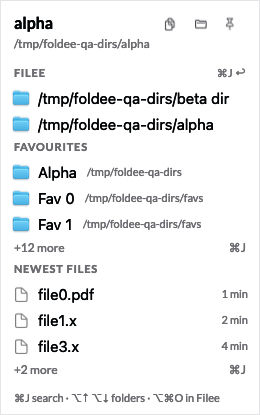
A narrow panel sits right of the dialog, at the dialog's height, and follows it when it moves. 1 click sends the dialog there.
- Header: the current folder in bold, its path under it, and 3 buttons: copy the path, open the folder in Filee, and the pin that makes it the app's default.
- Filee: the folders open in Filee's 2 panes right now. This is the row I click most.
- Favourites: Filee's favourites, each with its parent path in muted text.
- Recent: the last 6 folders I used in any dialog.
- Newest files: in Open dialogs only, the 5 newest PDFs, Office files, images and videos from Lastee. A click goes to the file's folder.
The strip never scrolls. When the rows don't fit, Foldee shortens the sections and adds a "+N more · ⌘J" row. It never takes the focus from the dialog, and it stays off the screen I share in calls.
The palette
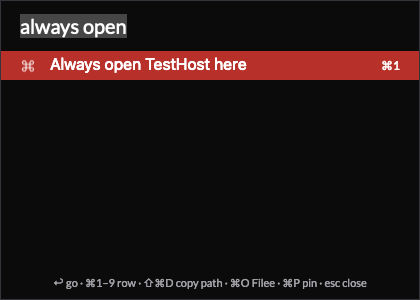
⌘J opens a palette over the dialog. I type a few letters, or paste a path, and press ↩. Filee's jump keys work there too, so ⌘J, K, ↩ goes where K goes in Filee.
Keys
| Key | Where | Does |
|---|---|---|
⌘J |
Any dialog | Opens or closes the palette |
⌥↑ / ⌥↓ |
Any dialog | Steps back and forward through the folders I visited |
⌥⌘O |
Filee | Sends the folder, or the selected file, to the dialog |
↩, ⌘1-⌘9 |
Palette | Goes to the selected row, or row 1 to 9 |
⌘P |
Palette | Always open this app here |
⇧⌘D |
Palette | Copies the selected row's path |
⌘O |
Palette | Opens the selected row in Filee |
⌥⌘O from Filee is the move I didn't have before: I browse in Filee, find the folder, press 1 key, and the dialog in the other app is already there.
When a jump can't happen safely, Foldee says why in a small card ("You typed, so Foldee stopped") and puts the path on the clipboard, so ⇧⌘G and paste finish the job by hand.
What I left out
Quick Search outside dialogs (Filee and my launcher do that), the file actions inside dialogs (rename, trash, info), folder sets, the Finder toolbar buttons, tags on save, and a menu bar icon. None of them had a use worth the code.
The numbers
| Metric | Foldee, measured | Default Folder X |
|---|---|---|
| Dialog event to dialog recognised | p50 9 to 12 ms | Not measured |
| Dialog recognised to strip drawn | p50 9 ms, p95 14 to 16 ms | Not measured |
⌘J to palette on screen |
Under 50 ms | No equivalent |
| Jump in an Open dialog | Median about 490 ms | Not measured |
| Jump in a Save dialog | 400 to 411 ms | Not measured |
| Jumps that arrived (interactive QA) | 24 of 24 | - |
| Memory | 54 MB installed | About 250 MB |
| CPU at idle | 0.0% | About 0.3% |
| Processes | 1 | 5 |
| Opening in a default folder | 0 ms: macOS opens the dialog there | - |
Most of a jump's time is Apple's, not mine:
| Step of 1 jump | Who | Time |
|---|---|---|
| Click to row lit | Foldee | Under 16 ms |
Send ⇧⌘G (Go to Folder) |
Foldee | 12 ms |
| The Go to Folder field appears | Apple | 89 to 382 ms |
Set the path, send ↩ |
Foldee | Under 20 ms |
| The dialog loads the folder | Apple | About 450 ms |
A faster language would change nothing. That's why the default folder goes through the preference: the fastest jump is the one that never happens.
How it works
The dialog isn't in the app
On macOS 26, every Open and Save dialog runs in a separate system process, openAndSavePanelService, even for apps that aren't sandboxed. The first spike found the consequence: keys sent to the app never reach the dialog. Foldee must find the right service process and send its keys there.
That's the risky part, so Foldee is strict about it:
- It recognises a dialog by its Accessibility identifier,
open-panelorsave-panel, in 1 batched call. It never walks the dialog's element tree: 1 walk of a sandboxed Save dialog stalled the spike for 17 to 28 s. - It picks the service by 2 tests: the service's responsible process is the host app, and its focused window has the dialog's exact frame. If not exactly 1 service passes, Foldee sends no keys.
- It jumps with the dialog's own Go to Folder:
⇧⌘G, set the path field, 1↩. Before that↩, a fresh read must show the path field focused with exactly the target path. Foldee never sends a 2nd↩, neverEsc, and never presses Save or Open.
The safety rules
Foldee works on other apps' windows, so its failures must stay inside Foldee. If it's slow, wrong or crashed, the dialog works exactly as macOS made it.
- The main thread never makes an Accessibility call and never touches the disk. Every Accessibility call has a timeout: 250 ms, and 50 ms for the first read.
- An input guard watches me, not itself. Before each key, Foldee checks macOS's idle counters for my keys, clicks and scrolls. Keys Foldee sends don't reset those counters, so it sees only my input, without an event tap.
- A crash-loop breaker. 3 abnormal starts in 5 minutes start safe mode: the strip only, no keys, no preference writes.
- A kill switch.
foldee offstops every key and every preference write within 1 s. - No keys while Default Folder X runs, so 2 apps never fight over 1 dialog.
Stack
- Swift 6.3 and AppKit, frame-based layout, no third-party code. 1 agent process, no App Sandbox (Accessibility writes don't work in one), a LaunchAgent inside the bundle. The app is 1.4 MB.
- About 6,500 lines of Swift, with the logic in a
FoldeeCorepackage that has no AppKit and runs under unit tests. - SQLite holds recent folders, defaults and a silent usage log. Settings are a JSONC file that reloads live.
- Code copied, not shared from my other apps: the fuzzy matcher from Lastee, the SQLite wrapper from Hifee, and the panel and hotkeys from Clipee, see Clipee: my own clipboard history for macOS.
Agent interface
A Python CLI wraps the app, with --json on every command, so my NicAI agents can drive it inside a task:
foldee status --json                                     # running, permissions, safe mode, the open dialog
foldee goto ~/Downloads --json                           # send the open dialog there, confirmed by the app
foldee default set com.apple.TextEdit ~/Documents --json # a default folder for 1 app
foldee recent -n 10 --json                               # the 10 folders used last in dialogs
foldee off --json                                        # kill switch
Writes go through a foldee:// URL with a request id. The app echoes the id back in a state file, so the CLI reports confirmed: true only once the app has acted.
What I learned
- Keep the panel on screen and hide it by transparency. Ordering the strip in while the host app animated its dialog cost 2 to 50 ms. With the panel always ordered in at alpha 0, dialog to strip drawn fell from 30 ms to 9 ms.
- Send a key down, wait 12 ms, then the key up. Without the gap, AppKit drops the key.
- QA must never see a real dialog. On the first day, a QA run sent a jump into a TextEdit dialog I had open. QA now watches only its own test windows, and fails if it sees any other dialog.
- Don't trust the dialog's own API across processes. On macOS 26.5, an out-of-process dialog's
directoryURLdoesn't update. Foldee checks the folder name the dialog shows instead.
How I built it
Claude Code built Foldee in 1 day, on 24th October 2026, through my usual app process:
- Usage review. It read Default Folder X's counters and preferences, my Filee and Lastee settings and my Hammerspoon keys, and wrote 41 questions in 2 rounds, each with a recommendation.
- 2 spikes on macOS 26.5. Small test programs drove real Open, Save and Choose Folder dialogs, plain and sandboxed, to answer 3 questions before any app code: how to detect a dialog, where its keys must go, and whether the preference write steers the next dialog.
- Council review. 5 expert agents (speed, reliability, Accessibility, keyboard, build readiness) scored the spec in 2 rounds and raised 34 blocking issues. The spec went to version 1.2.
- Build and QA. 11 commits between 17:11 and 22:52. 24 unit tests, 127 background checks that never take the focus, and 30 interactive checks with 24 real jumps. The interactive run takes the screen, so it runs only when I start it, and it stops the moment I touch the keyboard or mouse.
- Independent review. A separate agent found 21 issues (5 high, 9 medium, 7 low). All fixed.
The estimate was about 60% of 1 week of my Claude Max allowance.
What's next
- Real-app checks. The jumps in Chrome, Office and a sandboxed real app, 10 trials each. An app that fails goes on a list where a jump copies the path only.
- 2 faster paths to measure: the dialog's own Go keys (Home, Desktop, Downloads) and selecting a sidebar row. Each one stays off unless it beats Go to Folder by 150 ms in 20 of 20 trials.
- Select the last file again, once file selection proves safe.
- Uninstall Default Folder X after 1 week.
Further reading
The app Foldee replaces:

Apple's dialog, and why it runs in its own process:

The tool I built it with:

- Filee: my own file manager for macOS: the file manager whose panes, favourites and jumps fill the strip.
- Lastee: my own recent-files app for macOS: the recent-files app behind the Newest files section.
- The era of personal software is here: why I now build the apps I use.
- All my apps: see My apps: everything I built for myself