

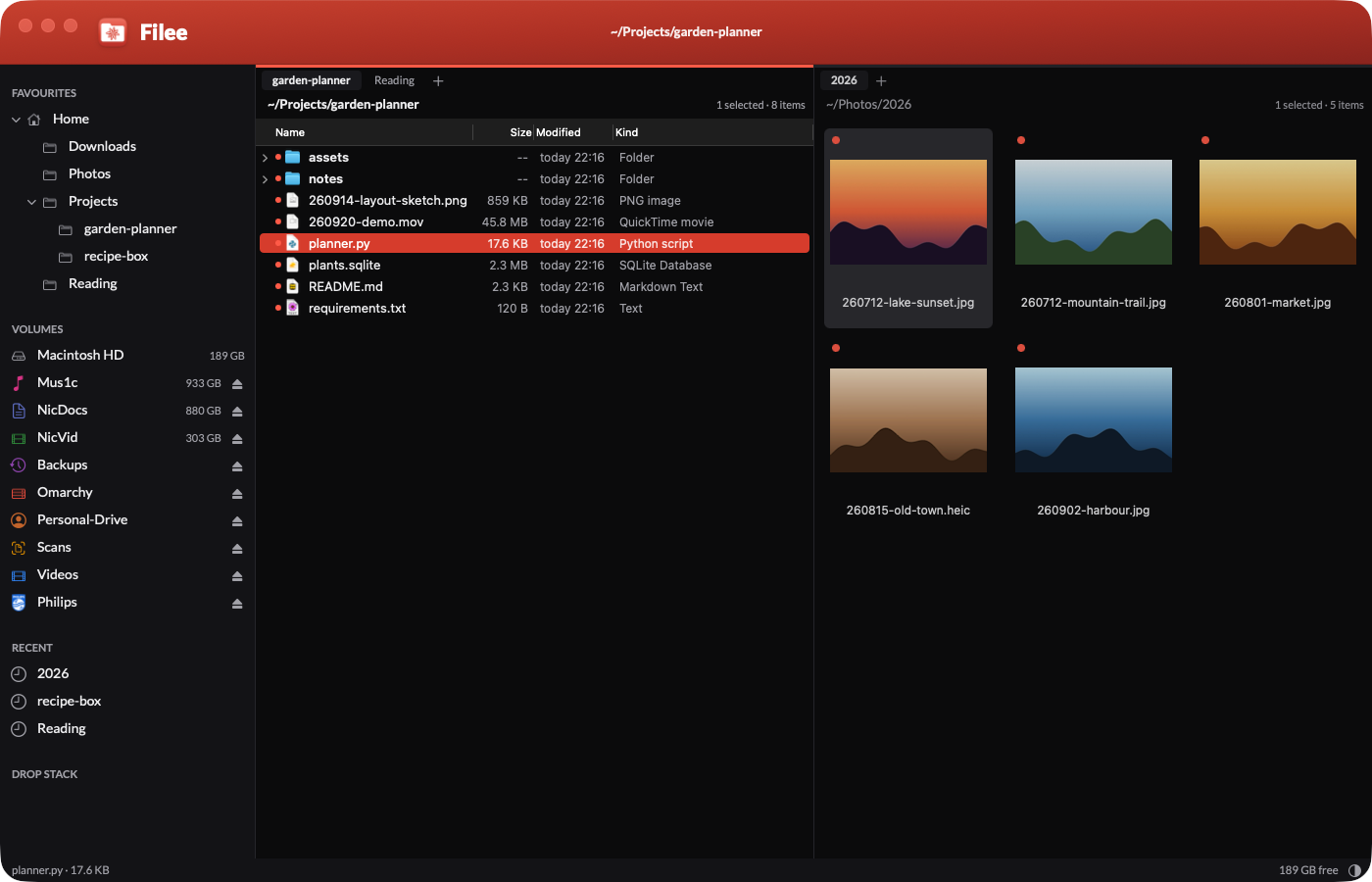
Filee is the file manager I now use on my Mac. It replaces Path Finder, which I used for years. 2 panes, tabs, 3 views, and every action on the keyboard. It is native Swift and AppKit, and it does exactly what I need, nothing else.
Since 14th October 2026, Filee is open source. The code, the spec, the tests and the build script are on GitHub, under the MIT licence:

I built it over 1 weekend with Claude Code, from a voice brief, then improved it while I used it. The story behind that is in The era of personal software is here. The name fits the -ee family of my other tools, next to Stickee: sticky notes that go full screen on every monitor and Dictee: my own local dictation app.
Why I built it
Path Finder was the best file manager for my needs, but not a perfect one. It is also heavy: 260 MB of memory with a big folder open, and more than 5 s to launch on my Mac. And there were things I wanted that no file manager does my way:
- Keyboard first. Type to filter,
⌘Kfor everything, no mouse needed. - My scripts in the file manager. Resize an image, upload it, transcribe a recording: 1 key on the selected file.
- Fast on big folders. Some of my folders hold 20,000+ files.
- My own look. Black, white and red, my fonts and my edelweiss logo.
Some Path Finder features I only noticed when they were missing. Each one went in the same day.
How it compares
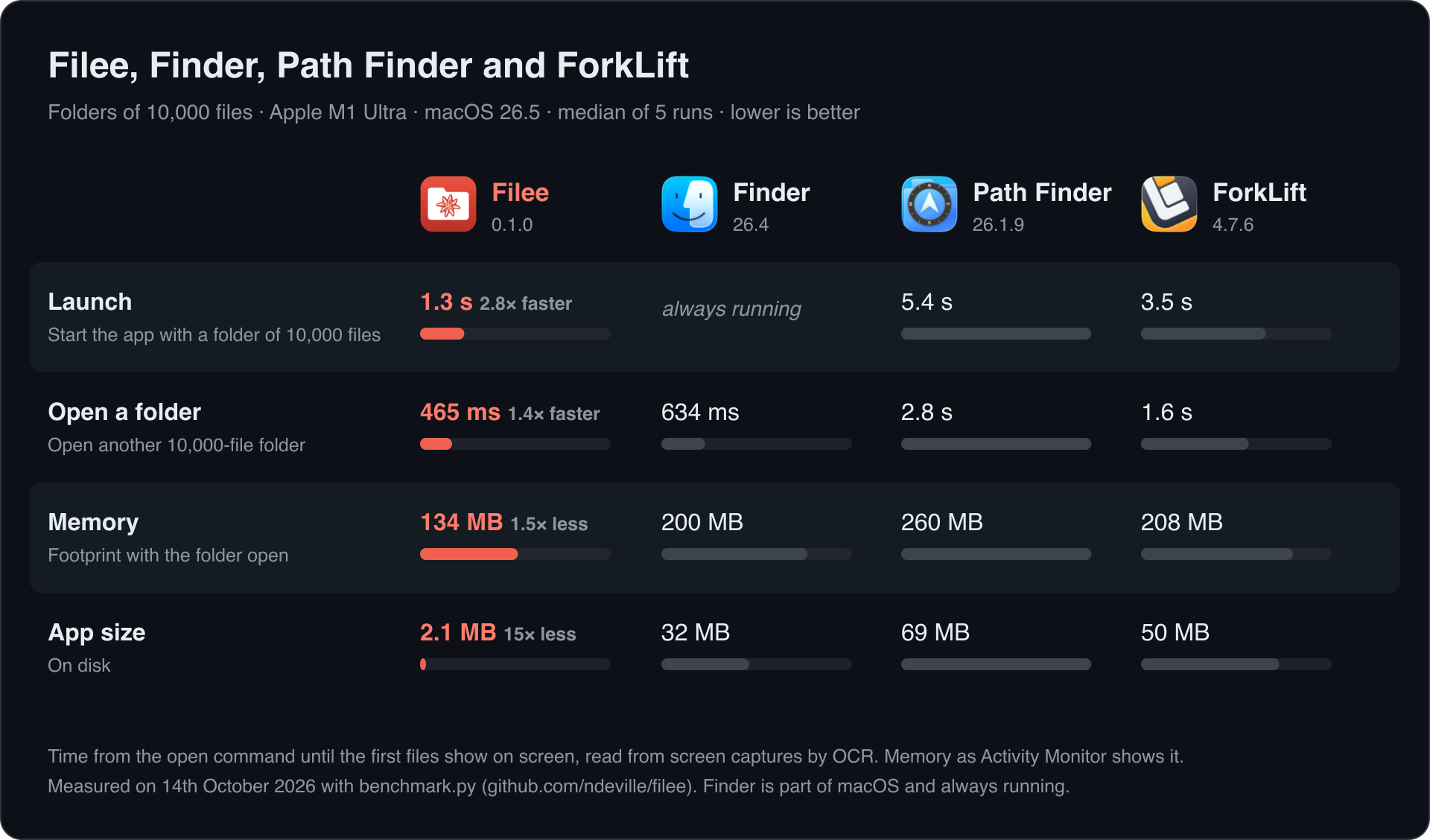
I measured Filee against Finder, Path Finder and ForkLift on folders of 10,000 files. Each app opens the first folder at launch, then a second folder while it runs. A script captures the screen and reads the frames with OCR to find the moment the first files show.
| Folders of 10,000 files | Filee | Finder | Path Finder | ForkLift |
|---|---|---|---|---|
| Launch, until the files show | 1.3 s | always running | 5.4 s | 3.5 s |
| Open a second folder | 465 ms | 634 ms | 2.8 s | 1.6 s |
| Memory with the folder open | 134 MB | 200 MB | 260 MB | 208 MB |
| App size on disk | 2.1 MB | 32 MB | 69 MB | 50 MB |
Median of 5 runs on a Mac Studio (M1 Ultra), macOS 26.5. Path Finder 26.1.9 and ForkLift 4.7.6 are the Setapp versions.
Filee is the fastest in every row, but Finder is close when it opens a folder: 634 ms against 465 ms. ForkLift and Path Finder are 3 to 6 times slower. The script, benchmark.py, is in the repo, so anyone can run it on their own Mac.
What it does
Browse
- 2 panes, each with its own tabs, history and view.
⌘1and⌘2switch between 1 and 2 panes,Tabmoves between them, and Swap Panes exchanges them. - 3 views, remembered per folder: a list that expands folders in place as a tree, Miller columns, and thumbnails from 64 to 384 px. A folder of mostly images opens as thumbnails on the first visit.
- Columns that fit their content every time a folder loads. Date added, created, extension and item count are a right-click away.
- Readable dates: "today 14:05", "yesterday", "3 days ago".
- "New today": a red dot marks every file added to its folder today. It resets at midnight, and it does the job of 2 Hazel rules that tagged new files red.
- A path bar that takes anything:
⌘Lor⌘G, then paste a path with quotes, afile://URL or shell escapes. Tab completes. A file path opens its folder and selects the file. - Folder sizes for every folder in the listing (
⌃⌘S), Get Info in 1 panel (⌃⌘I), Quick Look onSpace, invisible files on⇧⌘I.
Find
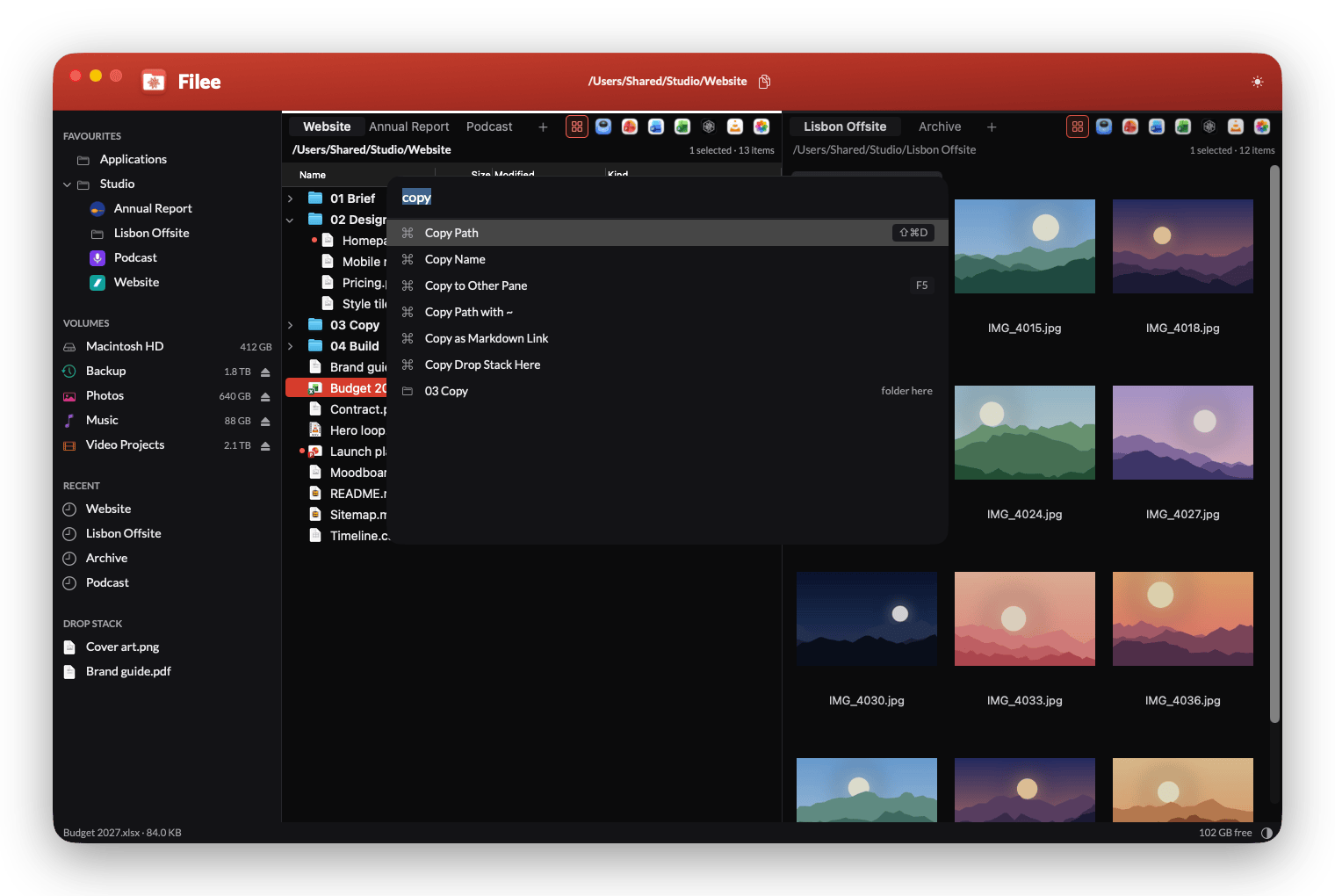
- Type to filter. Any letter starts a fuzzy filter on the folder, with the count and the typed text in large type.
Escclears it. - Command palette.
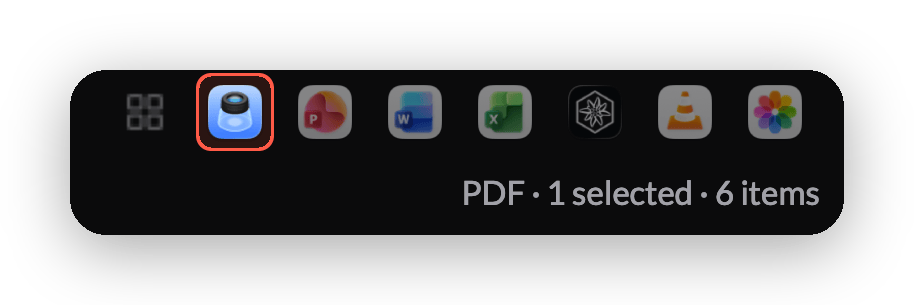
⌘Kfinds every command (with its key), custom actions, favourites, jumps, recent folders and the files in the folder. Type a path to go straight there. - File-type filter on each tab: PDF, PowerPoint, Word, Excel, Markdown, video or images. Each button shows the icon of the app that opens that type on the Mac, and the filter stays with the tab from folder to folder.
- Jumps:
⌘Jand 1 letter goes to a folder from the settings.
Work with files
- Copy, cut and paste from the Edit menu, so my global
⌘Dand⌘Fshortcuts work.F5andF6copy or move to the other pane. - Fast copies: a copy on the same APFS volume is a clone and finishes at once. Long copies show a progress panel with speed, time left and a cancel button.
- Name conflicts ask once: replace, keep both or skip, with "apply to all".
- Undo and redo, 50 steps, for rename, move, copy, new folder and Move to Trash. Filee never deletes a file for good.
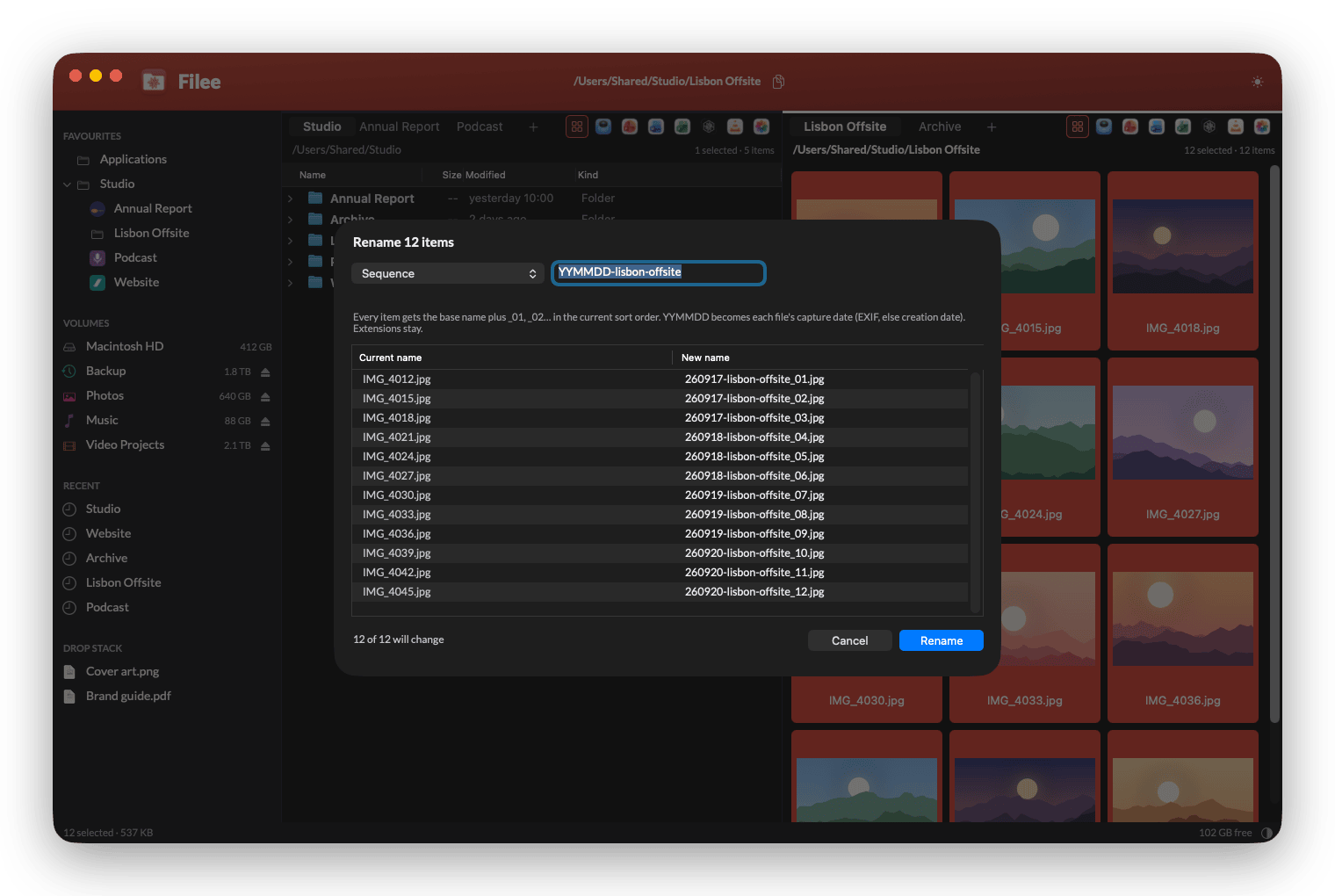
- Batch rename with a live preview: a sequence with
_01,_02, the photo's capture date forYYMMDD, find and replace with regular expressions, slugify and case changes. 1 undo reverts the whole batch. - Zip and extract, drag and drop with other apps, and a drop stack to collect files from several folders and drop them in 1 move.
- New folder, new text file, new folder with the selection, duplicate, symbolic link, Open With, and a terminal at the current folder in Ghostty.
Sidebar
- Favourites as a tree: each favourite sits under the favourite that contains it.
⇧⌘Fadds or removes the current folder. - Folder logos: a
.filee-icon.svgor.filee-icon.pnginside a folder becomes its icon in the sidebar. My Kaltura folder shows the Kaltura sun, and the logo syncs with the folder through Dropbox. - Volumes with free space, an eject button and their own icon and colour. A recorder shows its brand logo.
- Recent folders, the drop stack, and the keyboard all the way:
⌥⌘Fjumps to the favourites.
Custom actions
Any script on the selection, from a key, ⌘K or the context menu. Each action sets the file types it applies to, and runs in the background or in a terminal. Mine upload and resize images, upload videos, transcribe a recording in place and import the files from my voice recorder.
Look and feel
- Light and dark follow macOS, or
⌃⌘Lswitches. - Zoom the file list, the tab names and the type icons with
⌘+and⌘-.⌘0goes back to the default size. - A global hotkey (
⌃⌥⌘F) brings Filee to the front from any app. - Every key can change in
keybindings.json, in the VS Code format. - Filee is my default file viewer: "Reveal in Finder" in any app opens Filee, and a Hammerspoon rule moves new Finder windows to Filee.
What changed since the first version
The first version was ready on 10th October 2026, after 1 day. Since then, while I used it:
- 10th October, evening: the light and dark switch, the copy progress panel, favourites as a tree, volume icons and colours, the red title bar, and the sidebar on the keyboard.
- 12th October: the new app icon, Expand All and Collapse All, and a copy button for the folder path in the title bar.
- 13th October: "Reveal in Finder" opens Filee,
⌘Hgoes home, the file-type filter on each tab with the real app icons, 1 zoom for the files and the tab names, a cleaner⌘Kpalette, and folder logos from a dotfile. - 14th October: the open-source release, with the README screenshots and the benchmark.
Open source
I released Filee for 2 reasons. Someone else may want a fast, keyboard-first file manager. And the repo shows what 1 person can build with Claude Code in a few days.
It stays personal software: it does what I need on my Mac. I don't offer support, and I read issues and pull requests when I have time. The README says so in the second paragraph.
To build it, you need macOS 26, Xcode 26 and XcodeGen:
git clone https://github.com/ndeville/filee.git
cd filee
./build.sh --install
How I prepared the repo
The private repo held things that never belonged in public. The clean-up:
- Personal defaults out. The default favourites, jumps and actions pointed to my folders and scripts. A new user now gets Home, Desktop, Documents, Downloads and Applications, and 4 generic example actions. My own setup lives in
~/.filee/, outside the repo. - Brand logos out. The app shipped the Kaltura and Philips logos. The
.filee-icon.svgdotfile replaced them: any folder can carry its own logo. - The signing identity in 1 local file. The build script read my Developer ID from its own code. It now reads it from 1 git-ignored file, so anyone who forks Filee signs with their own certificate.
- History squashed. The old history held personal paths, scripts and notes, so the public repo starts from 1 clean commit. A force-push isn't enough: GitHub can keep old commits reachable by their ID.
I first treated the Developer ID itself as a secret, and added git hooks that refused any commit or push that contained it. That was a mistake. Every signed Mac app shows who signed it: codesign -dv on ForkLift shows "BinaryNights LLC" and its team ID. The name proves who made the app and opens nothing. The real secrets are the certificate's private key in the keychain, the Apple ID password and the notarisation credentials, and none of them was ever near the repo. I removed the hooks.
The repo also has screenshots.py, which builds a demo folder of made-up projects and captures the app in light and dark. My real folders never show in a screenshot.
For business people
A file manager is a tool I open 100s of times a day. Each small wait, each extra click and each missing shortcut adds up. Filee removes them for 1 user: me.
What changed for me:
- No more licence. Path Finder costs a yearly subscription. Filee costs nothing to run.
- My workflows are built in. The scripts I used to start from a terminal or a clipboard trick are now 1 key in the file manager.
- It fits the way I work. When I miss something, I describe it and it's there the same day. No feature request, no waiting for a vendor.
The limit: it's personal software. 1 user, 1 Mac, no support, no updates from anyone but me. That's the trade, and for a tool this central to my day it's a good one.
For technical people
Stack
| Layer | Choice |
|---|---|
| Language | Swift 6, about 9,200 lines |
| UI | AppKit, frame-based layout, no SwiftUI |
| Listing | getattrlistbulk(2): 100s of entries per system call |
| Copy, move | copyfile(3) with clones: instant on the same APFS volume |
| Watching | 1 FSEvents stream per visible folder |
| Config | JSON with comments in ~/.filee/, reloaded live |
| Core logic | A Swift package with no AppKit, 27 unit tests |
| Build | XcodeGen, Developer ID signing, hardened runtime |
| Dependencies | None |
Budgets
Inside the app, the spec sets a budget for each metric from day 1. The automated QA measures them on every build, and a build that breaks one doesn't ship.
| Metric | Budget | Filee |
|---|---|---|
| Launch to a usable window | < 300 ms | 140-220 ms |
| List a folder of 10,000 files | < 150 ms | 66-83 ms |
| Filter keystroke, 10,000 files | < 16 ms | 7-10 ms |
| Memory, 2 panes and 5 tabs | < 120 MB | 60-90 MB |
These numbers are smaller than the benchmark's, because they start when the app's code starts. The benchmark adds what macOS does around it: start the process, deliver the folder and draw the window.
QA that runs while I work
The QA harness drives the real app from JSON scripts: navigate, press keys, rename, copy, then check the result. 5 suites, 99 checks, in about 1 minute. It runs on fixture folders, never on my real files. It never activates the window, ignores my real key presses and uses a private pasteboard, so I keep working while it runs.
Lessons from the build
- Sorting text is slow.
localizedStandardComparecost 250 ms on 10,000 names. Filee builds a natural-order sort key once per file and reuses it for the filter. - The app icon can cost 65 MB. Drawing
NSApp.applicationIconImagein the title bar made macOS decode its 1024 px versions. A 128 px copy fixed it. - Some work waits until after launch. The type filter's app icons cost 75 ms to look up. They now load in the background, and the buttons show them a moment later.
- Tiling window managers change your measurements. Amethyst resized the QA window to a full screen tile, and the memory budget failed by 30-40 MB. The QA window is now fixed at 1400×900.
- Measure other apps from the screen, not from inside them. My first benchmark asked each app through the accessibility API whether its files showed. The questions slowed the apps: ForkLift came out 1 to 2 s slower than it is. The final benchmark watches the screen with ScreenCaptureKit and reads it with Vision OCR, and the apps never know.
- Network shares are slow to ask. A volume's name and free space can take 150 ms on a network share, so the sidebar loads them in the background.
- Since macOS 14, views don't clip. A view that fills its whole dirty rectangle paints over its neighbours.
Security
Filee reads the whole disk, so the first design goal is that it never leaks what it reads. Filee itself makes no network calls and sends no telemetry: nothing it reads leaves the Mac. Scripts run only when I press a key, never on their own. The future search index has a deny-list for secrets (.env, keys, SSH and cloud credentials) before it reads any content.
What's next
- Faster folder opening. The benchmark showed where the 465 ms go: about 100 ms for macOS to hand over the folder, 110 ms to list and sort it, and about 250 ms to lay out and draw the rows. The last part is the place to win.
- A folder size view, so I can cancel Path Finder for good.
- A whole-disk name index, to retire Find Any File.
- Content search in text, code, Office and PDF files.
- Later: a disk map like DaisyDisk.
Further reading
The app Filee replaces:

The other file manager in the benchmark:

The tool I built it with:

- The era of personal software is here: why I now build the apps I use.
- Path Finder - Finder alternative: my older note on Path Finder.
- Tilee: my own tiling window manager in Hammerspoon: the tiling window manager I built next.