
Eventee is my own app for the B2B events where I sell. A Mac app covers the work before and after the event. An iPad app covers the show floor. The data lives on my Mac, not in someone else's cloud.
The name follows the -ee family of my other tools (Notee: my own Markdown editor for macOS, Dictee: my own local dictation app). Why I build my own apps at all: The era of personal software is here.
Why I built it
Until now, each event ran on a mix of tools: spreadsheets, a task dashboard I built for the last show and my inbox. It worked, but nothing connected. The person I met on the floor, the message I sent them before the show, what we talked about and the follow-up email lived in different places.
What I wanted: 1 record per person that follows them through the whole event, on the device that fits the moment.
3 phases, 2 devices
A 3-way toggle at the top of the Mac app switches between the phases. During lives on the iPad only. Before and after live on the Mac only, where I have a keyboard and a big screen.
Before the show (Mac)
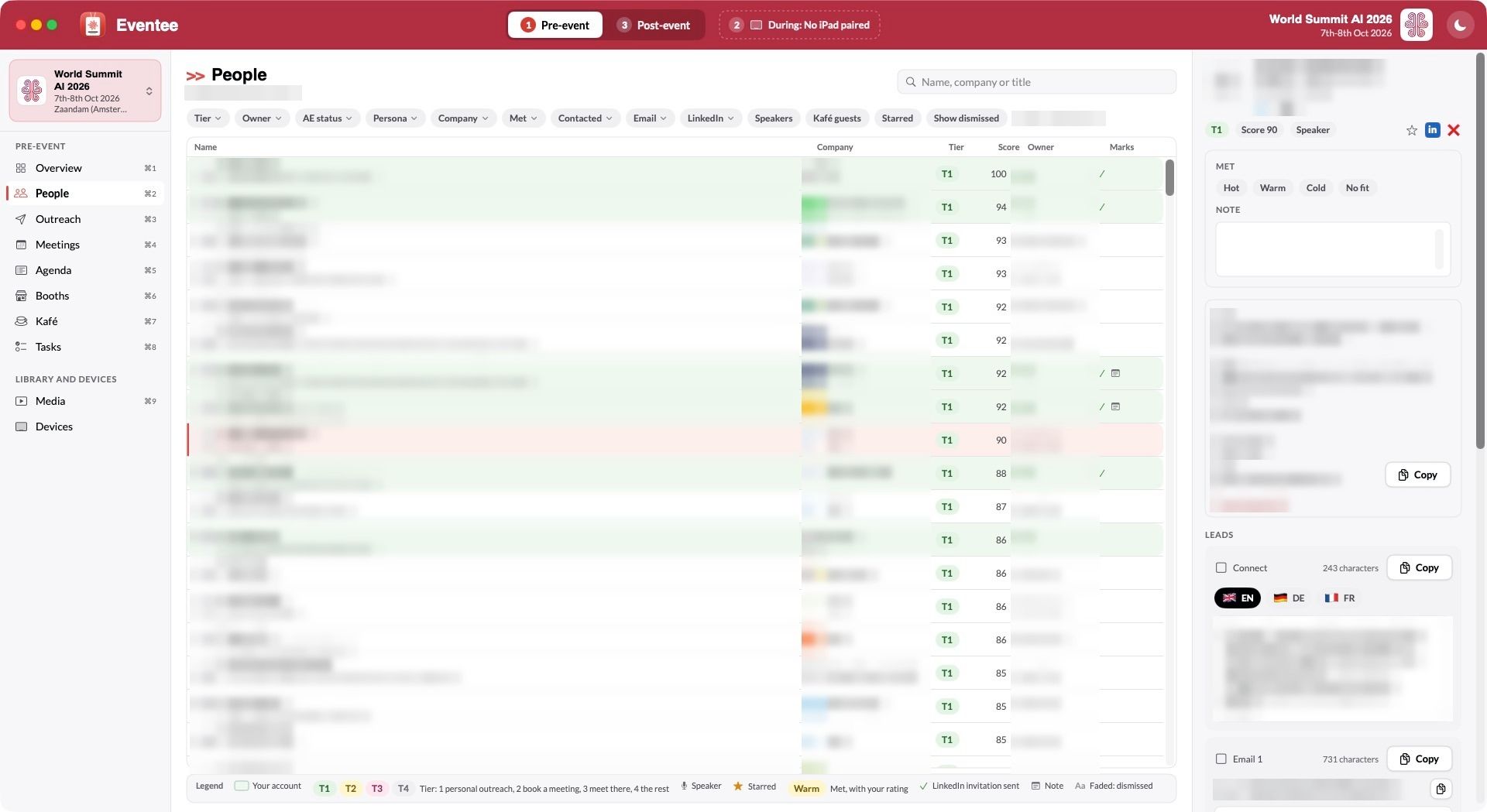
- People: the attendee data, with a tier and a score per person. My own accounts show in green, and a legend bar explains every mark.
- Outreach: drafts in English, French and German. Flag pills switch the language, and 1 click copies the text.
- Logistics: meetings, agenda, booths and side events in 1 place.
- Filters on every field where it makes sense: tier, owner, persona, company, contacted, speakers.
- Media: the demo videos and HTML slide decks the iPad will need on the floor.
During the show (iPad)
- Scan a badge or a QR code, and see who the person is and what I already sent them.
- Rate the conversation (hot, warm, cold, no fit) and star the person.
- Record a voice note right after the conversation: who, what they need, what I promised. The iPad transcribes it on the device with Apple's speech model, and files it under the person. No audio leaves the iPad until it syncs with my Mac.
- Demos offline: my demo videos and my master deck play from the iPad, so the venue wifi doesn't matter.
- Sync back to the Mac when a connection is there.
After the show (Mac)
- Voice notes transcribed a second time on the Mac with whisper, for a cleaner text.
- Every follow-up is generated automatically, on LinkedIn and by email, from the lead's context and my voice note. Each email comes with a personalised PDF one-pager for that person and their use case.
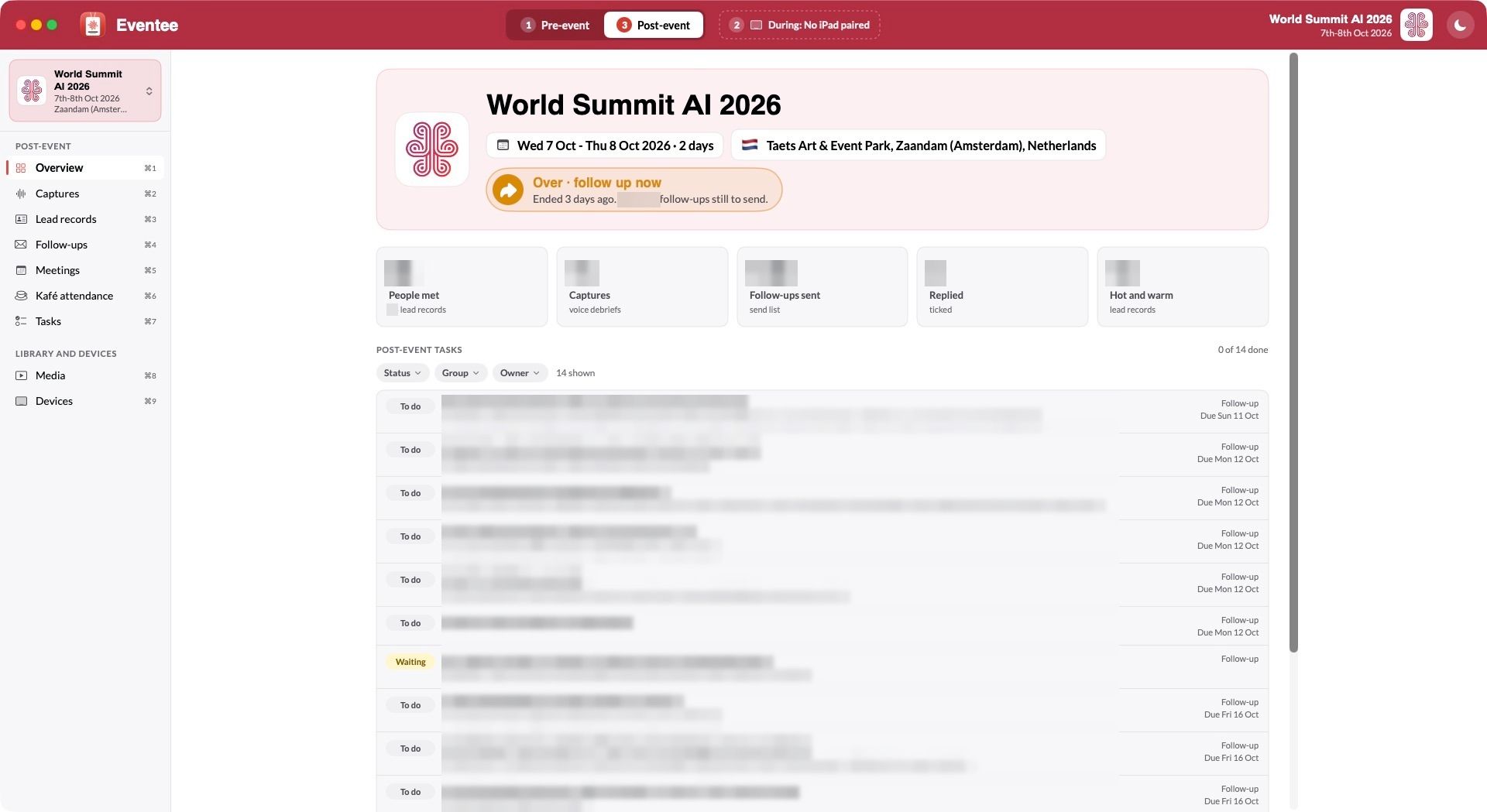
- The send list in 3 coloured groups: internal follow-ups first, then hot and warm leads, then cold and no fit.
- I review, copy and paste. Eventee doesn't send the emails itself. The address, the subject line and the text each have a copy button, and I paste them into my email client. Then I tick the follow-up as sent, so I always know who got what. With SMTP access to my corporate mailbox, Eventee could send them directly.
- The overview shows where the event stands: "Over · follow up now", with the number of follow-ups still to send.
What runs without me
The screens are the visible part. The work behind them runs by itself.
Enrichment: a name and a company are enough
I add a person with a name and a company. Eventee finds the rest through a waterfall: my own databases first, then Apollo, then FullEnrich for the gaps, which checks many data providers in turn. Each step runs only for what the previous one didn't find. A detail that was found is never overwritten.
The rules are configurable. Apollo runs without asking. FullEnrich costs credits, so it shows the cost and waits for my OK.
Scoring and priorities on my ICP
Every attendee gets a score and a tier from 1 to 4, measured against my ideal customer profile. An LLM answers 5 typed questions per person: the buyer role their title describes, the kind of organisation, their buying power, how close their job is to the problems I solve, and whether their company is a competitor. My own signals go on top: priority accounts, existing clients, accounts in my book, people I'm already connected with. The tier decides the effort: a personal message for tier 1, a meeting request for tier 2, a hello on the floor for tier 3.
Account context
For each company, Eventee shows which of my colleagues owns the account, and whether the company is already a client. I know before I write if the conversation belongs to someone else, and when a follow-up should go to a colleague first.
Messaging in my voice
Every message, before, during and after the event, is generated with context about the lead: their role, their company, what they said, what we discussed. My own model writes it in my voice: NicAI, a local LLM fine-tuned from Qwen 3.8 (27B) on my own writing. The story of that model is in Fine-tuning my own model (LLM): NicAI. It runs on my Mac, so lead data never goes to an outside model to be written up.
Messages that stay current
The unsent messages on LinkedIn, in the event's own app and by email are regenerated every day, so they never sound stale:
- Before the event: they mention the event to come.
- On day 2: they mention something from day 1.
- After the event: "yesterday" becomes "last week" when it should.
Small things I care about:
- A copy icon on every field. Name, company, email address, subject line: 1 click each.
- Each event has its own look. Its logo, its colour in the top bar, the country flag in the header.
- Text size for the whole app with ⌘+ and ⌘-, and a light and dark mode.
For business people
Eventee is software for 1 user. It does what I need at an event and nothing else.
The value is the single record per person, and the work I no longer do by hand. Before the show, the list is enriched, scored and written in my voice. On the floor, I scan a badge and see it all. After the show, every conversation turns into a follow-up with its own one-pager, and I can see at a glance what's still open.
The other value: it changes when I want it to. When something bothers me, I tell Claude Code, and the change is built, tested and installed in minutes. The copy icons and the coloured follow-up groups both came from 1 morning of real use.
The trade-offs:
- I maintain it, and there's no support team behind it.
- It runs on Apple devices only. An iPhone version is planned, not built.
- The iPad side hasn't seen a real show yet. Its first test is my next event.
For technical people
Architecture
| Part | Choice | Why |
|---|---|---|
| Hub | Python standard-library daemon on the Mac, LaunchAgent, SQLite | No dependencies, 1 database file |
| Apps | SwiftUI on macOS 26 and iPadOS 26 | Native, with camera and microphone on the iPad |
| Shared code | Swift package EventeeCore: SQLite, ops, queries, sync, theme |
The same logic on both apps, and the iPhone later |
| Sync | Append-only op log, hybrid logical clock, last writer per field | Works offline, merges without a conflict dialog |
| Network | Tailscale | The iPad reaches the Mac from any venue, no open port |
| Files | Stored by SHA-256 | A file is copied once and never changes |
| Speech | SpeechAnalyzer on the iPad, whisper.cpp on the Mac | On-device first, a stronger pass later on the Mac |
| Badges | VisionKit DataScannerViewController |
Text and QR codes from the live camera |
| Decks | HTML bundles with absolute paths rewritten, in WKWebView |
A deck with 383 files plays offline |
Local-first sync
Each device keeps its own SQLite database and a log of every change it makes: the record, the field, the value and a clock. The clock is a hybrid logical clock, the wall time plus a counter plus the device name, so 2 changes never tie.
Applying a change is 1 SQL upsert that wins only when its clock is newer. Python on the hub and Swift on the devices run the same statement. Applying the same change twice does nothing, so a retried sync is always safe.
Data safety
- No row is ever deleted. People are dismissed, media archived.
- A sent text never changes. A SQLite trigger refuses any update to a locked message or follow-up.
- Backups go to Dropbox: the database every 10 minutes while changes arrive, before every install of a new version, and on demand. Voice notes and photos are copied once. Old backups thin out to 1 per day after 48 hours. A restore command backs up the current database first.
- Tests never touch live data. Every test runs in a scratch folder with a test hub on another port, and email tests use a dry run.
- Eventee sends no email to leads. Follow-ups leave from my own email client, after I copy and paste them.
- The iPad holds no API keys. It talks only to the hub on my Mac.
Gotchas I hit
- Swift tools version. A package that targets macOS 26 needs
swift-tools-version: 6.2; 6.0 rejects.v26. - Event colours. A logo colour is often too light for white text. Eventee darkens it until the contrast reaches 5.5:1.
- A blue focus ring sat around the phase toggle in the top bar.
.focusEffectDisabled()removed it. - Audio recording in the iPad simulator hung the app when it started on the main thread. It now starts on a background thread with a timeout.
launchctl bootoutreturns before the old process is gone, so an immediatebootstrapfails with error 5. The install now waits for the old hub to stop.- Snapshots for the iPad failed on foreign keys while copying tables in order. The copy now turns them off while it runs.
The code: about 10,700 lines of Swift, 2,400 lines of Python, Python and Swift tests, and an end-to-end QA script that runs both apps against a test hub.
How I got there: 10 prompts
I built Eventee in 1 session with Claude Code, from 10th to 12th October 2026. I wrote 10 prompts about the app.
Eventee worked end to end after the 1st build prompt: the hub, the sync, the Mac app with its before and after modes, the iPad app and the media library, tested against my last event's data. The 6 prompts after it only made a working app better.
| Phase | Prompts | What happened |
|---|---|---|
| Brief and spec | 3 | Claude read the handover from my last event and asked 45 questions. I answered them |
| Build | 1 | "Go ahead and build now this event app", with the 3 phases and the media on the iPad |
| Improvements | 6 | Event look, filters, status, copy buttons, text size, icon, follow-up groups, backups |
What worked well:
- Spec before code. The first prompt said "don't build anything". The 45 questions surfaced decisions I hadn't made: how the devices sync, who sends the email, whether anything can be deleted (no).
- Real data, frozen. Claude made a read-only copy of my last event's data as the test set. The app was tested on real volumes from the first build, and the live files were never touched.
- Hard rules in the project file. No deletion, no email sent by a test, no test against live data. Every later change respected them without a reminder.
Further reading
- Notee: my own Markdown editor for macOS: my Markdown editor, built the same way
- The era of personal software is here: why I build my own apps now