

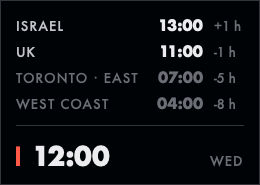
Clockee is the world clock on my Mac. It's a small card in the bottom-right corner of 1 display, above every window, on every Space. It shows my own time in large type and my next meeting with the client's local time. A click opens the time in the 4 places I work with: Israel, the UK, the East Coast and the West Coast.
Clockee replaces no app. The macOS menu bar clock stays where it is. I built Clockee with Claude Code: version 1.0 shipped on 28th October 2026. The app is 1 MB on disk and uses 14 MB of memory. The name follows the -ee family of my tools.
The screenshots in this note come from QA, with a fake clock and a fake meeting.
Why I built it
My week runs on 4 time zones. Before every call I did the same sum in my head: what time is it for them, are they still at work, is it a holiday there. The menu bar clock shows 1 time zone. A desktop widget sits under my windows, and I never see my desktop.
I wanted 3 things in 1 glance, without a click:
- My time, large enough to read from across the desk.
- My next meeting, with a countdown and the time for the client.
- Who is at work: working hours, their own weekend, their public holidays.
Before the build, the agent reviewed 90 days of my calendar history, my displays and my window manager. 1 round of 29 questions set the design.
What Clockee does
The card
The card sits flush in the corner of my main display. Top to bottom:
| Row | Shows | When |
|---|---|---|
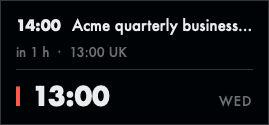
| Next meeting | Start time, subject, "in 25 min", and the client's local time | A meeting in the next 12 h |
| Countdown | Time left until a deadline another tool writes | A countdown file is set |
| Places | Label, time, offset from me ("+1 h"), or the weekday when the date differs | After a click on the card |
| My time | Large, no label, a red bar on the left and the weekday on the right | Always |
30 Oct 2026 The places are now hidden until I click the card, and a 2nd click hides them again. Version 1.0 showed them all the time, let clicks pass through to the window under it, and faded when the pointer came near. The closed card is smaller, which matters more than a click saved. A click still never takes the focus from the app I work in.
Working hours and holidays
Each place has its own working days, start and end times, and holiday calendars. A place outside working hours turns grey. A place on a public holiday gets a red dot after its label.
| Code | Holidays |
|---|---|
uk |
England and Wales bank holidays, with substitute days |
us |
9 federal holidays and the day after Thanksgiving |
ca-on |
Ontario statutory holidays, with substitute days |
il |
Rosh Hashanah to Shavuot, from Foundation's Hebrew calendar |
The holidays come from rules in code, for any year, offline. No data file to go stale, no network. Israel's weekend is Friday and Saturday, so its work week starts on Sunday. A place with 2 calendars, like the East Coast with Ontario and the US, stays at work when only 1 of them has a holiday and gets the red dot.
The client's local time
Clockee reads my next meeting from a local calendar database that another tool syncs every hour. It skips declined, cancelled, all-day and focus blocks, and events I'm alone in.
For each external email domain in the meeting, Clockee guesses the client's country: the top-level domain first (.uk, .il, .ca), then my company database. It then shows the first time zone that differs from mine, for example "13:00 UK". The countdown turns red 5 minutes before the start.
The countdown
1 row counts down to any deadline that another tool writes to a JSON file. I use it for my work sign-in session: a script keeps the session alive and writes its expiry, and the row turns red in the last hour and says "sign in" when the session has ended. Clockee only reads the file, so it stays generic.
The 1-line strip
The first design was a 1-line strip along the bottom of the screen. I switched to the card on day 1, but the strip stays as an option:

Speed and footprint
Clockee has no old app to beat, so the spec set budgets and QA fails when one breaks:
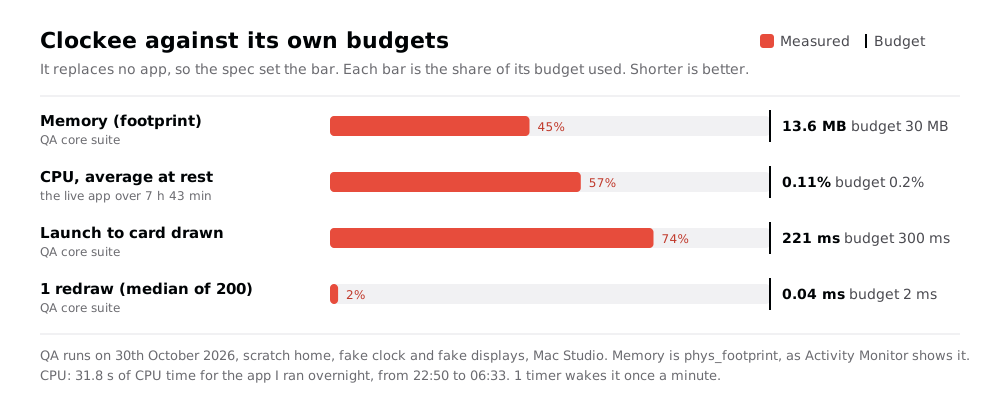
The app I ran overnight used 31.8 s of CPU time in 7 h 43 min. That's 0.11% on average, with a memory footprint of 14 MB.
The rules that keep it there are in the spec:
- 1 timer, re-armed on each minute boundary from the wall clock. No repeating timer that drifts.
- Redraw on events only: the minute tick, wake, a clock change, a time zone change, a new day, a display change, a settings change, a new meeting.
- The main thread never touches the disk. Settings, state and the calendar load on a background queue.
- The calendar is read at most once a minute, with a 200 ms busy timeout. A locked file keeps the last meeting and never blocks.
- The panel never becomes key and never activates the app.
Correct beats fast. A clock that is 1 hour wrong once is worse than no clock, so QA checks the offsets and weekdays across the daylight saving weeks, and Clockee redraws within 1 s of a wake.
How it's built
- Swift 6.3 and AppKit, 1 view drawn by hand. No SwiftUI.
- 1 borderless, non-activating
NSPanelat status-bar level: above normal and floating windows, below menus and Alfred. It joins every Space and stays out of ⌘Tab and Mission Control. - Foundation
TimeZonefor the time zones, so daylight saving is automatic. - Futura for a Bauhaus look, with Lato as the fallback. Any installed font works.
- No Dock icon, no menu bar icon, no permissions. A bundled login agent restarts it after a crash, in about 3 s.
- Settings in 1 JSON file with comments, reloaded live.
- No dependencies.
Gotchas worth knowing
isFloatingPanel = trueresets the window level to floating. Set the status-bar level after it.- macOS 15 and later ignore
sharingType = .nonefor ScreenCaptureKit, so Clockee shows in screenshots. Leaving it out of Shotee: my own screenshot app for the Mac and Recordee: my own screen and camera recorder, after 10 years of OBS captures is on the version 2 list. - Tilee: my own tiling window manager in Hammerspoon must never tile it. Clockee is in Tilee's list of floating apps.
The agent interface
Every command takes --json, so NicAI can use Clockee inside a task (see What is NicAI). The calendar skill can use clockee at to propose times across my places:
clockee status --json                    # each place's time, offset and status
clockee at 16:00 --json                  # 16:00 here, in every place
clockee at 09:00 --from Toronto --json   # 09:00 in Toronto, here and everywhere
clockee next --json                      # the meeting on the card, with the client's time
clockee places toggle --json             # open or close the places
clockee hide 30 --json                   # hide the card for 30 minutes
clockee status works when the app isn't running: it computes the times from the settings with Python's zoneinfo.
How it was built
Clockee followed my appee process for apps:
- Usage review: 90 days of calendar history, the displays, the window manager and the other apps.
- Questions: 29, each with a recommended answer, answered on 28th October 2026.
- Spec, build and QA: version 1.0 the same day. An independent review found 13 defects, all fixed. 2 examples: deleted calendar events showed as meetings, and
clockee atused today's offset, so other dates were 1 hour off across daylight saving. - Changes from use: on day 1, the vertical card and Futura. On 29th October, the countdown. On 30th October, the places behind a click.
QA today: 19 unit tests and 110 end-to-end checks in 6 suites. QA runs the real app with a fake clock, fake displays and a fixture calendar, and renders the card off screen. It never touches my real screen, calendar or pointer.
Next
Version 2 candidates: shift the times by scrolling over the card, a daylight saving alert, the time for the person on a call, and a Stream Deck key with the times.
Further reading
The tool I built it with:

Apple's window class behind the card:

The project generator the build uses:

- see Calendee: my own calendar app for macOS, my week calendar
- see Tilee: my own tiling window manager in Hammerspoon, which leaves Clockee floating
- see The era of personal software is here, why I now build the apps I use
- All my apps: see My apps: everything I built for myself