
NicAI CC, the NicAI Command Centre, is the native macOS app where the work of my AI comes back to me. I run about 50 Claude Code sessions at a time. Each one leaves something for me: a file to review, a question it can't answer alone, a step in a plan, a batch of messages to send, a prompt I started and didn't send. NicAI CC shows all of it in 1 window, and I act on each item with 1 key.
I started it on 14th October 2026 under the name Taskee, next to my other -ee tools. 3 days later it had grown from a task list into the console for all of What is NicAI, so I renamed it. 5 days, 109 commits and about 25,000 lines of Swift later, I use it all day.
The screenshots come from my real data, with client names, people, file names and messages blurred. The Sessions screenshot comes from the test copy of the app, which runs on made-up sessions.
From a chat window to a command centre
The app is the 4th step of the same problem: how do I work with more AI than I can watch?
| Step | How I worked | What broke |
|---|---|---|
| 1. The Claude desktop app | 1 conversation at a time. I copied the results out by hand | 1 conversation is 1 task. My files stayed outside |
| 2. Terminal windows | Claude Code, 1 Ghostty window per session, tiled by Tilee: my own tiling window manager in Hammerspoon | With many windows, I couldn't see which one waited on me |
| 3. A terminal multiplexer | All sessions in Herdr: they survive, and each pane has a state | The state was there, but the work was still in 5 places |
| 4. NicAI CC | 1 native window over sessions, files, questions and tasks | Still growing |
1. The Claude desktop app
The chat app was where I started. It is good for 1 question, 1 document, 1 draft. But my work lives in files and databases on my Mac. Every answer meant copy, paste and save by hand, and nothing ran while I wasn't looking.
2. Terminal windows
Claude Code changed the model. A session reads and writes my files, runs my scripts and keeps going on its own. So I opened 1 Ghostty window per task, and my tiling window manager put them in columns.
It worked for a few sessions. With more, I spent my time looking for the window that had asked a question a while ago. A session that waits is invisible: it sits quietly behind the others.
3. A terminal multiplexer
herdr is tmux rebuilt for coding agents. A server owns the terminals, so sessions survive a closed lid, and every pane carries a state: working, blocked or idle. Its socket API lets other programs read a pane and type into it.
That fixed "which session needs me". It didn't fix the rest. The work my sessions handed back still sat in 5 places:
| Where | What waited for me | How I saw it |
|---|---|---|
| Claude Code sessions | Questions, permission prompts, "go on" | herdr, 1 pane at a time |
| Output folders | Drafts, decks, documents to review | Finder |
TASKS.md files |
Decisions NicAI needs before it goes on | Nowhere: I opened the files by hand |
| Task dashboards | Plan steps, people to contact, warnings | 1 HTML page per task, in a browser |
| Claude Code transcripts | How much I use NicAI, and on what | Nowhere |
4. NicAI CC
NicAI CC reads all 5 and gives me 1 inbox per kind of work. Its job: show what needs me in 1 place, let me act in 1 key, and hand anything that needs NicAI back to NicAI in 1 key.
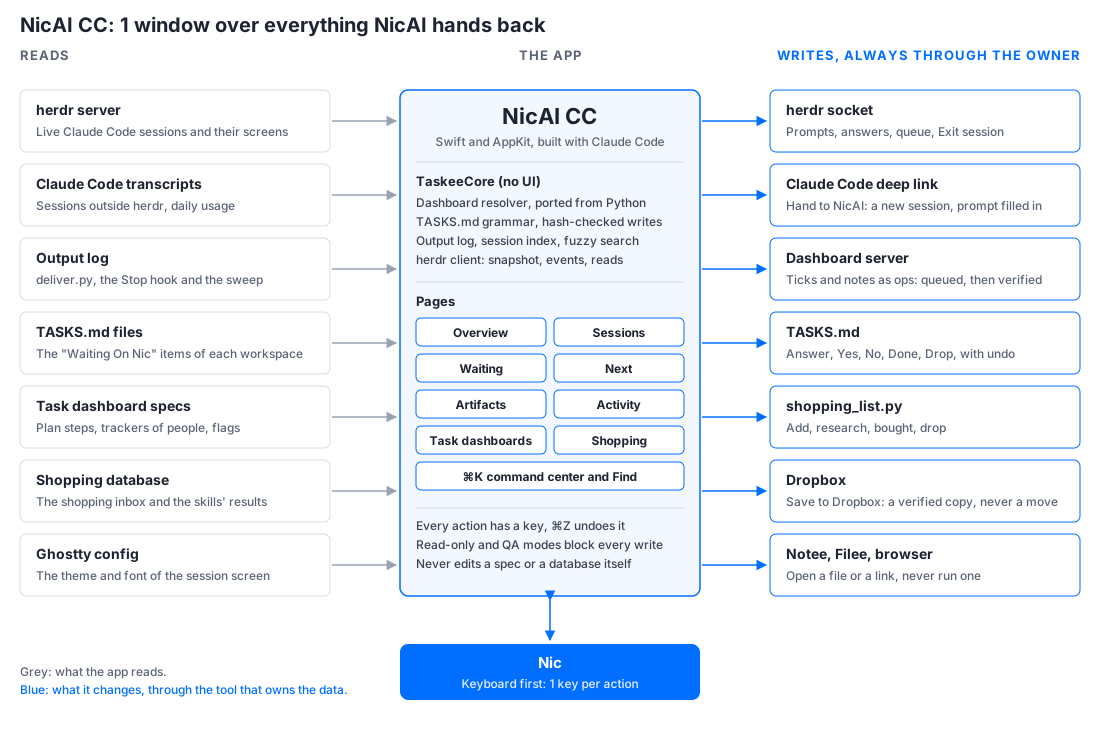
How it fits together
NicAI CC reads every source directly. It changes nothing directly: every write goes through the tool that owns the data.
The sections
The sidebar has 4 groups: Overview and Sessions, Needs you (Waiting, Next, Activity), Artifacts (1 entry per workspace), then the task dashboards and Shopping. Every section has a key.
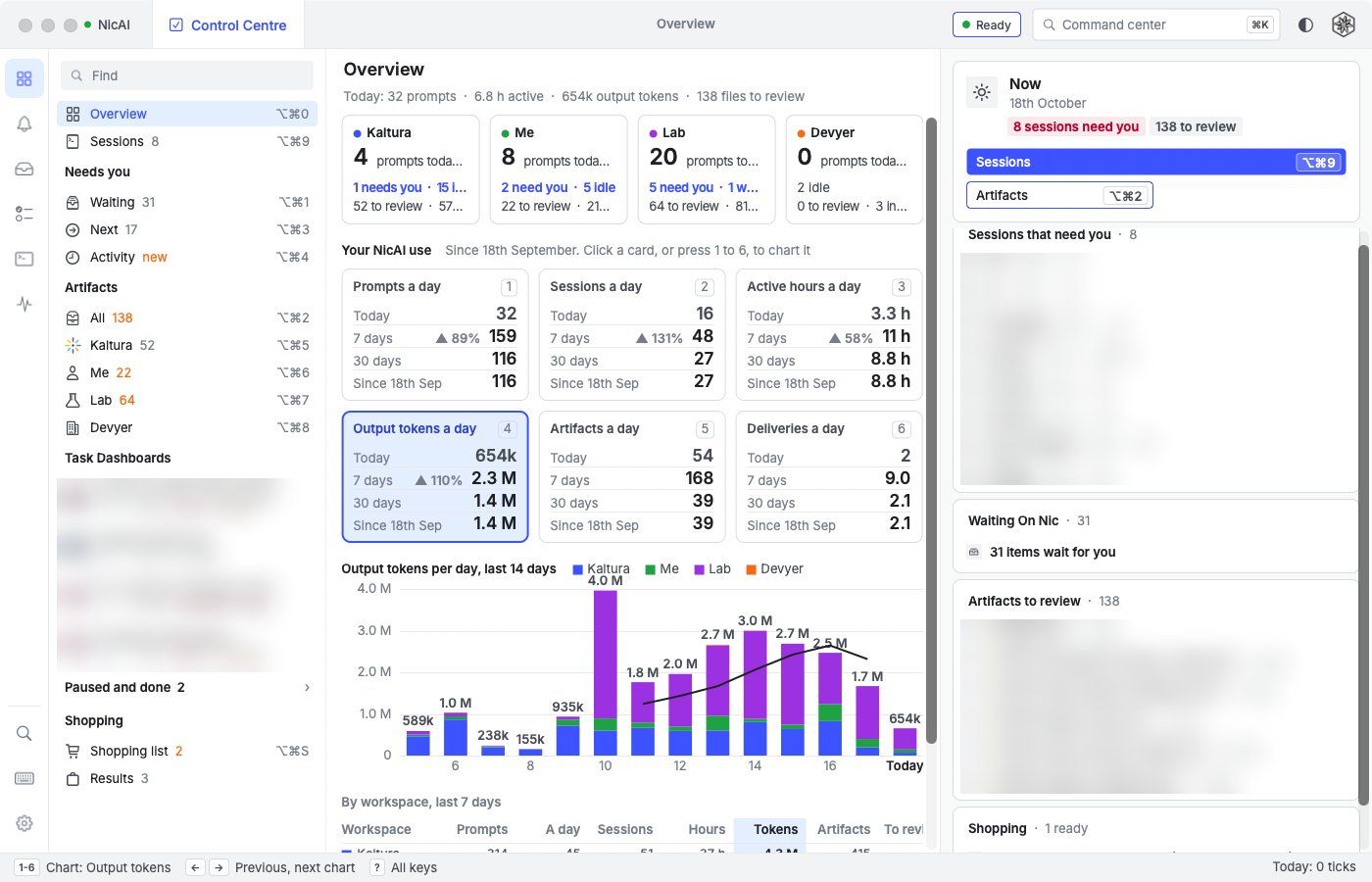
Overview
How I use NicAI, read from the Claude Code transcripts on disk.
- 1 card per workspace (work, personal, lab, my company): prompts today, sessions that need me, idle sessions, files to review.
- 6 metric cards: prompts, sessions, active hours, output tokens, artifacts and deliveries a day. Each card shows today, the 7-day and 30-day averages, and the average since the start.
- The chart:
1to6picks a metric,←→steps through them. 14 days, stacked by workspace, with the 7-day average as a line. - By workspace: the last 7 days as a table.
- Now: the sessions that need me, the Waiting count, the newest files to review and the shopping items that are ready.
Claude Code deletes a transcript 30 days after its last change, so NicAI CC keeps its own daily counts and the history survives.
Sessions
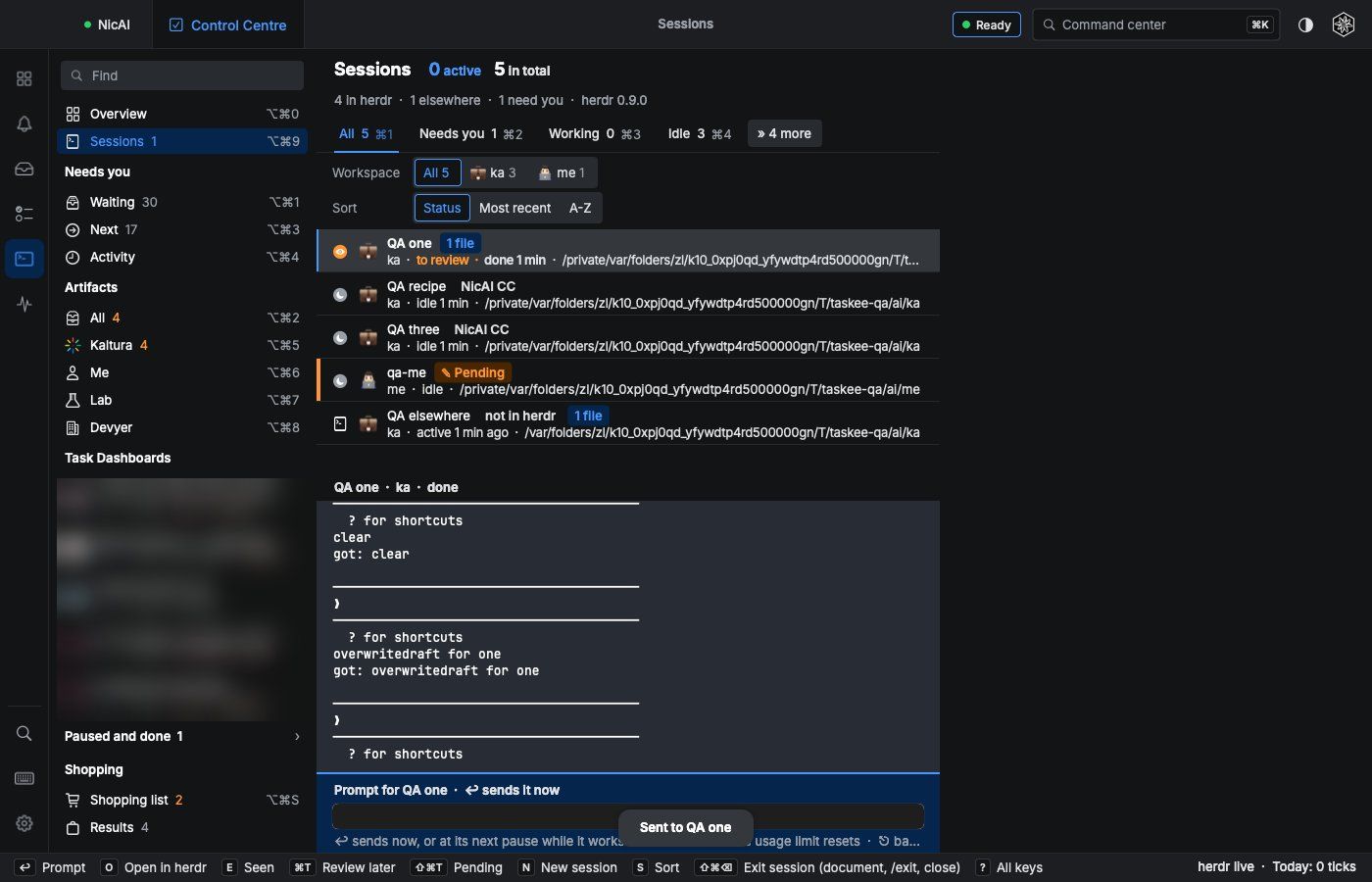
Every Claude Code session, live over herdr's socket.
- Tabs: All, Needs you, Working, Idle, Review, Pending, Queued and Not in herdr (
⌘1to⌘8). The heading counts the active sessions and the total. - Sort (
S): by state, by the most recent change, or A-Z. A workspace emoji starts each row. - The screen: the selected session's terminal sits under the list, in my Ghostty theme and font. A scroll up reads its last 1,000 lines.
- Answer a question:
1to9picks a choice of a blocked session, and only while herdr still shows the question I saw. - The prompt bar: each session keeps its own unsent text.
↩sends now, or queues the prompt for the next pause while the session works.⌘↩waits until the usage limit on the screen resets. - Pending: a session where I typed and didn't send gets an orange bar and a "Pending" chip, also when I click away without
⎋. NicAI CC also reads each session's own input box every 20 s. - Review later (
⌘T) turns the row's icon into an orange eye. - Exit session (
⇧⌘⌫, the red button): the row leaves the list at once. Behind it, the session runs/document-session, then/exit, then its tab closes. - Its artifacts: "8 files" on a row, the newest in the detail panel,
Rlists every file the session made. - Everything else:
Oopens it in herdr,⇧Rrenames the tab,Ccopies the resume command,⇧⎋interrupts,Nstarts a new session, notifications on blocked and done. - Sessions outside herdr (another terminal, the Claude app) show as read-only rows, with their last prompt and reply from the transcript.
Safety first: no key reaches a session unless I pressed it. NicAI CC refuses to type into a session that holds my own unsent draft.
Waiting
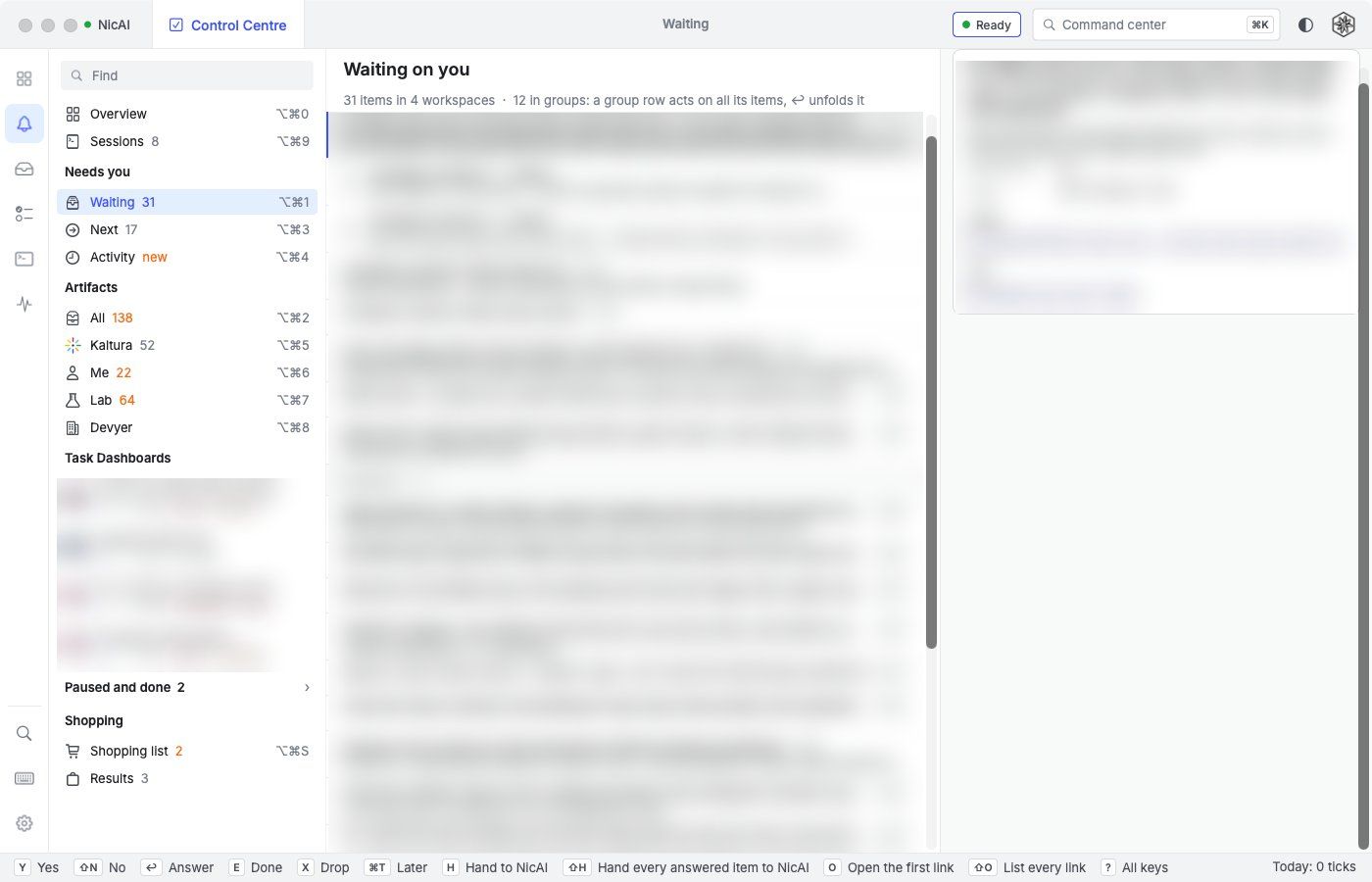
The "Waiting On Nic" items of every TASKS.md: the decisions NicAI needs before it goes on.
Yyes,⇧Nno,Edone,Xdrop,↩a typed answer,⌘Tlater (7 days).Hhands the selection to NicAI: 1 new Claude Code session with my answers.⇧Hhands over every answered item of the workspace.- Near-identical items fold into 1 group row that acts on all of them.
- Every write is hash-checked against the file and undoes with
⌘Z.
Next
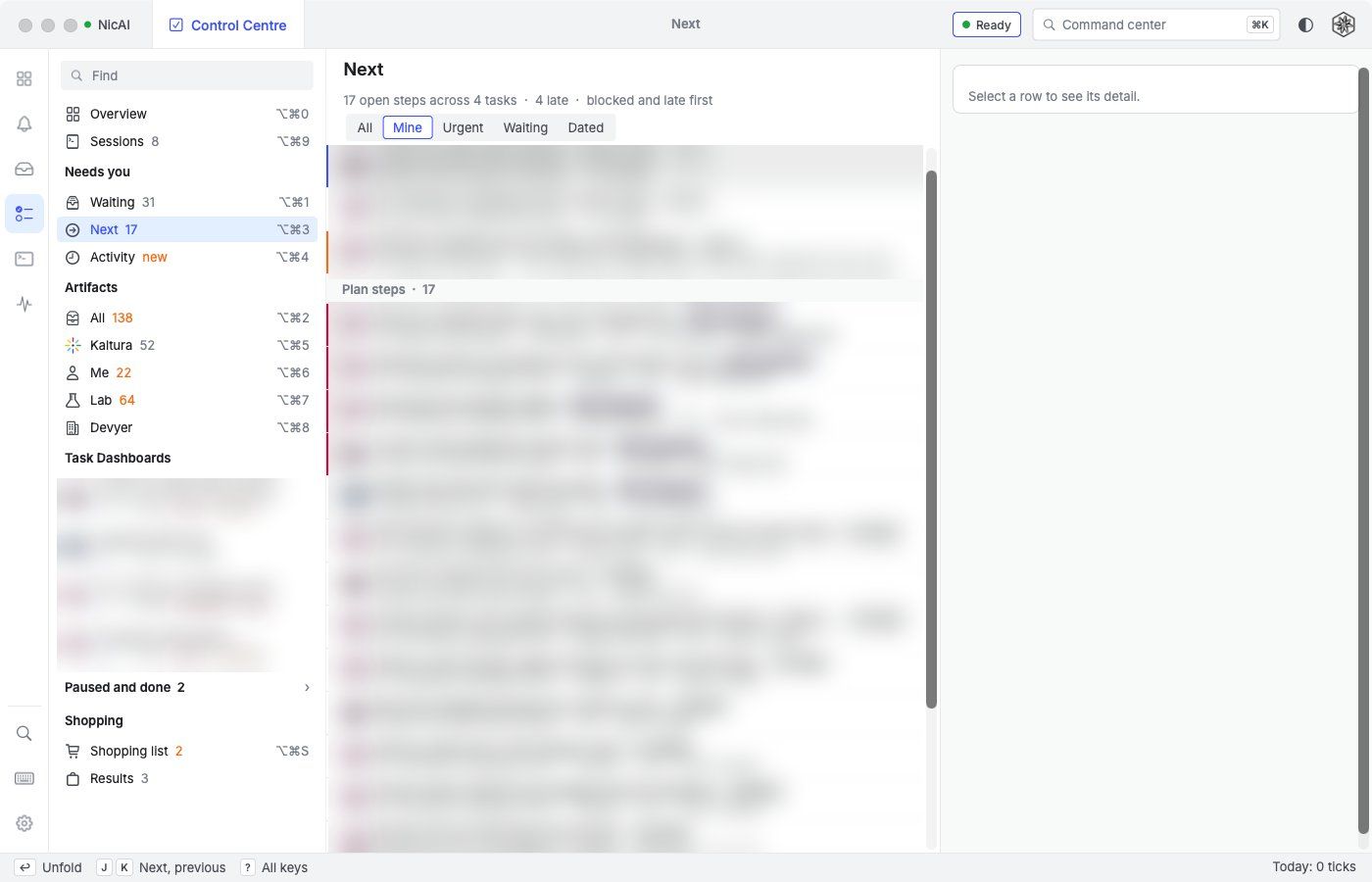
The open plan steps and warnings of every task dashboard in 1 list, blocked and late first. Filters: All, Mine, Urgent, Waiting, Dated. E marks a step done, A, W, B and T set its status, X skips it, and ↩ goes to the step in its task.
Artifacts
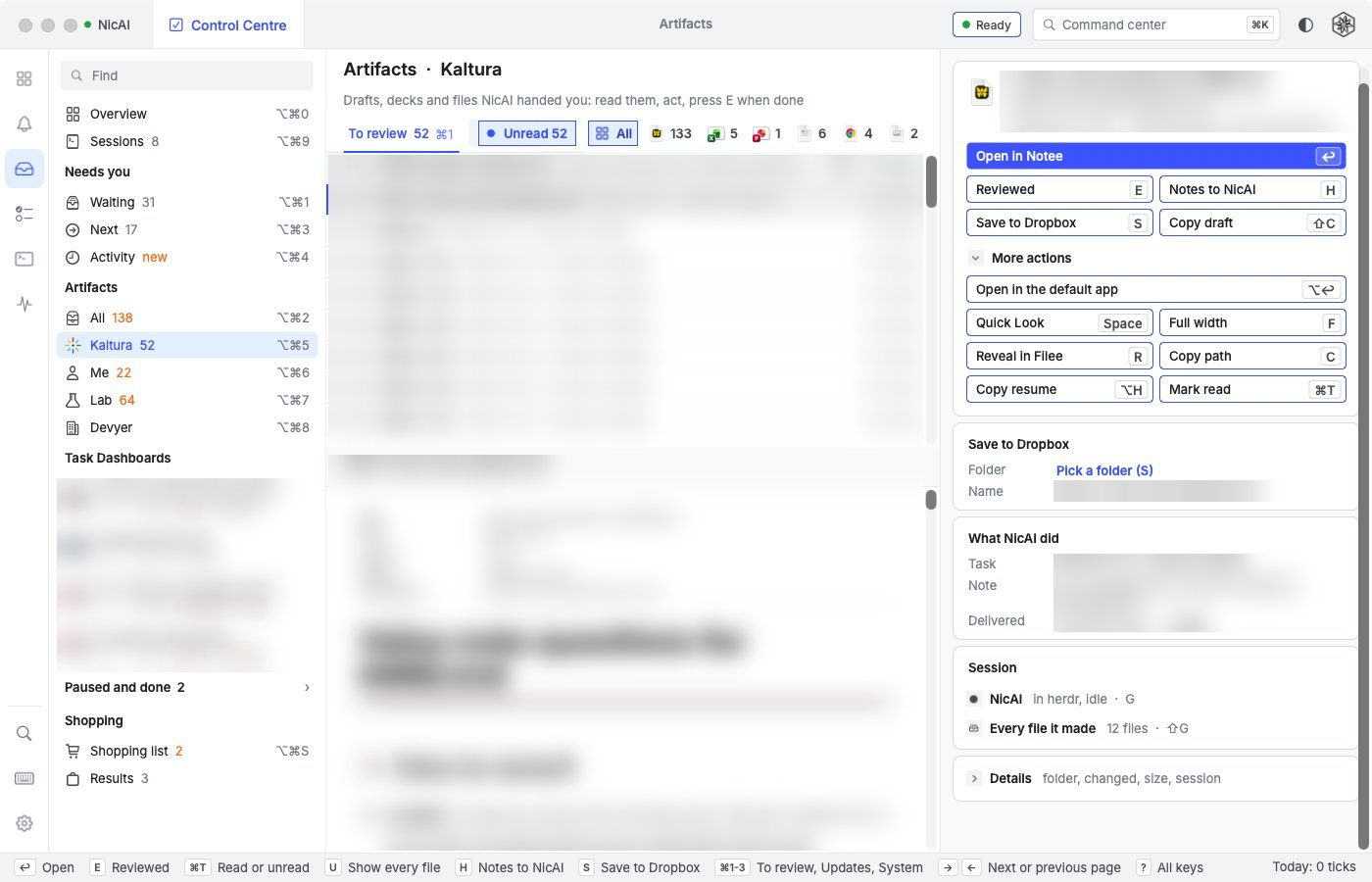
Every file NicAI made for me, 1 entry per workspace.
- How files arrive: a session hands a file over with 1 command, a hook catches the files a turn wrote, and a sweep every 10 minutes catches the rest.
- Tabs: To review, Updates and System, plus a filter by file type. Files stay unread until I press
⌘T. - The preview: Markdown in the style of this site, HTML pages, reveal.js decks (
→changes slide), PDFs and Office files.Fgives it the full width. - Actions:
Ereviewed,Ssave to Dropbox (the folder is suggested),Hnotes back to the session that made the file,Ggoes to that session.
Task dashboards
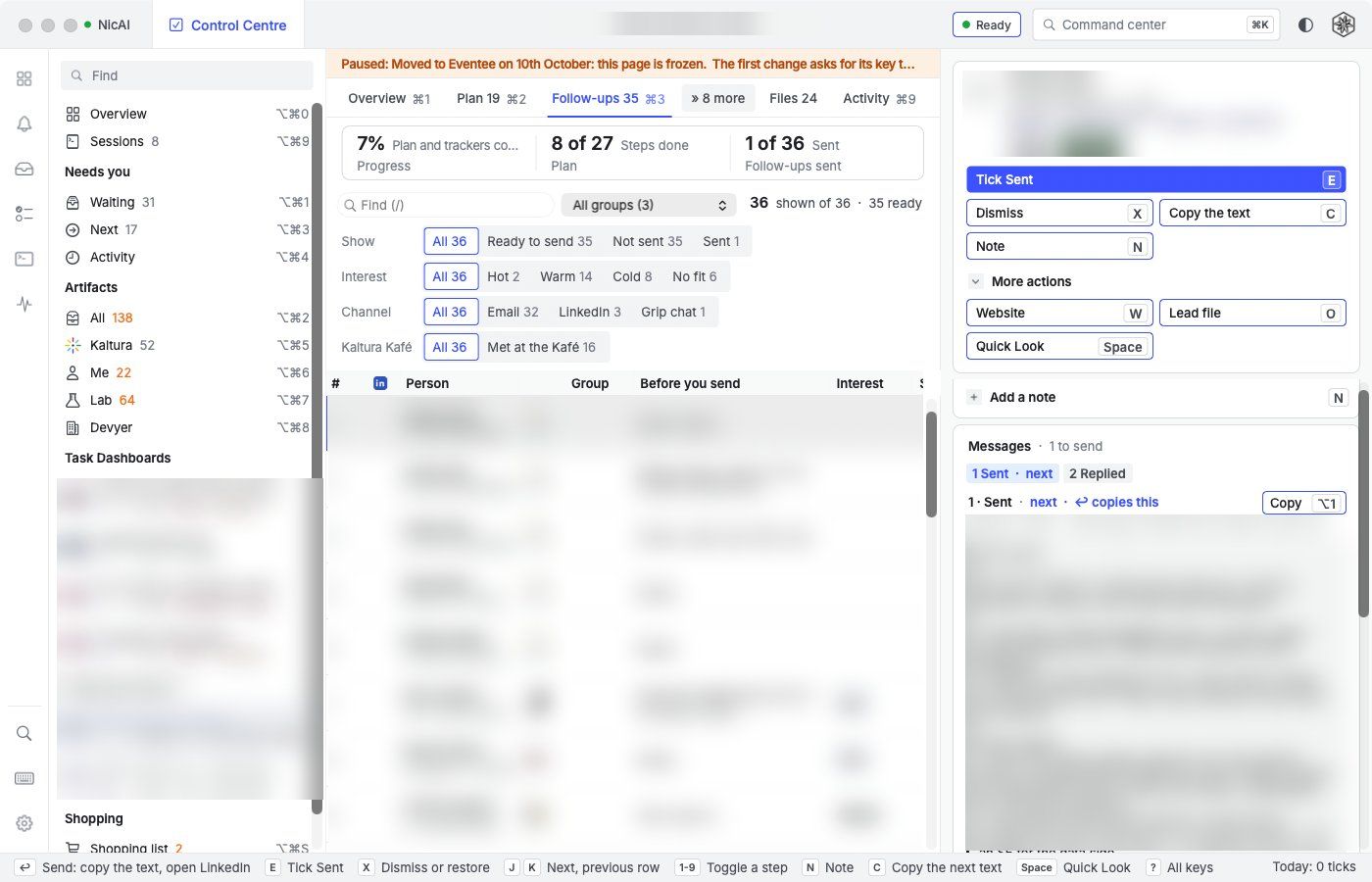
My task dashboards are JSON specs with an HTML page each. NicAI CC shows each task with tabs: Overview, Plan, 1 tab per tracker of people, Files and Activity.
- Filters: chips for status and facets,
/to find, a group menu. - The send loop:
↩copies the prepared text and opens the person's page in my browser. When I come back, a bar asks "Sent?":↩ticks it and moves on,⌘↩ticks and opens the next one. 1 key per person in a batch. - Steps:
1to9toggle a step of the selected row,⇧1to⇧9tick it with a date,Eticks the next step,Xdismisses,Nadds a note. - Writes: every tick goes to the dashboard server as an op, queued, retried and verified. The HTML pages keep working.
Activity
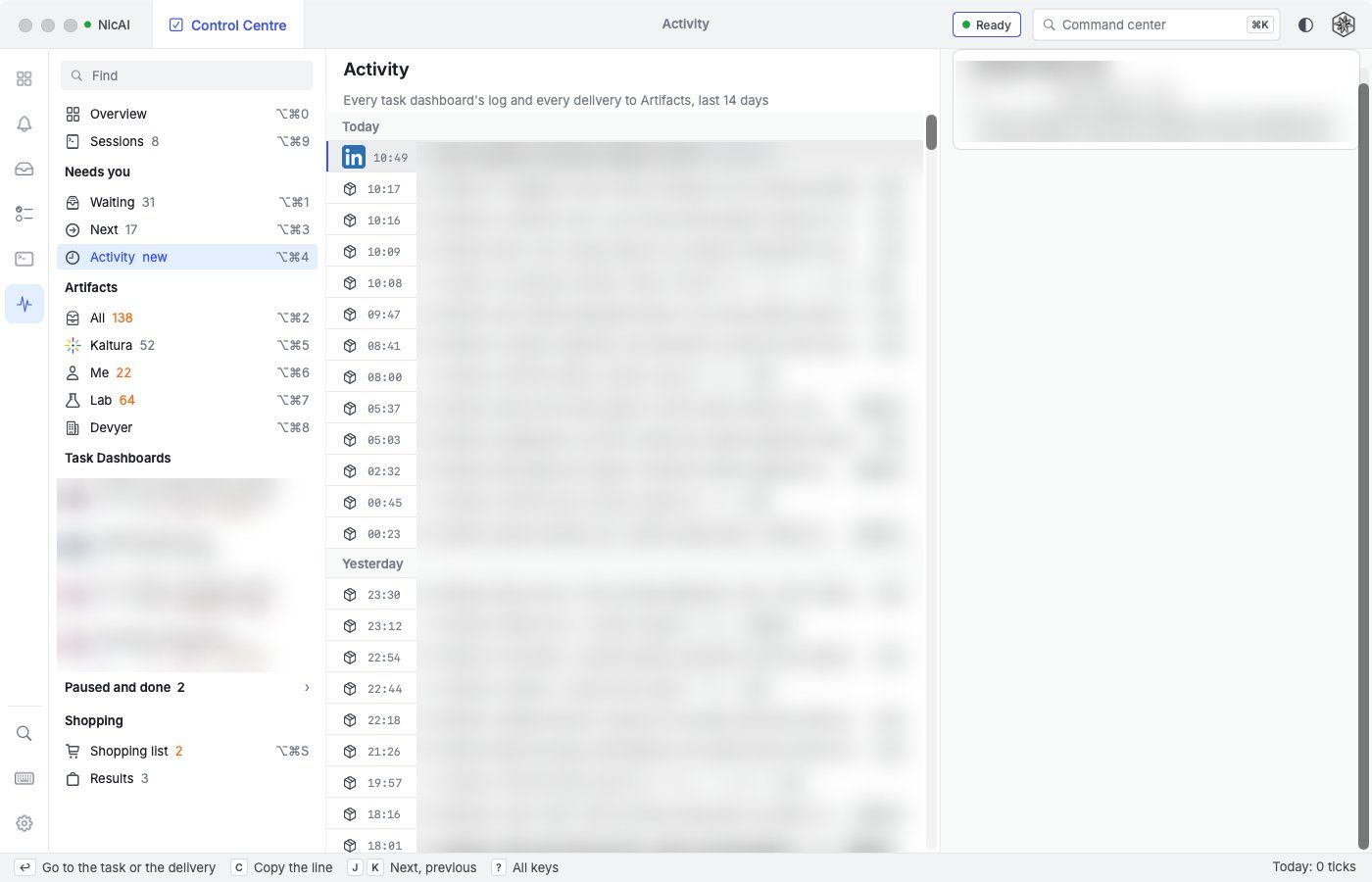
The logs of every task and every delivery to Artifacts, last 14 days, newest first. Lines since my last visit are marked new.
Shopping
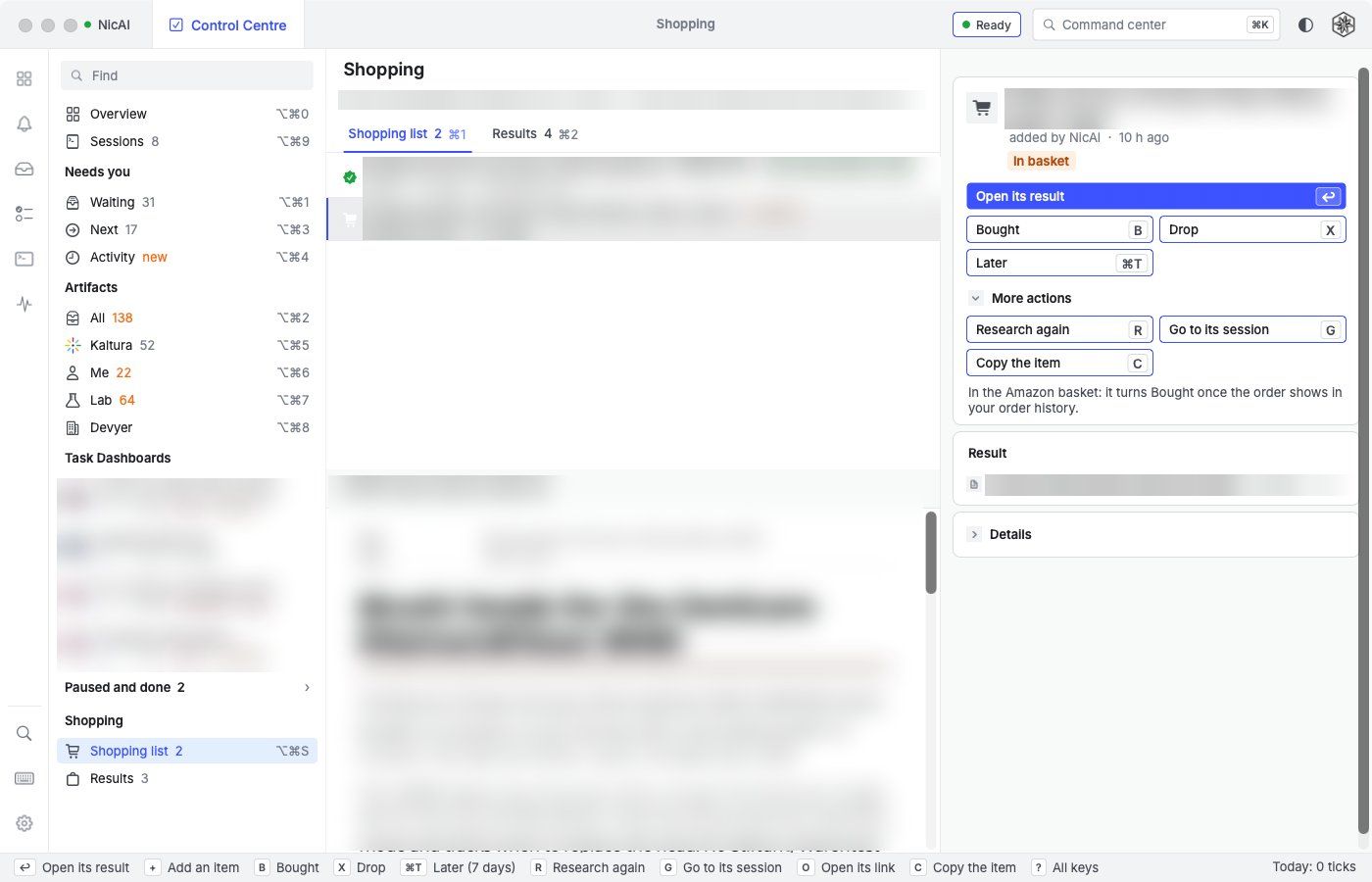
- Shopping list: I email an item to a shopping address, or press
+. Only my own addresses count, checked with DKIM or DMARC. A new item starts a research session at once. - States: New, Researching, Recommendation ready, In basket, Bought (read from my order history), Dropped, Later.
- Results: every result my shopping sessions found, with
Gto go to the session andHto send it notes.
⌘K command center and Find
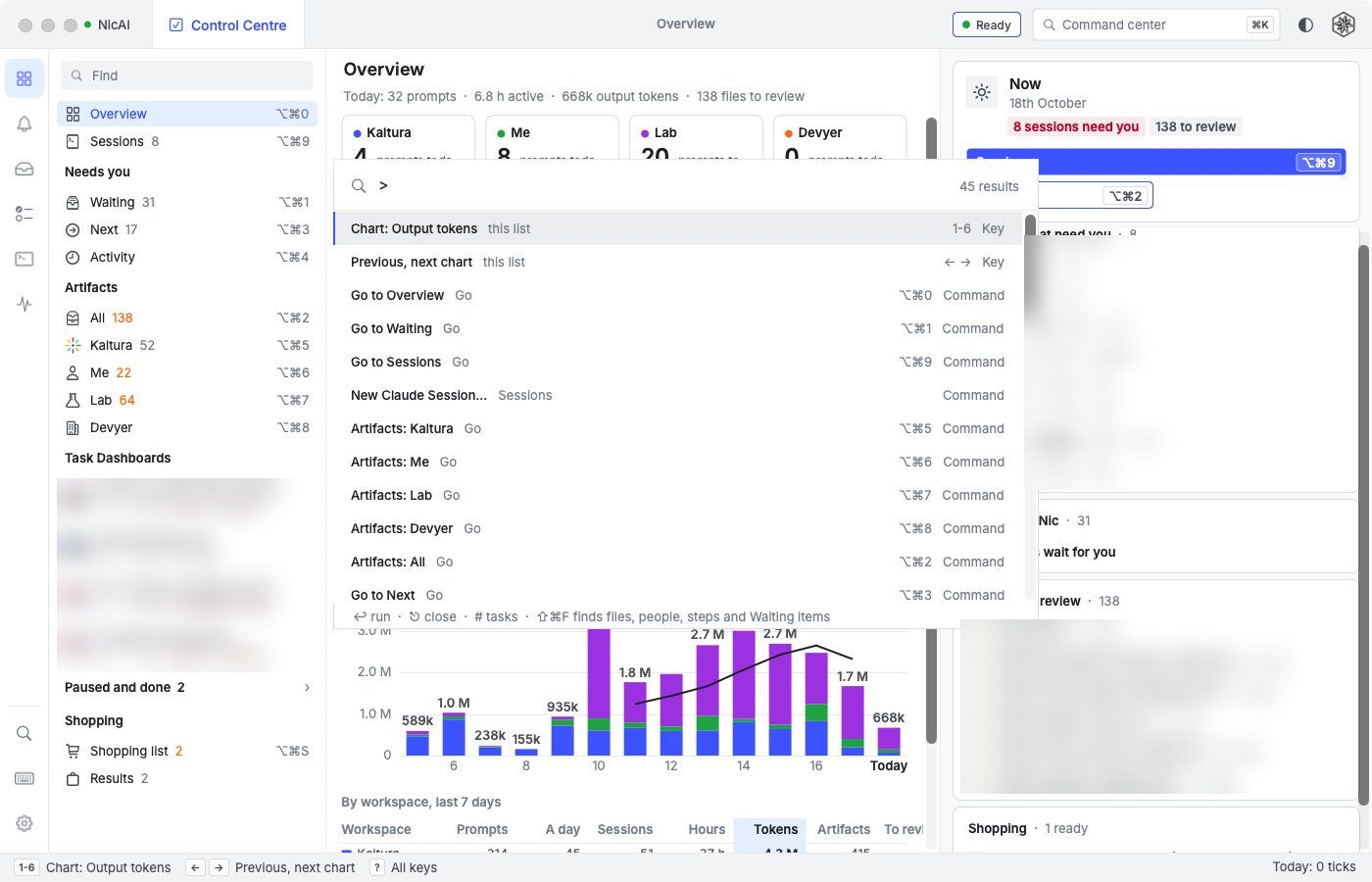
⌘Klists every command with its key.>commands,#tasks,@people,!Waiting items,/files.⇧⌘Ffinds things: tasks, people, steps, Waiting items, files and flags.⌃⌥⌘Tbrings NicAI CC to the front from any app, with⌘Kopen.
Across the app
- Keyboard first: every action has a key, and every button shows it. The status bar lists the keys of the current page,
?lists them all. - Undo: every write undoes with
⌘Z. - Hand to NicAI:
Hopens a new Claude Code session with the prompt filled in. Nothing runs until I press Enter. - Colour roles: blue is mine to act on, green validates, orange waits, red warns. Nothing else gets a colour.
- 1 text size:
⌘+and⌘-zoom the whole window. Light and dark with⌃⌘L. - Presenting mode (
⌃⌘P) hides my private workspaces and tasks before I share my screen. - Notifications and the Dock badge for new Waiting items, deliveries, and blocked or finished sessions.
- A Settings window, a key map file and a URL scheme that only navigates.
- Read-only mode blocks every write, for tests on my real data.
For business people
NicAI CC solves an attention problem, not an AI problem. The AI already does the work. What I lost was the overview: which session waits for me, which file needs my eyes, which decision blocks a task.
- The gain: 1 place to look, and 1 key per decision. A batch of 50 messages takes 50 key presses plus the sending, not 50 rounds of copy, switch, paste, tick.
- The cost: about 5 days to build, in Claude Code sessions, and the maintenance from now on. It fits 1 person and 1 set of tools. That is the point.
- The risk: an app that can type into 50 sessions can do damage. So the rules come first: no key without me, no write except through the owner of the data, and every test on copies.
For technical people
Architecture
- Swift and AppKit. The only outside code is the Markdown renderer it shares with Notee: my own Markdown editor for macOS.
TaskeeCoreis a Swift package with no UI: the dashboard resolver, theTASKS.mdgrammar, the output log, the session index, fuzzy search and the herdr client. - The dashboards stay Python. NicAI CC ports their read side to Swift. A parity test compares Swift and Python on every real dashboard: ids, order, states, counts, texts.
- herdr over its socket: 1 snapshot, then events, at most 4 page refreshes a second. The session screen is a
visibleread every second (about 1 ms), in ANSI, drawn in my Ghostty colours. - Transcripts by byte search, never a JSON parse: 16 GB of transcripts on disk.
- Every write has 1 owner: herdr for prompts, the dashboard server for ticks, a hash-checked temp file and rename for
TASKS.md, the shopping script for the shopping database.
QA
qa.pyruns a parity check and 22 end-to-end suites in about 3 minutes. Each suite drives the app from a JSON script and checks the screen, the state and the files.- QA runs a copy with its own bundle id, on copies of my dashboards, with its own dashboard server, its own herdr server and a small C program that plays Claude Code. At the end it checks that my real databases didn't change.
- Screenshots in QA use
screencapture -lon the window id, so the app never needs Screen Recording.
Lessons from the build
- Python habits matter in a port: stable sorts, code point string order,
str()of a float ("4.0") and banker's rounding all showed up as parity failures first. - An autorelease pool can cost 400 MB. Reading transcripts in 1 background block kept every chunk alive: 136 MB became 536 MB. 1 pool per chunk fixed it.
- Test apps must not fight the window manager. Every QA window got tiled into my columns and reflowed my screen. The QA copy now has a
.benchbundle id that the window manager leaves alone. - A synthetic key event is not a real one.
NSApp.currentEventnever sees it, so the test for⌘↩calls the bar's submit directly.
Performance review
I asked NicAI for a read-only review of the running app on 18th October 2026, 78 minutes after launch, with Sessions open.
| Measure | Value |
|---|---|
| CPU at rest | 0.1 to 0.3%, 0 idle wakeups, 4 threads |
| Memory footprint | 151 MB (98 MB of small allocations, 76 MB of it reclaimable) |
| Main thread over 5 s | Busy in about 9% of samples, mostly drawing table rows and SF Symbols |
| herdr queue | Busy 43% of the time, almost all of it waiting for screen reads |
| QA launch suite under load | Failed: 186 MB at rest against 175, 236 MB after 20 reloads against 200 |
| Biggest dashboard, cached | About 300 ms normally; 3.3 s in 1 run on a machine with a load average of 18 |
The app is light at rest. The cost shows when sessions are busy and when data changes.
Further reading



- What is NicAI: the AI system this app serves.
- Herdr: my note on herdr.
- Tilee: my own tiling window manager in Hammerspoon: the window manager the app had to learn to live with.
- My Claude Code setup: the hooks that hand every file to NicAI CC.
- Emailee: building my own mail app: my mail app, built the same way.