Agent Vitals is a free Stream Deck plugin that puts Claude Code on physical keys: usage gauges, live session status, and 3 buttons that answer permission prompts. It reads the local Claude sign-in, so there is no API key and no configuration. Installed on the Studio on 7th September 2026, replacing Claude Deck.
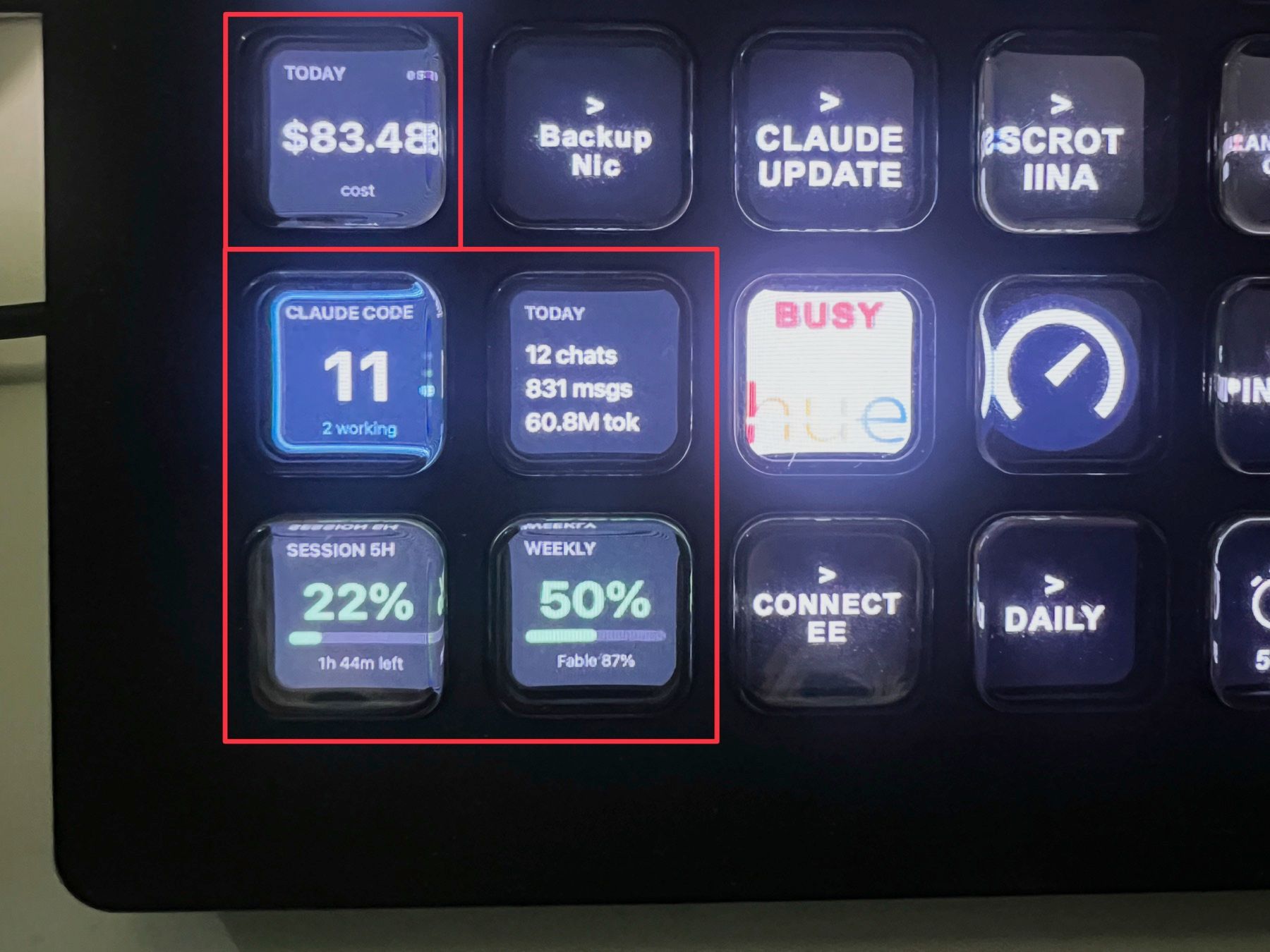
The 5 keys in the red boxes are my layout: daily cost, running sessions, today's activity, 5-hour window, weekly window.
What it shows
The gauges read the same numbers as /usage inside Claude Code. The 5-hour key shows the percentage burned plus the countdown to the reset. The weekly key adds the per-model split, so Fable at 87% shows up before it bites.
Session keys refresh every 5 seconds and report 5 states: Needs approval, Input needed, Working, Finished, Idle. The Claude Waiting key stays dark until a session blocks on you, then names the session and the reason. Press it and the terminal window comes to the front.
The 3 approval keys mirror the terminal prompt exactly: Allow is 1, Always Allow is 2, Deny is 3. Always Allow uses Claude Code's own suggested rule, so it writes the same permission entry you would get from the terminal.
The 20 actions
| Usage | What it shows |
|---|---|
| Session Usage (5h) | Subscription session limit, or local 5-hour spend |
| Weekly Usage | Weekly limit, or local 7-day spend |
| Model Usage (weekly) | Per-model weekly limit or per-model spend |
| Burn Rate | Tokens per hour, plus time left in the 5-hour cap |
| Usage | Local token volume and cost for a window; press to toggle |
| Today's Activity | Chats, messages and tokens today |
| Sessions | What it does |
|---|---|
| Active Sessions | Running sessions; press to cycle through details |
| Claude Status | Live state of one session |
| Claude Waiting | Lights up when any session waits on you |
| Focus Session | Cycles running sessions and raises the window |
| Approvals | Terminal equivalent |
|---|---|
| Claude Allow | 1 |
| Claude Always Allow | 2 |
| Claude Deny | 3 |
| Launchers | What it opens |
|---|---|
| Launch Claude Desktop | The Claude desktop app |
| Claude Quick Chat | The quick-chat hotkey |
| Open claude.ai | A new chat in the browser |
| Claude Code Terminal | A terminal in your GitHub folder |
| Project Terminal | Claude Code in a folder you configure |
| Quick Prompt | Quick chat with a canned prompt pasted in |
| Claude Custom | A Claude-styled key for any app, URL or folder |
Install
Download the plugin and open it. Stream Deck installs it and the actions appear under the Agent Vitals category.
curl -sL -o agent-vitals.streamDeckPlugin \
  https://github.com/tapparello/agent-vitals/releases/latest/download/dev.tapparello.agent-vitals.streamDeckPlugin
open agent-vitals.streamDeckPlugin
It lands in ~/Library/Application Support/com.elgato.StreamDeck/Plugins/dev.tapparello.agent-vitals.sdPlugin. Version 1.8.1 is a 94 KB ZIP.
Requirements and limits
| OS | macOS 11+ or Windows 10+ |
| Stream Deck | Software 6.5 or newer |
| Claude Code | Installed and signed in on the same machine |
| Claude Desktop | Optional, only for the launcher and quick-chat keys |
| Licence | MIT, free |
⚠️ WARNING: live subscription percentages need a consumer Pro or Max account. On a work or team account the gauges fall back to local spend, so you get cost instead of a percentage of the cap.
Everything runs locally. The plugin uses the existing sign-in token to hit Anthropic's usage endpoint and reads local Claude Code data. No analytics, no telemetry.
Compared to Claude Deck
| Agent Vitals | Claude Deck | |
|---|---|---|
| Platform | macOS + Windows | macOS only |
| Usage gauges | 5h, weekly, per-model, burn rate | 5h, 7-day, current + projected |
| Session status | Yes | No |
| Approval keys | Yes | No |
| Refresh | 5s for sessions | 60s default, 30s minimum |
| Price | Free, MIT | Free, pay what you want |
Claude Deck is the tidier gauge. Agent Vitals is the one that does something: clearing a permission prompt from a key beats switching windows to type 1.
Further reading