
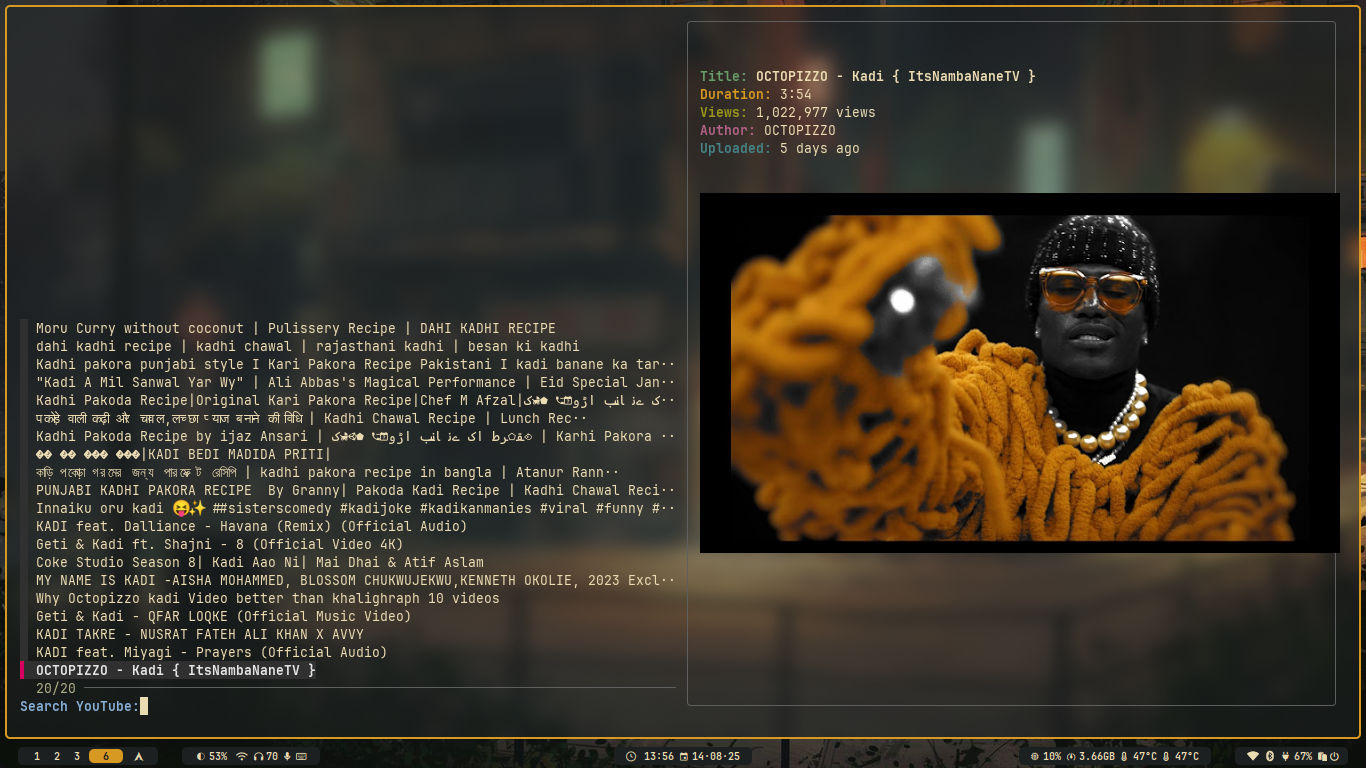
ytsurf searches YouTube, previews results with real thumbnails inside your terminal, and plays the one you pick in mpv. No browser, no recommendations column, no autoplay. It is one Bash script wrapping yt-dlp and fzf, and it has grown a real feature set: subscriptions, a personal feed, playback history, resume-where-you-stopped, queues, and downloads.

| Language | Bash, one 1,718-line script |
| Licence | GPL-3.0 |
| Created | 17th June 2025 |
| Latest release | v3.1.8, 21st July 2026 |
| Last code push | 10th August 2026 |
| Stars | 564, with 38 forks and 2 open issues |
What it does
- Search YouTube and pick from a fuzzy-filtered list
- Thumbnail previews rendered in the terminal
- Play video, or audio only
- Download video or audio, with interactive format and quality choice
- Playback history, and resume where you stopped (mpv and IINA save the position on quit)
- Queues and saved playlists
- Channel subscriptions with a personal feed, and an importer for your existing YouTube subscriptions
- Syncplay support for watching in sync with someone else
- Copy the short video URL to the clipboard
The interesting design choice is that the picker is swappable. The script does not own its own interface.
| Selector | What it is | Best for |
|---|---|---|
| fzf (default) | Terminal fuzzy finder with thumbnail previews | Most people |
| rofi | GUI menu, keyboard driven | A graphical menu on Linux |
| sentaku | Very minimal, no previews | Systems that cannot compile Go |
| television | Terminal picker, telescope.nvim style | A fancier terminal picker |
Installing
# macOS and Linux, Homebrew
brew tap stan-breaks/ytsurf https://github.com/stan-breaks/ytsurf
brew install stan-breaks/ytsurf/ytsurf

# Arch Linux
yay -S ytsurf

# Manual, anywhere
mkdir -p ~/.local/bin
curl -o ~/.local/bin/ytsurf https://raw.githubusercontent.com/Stan-breaks/ytsurf/main/ytsurf.sh
chmod +x ~/.local/bin/ytsurf
There is also a Nix flake for a system-wide NixOS install, and an AUR package. Note that --update only works on a manual install. A Homebrew or AUR install updates through its package manager.
The dependency list in the README is wrong
I read the script rather than trusting the README, and the two do not agree.
| Tool | README says | The script actually does |
|---|---|---|
| yt-dlp | Required | Required, hard exit if missing |
| mpv | Required | Required, hard exit if missing |
jq, curl |
Required | Required, hard exit if missing |
perl |
Not listed | Required, hard exit if missing |
| socat | Not listed | Required, hard exit if missing |
| fzf / rofi / sentaku | fzf required | Any one of the three satisfies the check |
| chafa | Required | Optional. You get a warning and no thumbnails |
| ffmpeg | Required | Never checked |
perl and socat are the ones that will bite you. socat is not installed by default on macOS, so brew install socat before the first run.
Running it on macOS
Nothing in the README covers this, and there is one blocker.
Install a modern Bash. macOS ships Bash 3.2.57, frozen at that version since 2007 for licence reasons. ytsurf calls mapfile 22 times, and mapfile arrived in Bash 4.0. The script tries to protect itself: the first thing it does is re-exec into /opt/homebrew/bin/bash when it finds one on a Darwin system. If you have not installed Homebrew's Bash, it falls back to whatever bash is on PATH, which is the 3.2 build, and the script breaks.
brew install bash socat mpv chafa
IINA works as the player. The script handles IINA as a first-class option and passes it --mpv-save-position-on-quit, so resume works the same as with mpv. Good if you want a native macOS window instead of an mpv one.
--copy-url uses pbcopy, so the clipboard path is already native.
Thumbnails depend on your terminal. chafa picks a graphics protocol and falls back through them. It renders properly in Ghostty (Kitty graphics protocol) and iTerm2 (its own inline image protocol). Alacritty has no image protocol, so you drop to coloured block characters, which is legible but ugly. There is a --block flag to force block mode everywhere.
Usage
ytsurf lo-fi study mix              # search and pick
ytsurf --audio orchestral soundtrack # audio only
ytsurf --download --format jazz piano # download, choose quality
ytsurf --history                     # replay from history
ytsurf --feed                        # your subscription feed
ytsurf                               # no args: interactive mode
The flags worth knowing:
| Flag | Does |
|---|---|
--audio |
Play or download audio only |
--download |
Download instead of playing |
--format |
Choose format and resolution interactively |
--queue, -q |
Add to or play the queue |
--subscribe, -s |
Subscribe to a channel locally |
--import-subs |
Import your YouTube subscriptions |
--feed, -F |
Show videos from subscribed channels |
--limit <N> |
Change the number of search results |
--copy-url |
Copy or print the short video link |
--edit, -e |
Open the config file |
Config
Lives at ~/.config/ytsurf/config. CLI flags always win over it.
# ~/.config/ytsurf/config
limit=25
audio_only=true
download_dir="$HOME/Videos/YouTube"
Where it fits
I already drive yt-dlp from a Python wrapper for transcripts, metadata and audio rips, which covers the scripted half of the job. ytsurf covers the other half: browsing. Search, look at thumbnails, pick something, watch it, with none of the sidebar pulling you sideways. Those are different tools and they do not overlap.
The subscription feed is the part that surprised me. Importing your YouTube subscriptions and reading the feed from the terminal removes the recommendation engine from the equation without giving up the channels you actually follow. That is a genuine improvement over the website, not just a novelty.
Caveats
- The Bash 3.2 trap on macOS is undocumented. So are
perlandsocat. Expect a first run that fails until you fix those. - No official site. GitHub is the only home, and there is a Discord for support.
- It depends on yt-dlp keeping up. When YouTube changes something, ytsurf breaks until yt-dlp ships a fix. That is true of every tool in this category.
- One 1,718-line Bash file. Readable and easy to audit, and also the reason a feature request takes a while to land safely.
- Syncplay has no audio-only mode yet, and the script exits with an error if you combine them.
Active project: 564 stars, releases roughly every six weeks, last push 10th August 2026.
Further reading
- Stan-breaks/ytsurf on GitHub
- yt-dlp, the downloader underneath
- mpv, the player
- chafa, the terminal image renderer
- Homebrew