

WordCraft is a free word processor that copies Microsoft Word: the same ribbon tabs, the same shortcuts, styles, tables, track changes, references and mail merge. It reads and writes .docx, runs natively on macOS, Windows, Linux and FreeBSD, and also runs in the browser through WebAssembly.
It comes from ArtCraft, the team behind the Crafting Apps that clone Photoshop, Premiere and the rest of Adobe's suite (see ArtCraft Crafting Apps). WordCraft is their first move on Microsoft Office, next to GridCraft for Excel and DeckCraft for PowerPoint. Like its siblings, it was written at AI speed: the repo went public on 7th October 2026 and shipped 4 releases in 5 days.
For me the interesting part isn't the Word lookalike. It's that every action is a command an agent can call over MCP, so Claude can open, edit and save a real .docx without Word installed.
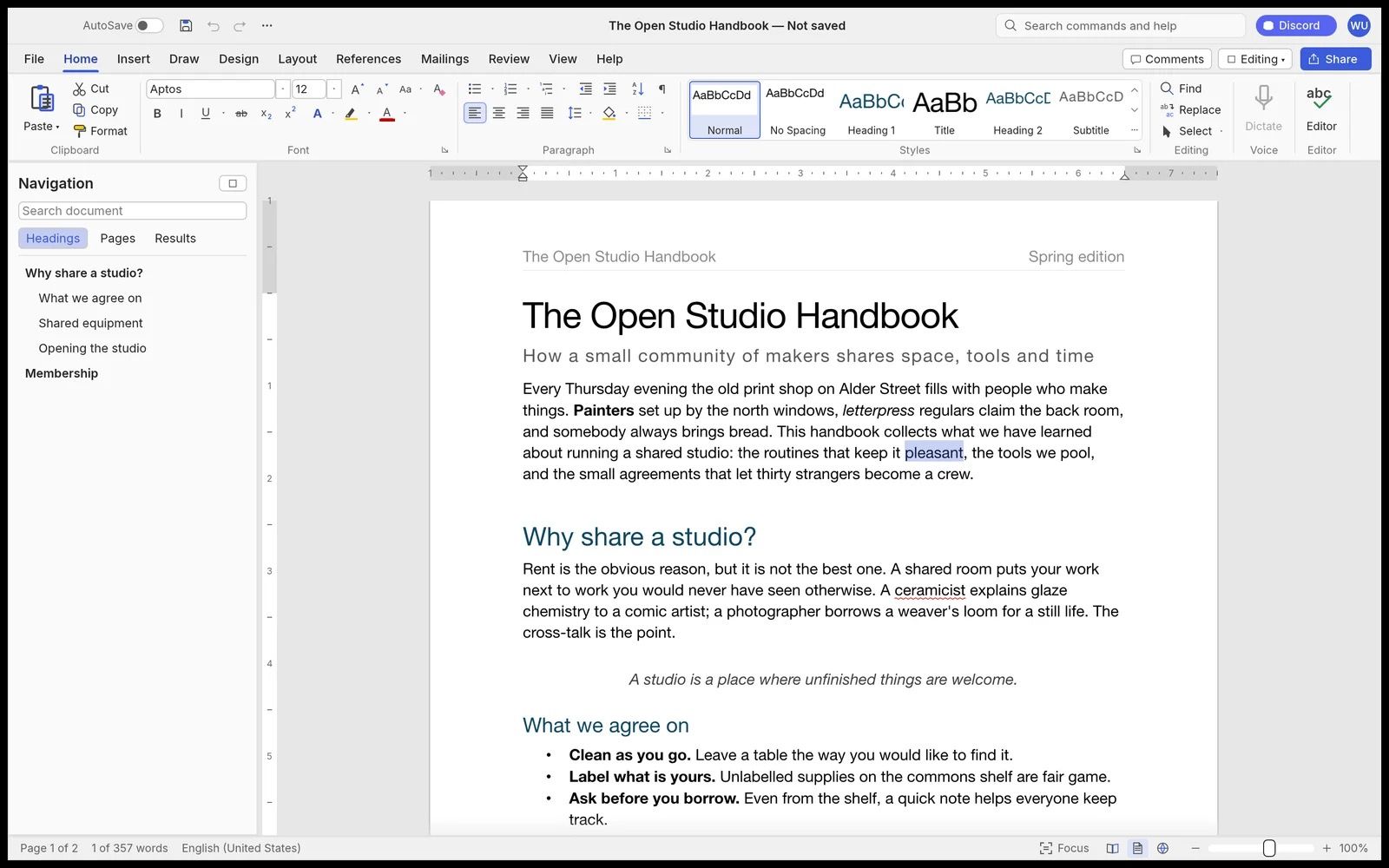
Key facts
| Maker | ArtCraft (Storyteller.ai), founded by Brandon Thomas, plus community contributors |
| Created | 7th October 2026 |
| Language | Rust. UI in egui on the GPU (wgpu). No Electron, no Tauri |
| Licence | MIT or Apache-2.0, your choice |
| Price | Free |
| Platforms | macOS, Windows (x64, arm64, x86), Linux (x86_64, arm64, RISC-V), FreeBSD, web |
| Latest | v0.5.0, 11th October 2026 |
| Traction | 4,925 stars, 1,493 forks and 324 open issues on 11th October 2026 |
| Status | Alpha. The team estimates it at about 60% of the way to replacing Word |
What works today
The README lists a lot, and the screenshots back it up:
- Writing and formatting: AutoCorrect, smart quotes, list autoformat, Format Painter, find and replace with regex.
- Styles: a live Styles gallery, style sets and themes.
- Tables: merge and split, banded styles, header rows that repeat across pages, sort, formulas.
- Pages: sections, columns, headers and footers, page numbers, watermarks, drop caps, hyphenation, line numbers.
- References: table of contents, footnotes, citations in APA, MLA, Chicago or IEEE, captions, cross-references, index.
- Review: spelling and grammar offline, comments in margin balloons, track changes, compare documents, accessibility checker.
- Mailings: mail merge from CSV, envelopes and labels.
- Files: reads and writes .docx, opens old .doc, exports PDF with selectable text, and imports and exports .odt, .rtf, .html, .md, .tex and .txt.
- Interface languages: English, Chinese, Japanese, Portuguese, Spanish, Ukrainian, Serbian, Estonian, Turkish and Russian. No German or French yet.
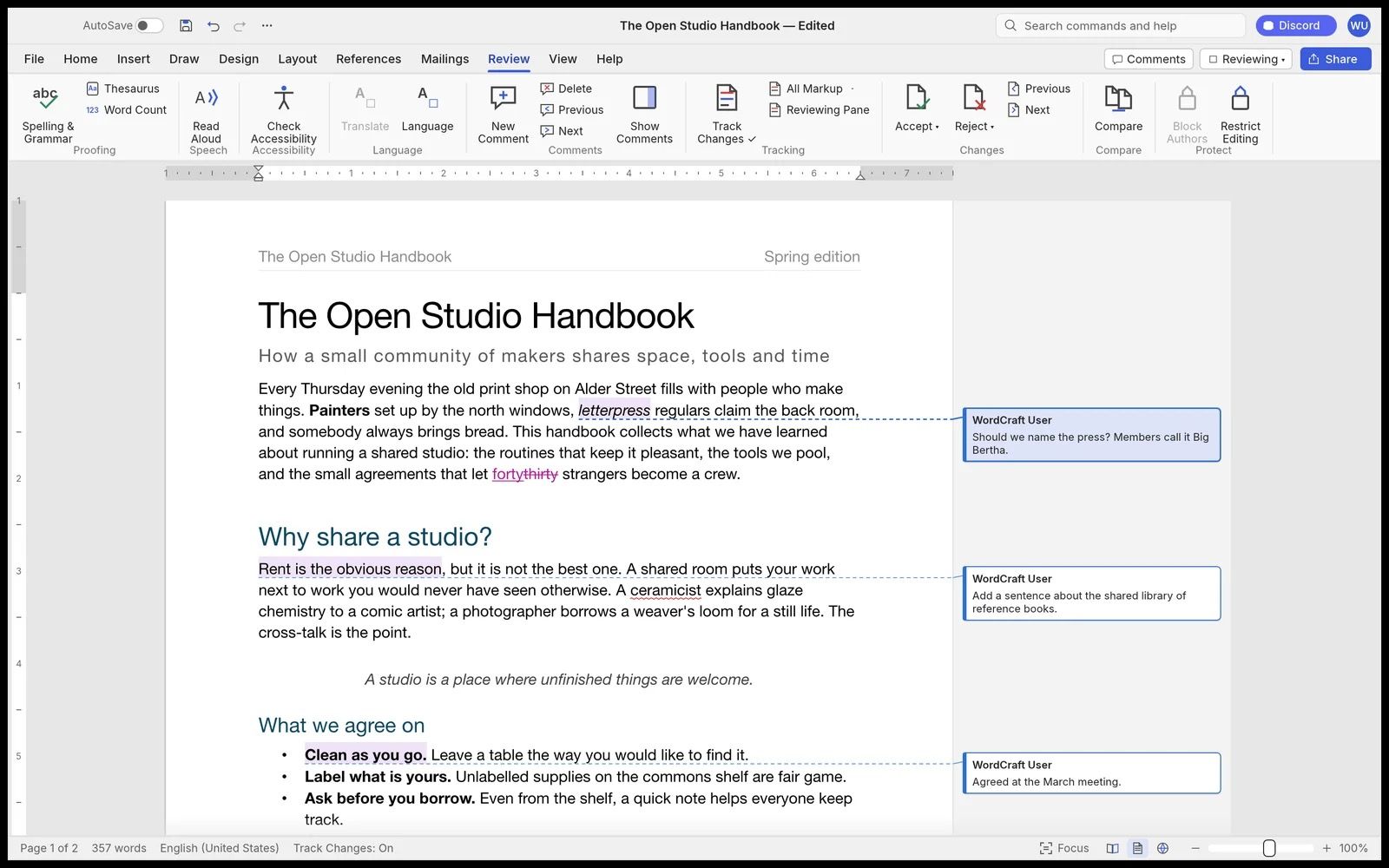
How far from Word
The team publishes its own parity numbers, and they are candid:
| Measure | Coverage |
|---|---|
| Word's ribbon features available as commands | 88% |
| Everyday essentials | About 63% |
| A typical professional's weekly work | About 55% |
| All of Word, for real work | About 60% |
Before beta, the team says it still needs testing against real-world .docx files, charts and SmartArt that survive a round trip, pagination closer to Word's, a stability sweep and native printing.
For business people
- What it is: a free Word you can install anywhere, including Linux and locked-down machines where nobody wants to pay for an Office licence.
- Cost: €0. The licence allows commercial use and modification.
- Where it fits today:
- reading and lightly editing .docx files on a machine without Office
- turning documents into PDF, text or other formats in bulk
- letting an AI agent write or fix Word documents directly
- Where it doesn't fit yet: contracts, proposals and anything that goes to a client. Pagination doesn't match Word exactly, charts and SmartArt don't survive a round trip, and nobody has tested it at scale on real company files. A proposal that looks different on the client's screen is worse than no tool.
- Risks:
- It is less than a week old. Expect bugs and frequent breaking changes.
- The company makes its money elsewhere (AI image and video credits), so the long-term funding of WordCraft is a promise, not a fact.
- The "clean-room" label is the company's own claim, and press coverage of the sibling apps has questioned it. It matters less here, because .docx is an open, documented standard (OOXML).
- Alternatives: LibreOffice and OnlyOffice are mature, free and much closer to full .docx fidelity. WordCraft's edge is speed, a Word-identical interface and agent control.
For technical people
Architecture
A layered Rust workspace, with a build check that enforces the layers:
| Layer | Crates | Job |
|---|---|---|
| L0 | wordcraft-geom |
Units and measurements |
| L1 | wordcraft-doc, -fonts, -proof |
Document model, fonts and shaping, spelling and grammar |
| L2 | wordcraft-layout, -docx, -formats |
Line breaking and pagination, OOXML, other formats |
| L3 | wordcraft-render, -pdf |
Rasteriser (vello_cpu), PDF (krilla) |
| L4 | wordcraft-engine |
Session, undo, 422 commands |
| L5 | wordcraft-mcp |
MCP server |
| L6 | wordcraft-ui-egui |
The Word-style front end, swappable |
2 details I like:
- Speed: paragraph layout is cached, so a keystroke in a 188-page document re-lays it out in about 1.4 ms.
- A "never crash" rule in the repo's
CLAUDE.md: nounwrap(), nopanic!, nounsafein non-test code, and a test that fires every command with junk parameters. That's the kind of guardrail you write when AI agents do most of the coding.
Install
- Download a build from the latest release: a signed and notarised DMG on macOS, MSI or portable zip on Windows, AppImage, Flatpak, deb, rpm or tarball on Linux.
- For the command-line tool on macOS, download
wordcraft-cli-<ver>-macos-universal.zip.
Or build from source:
git clone https://github.com/storytold/wordcraft
cd wordcraft
cargo run --release -p wordcraft -- --sample      # app with the sample document
cargo run --release -p wordcraft -- report.docx   # open a document
CLI
wordcraft-cli convert report.docx report.pdf      # docx, pdf, odt, rtf, html, md, tex, txt, png
wordcraft-cli text report.docx                    # plain text
wordcraft-cli inspect report.docx                 # document structure as JSON
wordcraft-cli run --template sample \
  --cmd 'select.text={"text":"Membership"}' --cmd format.bold --save out.docx
MCP for Claude Code
The same 422 commands that drive the ribbon are exposed over MCP:
# Headless: Claude edits documents without a window
claude mcp add wordcraft -- wordcraft-cli mcp

# Or let Claude drive the running app
wordcraft --control 7981 &
claude mcp add wordcraft-app -- wordcraft-cli mcp --connect 127.0.0.1:7981
The tools include list_commands, execute, batch, type_text, select_text, inspect_document, render_page and save_document. With the app running, screenshot, click and key are added. inspect_document lets an agent check its own work as JSON, without screenshots.
Gotchas
- Windows won't open: the app uses DirectX 12 only by default, because OpenGL crashes some AMD drivers. Set
$env:WGPU_BACKEND = "vulkan"to try another backend. - Slow on old Windows PCs: without a DirectX 12 driver it falls back to OpenGL. The log records the choice.
- Logs:
~/Library/Application Support/WordCraft/logs/on macOS,~/.config/wordcraft/logs/on Linux. Document text is never logged.RUST_LOG=debugfor more detail. - Moving target: v0.1.0 to v0.5.0 between 7th and 11th October 2026. Pin a version for anything scripted.
Pros and cons
Pros
- Free, permissive licence, runs everywhere including the browser.
- Word's interface and shortcuts, so no retraining.
- Real .docx in and out, plus PDF, ODT, Markdown and LaTeX.
- Fast native app, offline spelling and grammar.
- Agent-ready by design: CLI, JSON control channel and MCP server.
Cons
- Alpha: about 60% of Word by the team's own estimate.
- .docx fidelity untested on real-world files. Charts and SmartArt don't round-trip.
- No German or French interface.
- Less than a week old, with 300+ open issues.
- Long-term maintenance depends on a small company's other revenue.
My take
As a Word replacement, not yet. My proposals and client documents stay in Word, because the client opens them in Word and pagination has to match.
As an agent tool, it is already worth trying. I generate .docx files from Python today (see Convert Markdown files to Microsoft Word), and the output always needs a manual pass in Word. A headless WordCraft over MCP would let Claude Code open the generated file, check its structure with inspect_document, fix the styles and export the PDF, all in one loop. The MCP server is 1 command to add, so I'll test it on a non-sensitive proposal draft before trusting it with anything real.
Further reading

- Open Source AI Dev is Going After Microsoft Office, Too (Paul Thurrott, 9th October 2026)
- GridCraft and DeckCraft, the Excel and PowerPoint siblings
- ArtCraft Crafting Apps, the Crafting Apps suite and its background