claude-swap (command: cswap) keeps several Claude Code logins on one machine and swaps between them without /logout and /login.
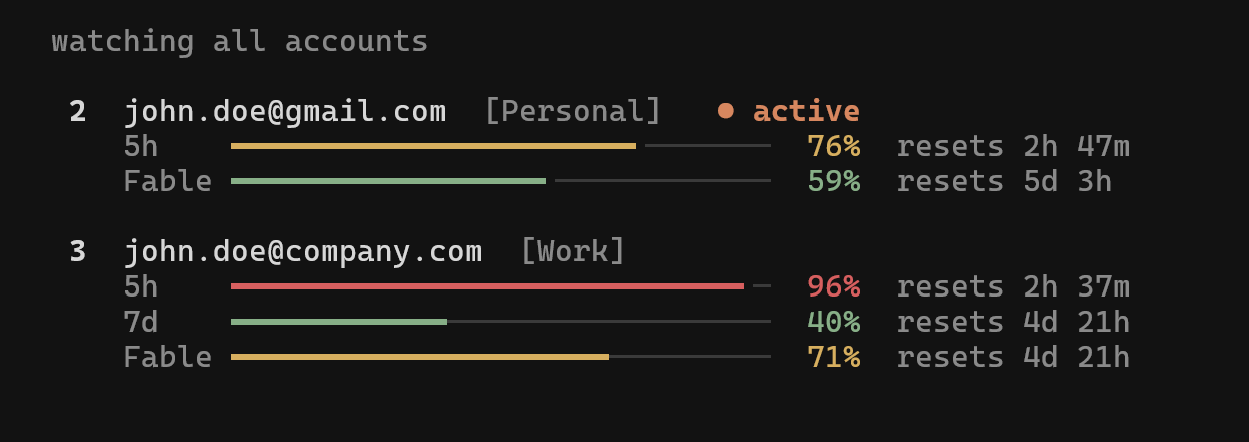
It shows 5-hour and 7-day usage for every account, switches automatically before the active account hits its limit, and runs 2 accounts in parallel terminals.
It works with the CLI and the VS Code extension, on macOS, Linux and Windows.
| Author | Onur Cetinkol (realiti4) |
| Language | Python 3.12+ |
| Licence | MIT |
| First commit | 11 Jan 2026 |
| Latest release | v0.26.0, 2 Sep 2026 |
| Traction | 2,563 stars, 272 forks, 544 commits (15 Sep 2026) |
| Dependencies | Textual, truststore, rumps for the optional macOS menu bar |
What it does
- Switch -
cswap switchrotates to the next account, or targets one by slot number, email or alias. - Dashboard -
cswap listprints 5-hour, 7-day and per-model weekly usage with reset times. Barecswapopens a full-screen TUI built on Textual. - Auto-switch -
cswap autopolls usage and moves to the account with the most quota left once the active one reaches 90% (configurable). - Session mode -
cswap run 2launches Claude Code as account 2 in the current terminal only. Every other terminal stays on the default login. - Directory mapping -
cswap map 2 ~/work/client-appbinds a repo to an account, so a barecswap runinside it picks that account. - Menu bar - macOS status item built on rumps, with usage at a glance and click-to-switch. Installs as a launchd agent.
- Backup -
cswap exportandcswap importmove accounts between machines.
For business people
Claude Pro and Max plans cap usage in a 5-hour window and a weekly window.
Heavy Claude Code users hit both.
The common fix is a second subscription, often one personal and one company account, and that means logging out and in every time. In current Claude Code, /logout can also revoke the stored token of the account you leave.
claude-swap removes that friction. No re-login, no guessing which account still has room, and a clean work/personal split per project folder.
Cost: the tool is free and open source. The accounts are not: each one is a separate paid subscription.
The main limitation is policy, not software.
- Anthropic's Consumer Terms don't forbid owning more than one account. They forbid sharing your credentials or making your account available to anyone else.
- The Claude Code legal and compliance page says advertised Pro and Max limits "assume ordinary, individual usage" and that Anthropic may enforce its restrictions "without prior notice".
- Anthropic's own environment variables reference calls
CLAUDE_CONFIG_DIR"useful for running multiple accounts side by side". Session mode uses exactly that mechanism. - The maintainer's answer in issue #31: the tool only saves and restores the login state you would change by hand, and creates no extra access.
Manual switching between 2 accounts you pay for yourself is the same act as logging in and out.
An all-day auto-rotation loop across many accounts is the use closest to "limit evasion", so that is where enforcement risk sits.
Never use it to share one person's subscriptions across a team. For team capacity, a Team or Enterprise plan or API billing is the clean route.
For technical people
Install
uv tool install claude-swap               # or: pipx install claude-swap
uv tool install 'claude-swap[menubar]'    # adds the macOS menu bar
cswap upgrade                             # later updates
Needs Python 3.12+, uv or pipx, and a logged-in Claude Code.
Add accounts
cswap add                  # while Claude Code is logged in as account 1
# in Claude Code: /login with account 2 (no /logout first)
cswap add --alias work
cswap list
⚠️ WARNING: don't run
/logoutbefore adding the next account. Current Claude Code may revoke the refresh token of the account you leave, and the stored backup dies with it. If a token expires anyway, log in with that account and re-runcswap add. It updates the slot instead of creating a duplicate.
Core commands
| Command | What it does |
|---|---|
cswap switch 2 |
Go to account 2 (also accepts an email or alias) |
cswap switch --strategy best |
Pick the account with the most quota left |
cswap auto --threshold 80 |
Foreground loop, switches at 80%, polls every 60s |
cswap auto --once --json |
Single check for cron, exit code 0 switched, 2 no-op |
cswap run 2 -- --resume |
Account 2 in this terminal only, args forwarded to claude |
cswap map 2 ~/work/app |
Bind a directory to an account |
cswap disable 2 |
Keep an account out of rotation |
cswap list --json |
Usage for scripts, schemaVersion: 1 |
cswap export backup.cswap |
Export all accounts to a JSON file |
Switch every session back to account 1
The weekly routine with 2 subscriptions: stay on account 1 until about 90% of its weekly window, switch to account 2, and come back once account 1 resets.
Every Claude Code session on the Mac reads the same default login from the Keychain, so 1 switch moves all of them.
- Wait for the reset.
cswap listshows when account 1's 7-day window resets. Switching earlier puts every session straight back on a full account. - Switch.
cswap switch 1. No Keychain prompt, and no/logoutfirst. - Check.
cswap listmarks account 1 as(active)and lists every running Claude Code instance by folder. - Let the sessions catch up. Open sessions pick up the new login within about 30 seconds (the Keychain cache). Run
/statusin one of them to confirm the account. The first message in each session is slower and costs a little more, because the prompt cache rebuilds. - Reboot only as a fallback. If a session still shows the old account after a minute, restart that session first. If several do: confirm
cswap listshows account 1 active, let any agent that is still working finish, then reboot. No need to/exiteach session: Claude Code saves every conversation as it goes, andclaude --resumebrings one back. After the reboot, runcswap listand/statusin a new session. - Check the connectors. claude.ai connectors (Gmail, Drive, Apollo and others) belong to the claude.ai account, not the machine. The ones set up on account 1 are still there. Local MCP servers don't change.
To go the other way, cswap switch 2.
How it works
- Credential swap.
cswap addbacks up the OAuth tokens plus the account section of~/.claude.json.cswap switchwrites the stored login back and leaves account-independent state, such as MCP server logins, alone. On macOS the tokens live in the Keychain (through thesecurityCLI). On Linux and Windows they sit in files under the backup directory. - Lock cooperation. Claude Code guards token refresh with
proper-lockfiledirectory locks (.oauth_refresh.lock,~/.claude.lock). claude-swap takes the same locks while it writes, so a swap can't land inside a refresh and get overwritten by the old account's new token. - No restart needed. On Linux and Windows, Claude Code re-reads the credentials file when it changes, so the next message runs on the new account. On macOS, Claude Code caches the Keychain item for about 30 seconds.
- Session mode.
cswap runstartsclaudewithCLAUDE_CONFIG_DIRset to a per-account profile. Claude Code hashes that path into its Keychain service name, so each profile gets its own credential. Sessions reuse your normal settings, CLAUDE.md and skills. User-scope MCP servers are copied in on every launch, MCP OAuth logins are not. Chat history stays per account unless you pass--share-history. - Usage polling. Numbers come from the
/api/oauth/usageendpoint, cached per account. Polling speeds up for busy accounts, slows down for idle ones, and backs off after HTTP 429. - Auto-switch safety. A 5-minute cooldown plus a hysteresis margin stop 2 accounts near the threshold from ping-ponging. Accounts with a dead refresh token go into quarantine.
--strategy consume-firstspends the account whose weekly window resets soonest, so perishable quota isn't wasted.
Data locations
| Platform | Credentials | Backups |
|---|---|---|
| macOS | Keychain | ~/.claude-swap-backup/ |
| Linux / WSL | Files in the backup folder | ~/.local/share/claude-swap/ |
| Windows | Files in the backup folder | ~/.claude-swap-backup/ |
Gotchas
cswap exportwrites plaintext JSON with live tokens. Encrypt it:cswap export - | gpg -c > backup.gpg.- The first message after a switch rebuilds the prompt cache, so it costs extra usage.
- After
cswap upgrade, the menu bar agent keeps running the old build. Re-runcswap menubar --install-service, orlaunchctl kickstart -k gui/$(id -u)/com.cswap.menubar. - The tool depends on Claude Code internals: lock file names, Keychain naming, the usage endpoint. Its lock code cites the Claude Code 2.1.218 bundle. A Claude Code update can break a feature until the maintainer catches up.
- 120 open issues and pull requests, many about usage caching edge cases around 429 responses.
Value
For anyone who already pays for 2 Claude subscriptions, claude-swap turns switching into one command and adds a cross-account usage view that Claude Code doesn't have.
The engineering is careful for a side project: it follows Claude Code's own lock protocol, runs about 1,900 tests, and ships a release every 1 to 3 weeks.
Good for keeping work and personal accounts apart by folder, with cswap map and cswap run.
Treat cswap auto with care. It works well, but an always-on rotation engine is the use most exposed to Anthropic's "ordinary, individual usage" clause.
Further Reading