
macOS has no idea which audio device you actually want. Plug in a monitor and output jumps to its speakers. Connect AirPods and they take over. Unplug them and the system picks something at random. There is no preference order, only a current default. Audio Priority Bar fixes exactly that: rank your outputs and inputs once, and the app switches to the highest-ranked device that happens to be connected.

| Author | Tobias Lütke, CEO of Shopify |
| Language | Swift 5.9, SwiftUI over CoreAudio |
| Licence | MIT |
| Requires | macOS 13 Ventura or later |
| Created | 27th December 2025 |
| Last commit | 29th December 2025 |
| Latest release | v1.2.1, 27th December 2025 |
| Traction | 781 stars, 39 forks, 20 open issues |
The problem
The more gear you own, the worse macOS behaves. My Mac Studio currently reports eleven audio endpoints: two Dell monitors, BMD HDMI, a Blackmagic device, the Cam Link 4K, the MOTU M2, an external microphone, external headphones, the Mac Studio speakers, and virtual devices installed by Teams and Zoom. Any of them can take the default when something reconnects, and macOS gives you no way to say which one should win.
Ranking is the right abstraction. It is the one thing System Settings has never offered.
What it does
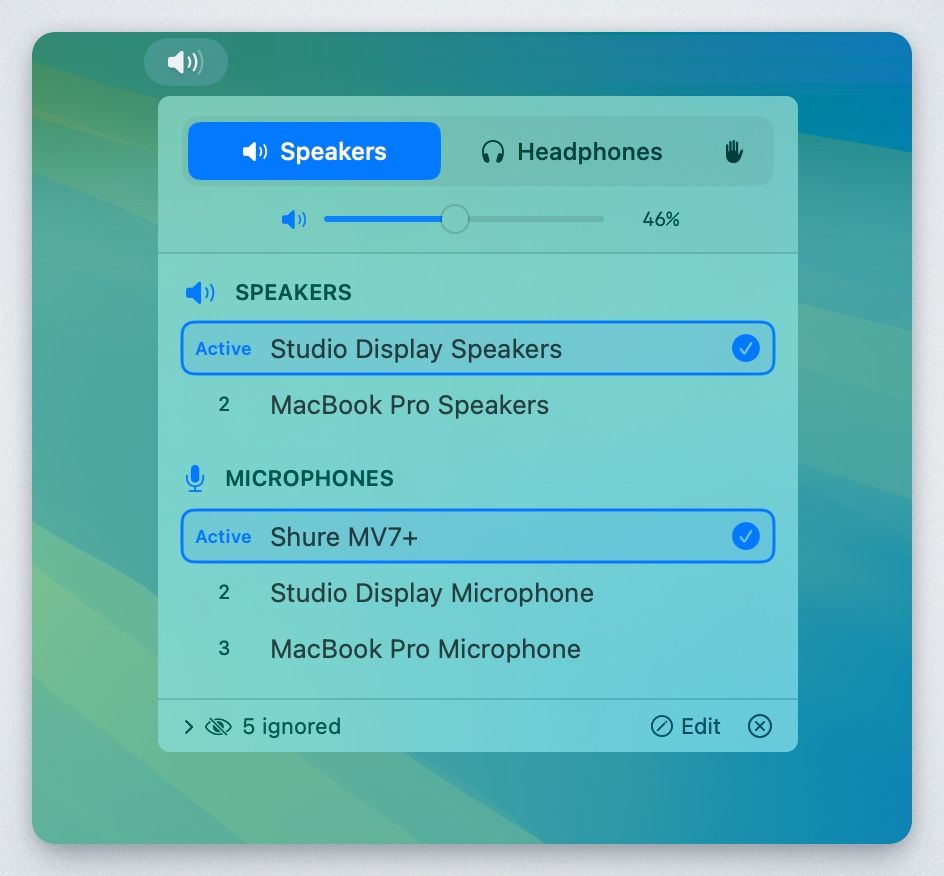
- Priority-based switching. When a higher-ranked device connects, it becomes active on its own.
- Separate speaker and headphone lists. Each output device carries a category, and each category keeps its own order.
- Microphone priority. Inputs get their own ranked list, independent of the output mode.
- Device memory. Devices you have ever connected stay in the list when unplugged, with a last-seen timestamp, so you can rank something that is not currently attached.
- Per-category ignore. Hide a device from the speaker list without hiding it from headphones, or hide it everywhere.
- Manual override. Custom mode turns auto-switching off entirely.
- Volume in the menu bar. A slider, scroll-wheel control, and the current percentage next to the mode icon.
Three modes drive the output half:
| Mode | Icon | Behaviour |
|---|---|---|
| Speakers | Speaker wave | Shows speaker devices, switches to the highest priority |
| Headphones | Headphones | Shows headphone devices, switches to the highest priority |
| Custom | Hand | Shows every device, no auto-switching |
The microphone list sits below the mode tabs and works the same way regardless of which mode you are in.
How it works
The app is small enough to read in one sitting: six Swift files, one CoreAudio wrapper, one persistence layer, two SwiftUI views.
- Discovery.
AudioDeviceServiceenumerates devices throughkAudioHardwarePropertyDevicesand registers a property listener, so connect and disconnect events fire immediately. - Persistence. Priorities live in
UserDefaults, keyed by device UID rather than the CoreAudio object ID. The UID survives reconnects, which is why an unplugged device keeps its rank. - Categories. An
OutputCategoryenum tags every output asspeakerorheadphone. v1.2.1 added auto-detection from a brand list, so most headphones land in the right bucket without help. - Exclusion. A "Never Use" flag keeps a device out of auto-selection while leaving it visible.
For anyone who wants to build something similar, Apple's CoreAudio documentation is the reference, and this repo is a short, readable example of using it from SwiftUI.
Installing
Build from source:
git clone https://github.com/tobi/AudioPriorityBar.git
cd AudioPriorityBar
./build.sh
# result: dist/AudioPriorityBar.app
Or download the zip from the releases page.
Neither route gives you a signed app. build.sh passes CODE_SIGNING_ALLOWED=NO and CODE_SIGN_IDENTITY="-", and the released binary is unsigned and not notarised. Gatekeeper blocks the first launch. Clear the quarantine flag:
xattr -dr com.apple.quarantine /Applications/AudioPriorityBar.app
An issue titled "Notarize app" has been open since 29th December 2025 with no reply. So has the request to add a Homebrew cask. Expect neither.
Project status
Be clear about what this is. Every commit in the repository lands between 27th and 29th December 2025. Nothing since. The project collected 781 stars and 20 open issues, and most of those issues have no maintainer response, including a bug from 27th May 2026 reporting that device order fails to save.
Treat it as finished code rather than a maintained product. The MIT licence and the small source tree mean fixing something yourself is realistic, and 39 forks suggest people already have.
Alternatives
| Option | What it is | Cost |
|---|---|---|
| SoundSource | Per-app routing, volume, EQ and effects from the menu bar | Paid, limited trial |
| Background Music | Per-app volume and auto-pause, virtual device based | Free, open source |
| switchaudio-osx | CLI device switcher, scriptable | Free, open source |
| System Settings | One current default, no ranking | Built in |

None of these do the one thing Audio Priority Bar does. SoundSource is the stronger product overall and solves a different problem: it controls where each app's audio goes, not which device wins when several are available. If ranking is what you want, this repo is the only thing that offers it.
Would I run it
The output side is a clear win. My listening chain runs through the MOTU M2, and anything that stops a monitor grabbing the default when it wakes up is worth having.
The input side needs more care. My default input feeds meetings, dictation, and a scheduled recorder, so an app that reassigns it automatically could interrupt something mid-capture. Custom mode exists for exactly that, but it also switches off the feature you installed the app for.
Worth pairing with a clean-up of the device list first. Half of the eleven endpoints on my machine are virtual devices left behind by conferencing apps, and ranking is easier when the list is short.
How to remove audio devices on macOS
Further reading
- tobi/AudioPriorityBar on GitHub
- Releases and prebuilt binaries
- Apple CoreAudio documentation
- SoundSource by Rogue Amoeba