
Recordly records your screen and then makes the recording look produced: it zooms in where your cursor is working, smooths the cursor path with motion blur and click animations, drops the whole thing on a styled background, and gives you a timeline to adjust any of it. Then it exports MP4 or GIF.
The reason it matters is the price. Screen Studio does the same job at $20 a month, or $9 a month billed yearly, and is macOS only. Recordly is free, AGPL 3.0, and runs on all 3 desktop platforms.

What it does
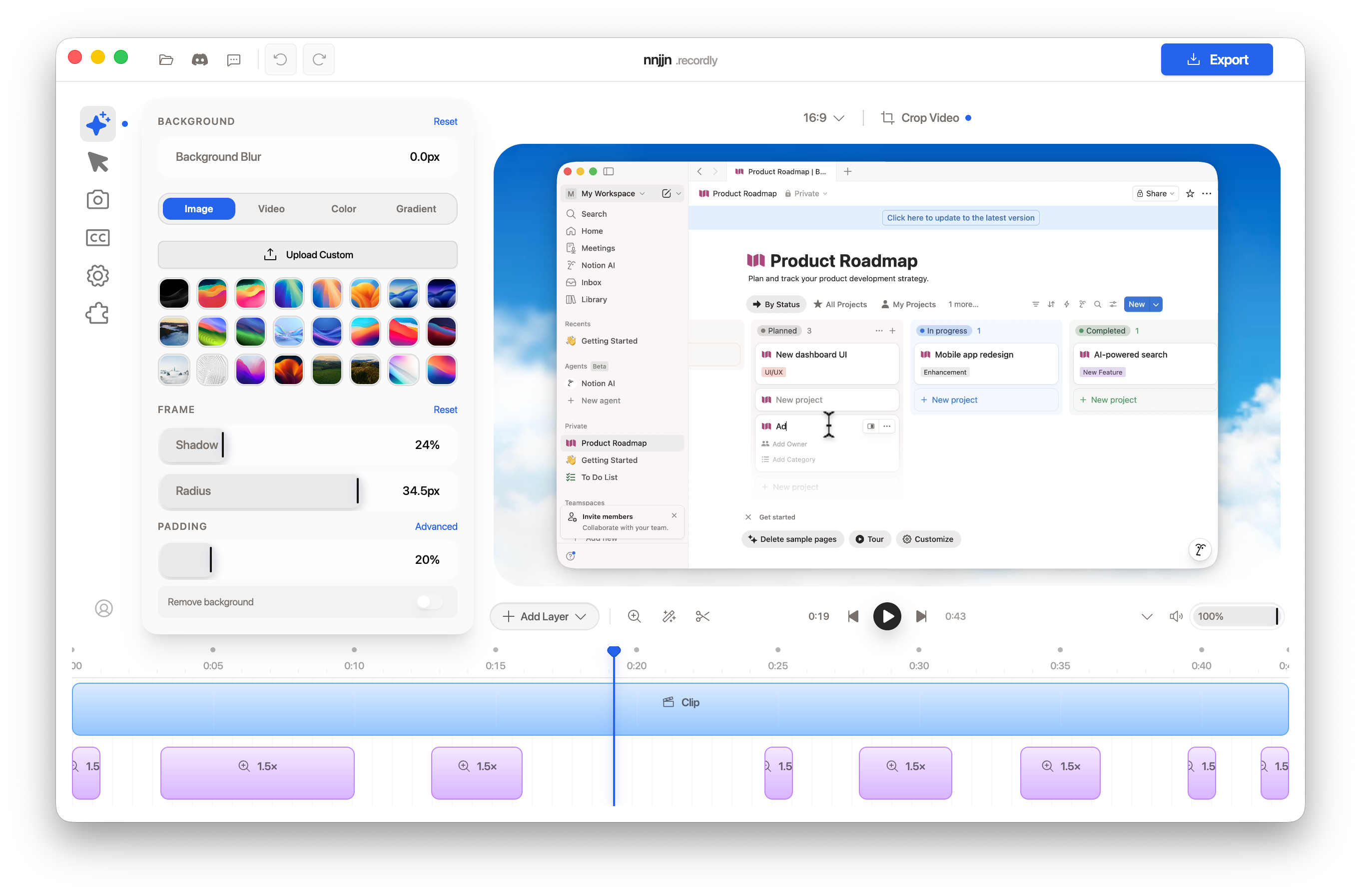
The auto-zoom is the feature that sells it. Recordly watches cursor activity during the capture and proposes zoom keyframes where you were actually working, which is the thing that separates a demo people watch from a demo people scrub through. Those become the purple blocks on the timeline, and you drag them around like any other clip.
- Cursor polish. Smoothing, motion blur and click animations. The recorded cursor is replaced by a rendered one, so it moves like an animation rather than a jittery mouse.
- Backgrounds and framing. Wallpapers, gradients, solid colours or blur, with shadow, corner radius and padding on the window frame.
- Webcam bubble that scales with the zoom instead of sitting at a fixed size.
- Dual-source audio from microphone and system, with sample-accurate sync.
- Timeline editor. Drag-and-drop control over speed, zooms and annotations. Captions are supported.
- Export to MP4 or a looping GIF, with quality and format options.
.recordlyproject files so you can come back and re-edit rather than re-record.- Import external audio or webcam footage, and loop a cursor path.
Specs
| Licence | AGPL 3.0, free, no paid tier |
| Repository | webadderallorg/Recordly, 24,000+ stars, 1,800+ forks |
| Built with | Electron, TypeScript, PixiJS for scene composition |
| macOS | 14.0 Sonoma or later, capture via native ScreenCaptureKit |
| Windows | Build 19041 or later, Windows Graphics Capture with WASAPI audio |
| Linux | Modern distros, Electron capture APIs, AUR package recordly-bin |
| Export | MP4, GIF |
| Launched | March 2026 |
The macOS build uses ScreenCaptureKit rather than a generic Electron capture path, which is the difference between a recording that looks right and one that does not. That is the platform to be on here.
Against Screen Studio
| Recordly | Screen Studio | |
|---|---|---|
| Price | Free | $20/month, or $9/month billed yearly |
| Platforms | macOS, Windows, Linux | macOS only, Ventura 13.1+ |
| Licence | AGPL 3.0, source on GitHub | Proprietary |
| Auto-zoom | Yes, cursor-driven | Yes, the original |
| Polish | Close, and improving fast | Still ahead on finish |
| Age | About 6 months | Years of iteration |
Screen Studio is the better product today. It has had years to sand the edges and it shows in the defaults. What Recordly has is 90% of the result at 0% of the price, on the platform you already own, with the source available.
Install
Prebuilt binaries live on the GitHub releases page. Arch and Manjaro can use the AUR package.
From source:
git clone https://github.com/webadderallorg/Recordly.git
cd recordly
npm install
npm run dev
macOS needs the Xcode command line tools, Linux needs build-essential and the X11 dev libraries, Windows needs Visual Studio 2022 with the C++ workload.
If you build it yourself on a Mac, Gatekeeper will block it until you strip the quarantine flag:
xattr -rd com.apple.quarantine /Applications/Recordly.app

What to watch
- Linux cannot hide the real cursor. The OS cursor shows through alongside the rendered one. Same problem on Windows builds older than 19041, which fall back to Electron capture.
- System audio on Linux usually needs PipeWire. It is native on Windows and macOS.
- It is Electron, so expect it to be heavier at rest than a native recorder.
- It is young. March 2026, roughly 197 open issues, moving quickly. Fine for a tool you drive by hand, less fine as the backbone of a delivery pipeline.
- AGPL 3.0 is irrelevant if you are only using the app. It matters the moment you want to build something on the code and ship it.
- Read the README, not the blog. The project's own blog posts list no drawbacks at all. The GitHub README states the platform limitations plainly, which is where the honest information lives.
Background
Recordly started as a fork of OpenScreen, the MIT-licensed recorder, and has since diverged past 80% of the code by the maintainer's own account. Traffic has gone both ways: features that appeared in Recordly first later showed up in OpenScreen. Worth knowing if you are choosing between them, because OpenScreen's MIT licence is the more permissive of the two.
The creator publishes as @webadderall.
Where it fits for me
This sits in the gap between hitting record in QuickTime and firing up the studio chain. For a Kaltura product walkthrough or a follow-up video after a call, the ATEM and the BMPCC are the wrong tool: too much setup for a 2-minute screen demo. QuickTime is the right effort level and the output looks like a support ticket.
Recordly is the middle. Record the flow once, let it place the zooms, pick a background, export. See ffmpeg if the file needs shrinking afterwards, though the built-in transcode may cover it.
The macOS build is the one to use, since ScreenCaptureKit is doing the capture rather than an Electron shim. Test it on a throwaway demo before it goes anywhere near a customer, because a 6-month-old project is a 6-month-old project.
| Alternative | Why |
|---|---|
| OpenScreen | The MIT-licensed parent. More permissive, fewer features |
| Screen Studio | Better finish, macOS only, $108 a year |
| Kap | Free and open source, quick captures, no auto-zoom |
| OBS Studio | Full control and no polish. Already in my chain |
Further reading
- Recordly, the site and downloads
- webadderallorg/Recordly, source and the limitations list
- What is Recordly?, the official guide
- Screen Studio, the paid benchmark