
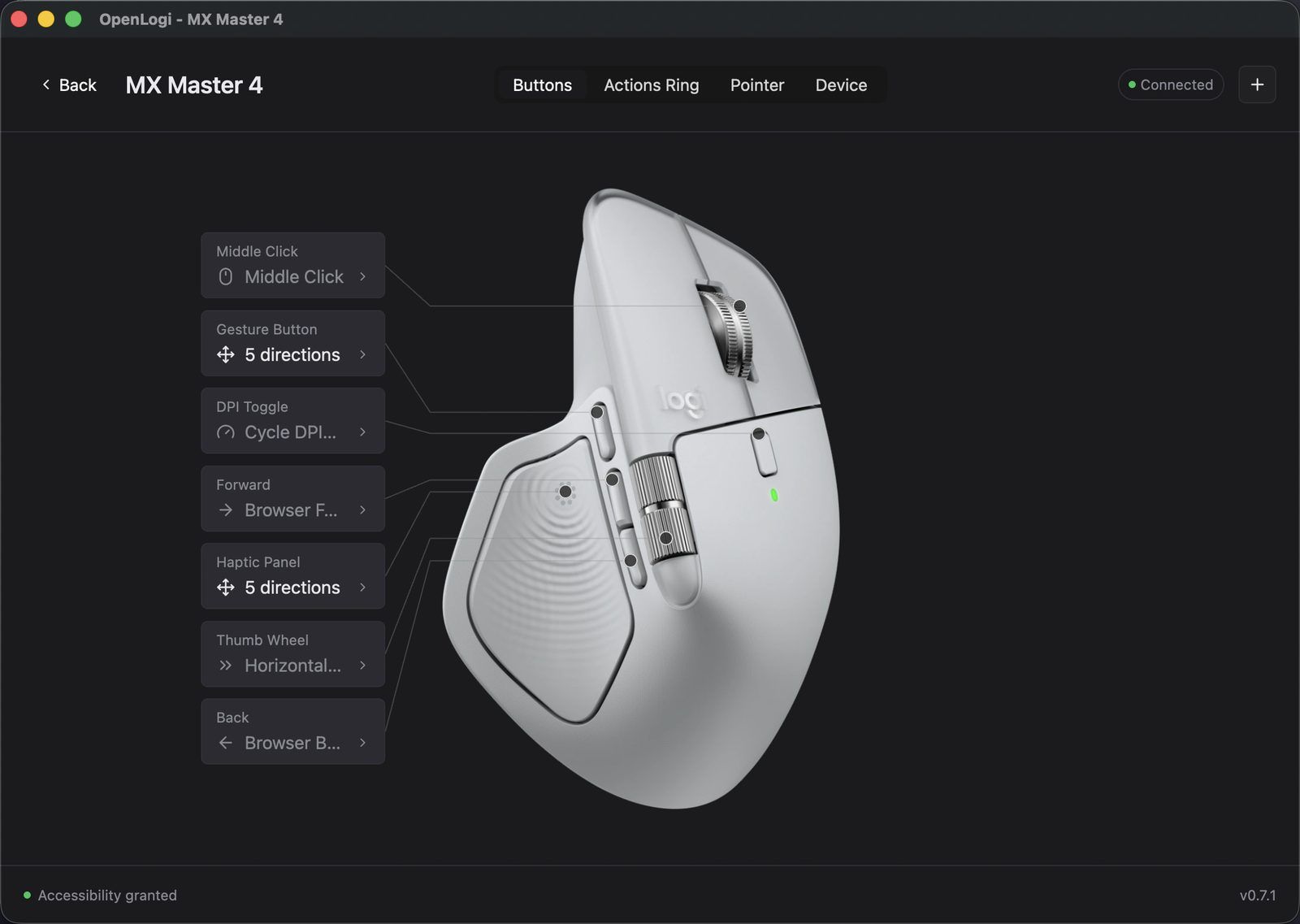
Logitech Options+ wants an account, runs a helper that phones home, and has never shipped for Linux. OpenLogi does the same job in Rust, keeps everything on the machine, and stores your whole configuration in one TOML file you can copy between computers. Built by AprilNEA, not affiliated with Logitech, and it went from nothing to 13,000 stars in three months.

| Author | AprilNEA, independent |
| Language | Rust, with a GPUI interface |
| Licence | Dual MIT and Apache-2.0 |
| Platforms | macOS 13 or later, Linux, Windows |
| Created | 24th May 2026 |
| Latest release | v0.7.4, 21st August 2026 |
| Traction | 13,193 stars, 356 forks, 242 open issues |
| Homebrew | brew install --cask openlogi, 7,495 installs in the past year |
What it does that Options+ does not
- Runs on Linux as a first-class platform, not an afterthought.
- Puts gestures on any button, or turns them off completely, instead of the one button Logitech chose.
- Keeps config in plain text. One TOML file, synced however you like.
- Ships a CLI next to the GUI, so the settings are scriptable.
- Stays light. Native Rust rather than an Electron shell.
The feature set already covers more than button mapping: DPI presets with cycle actions, SmartShift wheel tuning, per-device scroll inversion, an eight-slot Actions Ring around the cursor, F-key remapping with typed text and multi-step workflows, static RGB, Litra light control, and UVC image controls for Logitech webcams.
For business people
The pitch is privacy and portability. Options+ requires a Logitech account and runs a background service that reports to Logitech. OpenLogi requires neither. Nothing leaves the machine, and the configuration is a text file rather than a cloud profile tied to a login. If your IT policy blocks vendor telemetry or forbids consumer accounts on work hardware, that difference alone decides it.
The cost is zero. Dual MIT and Apache-2.0 licensing, no seats, no subscription.
Two things to weigh before anyone deploys it:
- It replaces Options+, it does not sit beside it. Quit Options+ first. The two fight over HID++ access, and only one can own a receiver at a time.
- It is pre-1.0 and says so. The project states plainly that it is under active development and not yet stable, and that features and configuration may still change. 242 open issues against 13,000 stars is the shape of a project growing faster than its maintainer. Fine on your own machine, too early for a fleet.
The one case where it wins outright today is a mixed estate with Linux in it. Options+ has never run there, so the comparison is against nothing.
For technical people
OpenLogi talks HID++ 2.0 straight to the device over Logi Bolt, Unifying, Lightspeed, Bluetooth, or a cable.
The design decision worth knowing is that support is feature-gated, not model-gated. The app reads a device's feature table (0x0001 FeatureSet) once and enables panels based on the feature IDs it finds, rather than on the marketing name. The published device list is therefore advisory, and the device itself is the authority. Inspect it directly:
openlogi diag features
The features it drives map to named HID++ IDs:
| Capability | Feature ID |
|---|---|
| DPI presets and cycling | 0x2201 |
| SmartShift wheel mode and sensitivity | 0x2111 |
| Native scroll inversion | 0x2121 |
| Static RGB lighting | 0x8070 / 0x8080 |
Remapping runs through the OS input hook, which is why macOS asks for Accessibility and Input Monitoring. The status bar in the app confirms the grant. Webcam preview additionally needs Camera permission.
Webcam control goes over UVC and writes values into the hardware, so a zoom or exposure change applies in Teams, Zoom, OBS and anything else reading that camera, rather than in one app only. The preview opens the camera only while you watch it and releases it when you leave.
Per-application profile overlays switch automatically on app focus on macOS and Windows. On Linux they work only under X11 or XWayland.
Linux packaging installs a udev rule so HID access needs no sudo, plus a user service:
systemctl --user enable --now openlogi-agent.service
Installing on macOS
brew install --cask openlogi
The DMG is signed and notarised for both Apple silicon and Intel, so there is no Gatekeeper workaround to perform. Quit Logi Options+ before the first launch.
Will it drive my trackball
This is the question that matters here, and the honest answer is a qualified yes.
| Tier | Devices |
|---|---|
| Full | MX Master 4, MX Master 3 and 3S, MX Master 2S |
| Partial | MX Anywhere 2S / 3 / 3S, MX Vertical, MX Ergo, Ergo M575, Lift, Signature, Pebble, M-series, G-series wireless |
| Keyboards | MX Keys and Keys S and Keys Mini, MX Mechanical, Craft, Ergo K860, K380, K480, K580, G915, G815, G513 |
| Other | Litra Glow, Litra Beam, any Logitech webcam |
The MX Ergo sits in the partial tier, and the newer MX Ergo S is absent from the list entirely. Since the app gates on the feature table rather than the model name, absence from the list is not the same as absence of support. Install it, run the diagnostic, and read what the device reports. That takes two minutes and beats guessing.
Alternatives
| Option | Platforms | Notes |
|---|---|---|
| Logi Options+ | macOS, Windows | Official. Account required, telemetry, no Linux |
| Solaar | Linux | Mature, Python, GUI and CLI, receiver pairing |
| logiops | Linux | Daemon plus config file, no GUI, gesture support |
Solaar and logiops are the long-standing Linux answers and remain solid. What neither offers is one tool that behaves the same on macOS, Linux and Windows, which is where OpenLogi is aiming.

Caveats
- Pre-1.0, and the project says so in a warning at the top of its own README. Configuration format may still change under you.
- The marketing pages contradict the README. The landing page lists per-application profiles as coming soon; the README lists them as shipping, with the Linux caveat. The README is the more specific document and is more likely to be current.
- The action count is inconsistent too. The site advertises 44 built-in actions, and the social preview image still says 37. Treat round numbers on the landing page as approximate.
- A firmware update can break it. No affiliation with Logitech means no advance notice.
- Uninstalling Options+ is part of the deal. Running both is not an option, so any Options+ feature you rely on needs checking first.
Further reading
- OpenLogi homepage
- Supported devices
- Installation guide
- AprilNEA/OpenLogi on GitHub
- Solaar, the Linux equivalent