

The Crafting Apps are a suite of free, open-source desktop apps from ArtCraft, each a clean-room reimplementation of an Adobe product: PhotoCraft for Photoshop, FilmCraft for Premiere Pro, LightCraft for Lightroom, and so on. They are written in pure Rust, run natively on macOS, Windows and Linux, and most also run in the browser through WebAssembly.
The story is as interesting as the software. The first repos went public on 30th September 2026. 11 days later PhotoCraft alone had 44,000 GitHub stars. The founder, Brandon Thomas, says he wrote the apps with Anthropic's Claude Opus 5.5. That makes the suite the loudest test yet of the claim that AI agents can now rebuild mature desktop software in weeks.
It is early alpha. Treat it as something to watch and script against, not as a Creative Cloud replacement.
Key facts
| Maker | ArtCraft (Storyteller.ai), founded by Brandon Thomas |
| First release | 30th September 2026 (PhotoCraft, VectorCraft, FilmCraft, LightCraft, PdfCraft) |
| Language | 100% Rust. UI on egui and wgpu (Metal, Vulkan, DirectX 12, WebGPU). No Electron, no web view |
| Licence | MIT or Apache-2.0, your choice |
| Price | Free. No account needed |
| Platforms | macOS, Windows, Linux. FreeBSD for PhotoCraft. Browser (WebAssembly) for every app except FilmCraft |
| Traction | PhotoCraft: 44,238 stars, 6,782 forks and 1,103 open issues on 11th October 2026 |
| Release pace | PhotoCraft went from v0.5.0 to v0.7.0 between 8th and 11th October 2026 |
| How it's built | Written with Claude Opus 5.5, according to the founder |
The 7 apps
| App | Replaces | What it does | Status | GitHub stars |
|---|---|---|---|---|
| PhotoCraft | Photoshop | Raster image editor, real PSD | Early alpha | 44,238 |
| VectorCraft | Illustrator | Vector illustration | In development | 6,532 |
| FilmCraft | Premiere Pro | Video editing, colour, sound | In development | 9,159 |
| LightCraft | Lightroom | Photo library and raw developer | In development | 9,440 |
| PdfCraft | Acrobat Pro | PDF workbench | Early alpha | 8,538 |
| EffectCraft | After Effects | Motion graphics and VFX | In development | 4,805 |
| DesignCraft | InDesign | Page layout and publishing | In development | 2,726 |
Star counts are from 11th October 2026. PdfCraft first shipped as PrintCraft, and most press coverage still uses that name.
The GitHub organisation already holds more than the 7 listed on the site. On 7th October 2026 the team added repos for WordCraft (Word), GridCraft (Excel), DeckCraft (PowerPoint), SoundCraft (Pro Tools) and CADCraft (AutoCAD). The ambition has grown from "Adobe" to "every pro desktop app".
PhotoCraft
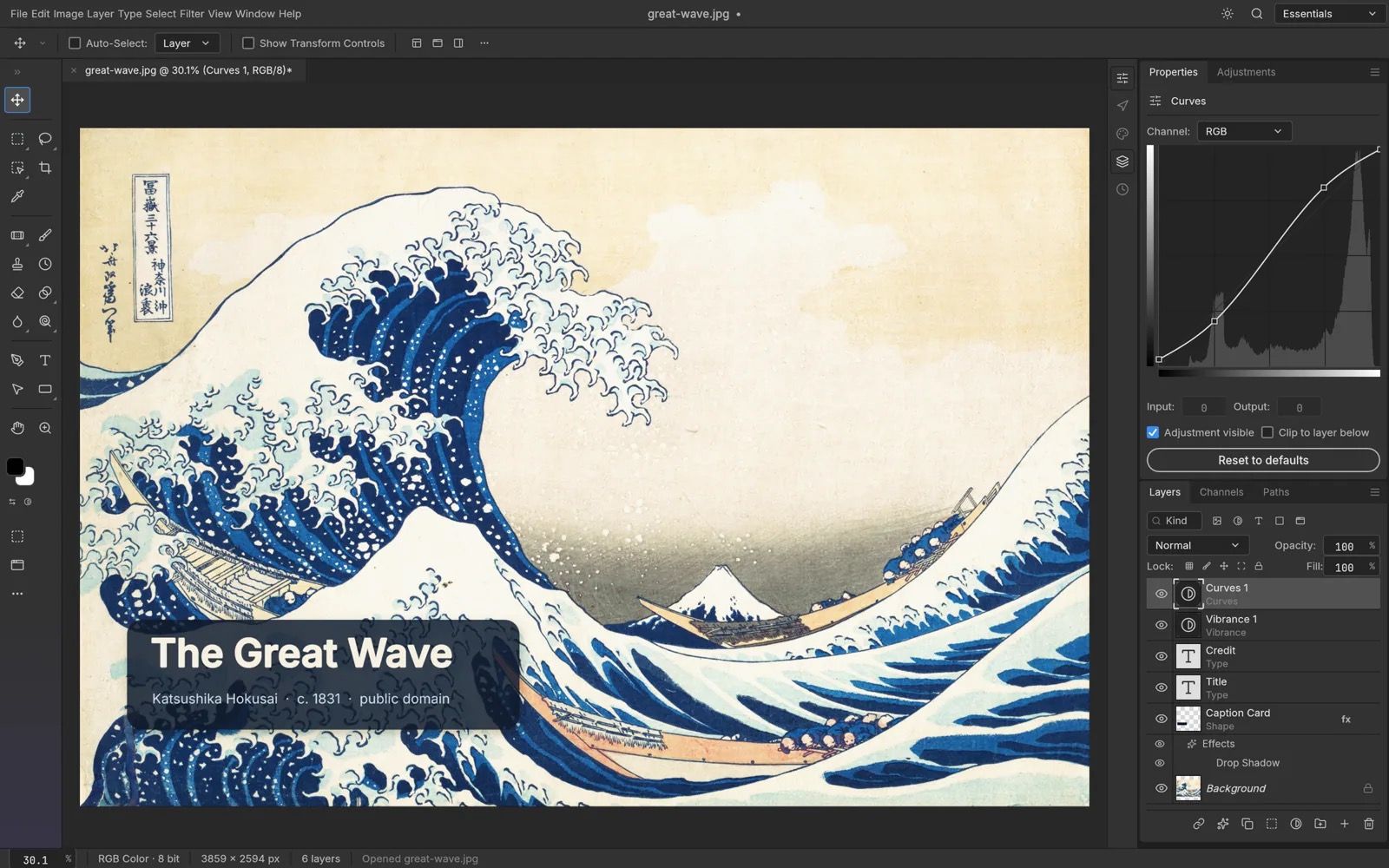
The most mature app, and the reason for the attention:
- PSD round-trips: re-saving keeps the render of 307 of the 309 psd-tools test files.
- Layers done properly: masks, 16 adjustment layers, layer styles (drop shadow, glow, bevel, stroke, overlays), smart objects, live type.
- 70+ filters with live preview on the canvas, including the Blur Gallery.
- Colour depth and modes: 8, 16 and 32-bit, in RGB, CMYK, Lab and greyscale, with ICC colour management.
- Local AI selection: Select Subject and Object Selection run on the device, with no cloud and no account.
- Photoshop muscle memory: the same menus and shortcuts, from ⌘J to ⇧⌘D.
The README is honest about the gaps: no generative AI features yet, 15 missing tools, thin typography and pro workflows, and no Photoshop plug-in support. It says outright that PhotoCraft is "not yet a Photoshop replacement for daily professional work".
FilmCraft
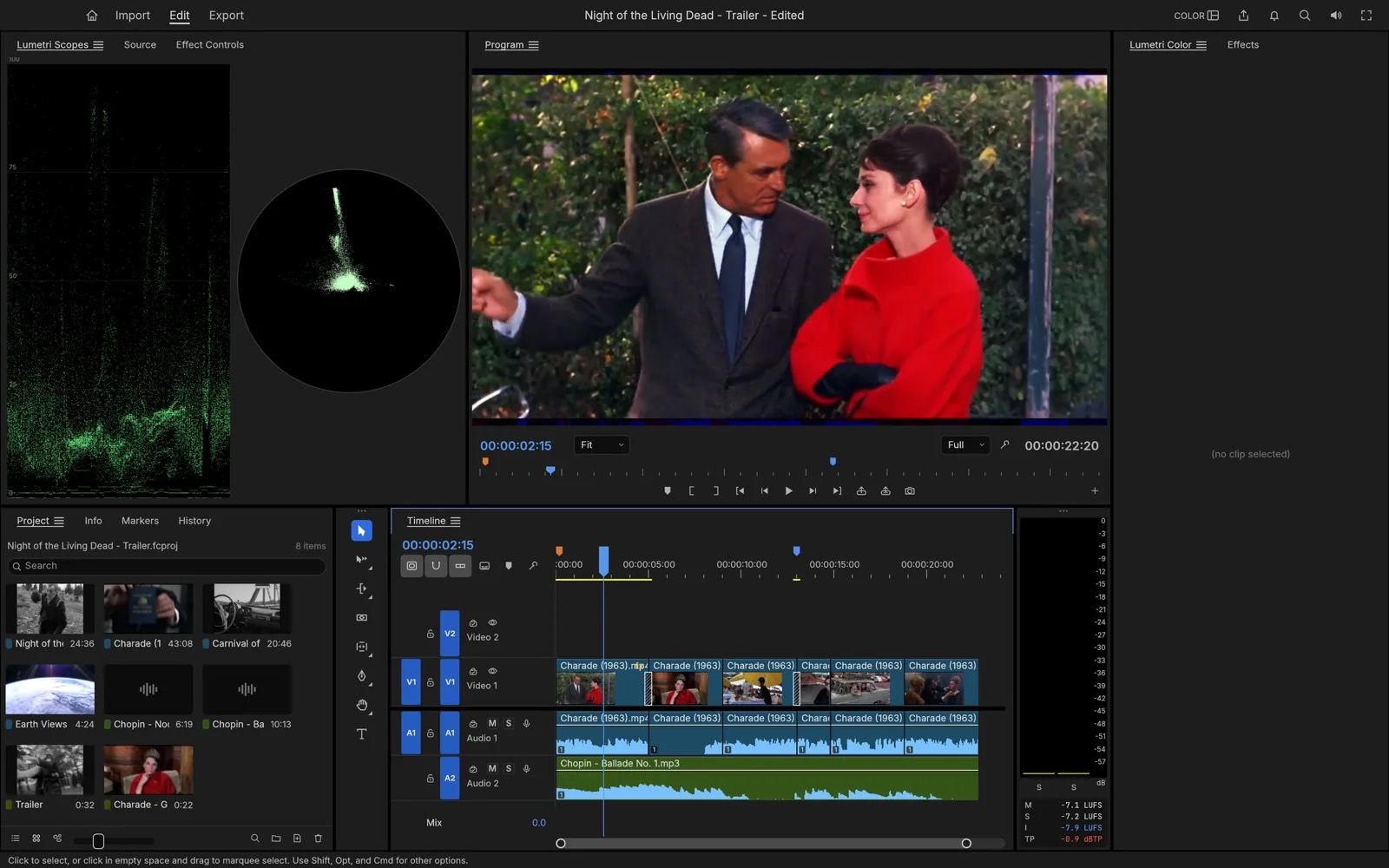
FilmCraft copies Premiere's panels, workspaces and shortcuts, and ships keymaps for Premiere, Final Cut Pro and Avid. The surprising part is underneath: the team wrote its own H.264, HEVC, ProRes and AAC codecs in Rust from the public specifications. All edit maths runs on integer ticks (254,016,000,000 per second), so 23.976 and 29.97 drop-frame are exact, not approximate. It has a Lumetri-style colour panel with scopes, 93 video effects and about 30 transitions. FilmCraft is the one app without a browser build.
Why it exists
ArtCraft started in 2025 as an AI tool, the "IDE for artists". The main artcraft repo (about 15,600 stars) is a desktop app to compose 2D and 3D scenes, pose characters and block camera angles, then generate images and video with models such as Nano Banana, GPT Image, FLUX, Seedance, Kling, Veo and Midjourney. That app makes money through credit subscriptions.
At the end of September 2026 the project pivoted to the Adobe clones. Thomas gives 2 reasons:
- Adobe fatigue. He says Adobe charged him its early cancellation fee more than once. Adobe settled a US government lawsuit over its subscription cancellation practices in 2026, which gave the pitch an audience.
- "Software is over". His point: if an agent can rebuild Photoshop's surface in weeks, the moat around desktop software is gone. Ars Technica and TechSpot ran with that line.
On parity he backtracked fast. He first promised 100% parity within a month, then said: "99% parity will take a while, but I'm sure it'll be measured in months and not years."
For business people
- What it is: free, open-source lookalikes of the Adobe apps that creative teams already know. Same menus, same shortcuts, files that open in both.
- Cost: €0, no account, no subscription. The licence (MIT or Apache-2.0) allows commercial use and modification.
- How it pays for itself: ArtCraft sells credits for its AI image and video app, from $10 a month (Basic, 1,000 credits) to $60 a month (Max, 6,600 credits). The editing apps don't need any of it. Thomas says the company's other film software funds the project.
- Maturity: early alpha at best. Expect missing features, bugs and 1,000+ open issues on the main app. Don't put a client deliverable through it yet.
- Risk:
- The "clean-room" label is disputed. A classic clean-room build uses 2 teams: one studies the original, the other writes code without seeing it. An LLM trained on the public internet doesn't fit that model neatly.
- Ars Technica flags trade dress as the real legal exposure: re-implementing functions is generally fine, but copying Adobe's look this closely could invite a claim. Adobe hasn't commented.
- Maintenance is unproven. A project that grew this fast on AI-written code still has to show it can keep a codebase this size healthy.
- When to consider it: for occasional editing on a machine without a Creative Cloud seat, for Linux users who miss Photoshop, and for teams that want to automate image or PDF work. For daily professional work today, Affinity (now free from Canva), DaVinci Resolve and Adobe itself are still the safe choices.
For technical people
Architecture
Each app is a Rust workspace with a strict layer model. PhotoCraft has 24 crates, and the build enforces the layering:
- L0 to L3: geometry, ICC colour, pixel formats, PSD and codec crates, the document model, the brush and type engines, and 2 compositors: a CPU one that serves as the reference oracle and a wgpu one for the GPU. Tests compare the 2.
- L5, the engine: a session plus a command registry. Every menu item, tool and dialog is a command, 500+ in PhotoCraft.
- L6, the shell: a thin egui UI, plus the automation crate with the MCP server.
Shared code lives in craft-libs. The repos ship an AGENTS.md written for AI coding agents, which tells you how the code was made and how the team expects it to grow.
Install
- For all the apps at once, install the ArtCraft Launcher from GitHub. It installs and updates every app.
- For a single app, use its page on getartcraft.com/download, or its GitHub release.
PhotoCraft's releases cover a lot of ground:
| Platform | Formats |
|---|---|
| macOS | Universal DMG and a separate CLI zip, both signed and notarised |
| Windows | MSI or portable zip, for x64, arm64 and x86 |
| Linux | AppImage, Flatpak bundle, deb, rpm, tarball, for x86_64 and arm64 |
| FreeBSD | Tarball laid out for /usr/local |
| Web | WebAssembly build, self-hostable with Docker |
To build from source:
git clone https://github.com/storytold/photocraft
cd photocraft
cargo run --release -p photocraft -- image.psd   # desktop app
cargo test --workspace                           # 1,700+ tests
Automation: CLI, JSON and MCP
This is the part that sets the suite apart. The UI, the CLI, a JSON control channel and an MCP server all call the same command registry, so anything you can click, a script or an agent can do.
# Headless: open, edit, save
photocraft-cli run wave.psd \
  --cmd filter.sharpen.smartSharpen     --params '{"amount":80}' \
  --cmd layer.newAdjustmentLayer.curves --params '{"points":[[0,0],[64,48],[192,212],[255,255]]}' \
  --out wave-final.png

# Apply 1 action list to a folder of images
photocraft-cli batch --actions grade.json --in ./raw --out ./graded

# Let an agent drive it over MCP
photocraft-cli mcp
photocraft --control opens an authenticated, loopback-only channel to the running app, for UI state, pointer events and offscreen screenshots. Every screenshot in the README was rendered that way.
Gotchas
- Wayland drag and drop doesn't work. winit 0.30 has no Wayland drag and drop. Use File › Open or paste, or start under XWayland with
WAYLAND_DISPLAY= photocraft. - AppImage desktop integration: the first run writes a launcher entry to
~/.local/share. SetPHOTOCRAFT_NO_DESKTOP_INTEGRATION=1to skip it. - macOS CLI: a bare binary can't carry a stapled notarisation ticket, so the first run checks notarisation online.
- Moving target: 3 releases in 4 days. Pin a version for anything scripted.
Pros and cons
Pros
- Free, permissively licensed, no account.
- Native Rust: fast start, GPU compositing, real Linux and ARM builds.
- Real file compatibility: PSD round-trips, ProRes and HEVC decoding.
- Fully scriptable through a CLI and MCP, by design rather than as an afterthought.
- Familiar layouts and shortcuts for anyone coming from Adobe.
Cons
- Early alpha. Most apps are "in development", and PhotoCraft says itself that it isn't ready for daily pro work.
- Built at AI speed. Code quality and long-term maintenance are open questions.
- The clean-room claim and the trade dress risk are untested.
- No plug-in ecosystem, no generative fill, no Adobe cloud features.
- The company's revenue comes from a different product, so the apps depend on that business staying healthy.
My take
I'd file this under "important signal, not yet a tool". The signal: one founder with Claude rebuilt enough of Photoshop and Premiere in 2 weeks to round-trip PSDs and decode ProRes with home-made codecs. Whatever happens to ArtCraft, that changes what "hard to copy" means for software.
For my own use, 2 things stand out. First, the CLI and MCP server: an image editor I can drive from Python or from Claude Code, with batch actions across a folder, is useful today even with half the features missing. Second, the Linux builds: on my Omarchy Mac mini, see Omarchy, a native PhotoCraft beats any Photoshop workaround. For anything a client sees, I stay with Affinity creative apps and Davinci Resolve for now, and I'll check back in a few months to see whether the parity promise holds.
Further reading


- FilmCraft on GitHub
- ArtCraft pricing, for the AI app's credits
- ArtCraft: open-source Adobe alternatives (tbreak, 8th October 2026)
- ArtCraft: 7 free creative apps against Adobe (ifun.de, in German, 6th October 2026)
- AI-made "clean-room" implementations of Photoshop and Premiere in Rust (Phoronix)