
AuK is an open-source speech model from Tencent's Hunyuan team that does 2 jobs with 1 model: it generates speech, and it edits speech you already recorded. You tell it what you want in plain language, such as "replace 'next Tuesday' with 'next Friday'" or "make this sound calmer", and it returns new audio in the same voice.
Tencent released it on 9th September 2026 under the MIT licence, with the weights on Hugging Face and a free demo Space to try it in the browser.
| Maker | Tencent Hunyuan |
| Size | 1.5 billion parameters, trained on millions of hours of audio |
| Variants | AuK, the base model, and AuK-Flash, distilled for fast 4-step generation |
| Licence | MIT |
| Languages | The demos cover English and Chinese |
| Runs on | NVIDIA GPUs, and Apple Silicon through MLX on a separate branch |
| Try it | The Hugging Face demo Space, with clips up to 30 seconds |
What it can do
All tasks go through the same interface: an instruction, plus audio when the task needs it.
| Category | Tasks |
|---|---|
| Speech generation | Clone a voice from a short reference clip, or create a voice from a description alone |
| Content editing | Replace, insert or remove words in a recording. Rewrite song lyrics and keep the melody |
| Acoustic editing | Change pitch in semitones, speed, or volume in decibels |
| Paralinguistic editing | Change the emotion or timbre, remove an accent, add or remove breaths and laughs, switch to a whisper |
| Enhancement and separation | Remove noise and echo, isolate 1 speaker, or pull the voice out of a song |
The content editing is the unusual part. Most text-to-speech tools make new audio from scratch. AuK changes a few words inside an existing recording, and the rest of the take stays as it was.
For business people
The problem it solves: fixing a recording normally means booking the speaker again. A wrong date in a product video, a mispronounced name in a webinar, a noisy room in a podcast: each one costs a re-record or an edit that sounds patched.
Where it fits:
- Corrections to training videos, product demos and voice-overs without a new session.
- Clean-up of recordings made in bad rooms.
- Localisation and variants: the same script in a calmer tone, or at a slower pace.
- Voice design for a product or a character from a written description.
The costs: the model is free and open. Running it needs a GPU, or the free demo Space for short tests. Tencent's team trimmed the memory use in September, so consumer GPUs are within reach.
The risks: this is voice cloning and voice editing. Anyone with a short clip of a person can make them say something new. Use it only on your own voice or with the speaker's consent, and say when audio was edited.
For technical people
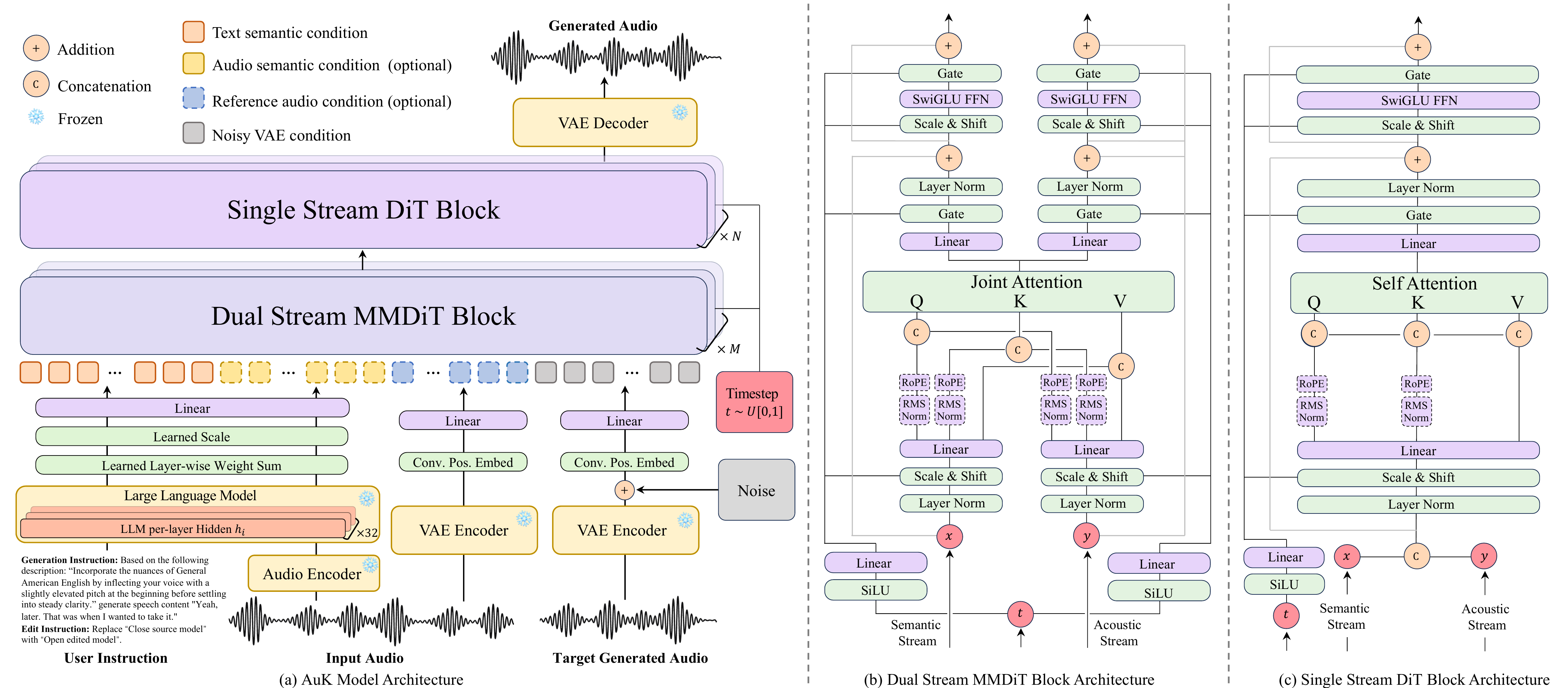
- Architecture: a diffusion transformer, with dual-stream MMDiT blocks followed by single-stream DiT blocks, generating the latents of an audio VAE.
- Conditioning: a frozen Qwen2.5-Omni-3B encodes the text instruction and the input audio. The model uses a learned mix of its layer outputs, plus the VAE latents of the reference audio.
- Duration is set per request (
gen_seconds). An optional Prompt Enhancer uses an LLM and speech recognition to turn a free-form request into the exact instruction and duration. - Serving: day-0 support in SGLang-Omni, a vLLM-Omni recipe for 1 H100, a ComfyUI node, and GGUF inference through audio.cpp.
Install and run
git clone https://github.com/Tencent-Hunyuan/AuK
cd AuK
uv venv --python 3.10 && source .venv/bin/activate
uv pip install -e .

auk-infer \
  --audio my-take.wav \
  --instruction "Replace 'next Tuesday' with 'next Friday'." \
  --output my-take-fixed.wav \
  --gen_seconds 8
From Python, a request is a chat-style message with text and optional audio:
from auk.infer.infer_auk import AukInfer, save_audio

engine = AukInfer("ckpts/AuK/config.yaml", "ckpts/AuK/auk_base.safetensors")
messages = [{"role": "user", "content": [
    {"type": "text", "text": "Remove the background noise and the echo."},
    {"type": "audio", "audio": "noisy.wav"},
]}]
audio, sr = engine.generate(messages, gen_seconds=6.0)
save_audio(audio, sr, "clean.wav")
A fine-tuning script takes JSONL pairs of instruction plus source audio, and target audio.
Value
2 uses stand out for me. The first is fixing my own recordings: a wrong word in a demo video or a webinar clip, corrected with 1 instruction instead of a re-take. The second is my video twin, which uses a stock catalogue voice today (see My video twin ). A voice model that clones and edits my own voice is the missing piece there.
The MLX branch matters: it runs on my Mac Studio. I'd test it on my own voice first, with clips I can compare against the original.
Further Reading