
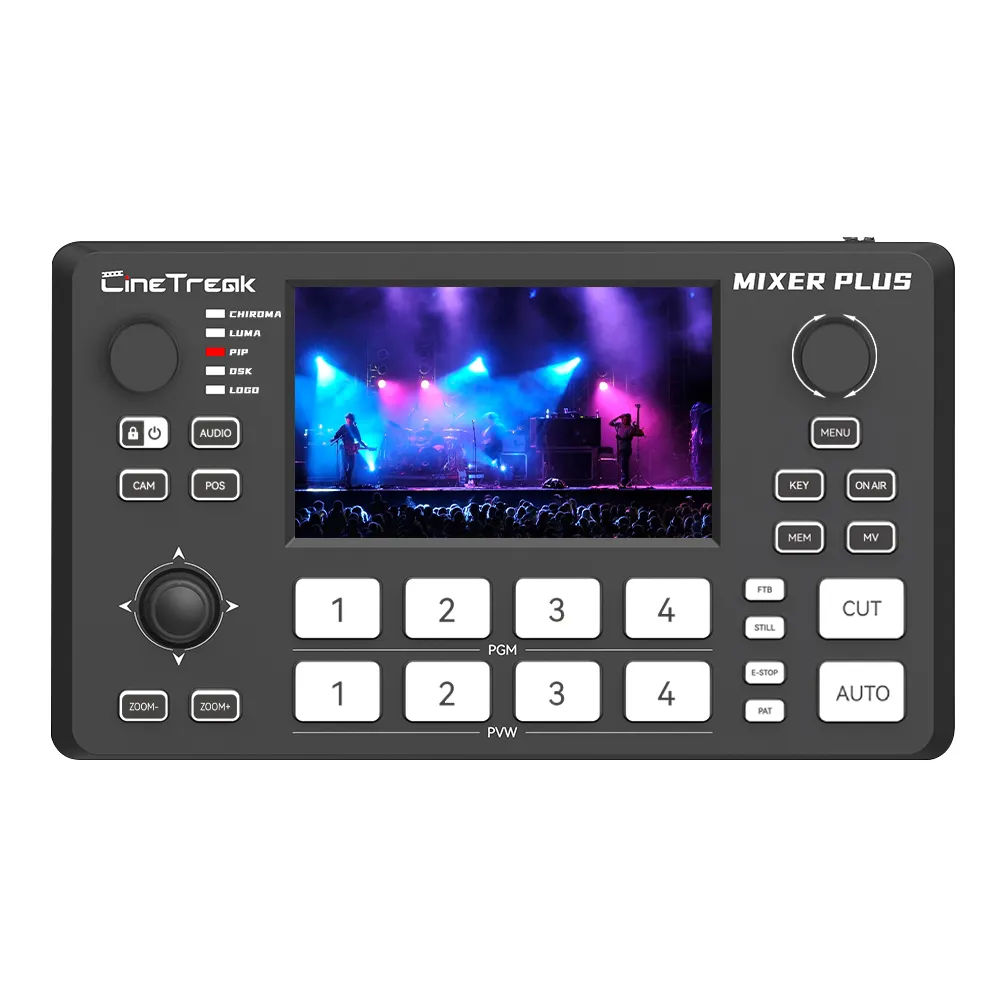
A $289 ultra-compact 4-HDMI live switcher with a built-in preview display, UVC 3.0 uncompressed USB out, VISCA-over-IP PTZ control for up to 4 cameras, and an HDMI variant or SDI variant depending on the build.
User manual
https://cinetreak.com/download-category/user-manual
Review
Specs at a glance
- 4x HDMI inputs with seamless switching
- 1x PGM HDMI out, 1x AUX HDMI out with customizable signal routing
- 2x line-in (mic) inputs, 1x headphone monitoring out
- 1x LAN (PTZ control and software control)
- USB 2.0 for media import
- USB 3.0 UVC for uncompressed HD streaming directly to OBS/Teams/Zoom
- Built-in preview display with Multi View, landscape or portrait
- 30 customizable transition effects, chroma key, luma key, PIP, DSK, logo overlay
- PTZ control via VISCA over IP for up to 4 cameras with presets
- Available in HDMI or SDI input variants
Why it is interesting for my current rig
My current chain for meetings:
BMPCC 4K → HDMI → ATEM Mini → HDMI → Elgato Cam Link → USB → Teams
The Mixer Plus could collapse that into:
BMPCC 4K → HDMI → Mixer Plus → USB 3.0 UVC → Teams
That removes the Elgato Cam Link from the chain, frees a USB port and an HDMI cable, and gives me a built-in preview instead of relying on the Elgato Prompter or a second monitor to confirm what is going out. The AUX output is still available to drive an external program feed if I ever want to record a clean line.
Pros vs. ATEM Mini
| Area | Cinetreak Mixer Plus | ATEM Mini |
|---|---|---|
| Price | $289 | ~$295 Mini / $495 Pro / $995 Extreme |
| HDMI inputs | 4 | 4 |
| Built-in preview display | Yes, Multi View on-device, landscape or portrait | No — Multi View only on Pro/Extreme via HDMI out |
| AUX HDMI output | Yes, customizable signal | Only on Pro/Extreme |
| USB streaming | USB 3.0 UVC, uncompressed HD | USB 2.0 webcam out, compressed |
| PTZ control | VISCA over IP for up to 4 cameras with presets | Via ATEM Software Control, no native VISCA-over-IP PTZ path |
| Audio inputs | 2 mic/line in + headphone monitor | 2 analog 3.5 mm inputs + headphone monitor (Pro/Extreme) |
| Keyers and overlays | Chroma, luma, PIP, DSK, logo | Chroma, luma, DSK, logo (richer on Pro/Extreme) |
| SDI variant | Yes, SDI input build available | No — separate product lines entirely (ATEM SDI, Constellation) |
| Form factor | Ultra-compact, integrated screen | Keyboard-sized, needs external preview |
| Ecosystem and tutorials | Small, early | Massive, industry standard |
| Software control | LAN-based control app | Free ATEM Software Control, very mature |
| Direct streaming / recording | Not documented (stream via OBS) | RTMP streaming and USB disk recording on Pro/Extreme |
| Macros and scripting | Not documented | Yes, macros in ATEM Software Control |
| Integration with BMPCC 4K | Works via HDMI like anything else | First-party Blackmagic pipeline, tallies and camera control |
Pros — where the Mixer Plus wins
- Built-in display: no more squinting at the ATEM Software Control window or burning a monitor on Multi View. For a desk setup, this is a real quality-of-life jump.
- UVC 3.0 out: removes the need for the Elgato Cam Link entirely, and the USB signal is cleaner than the ATEM Mini's compressed USB 2.0 webcam output.
- Price-to-feature ratio: at $289 you get AUX out, Multi View, PTZ-over-IP, and chroma. On Blackmagic's side those sit on the $495 Pro or the $995 Extreme.
- Native PTZ-over-IP: if I ever add a PTZ camera for a second angle or a demo overhead shot, this is already wired.
- SDI variant option: future-proofing if I upgrade to an SDI camera line.
- Fits the desk better: compact and self-contained, less cable clutter.
Cons — where the ATEM Mini still wins
- Ecosystem maturity: Blackmagic has a decade of firmware, tutorials, ATEM Software Control, DaVinci integration, and third-party accessories. Cinetreak is a much smaller player with thinner documentation.
- Native pipeline with BMPCC 4K: the ATEM Mini is the natural companion to my Blackmagic camera, including tally, camera control over HDMI, and Resolve-friendly workflows.
- Direct streaming and recording: the ATEM Mini Pro / Extreme can stream RTMP and record to a USB disk without a computer in the loop. The Mixer Plus relies on OBS on the Mac.
- Macros and automation: ATEM Software Control macros are genuinely useful for repeatable scenes. No equivalent documented on the Mixer Plus.
- Community troubleshooting: when something breaks at 7:55am before a Teams call, the ATEM has Stack Overflow, Reddit, and a thousand YouTube videos. The Mixer Plus does not.
- Resale and longevity: Blackmagic kit holds value and gets long-term firmware support. Unknown on Cinetreak.
- Unknowns in the spec: resolution/frame-rate matrix, codec behavior, and latency are not fully documented on the product page — those need to be confirmed from the manual before I would commit.
Decision lens
The Mixer Plus is genuinely attractive as a consolidation play: it would replace both the ATEM Mini and the Elgato Cam Link, give me a built-in monitor, and unlock PTZ-over-IP for future camera moves. The tradeoff is leaving the Blackmagic ecosystem, which is the cleanest fit with the BMPCC 4K and Resolve.
If I stay with Blackmagic, the honest upgrade path is ATEM Mini → ATEM Mini Pro or Extreme, not the Mixer Plus — that keeps the pipeline native and adds the features I am really missing (Multi View, direct stream/record, macros).
If I want to experiment and reclaim desk space, the Mixer Plus is the interesting bet. Worth reading the full manual before deciding.
Open questions to resolve before buying
- Supported resolutions, frame rates, and color sampling on PGM/AUX/USB out
- End-to-end latency through the switcher for live meetings
- How the UVC 3.0 output behaves in Teams vs OBS — any driver quirks on macOS Sequoia
- Whether the built-in display can show a true Multi View of all 4 inputs simultaneously, or only one at a time
- Firmware update cadence and how updates are delivered
- Behavior when audio is embedded on HDMI from the BMPCC 4K (my current audio rides HDMI from the Rode NTG3 via the camera)
- Confirm whether the LAN-based control app has a macOS client
Next steps
- Download and read the Mixer Plus user manual from the Cinetreak downloads page.
- Check return policy and warranty terms before ordering.
- Decide: try the Mixer Plus as a consolidation experiment, or upgrade within the Blackmagic line to an ATEM Mini Pro / Extreme.