

12 Oct 2026
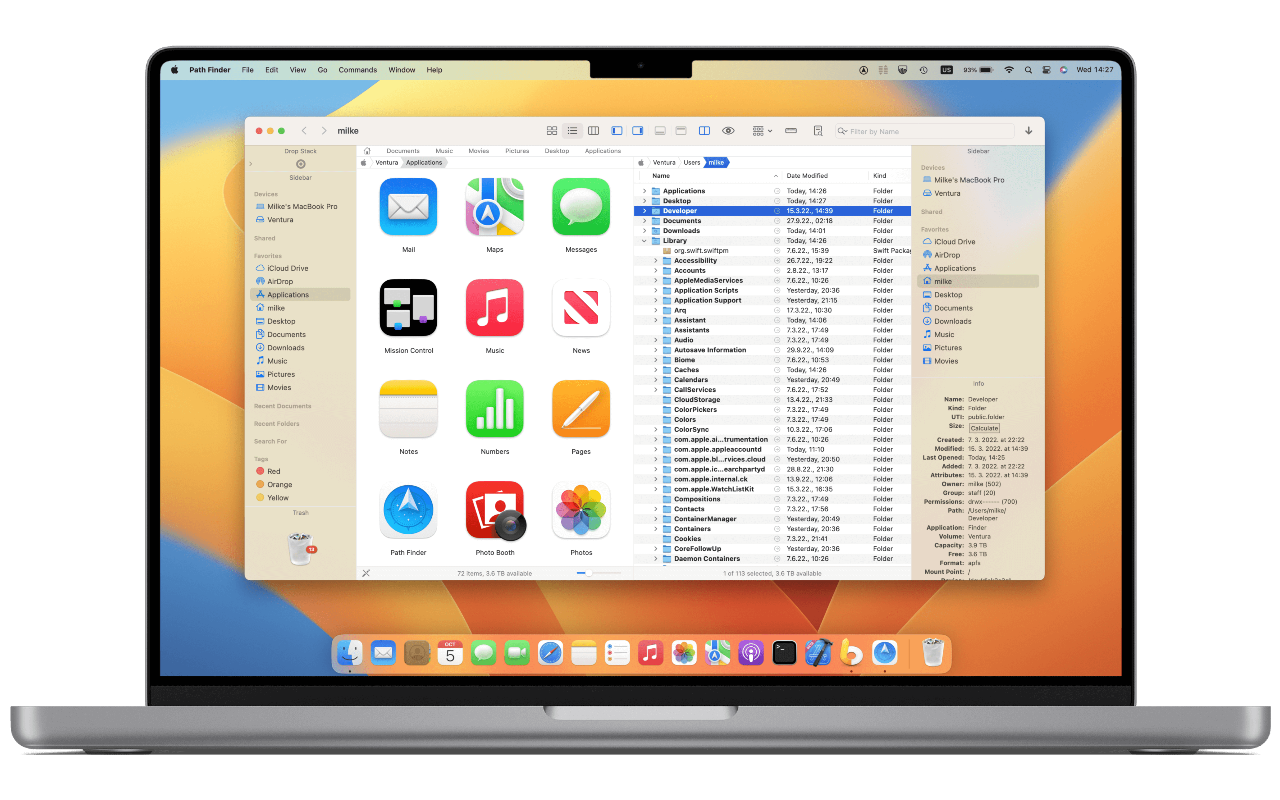
Path Finder is a file manager for macOS from Cocoatech, and the best-known Finder replacement on the Mac. It does everything Finder does, then adds what power users miss: 2 panes side by side, a Drop Stack for moving files in batches, batch renaming, folder compare and sync, hidden files, and a panel of modules around the file list.
It has been around since 2001, the year Mac OS X shipped. In 2005 John Siracusa of Ars Technica called it the "Final Cut Pro of file management". Several of its ideas later landed in Finder, tabs among them, which Apple added in OS X Mavericks in 2013.
Key facts
| Maker | Cocoatech, founded in 2001 by Steve Gehrman |
| First release | 2001, under the name SNAX |
| Latest | Path Finder 26, May 2026, a redesign that jumped from version 11 to Apple's year-based numbering |
| Platform | macOS only, native on Apple Silicon |
| Price | $29.95 a year, or a 1, 2 or 5-year licence. 30-day free trial |
| Also in | Setapp, the Mac app subscription bundle |
What it does
- Dual pane browsing. 2 folders side by side, and 1 click copies the selection to the other pane.
- Drop Stack. Drag files onto a holding area from anywhere, then drop the whole stack in 1 move or copy.
- Advanced file operations: batch rename, merge, compare and synchronise folders (FolderSync), show and edit hidden files, and secure delete.
- Advanced selection: select by name, extension, attributes and more.
- Smart sorting: folders, packages or files first.
- Navigation: bookmarks, tab presets, a Path Navigator you can type into, and a filter for the current folder.
- Size Browser: browse folders by size, with a hierarchical column view and a chart of what takes the space.
- Modules: panels around the file list for preview, info, and more, that you place and size yourself.
- Integrations: Dropbox, and browsing USB-connected iPhones.
New in Path Finder 26
Released in May 2026, version 26 is the biggest redesign in years:
- a cleaner, more compact layout, with full-height vertical shelves, a new toolbar and new icons
- faster rendering and better grouping in the Icons, List and Columns views
- redesigned modules that are easier to place and move
- a better Preview module, with improved Quick Look and large-file handling
- a new folder comparison operation and duplicate file detection
- many bug and crash fixes, in 20 languages
Pricing
Path Finder moved from 1-time purchases to subscriptions and time-limited licences. A 2018 licence cost $40.
| Option | Price |
|---|---|
| Annual subscription | $29.95 |
| 1-year licence | $32.95 |
| 2-year licence | $55.95 |
| 5-year licence | $122.95 |
A subscription or a 1-year licence covers 2 Macs, and you can buy more activations. There is a 30-day free trial and a 30-day money-back guarantee. Version 26 was a paid upgrade, free for anyone who bought a licence in the previous 12 months.
Path Finder or Finder
| Path Finder | Finder | |
|---|---|---|
| Dual pane | Yes | No |
| Batch rename | Yes, with more options | Basic |
| Folder compare, sync | Yes | No |
| Hidden files | Toggle and edit | ⌘⇧. to show |
| Size analysis | Size Browser | No |
| Cost | $29.95 a year | Free, built in |
| Memory | Heavier: about 300 MB on my Mac | Less than half that |
My notes
12 Aug 2022 starting note.
The macOS Finder is extremely limited, especially once you discover all the possiblities with an alternative like PathFinder.
issue with columns not respecting their width
solved by right-clicking on a column separator and selecting Right Size All Columns Individually
Positives
- custom font
Negatives
- column size not automatically adjusted
- visually not super clear which pane is selected
16 Nov 2022
The inability of Pathfinder to automatically adjust column size is grating on me.
October 2026: switched to Filee
12 Oct 2026 I no longer use Path Finder.
I switched to Filee, my own file manager for macOS. I built it with Claude Code over a weekend, to do exactly what I need and nothing else: 2 panes, tabs, every action on the keyboard, and my own scripts 1 key away on the selected file.
It is native Swift, launches in 0.2 s and uses about a quarter of the memory Path Finder took on my Mac. Each Path Finder feature I missed went in the same day.
The full story is in my Filee note, see Filee: my own file manager for macOS.
Further reading

- Path Finder 26.0, TidBITS on the May 2026 redesign and its pricing
- Path Finder on Setapp
- Filee: my own file manager for macOS, the file manager I replaced it with